Page 215 of 360
5-8
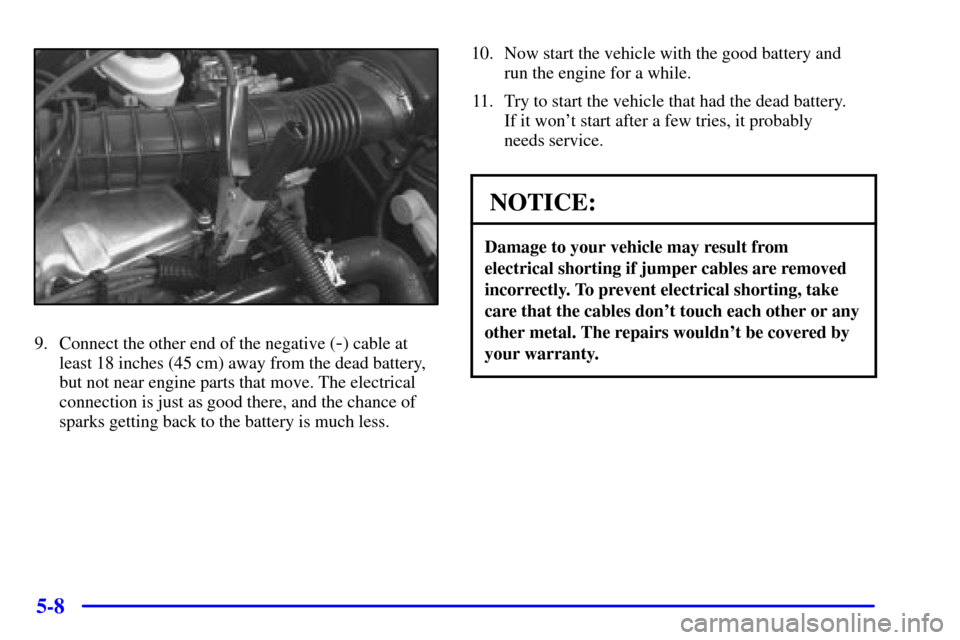
9. Connect the other end of the negative (-) cable at
least 18 inches (45 cm) away from the dead battery,
but not near engine parts that move. The electrical
connection is just as good there, and the chance of
sparks getting back to the battery is much less.10. Now start the vehicle with the good battery and
run the engine for a while.
11. Try to start the vehicle that had the dead battery.
If it won't start after a few tries, it probably
needs service.
NOTICE:
Damage to your vehicle may result from
electrical shorting if jumper cables are removed
incorrectly. To prevent electrical shorting, take
care that the cables don't touch each other or any
other metal. The repairs wouldn't be covered by
your warranty.
Page 216 of 360
5-9
Jumper Cable Removal
A. Heavy, Unpainted Metal Engine Part
B. Good Battery
C. Dead BatteryTo disconnect the jumper cables from both vehicles,
do the following:
1. Disconnect the black negative (
-) cable from the
vehicle that had the dead battery.
2. Disconnect the black negative (
-) cable from the
vehicle with the good battery.
3. Disconnect the red positive (+) cable from the
vehicle with the good battery.
4. Disconnect the red positive (+) cable from the
other vehicle.
5. Return the terminal cover to its original position.
Towing Your Vehicle
Consult your dealer or a professional towing service
if you need to have your disabled vehicle towed.
See ªRoadside Assistanceº in the Index. If you
want to tow your vehicle behind another vehicle for
recreational purposes (such as behind a motorhome),
see ªRecreational Vehicle Towingº in the Index.
Page 240 of 360

6-
6-1
Section 6 Service and Appearance Care
Here you will find information about the care of your vehicle. This section begins with service and fuel information,
and then it shows how to check important fluid and lubricant levels. There is also technical information about your
vehicle, and a part devoted to its appearance care.
6
-2 Service
6
-3 Fuel
6
-5 Fuels in Foreign Countries
6
-6 Filling Your Tank
6
-8 Filling a Portable Fuel Container
6
-9 Checking Things Under the Hood
6
-14 Engine Oil
6
-21 Engine Air Cleaner/Filter
6
-23 Automatic Transaxle Fluid
6
-24 Manual Transaxle Fluid
6
-24 Hydraulic Clutch
6
-25 Engine Coolant
6
-28 Surge Tank Pressure Cap
6
-29 Power Steering Fluid6
-29 Windshield Washer Fluid
6
-31 Brakes
6
-35 Battery
6
-36 Bulb Replacement
6
-43 Tires
6
-51 Appearance Care
6
-52 Cleaning the Inside of Your Vehicle
6
-54 Care of Safety Belts
6
-55 Cleaning the Outside of Your Vehicle
6
-60 Vehicle Identification Number (VIN)
6
-61 Electrical System
6
-66 Replacement Bulbs
6
-66 Capacities and Specifications
6
-67 Normal Maintenance Replacement Parts
Page 250 of 360
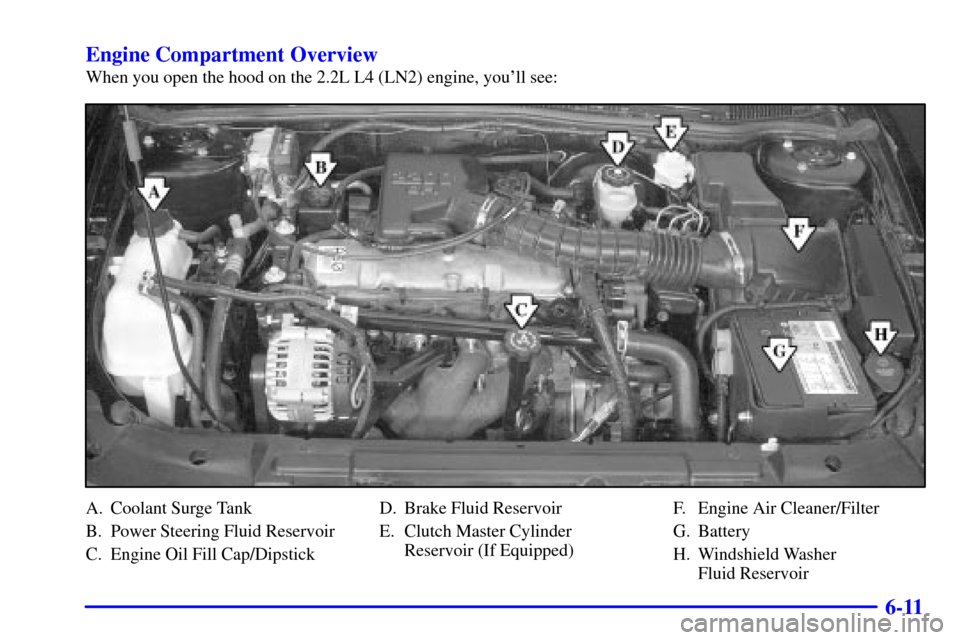
6-11 Engine Compartment Overview
When you open the hood on the 2.2L L4 (LN2) engine, you'll see:
A. Coolant Surge Tank
B. Power Steering Fluid Reservoir
C. Engine Oil Fill Cap/DipstickD. Brake Fluid Reservoir
E. Clutch Master Cylinder
Reservoir (If Equipped)F. Engine Air Cleaner/Filter
G. Battery
H. Windshield Washer
Fluid Reservoir
Page 251 of 360
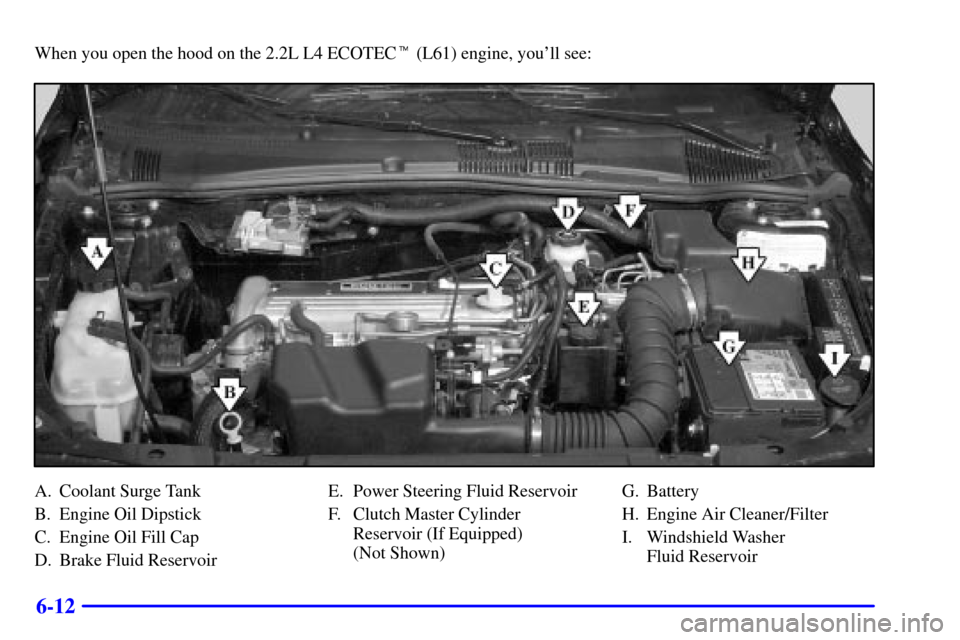
6-12
When you open the hood on the 2.2L L4 ECOTEC� (L61) engine, you'll see:
A. Coolant Surge Tank
B. Engine Oil Dipstick
C. Engine Oil Fill Cap
D. Brake Fluid ReservoirE. Power Steering Fluid Reservoir
F. Clutch Master Cylinder
Reservoir (If Equipped)
(Not Shown)G. Battery
H. Engine Air Cleaner/Filter
I. Windshield Washer
Fluid Reservoir
Page 252 of 360
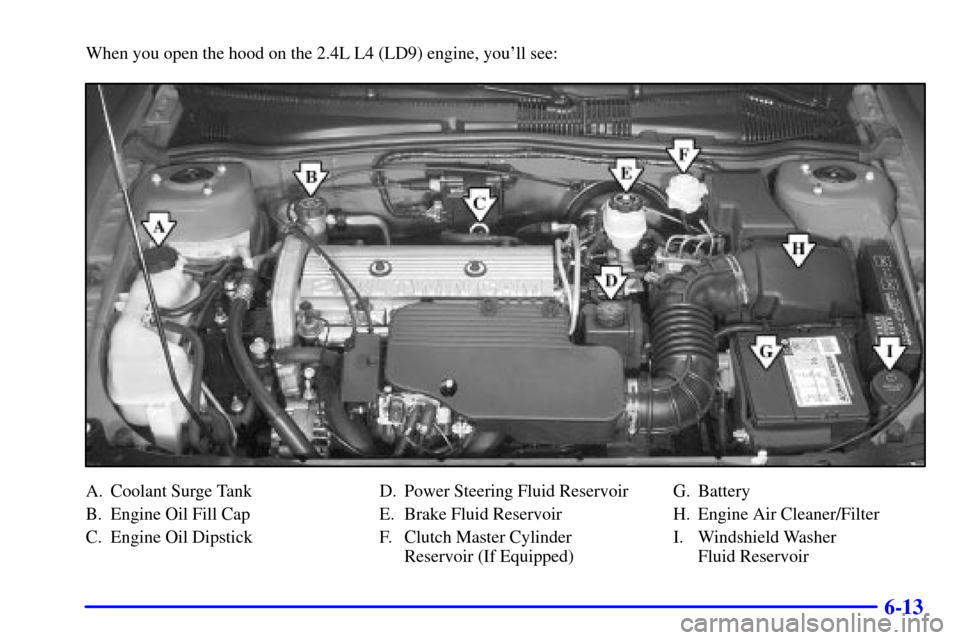
6-13
When you open the hood on the 2.4L L4 (LD9) engine, you'll see:
A. Coolant Surge Tank
B. Engine Oil Fill Cap
C. Engine Oil DipstickD. Power Steering Fluid Reservoir
E. Brake Fluid Reservoir
F. Clutch Master Cylinder
Reservoir (If Equipped)G. Battery
H. Engine Air Cleaner/Filter
I. Windshield Washer
Fluid Reservoir
Page 260 of 360
6-21
If your vehicle is equipped with a 2.2L L4 ECOTEC
(L61) engine, it has a unique oil filter element. When
reinstalling the filter cap, do not exceed 18 lb
-ft
(25 N�m). Inspect the condition of the O
-ring and
replace if damaged.
What to Do with Used Oil
Used engine oil contains certain elements that may be
unhealthy for your skin and could even cause cancer.
Don't let used oil stay on your skin for very long. Clean
your skin and nails with soap and water, or a good hand
cleaner. Wash or properly throw away clothing or rags
containing used engine oil. See the manufacturer's
warnings about the use and disposal of oil products.
Used oil can be a threat to the environment. If you
change your own oil, be sure to drain all the oil from the
filter before disposal. Never dispose of oil by putting it
in the trash, pouring it on the ground, into sewers, or
into streams or bodies of water. Instead, recycle it by
taking it to a place that collects used oil. If you have a
problem properly disposing of your used oil, ask
your dealer, a service station or a local recycling center
for help.
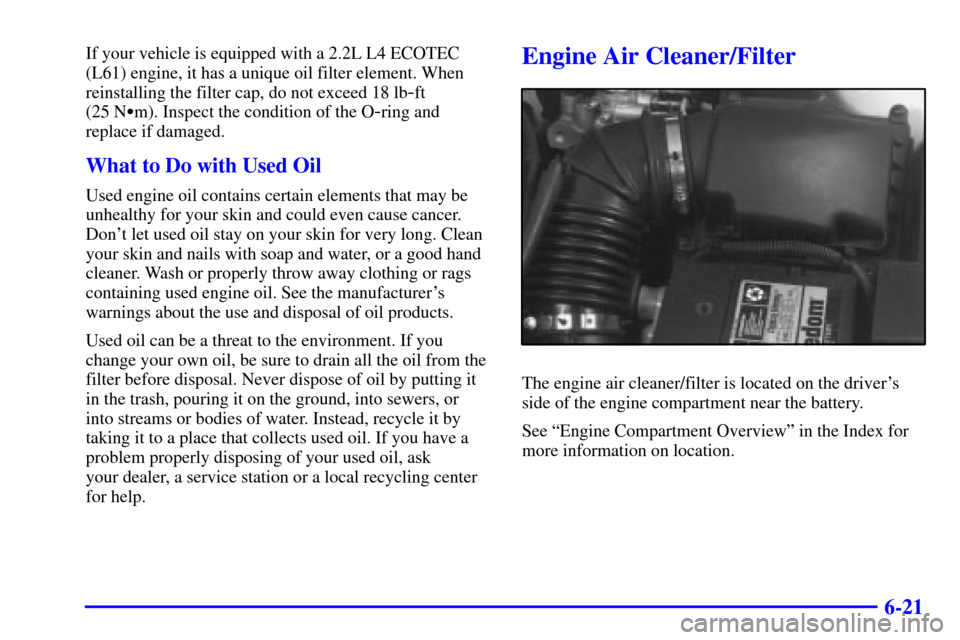
Engine Air Cleaner/Filter
The engine air cleaner/filter is located on the driver's
side of the engine compartment near the battery.
See ªEngine Compartment Overviewº in the Index for
more information on location.
Page 274 of 360
6-35
Battery
Your new vehicle comes with a maintenance free
ACDelco� battery. When it's time for a new battery, get
one that has the replacement number shown on the
original battery's label. We recommend an ACDelco
battery. See ªEngine Compartment Overviewº in the
Index for battery location.
WARNING: Battery posts, terminals and related
accessories contain lead and lead compounds, chemicals
known to the State of California to cause cancer and
reproductive harm. Wash hands after handling.
Vehicle Storage
If you're not going to drive your vehicle for 25 days
or more,remove the black, negative (
-) cable from
the battery. This will help keep your battery from
running down.
CAUTION:
Batteries have acid that can burn you and gas
that can explode. You can be badly hurt if you
aren't careful. See ªJump Startingº in the Index
for tips on working around a battery without
getting hurt.
Contact your dealer to learn how to prepare your vehicle
for longer storage periods.
Also, for your audio system, see ªTheft
-Deterrent
Featureº in the Index.
Page:
< prev 1-8 9-16 17-24