Page 114 of 488
2-48
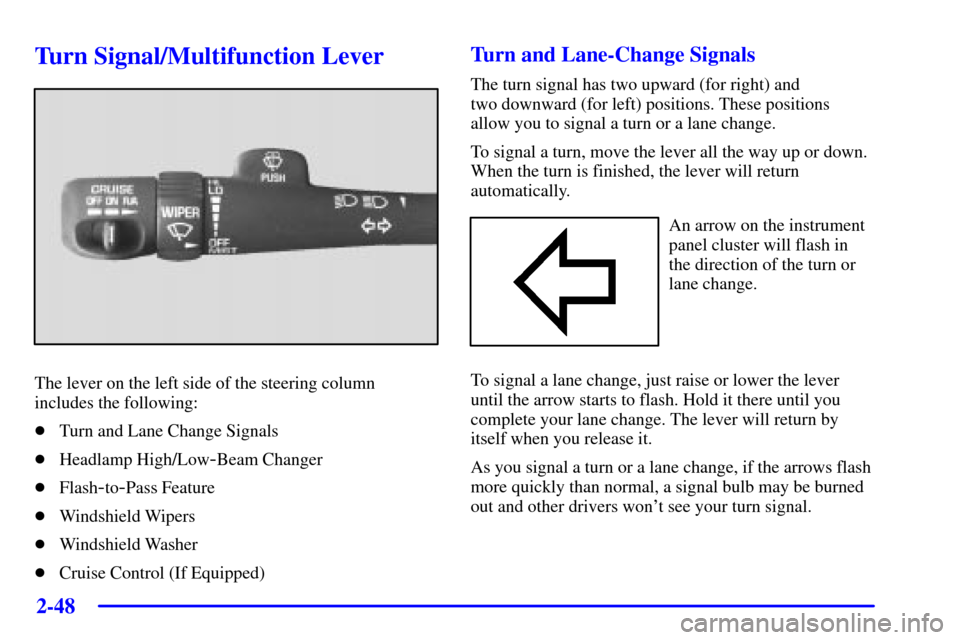
Turn Signal/Multifunction Lever
The lever on the left side of the steering column
includes the following:
�Turn and Lane Change Signals
�Headlamp High/Low
-Beam Changer
�Flash
-to-Pass Feature
�Windshield Wipers
�Windshield Washer
�Cruise Control (If Equipped)
Turn and Lane-Change Signals
The turn signal has two upward (for right) and
two downward (for left) positions. These positions
allow you to signal a turn or a lane change.
To signal a turn, move the lever all the way up or down.
When the turn is finished, the lever will return
automatically.
An arrow on the instrument
panel cluster will flash in
the direction of the turn or
lane change.
To signal a lane change, just raise or lower the lever
until the arrow starts to flash. Hold it there until you
complete your lane change. The lever will return by
itself when you release it.
As you signal a turn or a lane change, if the arrows flash
more quickly than normal, a signal bulb may be burned
out and other drivers won't see your turn signal.
Page 115 of 488

2-49
If a bulb is burned out, replace it to help avoid an
accident. If the arrows don't go on at all when you
signal a turn, check the fuse (see ªFuses and Circuit
Breakersº in the Index) and for burned
-out bulbs.
If you have a trailer towing option with added wiring for
the trailer lamps, a different turn signal flasher is used.
With this flasher installed, the signal indicator will flash
even if a turn signal bulb is burned out. Check the front
and rear turn signal lamps regularly to make sure they
are working.
Turn Signal On Chime
If your turn signal is left on for more than 3/4 of a mile
(1.2 km), a chime will sound at each flash of the turn
signal. To turn off the chime, move the turn signal lever
to the off position.
Headlamp High/Low-Beam Changer
To change the headlamps from low beam to high or high
to low, pull the multifunction lever all the way toward
you. Then release it.
When the high beams are
on, this indicator light on
the instrument panel cluster
will also be on.
Flash-to-Pass Feature
This feature lets you use your high-beam headlamps
to signal a driver in front of you that you want to pass.
It works even if your headlamps are in the
automatic position.
To use it, pull the turn signal lever toward you, but not
so far that you hear a click.
If your headlamps are in the automatic position or on
low beam, your high
-beam headlamps will turn on.
They'll stay on as long as you hold the lever toward you
and the high
-beam indicator on the instrument panel
cluster will come on. Release the lever to return to
normal operation.
Page 305 of 488

4-60 Turn Signals When Towing a Trailer
When you tow a trailer, your vehicle has to have extra
wiring and a heavy
-duty turn signal flasher (included in
the optional trailering package).
The arrows on your instrument panel will flash
whenever you signal a turn or lane change. Properly
hooked up, the trailer lamps will also flash, telling other
drivers you're about to turn, change lanes or stop.
When towing a trailer, the arrows on your instrument
panel will flash for turns even if the bulbs on the trailer
are burned out. Thus, you may think drivers behind you
are seeing your signal when they are not. It's important
to check occasionally to be sure the trailer bulbs are
still working.
Driving On Grades
Reduce speed and shift to a lower gear before you start
down a long or steep downgrade. If you don't shift
down, you might have to use your brakes so much that
they would get hot and no longer work well.If you have an automatic transmission, you can tow in
DRIVE (D). You may want to shift the transmission to
THIRD (3) or, if necessary, a lower gear selection if the
transmission shifts too often (e.g., under heavy loads
and/or hilly conditions). Or, if you have a manual
transmission and you are towing a trailer, it's better not
to use FIFTH (5) gear. Just drive in FOURTH (4) gear
(or, as you need to, a lower gear). See ªTow/Haul
Modeº in the Index.
When towing at high altitude on steep uphill grades,
consider the following: Engine coolant will boil at a
lower temperature than at normal altitudes. If you turn
your engine off immediately after towing at high altitude
on steep uphill grades, your vehicle may show signs
similar to engine overheating. To avoid this, let the
engine run while parked (preferably on level ground)
with the automatic transmission in PARK (P) (or the
manual transmission out of gear and the parking brake
applied) for a few minutes before turning the engine off.
If you do get the overheat warning, see ªEngine
Overheatingº in the Index.
Page 346 of 488

6-
6-1
Section 6 Service and Appearance Care
Here you will find information about the care of your vehicle. This section begins with service and fuel information,
and then it shows how to check important fluid and lubricant levels. There is also technical information about your
vehicle, and a part devoted to its appearance care.
6
-2 Service
6
-3 Fuel
6
-5 Fuels in Foreign Countries
6
-6 Filling Your Tank
6
-8 Filling a Portable Fuel Container
6
-8 Checking Things Under the Hood
6
-11 Engine Oil
6
-16 Engine Air Cleaner/Filter
6
-17 Automatic Transmission Fluid
6
-20 Manual Transmission Fluid
6
-21 Hydraulic Clutch
6
-22 Rear Axle
6
-23 Four-Wheel Drive (If Equipped)
6
-25 Engine Coolant
6
-29 Radiator Pressure Cap
6
-29 Power Steering Fluid
6
-30 Windshield Washer Fluid6
-32 Brakes
6
-36 Battery
6
-37 Bulb Replacement
6
-42 Windshield Wiper Blade Replacement
6
-45 Tires
6
-55 Appearance Care
6
-55 Cleaning the Inside of Your Vehicle
6
-58 Care of Safety Belts
6
-59 Cleaning the Outside of Your Vehicle
6
-63 GM Vehicle Care/Appearance Materials
6
-64 Vehicle Identification Number (VIN)
6
-64 Service Parts Identification Label
6
-65 Electrical System
6
-71 Replacement Bulbs
6
-71 Capacities and Specifications
6
-73 Normal Maintenance Replacement Parts
Page 382 of 488
6-37
Bulb Replacement
See ªReplacement Bulbsº in the Index for the proper
types of bulbs to use. For any bulb changing procedure
not listed in this section, contact your GM dealer's
service department.
Halogen Bulbs
CAUTION:
Halogen bulbs have pressurized gas inside and
can burst if you drop or scratch the bulb. You or
others could be injured. Be sure to read and
follow the instructions on the bulb package.
Headlamps
One-Piece Composite Headlamp System
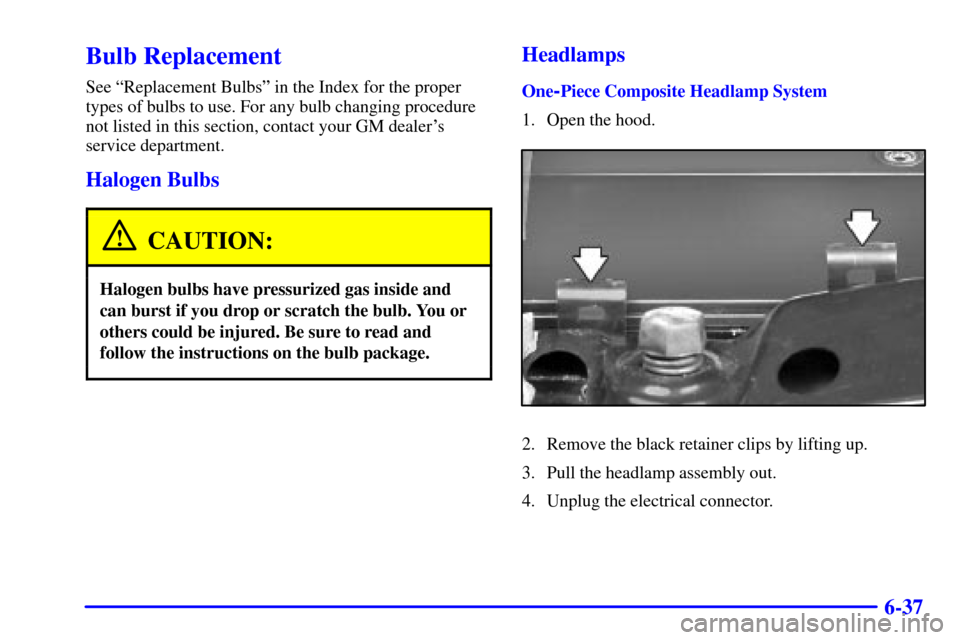
1. Open the hood.
2. Remove the black retainer clips by lifting up.
3. Pull the headlamp assembly out.
4. Unplug the electrical connector.
Page 383 of 488
6-38
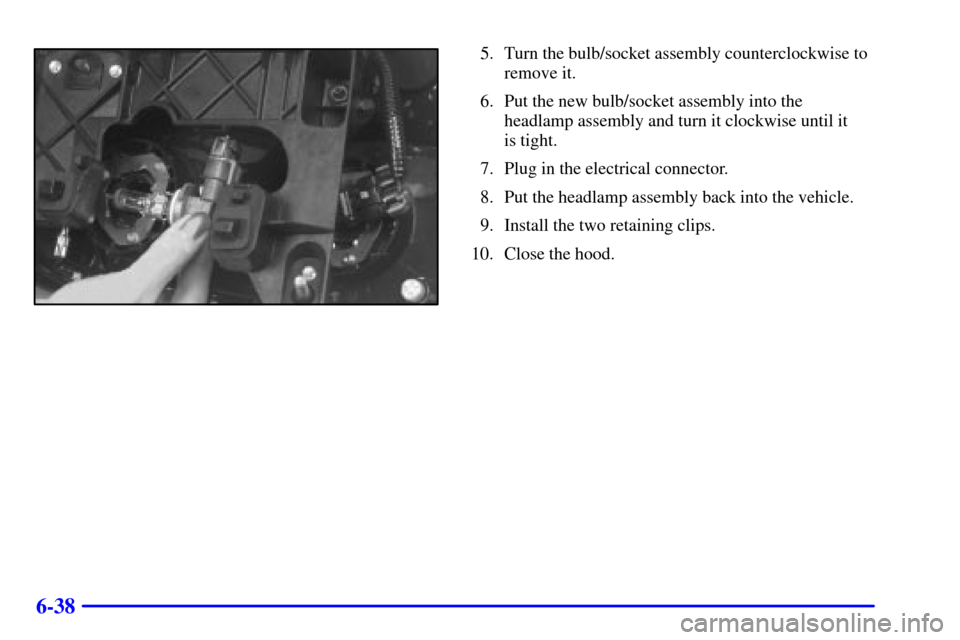
5. Turn the bulb/socket assembly counterclockwise to
remove it.
6. Put the new bulb/socket assembly into the
headlamp assembly and turn it clockwise until it
is tight.
7. Plug in the electrical connector.
8. Put the headlamp assembly back into the vehicle.
9. Install the two retaining clips.
10. Close the hood.
Page 384 of 488
6-39
Tw o-Piece Composite Headlamp System
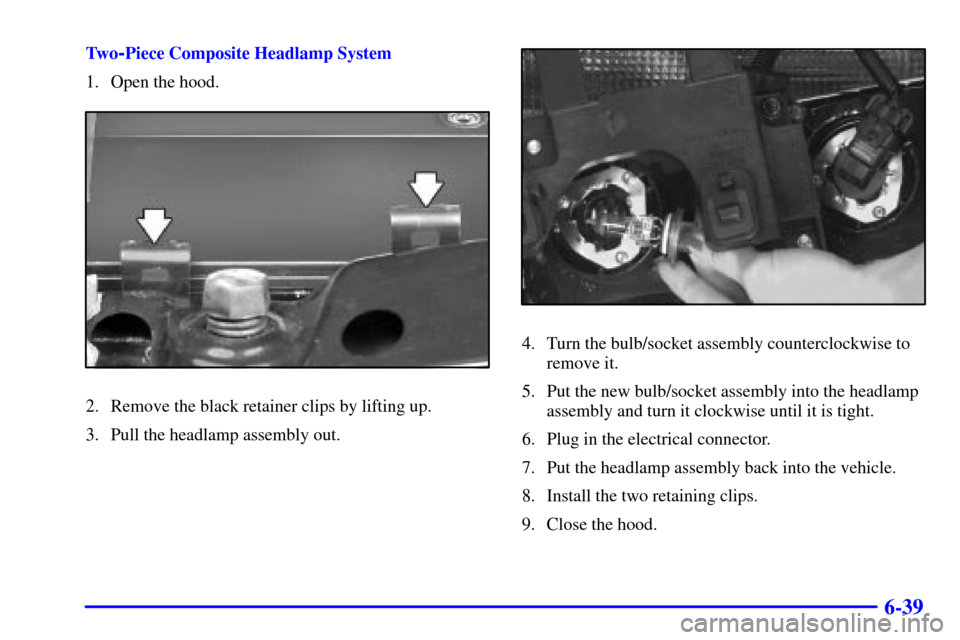
1. Open the hood.
2. Remove the black retainer clips by lifting up.
3. Pull the headlamp assembly out.
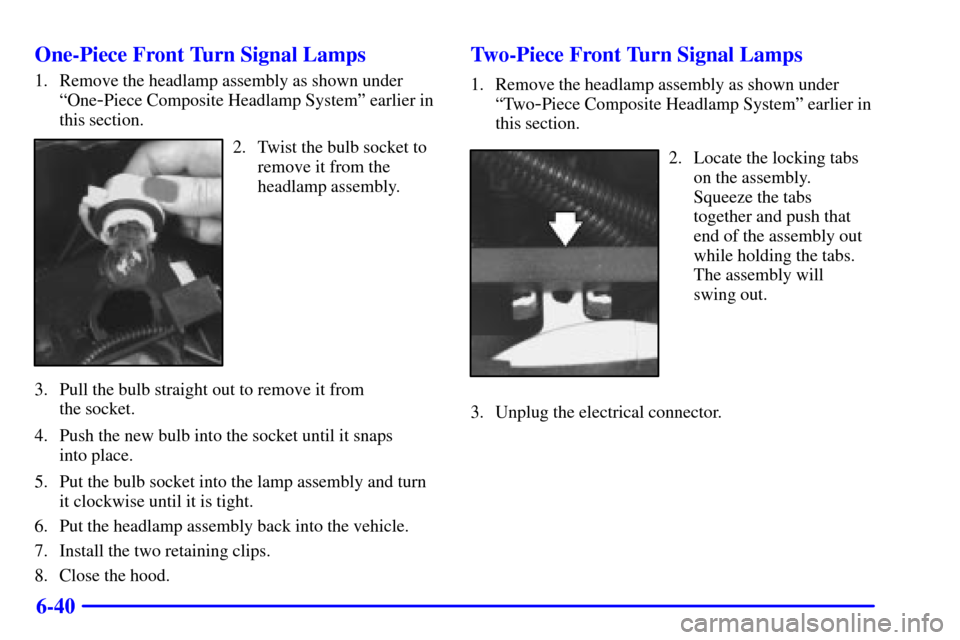
4. Turn the bulb/socket assembly counterclockwise to
remove it.
5. Put the new bulb/socket assembly into the headlamp
assembly and turn it clockwise until it is tight.
6. Plug in the electrical connector.
7. Put the headlamp assembly back into the vehicle.
8. Install the two retaining clips.
9. Close the hood.
Page 385 of 488
6-40 One-Piece Front Turn Signal Lamps
1. Remove the headlamp assembly as shown under
ªOne
-Piece Composite Headlamp Systemº earlier in
this section.
2. Twist the bulb socket to
remove it from the
headlamp assembly.
3. Pull the bulb straight out to remove it from
the socket.
4. Push the new bulb into the socket until it snaps
into place.
5. Put the bulb socket into the lamp assembly and turn
it clockwise until it is tight.
6. Put the headlamp assembly back into the vehicle.
7. Install the two retaining clips.
8. Close the hood.
Two-Piece Front Turn Signal Lamps
1. Remove the headlamp assembly as shown under
ªTwo
-Piece Composite Headlamp Systemº earlier in
this section.
2. Locate the locking tabs
on the assembly.
Squeeze the tabs
together and push that
end of the assembly out
while holding the tabs.
The assembly will
swing out.
3. Unplug the electrical connector.