Page 116 of 400

2-43
Interior Lamps
Instrument Panel Brightness Control
This feature controls the brightness of the instrument
panel lights.
The thumbwheel for this feature is located to the right of
the exterior lamps control.
Turn the thumbwheel up to brighten the lights or down
to dim them.
When the thumbwheel is moved to the first position, the
radio display and transmission selection display will go
to full intensity. The instrument panel cluster will be
dimly lit.
Moving the thumbwheel up to the next position will
activate the interior dome lamps.
Exit Lighting
With exit lighting, the interior lamps will come on when
you remove the key from the ignition. The lights will
not come on if the DOME OVERRIDE button is
pressed in.
Illuminated Entry
Your vehicle is equipped with an illuminated
entry feature.
When a door is opened, the dome lamps will come on
if the DOME OVERRIDE button is in the out position.
When all the doors are closed, the lamps will stay on for
a short period of time and will then go out. If the DOME
OVERRIDE button is pressed in, the lamps will not
come on.
Page 133 of 400
2-60
The Instrument Panel - Your Information System
Page 134 of 400
2-61
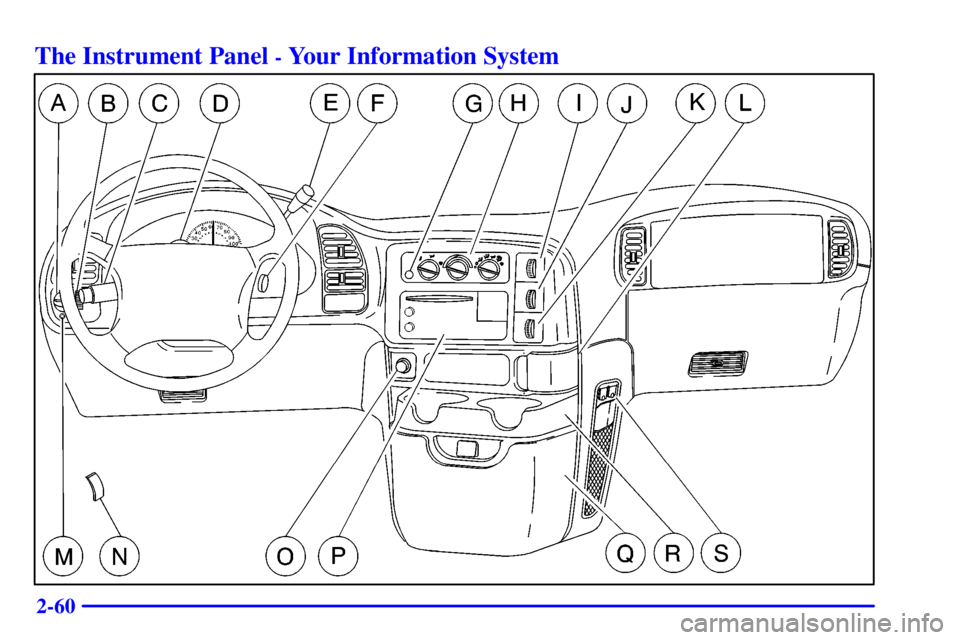
The main components of your instrument panel are the following:
A. Exterior Lamp Control
B. Instrument Panel Brightness Thumbwheel
C. Multifunction Lever
D. Hazard Warning Flasher Button
E. Transmission Shift Lever
F. Ignition Switch
G. Rear Defogger Button (Option)
H. Comfort Controls
I. Rear A/C Control (Option)
J. Rear Heater Control (Option)K. Rear Washer/Wiper Switch (Option)
L. Front Ashtray
M. Dome Override Button
N. Hood Release
O. Cigarette Lighter
P. Audio System
Q. Front Storage Compartment
R. Cupholders/Storage Tray
S. Accessory Power Outlets
Page 135 of 400
2-62
Instrument Panel Cluster
Your instrument panel cluster is designed to let you know at a glance how your vehicle is running. You'll know how fast you're
going, about how much fuel you've used, and many other things you'll need to know to drive safely and economically.
United States version shown, Canada similar
Page 137 of 400

2-64
When one of the warning lights comes on and stays on
when you are driving, or when one of the gages shows
there may be a problem, check the section that tells you
what to do about it. Please follow this manual's advice.
Waiting to do repairs can be costly
-- and even
dangerous. So please get to know your warning lights
and gages. They're a big help.
Safety Belt Reminder Light
When the key is turned to RUN or START, a tone will
come on for about eight seconds to remind people to
fasten their safety belts, unless the driver's safety belt is
already buckled.
The safety belt light will
also come on and stay on
for about 20 seconds,
then it will flash for about
55 seconds.
If the driver's belt is already buckled, neither the tone
nor the light will come on.
Air Bag Readiness Light
There is an air bag readiness light on the instrument
panel, which shows AIR BAG or the air bag symbol.
The system checks the air bag's electrical system for
malfunctions. The light tells you if there is an electrical
problem. The system check includes the air bag sensor,
the air bag modules, the wiring and the crash sensing
and diagnostic module. For more information on the
air bag system, see ªAir Bagº in the Index.
This light will come on when you start your vehicle, and
it will flash for a few seconds. Then the light should go
out. This means the system is ready.
Page 151 of 400

3-2
Comfort Controls
This section tells you how to make your air system work
for you. Your comfort control system with air
conditioning uses ozone
-friendly refrigerant.
With these systems, you can control the heating,
cooling and ventilation in your vehicle. Your vehicle
also has a flow
-through ventilation system described
later in this section.
Heating System
If your vehicle does not have air conditioning, your
heater controls will look like this.Fan Knob
The fan know is located on the left of the control
panel. This control has four positions. To increase
airflow, turn the knob toward HI. To decrease airflow,
move it toward LO.
Temperature Knob
This knob is next to the fan knob. It controls the
temperature of the air flowing into your vehicle. Turn
the knob clockwise for warmer air. Turn the knob
counterclockwise for cooler air.
Function Knob
This knob is on the right of the temperature knob.
The function knob allows you to choose the direction of
air delivery.
OFF: This setting turns the system off.
(Vent): The air comes out at the vents on your
instrument panel.
Page 152 of 400
3-3
(Bi-level): With this setting, the outside air comes
out both the instrument panel vents and floor ducts.
Adjust the temperature knob for warmer or cooler air.
(Floor): Most of the air comes out near the floor.
The rest comes out from the defroster vents under the
windshield and at the front side windows.
(Blend): With this setting, the outside air comes
out both the floor ducts and defroster vents. Adjust the
temperature knob for warmer or cooler air.
DEF (Defrost): This setting operates the defroster.
Most of the air comes out near the windshield, with
some going to the floor ducts and front side windows.
Heating/Air Conditioning System
(If Equipped)
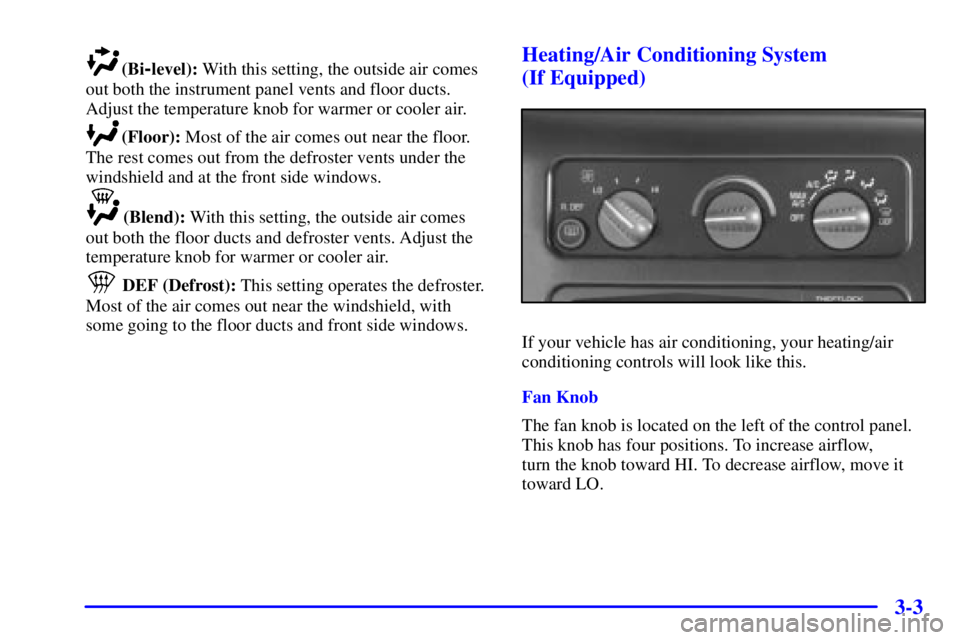
If your vehicle has air conditioning, your heating/air
conditioning controls will look like this.
Fan Knob
The fan knob is located on the left of the control panel.
This knob has four positions. To increase airflow,
turn the knob toward HI. To decrease airflow, move it
toward LO.
Page 153 of 400

3-4
Temperature Knob
This knob is next to the fan knob. It controls the
temperature of the air flowing into your vehicle. Turn
the knob clockwise for warmer air. Turn the knob
counterclockwise for cooler air.
Function Knob
This knob is located on the right side of the temperature
knob. The function knob allows you to choose the
direction of air delivery.
OFF: This setting turns the system off.
MAX A/C (Maximum Air Conditioning): This setting
cools the air the fastest, by recirculating the inside air.
A/C (Air Conditioning): This setting brings in outside
air, cools and dehumidifies it.
(Bi-Level): This setting brings in outside air and
blows it out through the floor ducts and the instrument
panel vents. If you move the temperature knob between
hot and cold, cooler air will come out of the upper vents
while warmer air comes out of the floor ducts. The air
conditioning compressor may operate in this setting to
cool the air.
(Vent): The air comes out at the vents on your
instrument panel. The air conditioning compressor will
not run in this position. Adjust the temperature knob for
warmer or cooler air.
(Floor): Most of the air comes out near the floor.
The rest comes out from the defroster vents under the
windshield and at the front side windows.
(Blend): With this setting, the outside air comes
out of both the floor ducts and defroster vents. Adjust
the temperature knob for warmer or cooler air. The air
conditioning compressor may operate in this setting to
dehumidify the air.
DEF (Defrost): This setting operates the defroster.
Most of the air comes out near the windshield, with
some going to the floor ducts and front side windows.
The air conditioning compressor may operate in this
setting to dehumidify the air.