Page 183 of 365

3-31 Radio Personalization with Home and
Away Feature (If Equipped)
If DRIVER 1 (HOME or AWAY) PRESETS or
DRIVER 2 (HOME or AWAY) PRESETS appears
in the display when the radio is first turned on,
your vehicle is equipped with this feature.
This feature allows the driver to return to the last used
audio source (radio, cassette or CD) using their remote
keyless entry transmitter. This feature can also store
and recall AM and FM presets, volume, tone and the
last selected radio station. The number on the back of
each transmitter (1 or 2) corresponds to driver 1 or 2.
If transmitter 1 is used to enter the vehicle, the last
used audio source and/or settings set by driver 1 will be
recalled. If transmitter 2 is used to enter the vehicle, the
last used audio source and/or settings set by driver 2 will
be recalled. The settings can also be recalled by pressing
the MEMORY seat buttons 1 or 2 located on the
driver's door.
Your radio can store home and away presets. Home and
away presets allow you to use one set of preset radio
settings in the area where you live, and another set when
you go out of town. That way, you will not need to
reprogram your presets every time you travel. With the
radio off and the clock displayed, use fast forward andreverse to select home or away presets. To select the
away presets, press and hold FF for five seconds until
you hear a beep. The next time the radio comes on,
the away presets will be active. To select the home
presets, press and hold RW or REV for five seconds
until you hear a beep. The next time the radio comes on,
the home presets will be active.
When battery power is removed and later applied, you
will not have to reset your home radio presets because
the radio remembers them. However, you will have to
reset your away radio presets.
Theft-Deterrent Feature
THEFTLOCK� is designed to discourage theft of
your radio. Your vehicle has a ªbuilt
-inº theft-deterrent
feature on each radio that is automatic
-- there is
no programming required. The radio in your vehicle
cannot be used in any other vehicle. When the radio
was originally installed in your vehicle at the factory,
it stored the Vehicle Identification Number (VIN).
Each time the ignition is turned on, the VIN is verified.
If the vehicle's VIN does not match the VIN stored in
the radio, THEFTLOCK will be activated and the audio
system will not play. If the radio is removed from your
vehicle, the original VIN in the radio can be used to
trace the radio back to your vehicle.
Page 200 of 365

4-12
If you need to reduce your speed as you approach a
curve, do it before you enter the curve, while your
front wheels are straight ahead.
Try to adjust your speed so you can ªdriveº through
the curve. Maintain a reasonable, steady speed.
Wait to accelerate until you are out of the curve,
and then accelerate gently into the straightaway.
Steering in Emergencies
There are times when steering can be more effective
than braking. For example, you come over a hill and
find a truck stopped in your lane, or a car suddenly
pulls out from nowhere, or a child darts out from
between parked cars and stops right in front of you.
You can avoid these problems by braking
-- if you can
stop in time. But sometimes you can't; there isn't room.
That's the time for evasive action
-- steering around
the problem.
Your vehicle can perform very well in emergencies
like these. First apply your brakes. See ªBraking in
Emergenciesº earlier in this section. It is better to
remove as much speed as you can from a possible
collision. Then steer around the problem, to the left
or right depending on the space available.
An emergency like this requires close attention and a
quick decision. If you are holding the steering wheel at
the recommended 9 and 3 o'clock positions, you can
turn it a full 180 degrees very quickly without removing
either hand. But you have to act fast, steer quickly,
and just as quickly straighten the wheel once you have
avoided the object.
The fact that such emergency situations are always
possible is a good reason to practice defensive driving
at all times and wear safety belts properly.
Page 246 of 365
5-18
1. Park the vehicle on a level surface. You can remove
the coolant surge tank pressure cap when the cooling
system, including the coolant surge tank pressure cap
and upper radiator hose, is no longer hot. Turn the
pressure cap slowly counterclockwise (left) until it
first stops. (Don't press down while turning the
pressure cap.)
If you hear a hiss, wait for that to stop.
A hiss means there is still some pressure left.2. Then keep turning the cap, but now push down as
you turn it. Remove the pressure cap.
Page 250 of 365
5-22 Removing the Spare Tire and Tools
The equipment you'll need is in the trunk. Pull the
carpeting from the floor of the trunk. Turn the
retainer (center dial) on the compact spare tire cover
counterclockwise to remove it. Lift and remove the
cover. (See ªCompact Spare Tireº in the Index for
more information about the compact spare.)
Lift up the compact spare tire to remove it from the trunk.
Page 251 of 365
5-23
Turn the nut holding the jack and wheel wrench
counterclockwise and remove it. Then remove the
jack and wrench.The tools you'll be using include the jack (A) and the
wheel wrench (B).
Page 253 of 365
5-25
2. Find the jacking location from the diagram above
and corresponding cutouts in the plastic molding.
CAUTION:
Getting under a vehicle when it is jacked up is
dangerous. If the vehicle slips off the jack, you
could be badly injured or killed. Never get under
a vehicle when it is supported only by a jack.
CAUTION:
Raising your vehicle with the jack improperly
positioned can damage the vehicle and even
make the vehicle fall. To help avoid personal
injury and vehicle damage, be sure to fit the
jack lift head into the proper location before
raising the vehicle.
3. Attach the wheel wrench to the jack. Turn the wheel
wrench counterclockwise to lower the jack lift head
until the jack fits under the vehicle.
4. Position the jack under the vehicle and raise the jack
lift head until it fits firmly into the notch in the
vehicle's frame nearest the flat tire.
5. Put the compact spare tire near you.
Page 254 of 365
5-26
6. Raise the vehicle by turning the wheel wrench
clockwise. Raise the vehicle far enough off the
ground so that the flat tire can be removed
and the compact spare tire will fit on the wheel
mounting surface.
7. Remove all wheel nuts and take off the flat tire.
8. Remove any rust or dirt
from the wheel bolts,
mounting surfaces and
spare wheel.
CAUTION:
Rust or dirt on the wheel, or on the parts to
which it is fastened, can make the wheel nuts
become loose after a time. The wheel could come
off and cause an accident. When you change a
wheel, remove any rust or dirt from the places
where the wheel attaches to the vehicle. In an
emergency, you can use a cloth or a paper towel
to do this; but be sure to use a scraper or wire
brush later, if you need to, to get all the rust or
dirt off.
Page 255 of 365
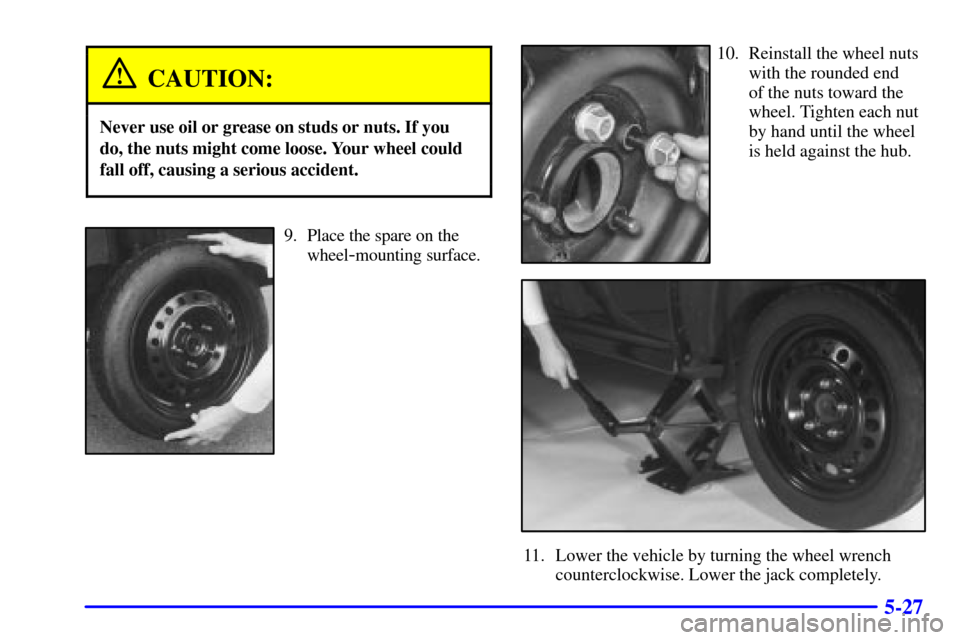
5-27
CAUTION:
Never use oil or grease on studs or nuts. If you
do, the nuts might come loose. Your wheel could
fall off, causing a serious accident.
9. Place the spare on the
wheel
-mounting surface.
10. Reinstall the wheel nuts
with the rounded end
of the nuts toward the
wheel. Tighten each nut
by hand until the wheel
is held against the hub.
11. Lower the vehicle by turning the wheel wrench
counterclockwise. Lower the jack completely.