Page 82 of 395

2-19
Theft
Vehicle theft is big business, especially in some cities.
Although your vehicle has a number of theft
-deterrent
features, we know that nothing we put on it can make it
impossible to steal. However, there are ways you
can help.
Key in the Ignition
If you leave your vehicle with the keys inside, it's an
easy target for joy riders or professional thieves
-- so
don't do it.
With the ignition off and the driver's door open, you'll
hear a chime reminding you to remove your key from
the ignition and take it with you. Always do this. Your
ignition and transaxle will be locked. And remember to
lock the doors.
Parking at Night
Park in a lighted spot, close all windows and lock your
vehicle. Remember to keep your valuables out of sight.
Put them in a storage area, or take them with you.
Parking Lots
Even if you park in a lot where someone will be
watching your vehicle, it's still best to lock it up and
take your keys. But what if you have to leave your
ignition key?
�If possible, park in a busy, well
-lit area.
�Put your valuables in a storage area, like your trunk
or glove box.
�Be sure to close and lock the storage area.
�Close all windows.
�Insert the master key into the Trunk button and turn
it to LK (lock).
�Lock the glove box.
�Lock all doors except the driver's.
�Give the valet key to the valet. Then take the master
key with you.
Page 113 of 395

2-50
Rear Reading Lamps
To turn on a rear seat reading lamp, press the button
above that rear door. To turn off the reading lamp, press
the button again.
Trunk Lamp
When you open the trunk to its full open position, a
lamp will come on inside the trunk. This lamp will
automatically turn off when the trunk is closed.
Glove Box Lamp
When you open the glove box, a lamp will come on
inside the glove box. This will automatically turn off
when the glove box is closed.
Battery Rundown Protection
This feature shuts off all lamps that are left on for more
than 10 minutes when the ignition is off. This will keep
your battery from running down.
Mirrors
Inside Manual Day/Night Rearview Mirror
When you are sitting in a comfortable driving position,
adjust the mirror so you can see clearly behind your
vehicle. Grip the mirror in the center to move it up or
down and side to side. The day/night adjustment allows
you to adjust the mirror to avoid glare from the lamps
behind you. Pull the tab forward for daytime use; push it
back for night use.
Page 122 of 395

2-59
You will also find two auxiliary power outlets located
inside the rear storage area. These outlets can be used
for accessories requiring power, such as a cellular phone
or fax machine. See ªAuxiliary Power Outletsº in
the Index.
Rear Armrest
Your vehicle's rear seat armrest contains two
cupholders. To access the cupholders, pull the
armrest down from the rear seatback.
Rear Storage Armrest (If Equipped)
The rear storage armrest contains two cupholders.
To access the cupholders, pull the armrest down from
the rear seatback.
The storage armrest also includes a storage area inside
the armrest. To open it, pull up on the lever at the front
edge of the armrest.
Rear Seat Pass Through
Your vehicle is equipped with a rear storage armrest
with a pass
-through feature that allows for trunk access.
Pull the rear armrest down, then push down on the trunk
access panel latch to open the panel. To close, push the
access panel until it latches.
Convenience Net
Your vehicle has a convenience net. You'll see it just
inside the back wall of the trunk.
Put small loads, like grocery bags, behind the net. It can
help keep them from falling over during sharp turns or
quick starts and stops.
The net isn't for larger, heavier loads. Store them in the
trunk as far forward as you can.
You can unhook the net so that it will lie flat when
you're not using it.
Page 134 of 395
2-71
The main components of your instrument panel are the following:
A. Air Outlet
B. Exterior Lamps Control
C. Turn Signal/Multifunction Lever
D. Steering Wheel Controls
E. Hazard Warning Flashers Button
F. Instrument Panel Cluster
G. Shift Lever
H. Audio System
I. Air Outlet
J. Fuel Door Release ButtonK. Trunk Release and Lockout Button
L. Hood Release
M. Ignition Switch
N. Traction Control Button (If Equipped)
O. Heated Seat Controls (Option)
P. Ashtray and Cigarette Lighter
Q. Climate Control System
R. Glove Box
S. Passenger Climate Control
Page 153 of 395

2-90
Oil Life System: Press the GAGE INFO button until
OIL LIFE INDEX appears in the display. The OIL LIFE
INDEX NORMAL display will show an estimate of the
oil's remaining useful life. When the oil life index is less
than 10%, the display will show OIL LIFE INDEX
CHANGE OIL. When you have the oil changed, you
will have to reset the GM Oil Life System�. To reset
the Oil Life System, see ªEngine Oil Life Systemº or
ªEngine Oil, When to Changeº in the Index.
DIC Warnings and Messages
Other messages or warnings may appear in the DIC
display. For Canadian drivers, in addition to the DIC
message your DIC will display EXP with a number after
it which reflects the following messages:
EXP (Export ID) Warning Message. . . . . . . . . . . .
23 DOOR AJAR. . . . . . . . . . . . . . . . . . . . . . . . . . . . .
24 TRUNK AJAR. . . . . . . . . . . . . . . . . . . . . . . . . . . .
25 WINDSHIELD WASHER FLUID LOW. . . . . . . .
36 ENGINE OIL LOW
- CHECK LEVEL . . . . . . . . .
54 SERVICE STABILITY SYSTEM. . . . . . . . . . . . .
55 STABILITY SYSTEM ACTIVE. . . . . . . . . . . . . .
82 CHANGE ENGINE OIL SOON. . . . . . . . . . . . . .
91 TRACTION CONTROL SYSTEM ACTIVE. . . .
140 TIRE PRESSURE LOW. . . . . . . . . . . . . . . . . . . The EXP codes are used to make translation from
English to other languages easier.
Pressing any of the DIC control buttons will remove the
messages or warnings from the DIC display.
SERVICE STABILITY SYSTEM
- 54: If you ever
see the SERVICE STABILITY SYSTEM message, it
means there may be a problem with your stability
enhancement system. If you see this message, try to
reset the system (stop; turn off the engine; then start the
engine again). If the SERVICE STABILITY SYSTEM
message still comes on, it means there is a problem. You
should see your dealer for service. Reduce your speed
and drive accordingly.
STABILITY SYSTEM ACTIVE
- 55: You may see
the STABILITY SYSTEM ACTIVE message on the
Driver Information Center. It means that an advanced,
computer
-controlled system has come on to help your
vehicle continue to go in the direction in which you're
steering. This stability enhancement system activates
when the computer senses that your vehicle is just
starting to spin, as it might if you hit a patch of ice or
other slippery spot on the road. When the system is on,
you may hear a noise or feel a vibration in the brake
pedal. This is normal.
Page 163 of 395

2-100
A chime will sound the first time an object is detected,
if the object is between 20 inches (0.5 m) and 5 feet
(1.5 m) away.
URPA can detect objects 3 inches (7.6 cm) and wider,
and at least 10 inches (2.5 cm) tall, but cannot detect
objects that are above trunk level. In order for the rear
sensors to recognize an object, it must be within
operating range.
If the URPA system is not functioning properly, the
display will flash red, indicating that there is a problem.
The light will also flash red when you are driving if a
trailer is attached to your vehicle, or if you have a
bicycle or an object hanging out of your trunk. The
light will continue to flash until the trailer or the object
is removed and your vehicle is driven forward at least
15 mph (25 km/h). It may also flash red if the ultrasonic
sensors are not kept clean. For cleaning instructions, see
ªCleaning Your Vehicleº in the Index.So be sure to keep your rear bumper free of mud,
dirt, snow, ice and slush or the system may not work
properly. If after cleaning the rear bumper and then
driving at least 15 mph (25 km/h), the display continues
to flash red, see your dealer. It may also flash red if your
vehicle is moving in REVERSE (R) at a speed greater
than 3 mph (5 km/h). Other conditions that may affect
system performance include things like, the vibrations
from a jackhammer or the compression of airbrakes
on a very large truck.
As always, drivers should use care when backing up a
vehicle. Always look behind you, being sure to check
for other vehicles, obstructions and blind spots.
Page 164 of 395

3-
3-1
Section 3 Comfort Controls and Audio Systems
In this section, you'll find out how to operate the comfort control and audio systems offered with your vehicle.
Be sure to read about the particular systems supplied with your vehicle.
3
-2 Comfort Controls
3
-2 Dual Automatic ComforTemp�
Climate Control
3
-4 Air Conditioning
3
-5 Heating
3
-5 Defogging and Defrosting
3
-5 Rear Window Defogger
3
-6 Passenger Climate Control
3
-6 Personal Choice Comfort Controls
(If Equipped)
3
-7 Ventilation System
3
-8 Steering Wheel Controls for Climate Control
3
-8 Audio Systems
3
-8 Setting the Clock3
-9AM-FM Stereo with Cassette Tape Player and
Automatic Tone Control (If Equipped)
3
-13 AM-FM Stereo with Cassette Tape and
Compact Disc Player with Automatic Tone
Control (If Equipped)
3
-19 Trunk-Mounted CD Changer (Option)
3
-23 Personal Choice Radio Controls (If Equipped)
3
-23 Theft-Deterrent Feature
3
-25 Audio Steering Wheel Controls
3
-26 Understanding Radio Reception
3
-27 Tips About Your Audio System
3
-28 Care of Your Cassette Tape Player
3
-29 Care of Your Compact Discs
3
-29 Care of Your Compact Disc Player
3
-29 Heated Backlite Antenna
Page 182 of 395
3-19 Trunk-Mounted CD Changer (Option)
With the optional compact disc changer, you can play up
to 12 discs continuously. Normal size discs may be
played using the trays supplied in the magazine.
The small discs (8 cm) can be played only with specially
designed trays.
NOTICE:
Place large objects in the trunk appropriately so
that they will not come into contact with the CD
changer. Damage could result that wouldn't be
covered by your warranty.
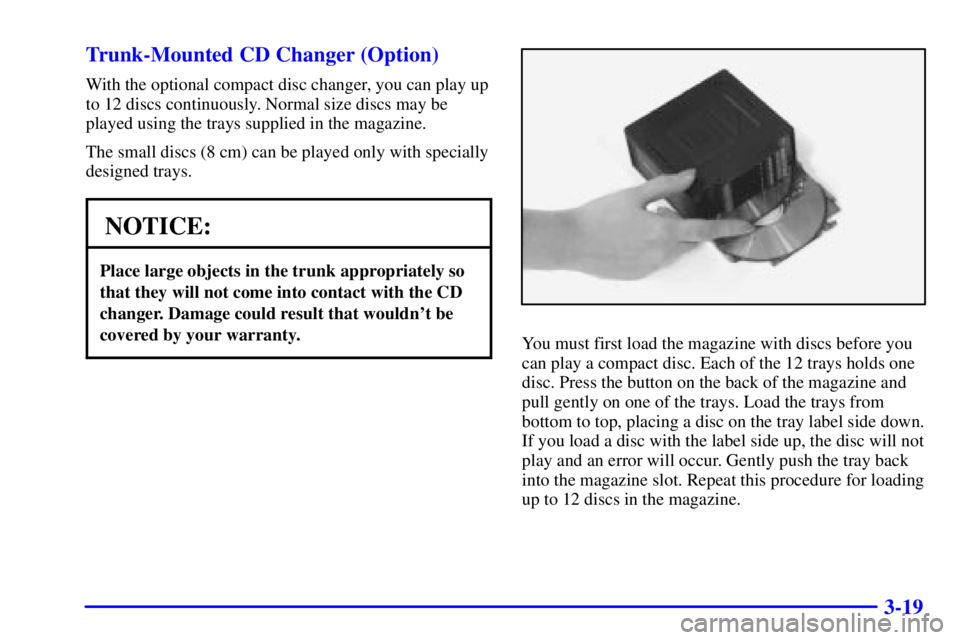
You must first load the magazine with discs before you
can play a compact disc. Each of the 12 trays holds one
disc. Press the button on the back of the magazine and
pull gently on one of the trays. Load the trays from
bottom to top, placing a disc on the tray label side down.
If you load a disc with the label side up, the disc will not
play and an error will occur. Gently push the tray back
into the magazine slot. Repeat this procedure for loading
up to 12 discs in the magazine.