Page 92 of 357
2-28
4. Before starting the engine, be sure to unplug
and store the cord as it was before to keep it away
from moving engine parts. If you don't, it could
be damaged.
How long should you keep the coolant heater plugged
in? The answer depends on the outside temperature, the
kind of oil you have, and some other things. Instead of
trying to list everything here, we ask that you contact
your dealer in the area where you'll be parking your
vehicle. The dealer can give you the best advice for
that particular area.Automatic Transaxle Operation
Your automatic transaxle will have a shift lever on the
steering column.
The graphic shown above is displayed on your
instrument panel cluster in reference to your steering
column shift lever.
Maximum engine speed is limited on automatic
transaxle vehicles when you're in PARK (P) or
NEUTRAL (N) to protect driveline components
from improper operation.
Page 101 of 357
2-37
CAUTION:
It can be dangerous to get out of your vehicle if
the shift lever is not fully in PARK (P) with the
parking brake firmly set. Your vehicle can roll.
Don't leave your vehicle when the engine is
running unless you have to. If you've left the
engine running, the vehicle can move suddenly.
You or others could be injured. To be sure your
vehicle won't move, even when you're on fairly
level ground, always set your parking brake and
move the shift lever to PARK (P).
Follow the proper steps to be sure your vehicle won't
move. See ªShifting Into PARK (P)º in the Index.
If you are parking on a hill and if you're pulling a
trailer, also see ªTowing a Trailerº in the Index.
Horn
Press the horn symbol on your steering wheel pad to
sound the horn.
Tilt Wheel
A tilt wheel allows you to adjust the steering wheel
before you drive. You can raise it to the highest level
to give your legs more room when you exit and enter
the vehicle.
The lever that allows you to tilt the steering wheel is
located on the left side of the steering column.
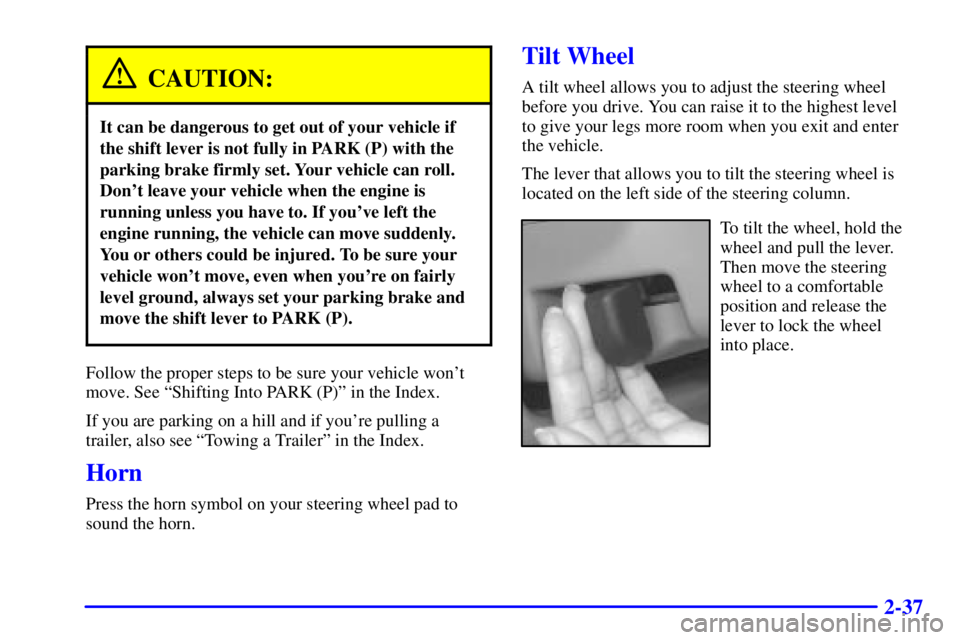
To tilt the wheel, hold the
wheel and pull the lever.
Then move the steering
wheel to a comfortable
position and release the
lever to lock the wheel
into place.
Page 102 of 357
2-38
Turn Signal/Multifunction Lever
The lever located on the left side of the steering column
includes the following:
�Turn and Lane
-Change Signals
�Headlamp High/Low
-Beam Changer
�Flash
-to-Pass Feature
�Windshield Wipers
�Windshield Washer
�Cruise Control (If Equipped)
Turn and Lane-Change Signals
The turn signal has the following positions: two upward
(for right) and two downward (for left). These positions
allow you to signal a turn or a lane change.
To signal a turn, move the lever all the way up
or down. When the turn is finished, the lever will
return automatically.
An arrow on the instrument
panel cluster will flash in
the direction of the turn or
lane change.
To signal a lane change, just raise or lower the lever
until the arrow starts to flash. Hold it there until you
complete your lane change. The lever will return by
itself when you release it.
Page 122 of 357
2-58
(Volume Control): You can control the volume
of the OnStar System using either the volume knob
on the radio or using the steering wheel volume control
(If equipped).
(Telltale Light): This light will indicate the status of
the system. A solid green light will come on when you
start the vehicle to let you know that the system is on
and is ready to make or receive calls.
If the light blinks green it means that an incoming or
outgoing call is in progress. Press the Communication
button if you notice the light blinking and you are not
on a call.
The light will be red in the event of an OnStar system
malfunction. If this occurs press the OnStar button to
attempt to contact an advisor. If the connection is made,
the advisor will assist you with steps to take to make
sure that the system is functioning properly. If you
cannot contact the advisor, take your vehicle to your
dealership as soon as possible for assistance.
Cellular Antenna
The cellular antenna on the outside of your vehicle is
critical to effective communications using the OnStar
system. Optimum cellular reception can be obtained
when the mast is straight up and down.
OnStar Services
The following services are available within OnStar
service plans. Your vehicle comes with a specific
one
-year service plan that allows use of some or all for
the following services.
�Automatic Notification of Air Bag Deployment: If
an air bag deploys, a priority emergency signal is
automatically sent to the center. An advisor will
locate your vehicle's position, try to contact you
and assist you in the situation. If the center is unable
to contact you, an emergency service provider will
be contacted.
Page 127 of 357
2-63
The main components of the instrument panel are the following:
A. Exterior Lamps Control
B. Turn Signal/Multifunction Lever
C. Instrument Panel Cluster
D. Audio Steering Wheel Controls (If Equipped)
E. Gear Shift Lever
F. Vents
G. Side Window Defogger VentH. Hood Release
I. Tilt Wheel Lever
J. Horn
K. Audio System
L. Ashtray
M. Climate Controls
N. Glove Box
O. Instrument Panel Fuse Block
Page 145 of 357

3-
3-1
Section 3 Comfort Controls and Audio Systems
In this section, you'll find out how to operate the comfort control and audio systems offered with your vehicle.
Be sure to read about the particular systems supplied with your vehicle.
3
-2 Comfort Controls
3
-2 Dual ComforTemp� Climate Control
3
-4 Dual Automatic ComforTemp� Climate
Control (If Equipped)
3
-7 Defogging and Defrosting
3
-8 Rear Window Defogger
3
-9 Ventilation System
3
-10 Audio Systems
3
-10 Setting the Clock
3
-10 AM-FM Stereo
3
-12 AM-FM Stereo with Cassette Tape Player
(If Equipped)
3
-16 AM-FM Stereo with Cassette Tape Player and
Automatic Tone Control (If Equipped)3
-21 AM-FM Stereo with Cassette Tape and
Compact Disc Player with Automatic Tone
Control (If Equipped)
3
-27 Theft-Deterrent Feature (If Equipped)
3
-29 Audio Steering Wheel Controls (If Equipped)
3
-30 Understanding Radio Reception
3
-30 Tips About Your Audio System
3
-31 Care of Your Cassette Tape Player
3
-32 Care of Your Compact Discs
3
-32 Care of Your Compact Disc Player
3
-32 Fixed Mass Antenna
3
-32 Backglass Antenna (If Equipped)
3
-33 Diversity Antenna System (If Equipped)
Page 173 of 357

3-29 Audio Steering Wheel Controls
(If Equipped)
If your vehicle has this feature, you can control certain
radio functions using the buttons on your steering wheel.
� SEEK �: Press the up or down arrow to seek to the
next or previous radio station.
If a cassette tape or compact disc is playing, the player
will advance to the next or previous selection.SCAN: Press this button and SCAN will appear on
the display. The radio will scan to the first preset station
on your pushbuttons, play for a few seconds, then go
to the next preset station. The radio will scan preset
stations with a strong signal only. Press SCAN again
to stop scanning.
AM FM: Press this button to choose AM, FM1 or FM2.
If a cassette tape or compact disc is playing, press this
button to listen to the radio.
SRCE (Source): Press this button to change to
playing a cassette tape or compact disc when listening
to the radio.
MUTE: Press this button to silence the audio system.
Press it again to turn on the sound.� VOL (Volume)�: Press the up or down arrow to
increase or decrease volume.
Page 178 of 357
4-
4-1
Section 4 Your Driving and the Road
Here you'll find information about driving on different kinds of roads and in varying weather conditions. We've also
included many other useful tips on driving.
4
-2 Defensive Driving
4
-3 Drunken Driving
4
-6 Control of a Vehicle
4
-6 Braking
4
-9 Enhanced Traction System (ETS)
4
-11 Steering
4
-13 Off-Road Recovery
4
-13 Passing
4
-15 Loss of Control
4
-16 Driving at Night4
-17 Driving in Rain and on Wet Roads
4
-20 City Driving
4
-21 Freeway Driving
4
-22 Before Leaving on a Long Trip
4
-23 Highway Hypnosis
4
-24 Hill and Mountain Roads
4
-26 Winter Driving
4
-30 Recreational Vehicle Towing
4
-31 Loading Your Vehicle
4
-33 Towing a Trailer