2002 BMW M3 CONVERTIBLE steering
[x] Cancel search: steeringPage 61 of 159
61n
OverviewControlsMaintenanceRepairsDataIndex
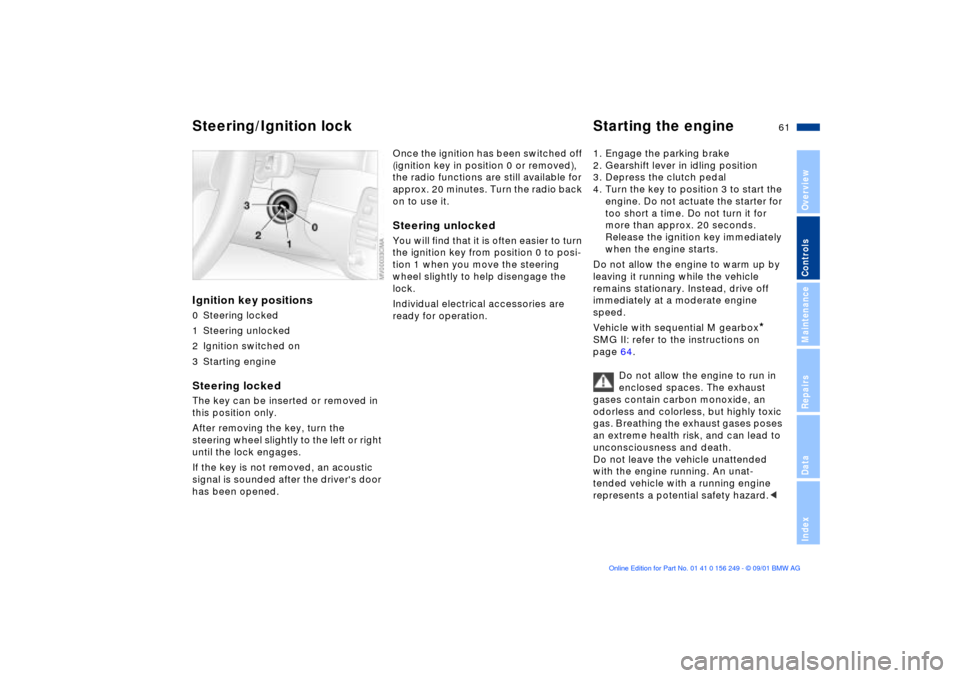
Ignition key positions0 Steering locked
1 Steering unlocked
2 Ignition switched on
3 Starting engineSteering locked The key can be inserted or removed in
this position only.
After removing the key, turn the
steering wheel slightly to the left or right
until the lock engages.
If the key is not removed, an acoustic
signal is sounded after the driver's door
has been opened.
Once the ignition has been switched off
(ignition key in position 0 or removed),
the radio functions are still available for
approx. 20 minutes. Turn the radio back
on to use it.Steering unlocked You will find that it is often easier to turn
the ignition key from position 0 to posi-
tion 1 when you move the steering
wheel slightly to help disengage the
lock.
Individual electrical accessories are
ready for operation. 1. Engage the parking brake
2. Gearshift lever in idling position
3. Depress the clutch pedal
4. Turn the key to position 3 to start the
engine. Do not actuate the starter for
too short a time. Do not turn it for
more than approx. 20 seconds.
Release the ignition key immediately
when the engine starts.
Do not allow the engine to warm up by
leaving it running while the vehicle
remains stationary. Instead, drive off
immediately at a moderate engine
speed.
Vehicle with sequential M gearbox
*
SMG II: refer to the instructions on
page 64.
Do not allow the engine to run in
enclosed spaces. The exhaust
gases contain carbon monoxide, an
odorless and colorless, but highly toxic
gas. Breathing the exhaust gases poses
an extreme health risk, and can lead to
unconsciousness and death.
Do not leave the vehicle unattended
with the engine running. An unat-
tended vehicle with a running engine
represents a potential safety hazard.<
Steering/Ignition lock Starting the engine
Page 62 of 159

62n
Starting the engine Switching off the engine If the engine does not start on the first
attempt (the engine is very hot or cold,
for instance):
>Press the accelerator pedal halfway
down while engaging the starter.
Cold starts at very low temperatures,
starting at about 5 7 (Ð15 6) and at
high altitudes above 3,300 feet
(1,000 m):
>For the initial start attempt, allow the
starter to remain engaged somewhat
longer (approx. 10 seconds).
Extended starting attempts, char-
acterized by excessively frequent
or long periods with the starter
engaged, can lead to damage to the
catalytic converter.<
When driving, standing at idle or
when parking, take precautions to
avoid contact between the hot exhaust
system and easily flammable materials
(grass, hay or leaves, for example).
Such contact could lead to a fire,
resulting in serious personal injury and
property damage.<
Engine idle speed is controlled by the
engine computer system. Increased
speeds at start-up are normal and
should decrease as the engine warms
up. If engine speed does not decrease,
service is required.
To prevent the battery from
discharging, always deactivate elec-
trical devices that are not in use. Switch
the ignition off when the vehicle is not
being driven.Turn the ignition key to position 1 or 0.
Do not remove the ignition key
while the vehicle is still moving. If
you do so, the steering will lock, making
it impossible to steer the vehicle.
When you leave the vehicle, always
remove the ignition key and engage the
steering lock.
While parking on a downhill road, set
the parking brake, as engaging even
the first or reverse gear may not be
sufficient to prevent the vehicle from
rolling away.<
Vehicle with sequential M gearbox
*
SMG II: refer to the instructions on
page 64.
Page 64 of 159

64n
Manual transmission Sequential M gearbox
* SMG II
Reverse Select only when the vehicle is
stationary. Press the shift lever to the
left to overcome the resistance.
As you do this, the backup lamps will
turn on automatically when the ignition
key is in position 2.
Do not hold the vehicle in place on
slopes by slipping or "riding" the
clutch. Use the parking brake instead.
Riding the clutch causes the clutch
assembly to wear out sooner.<
The conceptThe sequential M gearbox SMG II is an
automated manual gearbox with which
clutching and shifting is assumed by an
electro-hydraulic system.
The SMG II is operated via two shift
paddles on the steering wheel and the
selector lever in the center console.
It offers the following functions:
>Sequential and automated shifting
mode
>Ability to choose between different
driving programs (Drivelogic)
>Gradient assistance
>Upshift display (shift lights)
>Throttle blip
>Driving dependent functions:
The respective driving situation (e.g.
cornering, mountain driving, braking)
is detected by sensors and taken into
account accordingly for shifting, e.g.
to achieve optimum gear selection
during deceleration and subsequent
acceleration>Slip recognition at the rear axle for
increasing driving stability, e.g.
during downshifting on slippery road
surfaces
>Operating safety through protection
against misshifting.
Page 66 of 159

66n
Sequential M gearbox
* SMG II
The warning stops after approx. 10
seconds. If you move the selector lever
into a forward or reverse position
during this time, a gear is automatically
engaged.
The SMG II has no park position
for securing the vehicle against
rolling.
The ignition key can be removed in any
selector lever position.<
Always engage the parking brake
when parking on downhill roads.
Engaging a gear may not sufficiently
secure the vehicle against rolling.<
Display in instrument clusterThe selector lever position, currently
engaged gear and selected driving
program are displayed in the instrument
cluster.
1 Engaged gear
2 Selected driving program
(corresponds to the number of illumi-
nated fields), refer to page 68
3 Tapping the selector lever to the right
switches over into the displayed shift
mode
4 "A" indicates an activated automated
mode.
R - Reverse positionOnly engage with the vehicle stopped
or at low speed, e.g. for "rocking free"
in deep snow.0 - Position 0Always engage before starting the
engine.
If the driving situation requires, e.g.
when downshifting on slippery roads,
the SMG II automatically disengages
and reengages the clutch, i.e. it is not
necessary to manually engage
position 0. S - Sequential modeIn the sequential mode all forward
gears are to be shifted by the driver.
Changeover from automated to
sequential mode:
>Tap the selector lever to the right
toward "S" or
>Change gears with the selector lever
or the shift paddles on the steering
wheel.
You do not need to reduce the throttle
for shifting.
Page 67 of 159

67n
OverviewControlsMaintenanceRepairsDataIndex
Sequential M gearbox
* SMG II
Shifting gears with shift paddles on
steering wheel:
>To upshift, briefly pull the right
paddle "+"
>To downshift, briefly pull the left
paddle "Ð".
Shift paddles with various widths
matched to the shape of your
hand are available from your BMW
center.<
Shifting gears with selector lever:
>To upshift, pull the selector lever
backward "+"
>To downshift, push the selector lever
forward "Ð".
No automatic upshifting is carried out in
the sequential mode.
You accelerate from higher gears, e.g.
during passing, by manually down-
shifting.
In the following situations the SMG II
helps you "think" in the sequential
mode:
>Upshifts and downshifts are only
executed when the new gear will
provide a suitable combination of
vehicle and engine speed, i.e., down-
shifts that would cause the engine to
overrev will not be executed
>During a stop the gearbox is auto-
matically downshifted into the first
gear so that, e.g. before a traffic light,
it is only necessary to accelerate to
continue driving
>When the speed is reduced, the
gearbox is automatically down-
shifted shortly before a gear-depen-
dent minimum speed is reached
without you taking any action.
A - Automated modeEach time the engine is started, the
automated mode is activated as soon
as you move the selector lever into the
forward driving position.
In the automated mode all forward
gears are automatically shifted.
Changeover from sequential to auto-
mated mode: tap the selector lever to
the right toward "A". Watch the display
in the instrument cluster, refer to
page 66.
For rapid acceleration, e.g. during
passing, depress the accelerator pedal
completely (kick-down). The gearbox
now downshifts in dependence on the
selected driving program.
Even in the automated mode, you can
help specify the shifting point: if a gear-
dependent minimum speed is
exceeded, you can upshift by slowly
reducing pressure on the accelerator
pedal. In the process, the respective
driving situation is detected by sensors
and taken into account.
Page 78 of 159

78n
Computer
Mode selectionWith the ignition key in position 1 and
higher, you can use the button in the
turn signal lever to retrieve information
from the computer for display in the
instrument cluster. By pressing the
button briefly in the direction of the
steering column, you can call up a new
function for display.
The displays appear in the following
order:
Time of day, outside temperature,
average fuel consumption, cruising
range, average vehicle speed.
Starting with ignition key position 1, the
last active setting is displayed.
Outside temperature You can change the units of measure
(6/7) for the outside temperature
display by pressing the right-hand reset
button in the instrument cluster while
the temperature display is active.
Ice warning If the outside temperature drops to
about 37.5 7 (+3 6), then the
computer will automatically switch to
show the outside temperature. In addi-
tion, a signal sounds as a warning and
the display flashes for a brief period.
The ice warning does not alter the
fact that surface ice can form at
temperatures above 37.5 7 (+3 6), on
bridges or shaded road surfaces, for
instance.<
Page 81 of 159

81n
OverviewControlsMaintenanceRepairsDataIndex
Dynamic Stability Control (DSC)
The concept
DSC maintains vehicle stability, even in
critical driving situations.
The system optimizes vehicle stability
during acceleration and when starting
from a full stop, as well as optimizing
traction. In addition, it also recognizes
unstable driving conditions such as
under- or oversteering on curves, and
keeps the vehicle on a steady course
by using the engine and brake system
to intervene at the different wheels,
doing only what it can within the laws of
physics, of course.
The system starts up automatically
each time you start the engine.The laws of physics cannot be
repealed, even with DSC. The
results of driving irresponsibly rest with
the driver. We therefore urge you to
avoid using the additional safety margin
of the system as an excuse for taking
risks. Do not make any modifications to
the DSC system. Allow only authorized
technicians to perform service proce-
dures on the DSC.<
Indicator lamp
The indicator lamp in the instru-
ment cluster will go out shortly
after the ignition has been
switched on, refer to page 18.
>Indicator lamp flashes: the system is
active and is controlling the drive
torque based on driving conditions
>If the indicator lamp fails to go out
after the engine has been started, or
if it comes on during normal driving
and stays on: the system has been
deactivated via the button or is
defective. You can continue to drive
the vehicle normally, but without
DSC. Please consult your BMW
center for repairs.
Page 84 of 159

84n
Flat Tire Monitor
M Engine dynamics control
Flat tire
The indicator lamp in the instru-
ment cluster will light up red in
the event of a flat tire with
ensuing loss in pressure. In addition, an
acoustic signal is sounded. To come to
an immediate stop, reduce speed, while
avoiding any sudden, jerky braking or
steering maneuvers.
Fix the flat tire using the M Mobility
system (refer to page 132).
Resetting the indicator lamp: the red
indicator lamp has to be switched off
manually after putting on a new wheel.
At this point, hold the Flat Tire Monitor
button down until the indicator lamp
goes out. Reinitialize the system after-
ward.
The Flat Tire Monitor cannot alert
you to severe and sudden tire
damage caused by external factors.
Another factor which the Flat Tire
Monitor does not recognize is the
balanced and very gradual pressure
loss that takes place in all tires over an
extended period of time.<
Check the tire inflation pressure
on a regular basis and correct if
necessary, refer to page 24.
Under certain circumstances, there
may be false warnings or a delayed
detection of losses in pressure when
driving on snow-covered or slippery
road surfaces.
Performance-oriented driving (slip at
the drive wheels, high levels of lateral
acceleration) can also delay the
appearance of status reports in the Flat
Tire Monitor's display panel.<
System malfunctionAs long as there is still a malfunction,
the indicator lamp in the instrument
cluster will stay lit up yellow.
Please contact your BMW center for
additional information.
The system (Sport mode identification)
will cause the engine to respond spon-
taneously to the motion of the acceler-
ator pedal. Activating/deactivating
sport-mode identificationActivating: with the key in ignition key
position 2, press the sport button. The
indicator lamp will light up.
The vehicle may gain speed
without any additional pressure on
the accelerator pedal when the system
is activated.<
Deactivating: press the sport button
again; the indicator lamp will go out.
The sport mode is deactivated every
time the engine is started.