Page 182 of 372
To set the clock:Push the CLOCK button. The
hours digits will start blinking. If
you want to only set the minutes,
go to step 4. To change the hours to a lower
number, press and hold the
MODE button. To change the
hours to a higher number, press
andholdtheA/Cbutton.
To set the minutes, press the
CLOCK button again. The
minutes digits will start blinking.
When the hours reach the desired
number, release the button. Use the MODE or A/C button to
set the minutes to the desired
number.
Press the CLOCK button again.
The clock will return to its normal
display.
1.
2.
3.4.
5.
6.
Setting the Clock
Trip Computer
Comf ort and Convenience Feat ures178
01/09/07 12:23:26 31S3V610_183
Page 183 of 372

�µ�µ
You can also quickly set the time to
the nearest hour. Press the CLOCK
button, then press the RESET button.
If the displayed time is before the
half hour, it will reset back to the
previous hour. If the displayed time
is af ter the half hour, it will reset
f orward to the next hour.
For example:
1:06 will reset to 1:00
1:52 will reset to 2:00
The compass shows your direction
of travel. It indicates eight directions.
Compass operation can be af f ected
by driving near power lines or
stations, across bridges, through
tunnels, over railroad crossings, past
large vehicles, or driving near large
objects that can cause a magnetic
disturbance.
It can also be af f ected by accessories
such as antennas and roof racks that
are mounted by magnets.The compass may need to be
manually calibrated af ter exposure to
a strong magnetic field. If the
compassseemstobecontinually
showing the wrong direction and is
not self -calibrating, do the f ollowing.
NOTE: You should do this procedure
in an open area, away from buildings,
power lines, and other vehicles.
The compass is self -calibrating. If
you see ‘‘ ’’ in the direction
display and ‘‘Calibrate’’ is blinking,
the compass is self -calibrating.
CONT INUED
Trip Computer
Compass Operation
Compass Calibration
Comf ort and Convenience Feat ures179
01/09/07 12:23:38 31S3V610_184
Page 184 of 372
�µ�µ
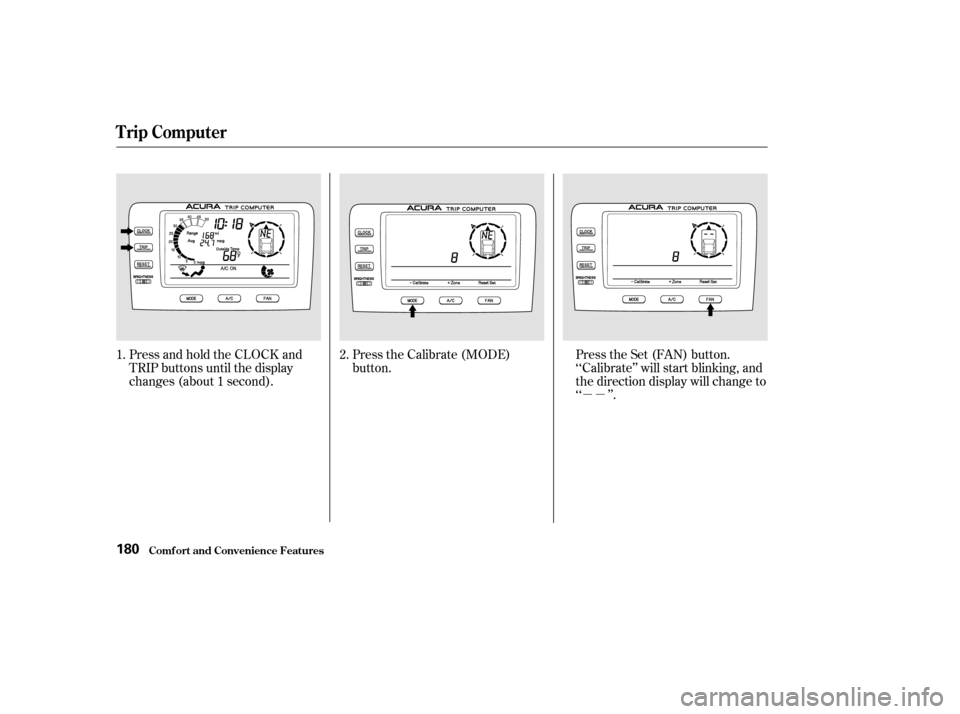
Press and hold the CLOCK and
TRIP buttons until the display
changes (about 1 second).
Press the Calibrate (MODE)
button.
Press the Set (FAN) button.
‘‘Calibrate’’ will start blinking, and
the direction display will change to
‘‘ ’’.
1. 2.
Trip Computer
Comf ort and Convenience Feat ures180
01/09/07 12:23:47 31S3V610_185
Page 185 of 372
�µ�µ
Drivethevehicleslowlyintwo
complete circles. In most areas, there is a variation
between magnetic north and true
north. Zone selection is required so
the compass can compensate f or this
variation. To check and select the
zone set into the compass, do the
f ollowing.
Press and hold the CLOCK and
TRIP buttons until the display
changes (about 1 second).
When the display goes f rom
‘‘ ’’ to an actual heading, the
unit is calibrated.
Press the CLOCK, TRIP, or
RESET button to complete the
calibration and return the display
to normal. 1.
CONT INUED
Trip Computer
Comf ort and Convenience Feat ures
Compass Zone Select ion
181
01/09/07 12:23:56 31S3V610_186
Page 186 of 372
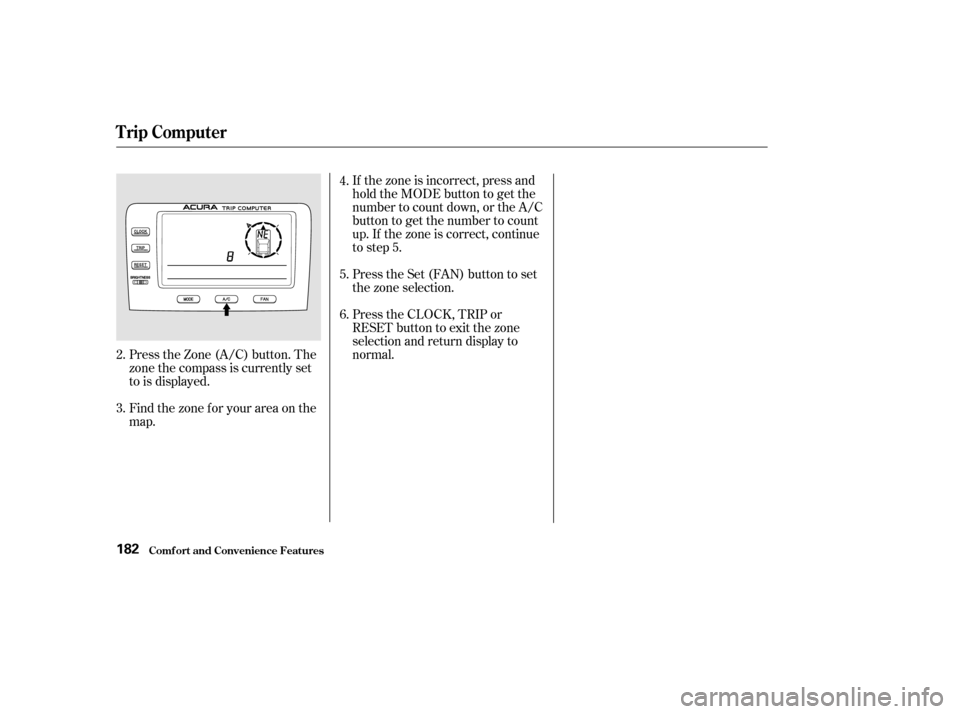
If the zone is incorrect, press and
hold the MODE button to get the
number to count down, or the A/C
button to get the number to count
up. If the zone is correct, continue
to step 5.
Press the Set (FAN) button to set
the zone selection.
Press the CLOCK, TRIP or
RESET button to exit the zone
selection and return display to
normal.
Press the Zone (A/C) button. The
zone the compass is currently set
to is displayed.
Find the zone f or your area on the
map.
2.
3. 4.
5.
6.
Trip Computer
Comf ort and Convenience Feat ures182
01/09/07 12:24:05 31S3V610_187
Page 189 of 372

The Trip Computer displays the
f ollowing inf ormation. To switch to
this display, press the A/C-Trip
button.TheAvgdisplayshowsyouthe
average f uel economy since you
last reset the display. Clock
Outside Temperature.
Instantaneous f uel mileage.
The Range, or estimated distance
you can travel on the fuel
remaining in the tank. This
distance is estimated from the fuel
economy you have gotten over the
last several miles, so it will vary
with changes in speed, traf f ic, etc.
CONT INUED
(With Navigation System)
Trip Computer
Comf ort and Convenience Feat ures185
I INNS STTA
A N
NT TA
A N
NE EO
OU USS F
FUUE EL
L M
M I
ILLE E A
A G
GE E
J
JO OY Y S
STTI
ICCK K E
E
L
LAA P
PS
SE ED
D
T
T I
IMM E
E
R
RE ES
SE ET
T
I
IC CO ON N
T
T
R
RI IPP
M
M E
ET
TE
ER
R
O
On n/
/O
Of ff
f
I
IC CO ON N
C
CL LOOC CKK
T
T
R
RI IPP H
HI
ISST TO
OR RYY I
ICCO ON N
R
RA A N
NG GEE
A
A V
VE
ER
RA A G
GE E F
FUUE EL
L
E
E C
CO ON NOOMM Y
Y
A
A /
/C
C- -T
T R
RI IPP
B
BU UT TT
TO
ON N
C
CA A N
NC CEEL
L
B
BU UT TT
TO
ON N
S
SEET
TU
UP P I
ICCO ON N
O
OU UTTS
SI IDD E
E T
TE
EM
M P
PE
ER
RA A T
TU
UR REE
01/09/07 12:24:28 31S3V610_190
Page 193 of 372
�µ
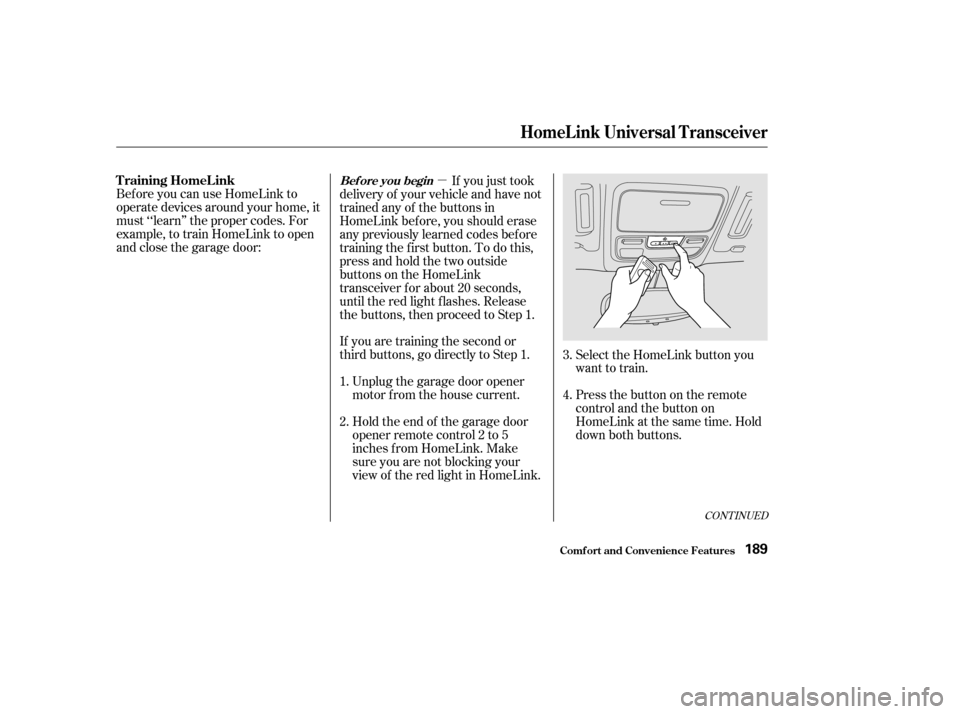
If you are training the second or
third buttons, go directly to Step 1. Unplug the garage door opener
motor f rom the house current.
Bef ore you can use HomeLink to
operate devices around your home, it
must ‘‘learn’’ the proper codes. For
example, to train HomeLink to open
and close the garage door:
If you just took
delivery of your vehicle and have not
trained any of the buttons in
HomeLink bef ore, you should erase
any previously learned codes bef ore
training the f irst button. To do this,
press and hold the two outside
buttons on the HomeLink
transceiver for about 20 seconds,
until the red light f lashes. Release
the buttons, then proceed to Step 1.
Holdtheendof thegaragedoor
opener remote control 2 to 5
inches f rom HomeLink. Make
sure you are not blocking your
view of the red light in HomeLink. Select the HomeLink button you
want to train.
Press the button on the remote
control and the button on
HomeLink at the same time. Hold
down both buttons.
2. 3.
4.
1.
CONT INUED
T raining HomeL inkBef ore you begin
HomeL ink Universal T ransceiver
Comf ort and Convenience Feat ures189
01/09/07 12:25:09 31S3V610_194
Page 205 of 372

However, if electronic accessories
are improperly installed, or exceed
your vehicle’s electrical system
capacity, they can interf ere with theoperation of your vehicle, or even
cause the airbags to deploy.
Make sure the accessory does not
obscure any lights, or interf ere
with proper vehicle operation or
perf ormance.
Be sure electronic accessories do
not overload electrical circuits
(see page ).
If possible, have your dealer inspect
the f inal installation. Bef ore installing any accessory:
When properly installed, cellular
phones, alarms, two-way radios, and
low-powered audio systems should
not interf ere with your vehicle’s
computer-controlled systems, such
as the SRS and anti-lock brake
system.
Modif ying your vehicle, or installing
some non-Acura accessories, can
make your vehicle unsaf e. Bef ore
you make any modif ications or add
anyaccessories,besuretoreadthe
f ollowing inf ormation.
Your dealer has genuine Acura
accessories that allow you to
personalize your vehicle. These
accessories have been designed and
approved f or your vehicle, and are
covered by warranty.
Non-Acura accessories are usually
designed f or universal applications.
Although aftermarket accessories
may f it on your vehicle, they may not
meet f actory specif ications, and
could adversely af f ect your vehicle’s
handling and stability. (See
‘‘Modif ications’’ on the page f or
additional information.)
Have the installer contact your
Acura dealer f or assistance bef ore
installing any electronic accessory.
202 336
A ccessories
A ccessories and Modif ications
Bef ore Driving201
Improper accessories or
modifications can affect your
vehicle’s handling, stability and
performance, and cause a
crash in which you can be hurt
or killed.
Follow all instructions in this
owner’s manual regarding
accessories and modifications.
01/09/07 12:27:10 31S3V610_206