2002.5 PEUGEOT 807 key
[x] Cancel search: keyPage 38 of 181

44
YOUR 807 IN DETAIL
GENERAL FUNCTIONS On/off
With the ignition key in the accessories or ignition position , press button Mto switch the set on or off.
The set can operate for 30 minutes without the vehicle ign ition being switched on.
Antitheft system
The audio system is coded in such a way that it can operate on ly on your vehicle. It would not function if fitted to another
vehicle.
The antitheft system is automatic and requires no action on your part.
ADJUSTING THE VOLUME
Press button Oto increase the volume, or button Nto decrease it.
Continuous pressure on buttons Oand Nallows a gradual adjustment of the volume.
AUDIO SETTINGS Press button G several times in succession to access the bass ( BASS), treble(TREB), loudness (LOUD),
fader (FAD) , balance ( BAL)and automatic volume correction.
Exit from audio mode is automatic after a few seconds without p ressing any button, or by pressing button G
after configuration of the automatic volume correction.
Note: bass and treble settings are specific to each source. It is possibl e to set them differently for radio, cas
sette (RB3) , CD (RD3) and CD changer.
18-11-2002
Page 54 of 181
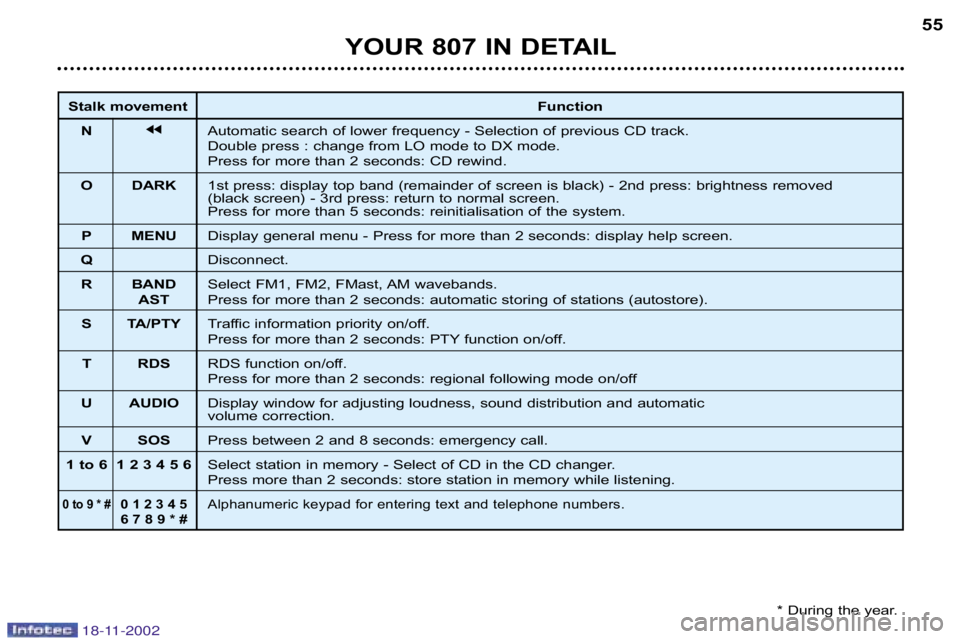
YOUR 807 IN DETAIL55
Stalk movement
Function
N jjAutomatic search of lower frequency Selection of previous CD track.
Double press : change from LO mode to DX mode.
Press for more than 2 seconds: CD rewind.
O DARK 1st press: display top band (remainder of screen is black) 2nd press: brightness removed
(black screen) 3rd press: return to normal screen.
Press for more than 5 seconds: reinitialisation of the system.
P MENU Display general menu Press for more than 2 seconds: display help scre en.
Q Disconnect.
R BAND Select FM1, FM2, FMast, AM wavebands.
AST Press for more than 2 seconds: automatic storing of stations (autosto re).
S TA/PTY Traffic information priority on/off.
Press for more than 2 seconds: PTY function on/off.
T RDS RDS function on/off.
Press for more than 2 seconds: regional following mode on/off
U AUDIO Display window for adjusting loudness, sound distribution an d automatic
volume correction.
V SOS Press between 2 and 8 seconds: emergency call.
1 to 6 1 2 3 4 5 6 Select station in memory Select of CD in the CD changer.
Press more than 2 seconds: store station in memory while listening.
0 to 9 * #0 1 2 3 4 5Alphanumeric keypad for entering text and telephone numbers.
6 7 8 9 * #
* During the year.
18-11-2002
Page 55 of 181

YOUR 807 IN DETAIL
56
GENERAL FUNCTIONS On/off
With the ignition switch in the accessories position or with the ignition on, press button C to switch the audio
function of the RT3 audio/telephone on or off.
Note: in the absence of an ignition key, press button C to switch the telematics system on or off.
The RT3 telephone can operate for 30 minutes without switc hing the vehicle ignition on.
Notes:
– the SIM card must be removed only after the audio/telephone h as been switched off,
– following automatic switching off of the audio/telepho ne after 30 minutes, it is possible to make a telephone call by pressing
button D,
– after the ignition has been switched off, the audio/te lephone can be switched on again by pressing buttons D, E, V or by
inserting a CD in the player.
Antitheft system
The RT3 audio/telephone is coded in such a way that it ca n operate only on your vehicle. If fitting it to another vehicle,
consult your PEUGEOT dealer for configuration of the system.
The system is automatic and requires no action on your part.
ADJUSTING THE VOLUME
Turn button Cclockwise to increase the volume of the audio/telephone or an ticlockwise to decrease it.
Note: the volume setting is specific to each source. It is possible to have different settings for radio, CD or CD changer.
AUDIO SETTINGS Press buttonUto access Bass,Treble ,Loudness ,Fader (front/rear balance), Balance(left/. right balance)
and Automatic volume adjustment settings.
Exit from audio mode is automatic after a few seconds without a ny action, or by pressing button J.
Note: bass and treble settings are specific to each source. It is possibl e to have different settings for radio,
CD or CD changer.
18-11-2002
Page 63 of 181

YOUR 807 IN DETAIL
64
TELEPHONE MODE
This function is a GSM dualband telephone (800 and 1 800 MHz) incorporated in the RT3 audio system.
It is a ''hands free'' telephone. This function is provided by a microphone located next to the front courtesy light, the
speakers and a steering column control which allows access to most of the functions (because the audio/telephone control
panel buttons allow access to all the functions).
Display of the principal ''mobile'' type functions, as well as consultation of the indexes, is pro vided by the multi–function
display.
This function is active whatever position the ignition key is in.
Note: when the key is in the accessories position (1st notch), this funct ion will be interrupted after thirty minutes, when the
message ''Economy mode active'' appears on the multi–function display. If you are using the telephone at that time, you
will be able to finish your call.
Using the menus
Press the ''MENU'' button to display the general menu. Select thetelematicsapplication, validiate Telephone functions
to access the principal telephone functions, then the various menus, in order to reach the one required.
This menu allows you to access the following functions:
Network: allows you to select the network search mode and to see the ne tworks
available.
Duration of calls: allows you to consult the duration recorder of calls made and ze ro
reset.
SIM card security: allows you to use or modify the PIN code and to erase the list of
calls and minimessages (SMS).
Telephone options: allows you to configure the calls with entering of my number,
automatic answering after X rings and specification of ring opt ions.
Within each menu:
Move around and select a function by turning knob Gthen validate by pressing the knob.
Cancel an operation by means of the ''ESC''button.
18-11-2002
Page 64 of 181

YOUR 807 IN DETAIL65
Using the alphanumeric keypad
For a given button, to input a character in the second or sub sequent rows press until you obtain the character required.
Installing the SIM card Open flap Lby pressing the point of a pencil on the circular opening ab ove the flap.
Insert your MicroSIM card as indicated in the graphics, then close th e flap.
Note: removal or insertion of the SIM card must only be carried out after the RT3 audio/telephone has been
switched off. Buttons Associated characters
[1] 1 or space
[2] 2 or A B C 2 or a b c 2
[3] 3 or D E F 3 or d e f 3
[4] 4 or G H I 4 or g h i 4
[5] 5 or J K L 5 or j k l 5
[6] 6 or M N O 6 or m n o 6
[7] 7 or P Q R S 7 or p q r s 7
[8] 8 or T U V 8 or t u v 8
[9] 9 or W X Y Z 9 or w x y z 9
[0] 0 or + (long press)
[#] # or P (long press)
[*] * or erasing of last character input (long press)
18-11-2002
Page 65 of 181

YOUR 807 IN DETAIL
66
Inputting the PIN code Input your PIN code using the alphanumeric keypad and validate by pressing knobGor button #
to access the network. Connection to the network is validated by the appearance of a symbol on
the screen.
Warning: if you make three errors in succession when inputting your PIN code, your SIM card
will be blocked. To unblock it, you will need to input t he PUK code. The PUK code will be suplied
to you by the person selling your SIM card (input of the PUK code allows for 10 errors in suc
cession; after this the SIM card becomes permanently unusable).
Note: the PIN code is required each time the ignition is switched o n, unless the PIN code has
been stored in the memory or protection by PIN code is not activat ed on the SIM card.
Cancelling of PIN code request
In the menu ''Telephone functions'' select''SIM card security'' , then''Process the PIN code'' , then validate the ''Can
cel'' function.
Warning: in this case, do not lose your SIM card. Losing it would mean a nyone who finds it would be able to make unlimited calls.
Telephone function screens
Not in use
This screen indicates the presence of voice messages or minimessages (SMS) no t lis
tened to, the cumulatve time in use since the last zero reset a nd the status of your tele
phone.
In use
This screen indicates the time elapsed since the start of the co nversation, as well as
the number* or name of the person to whom you are speaking (if recorded in the index)
and the status of your telephone.
*If this option and service are available.
18-11-2002
Page 66 of 181

YOUR 807 IN DETAIL67
Making a call Press buttonDto display the contextual menu of the telephone.
Note: pressing the end 5of the steering column control for more than 2 seconds calls
up a contextual menu limited to the "Directory" and "List of calls" functions.
Entering a number Select the function ''Enter number''then enter the number of the person you wish to speak to usin g the
alphanumeric keypad.
Press button Dto make the call.
Making a call from a directory
Select the "Directory" function to access all the files containing a telephone nu mber or the "List of calls" function to access
the list of the last ten incoming (if the number display opt ion is active) or outgoing calls.
Note: there are two directories, the RT3 audio/telephone directory and the SIM card directory. To consult the SIM directory,
insert your SIM card and enter you PIN code.
Receiving a call
When a ringing sounds to let you know that a call is waiti ng, you can choose either to accept it by pressing
button Dor the end of the steering wheel remote control or not to a ccept it by pressing the button Qor by
selecting and validating the "NO"button from the "Answer ?"menu.
If you accept the call, to end your communication, press button Q.
18-11-2002
Page 67 of 181

YOUR 807 IN DETAIL
68
Mini messages (SMS)
Accessing mini messages When the buzzer sounds (if the SMS mini messages buzzer option is acti ve) and a
superimposed screen announces "Do you wish to read the new mini message
(SMS)?" , you can choose to read the mini message received by selecting an d validat
ing "YES" or postpone reading it by selecting and validating "NO", by pressing the
"ESC" button or by waiting unti the announcement disappears.
Note: the old mini messages stored and the new mini messages, the read ing of which you wish to postpone, can be con
sulted. Press the "MENU"button then validate the telematic icon, select "Mini messages (SMS)"and validate the function
"Reading of mini messages received" by pressing knob G. Then scroll through the list by turning the knob and press t he
knob to select the mini message to be read.
Sending a mini message
Note:Before typing your first mini message, check that your mini messages (SMS)
centre number is stored correctly in the submenu "Server centre number". If it is not,
any mini messages typed before this number is entered will be de leted and not sent.
In the menu "Mini messages (SMS)" validate the function "Typing of a mini mes
sage" . Type your mini message using the alphanumeric keypad and valida te it using
the "OK" button to store it or validate the "Send"button to send it.
Validation of the "Send"button enables you to enter the number of your recipient or se lect it from the directory or from the
list of calls and send the message.
"Duration of calls" menu
Select the "Duration of calls" function from the "Telephone functions" menu to consult the duration counters for the calls
made. The part counter totals the duration of the calls since the last zero reset carried out using the "Zero reset" button.
"Telephone options" menu
Select the "Telephone options" function from the "Telephone options" menu to access the functions:
• "Configure the calls" which permits activation and deactivation of the "show my number" and "automatic answering after
X rings" functions
• "Ringing options" which permits adjustment of the ringing volume for voice calls an d activation of the mini messages
(SMS) receipt buzzer.
18-11-2002