2001 VOLVO S80 buttons
[x] Cancel search: buttonsPage 31 of 106
Move the seat as far rearward as possible for easiest access to the lumbar support control.
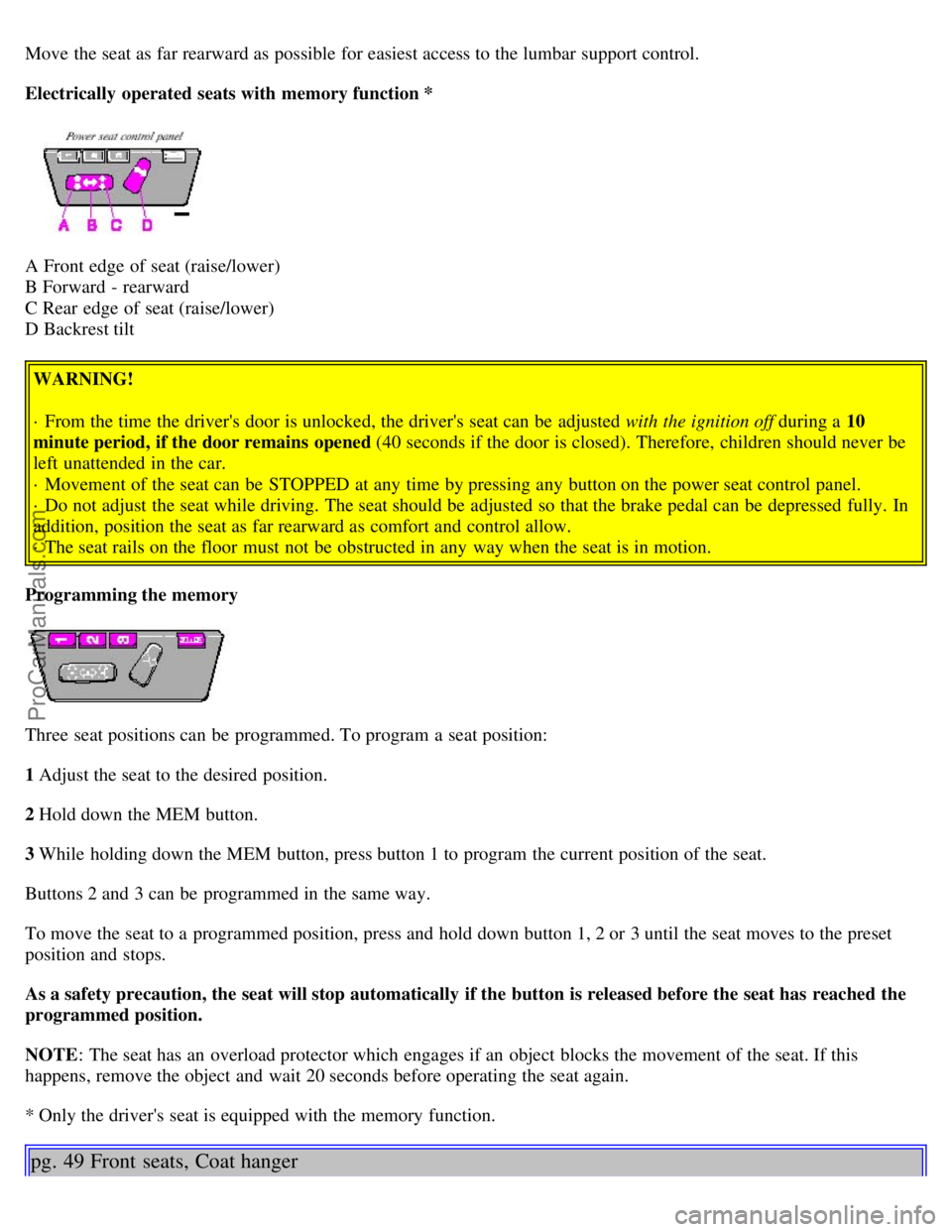
Electrically operated seats with memory function *
A Front edge of seat (raise/lower)
B Forward - rearward
C Rear edge of seat (raise/lower)
D Backrest tilt WARNING!
· From the time the driver's door is unlocked, the driver's seat can be adjusted with the ignition off during a 10
minute period, if the door remains opened (40 seconds if the door is closed). Therefore, children should never be
left unattended in the car.
· Movement of the seat can be STOPPED at any time by pressing any button on the power seat control panel.
· Do not adjust the seat while driving. The seat should be adjusted so that the brake pedal can be depressed fully. In
addition, position the seat as far rearward as comfort and control allow.
· The seat rails on the floor must not be obstructed in any way when the seat is in motion.
Programming the memory
Three seat positions can be programmed. To program a seat position:
1 Adjust the seat to the desired position.
2 Hold down the MEM button.
3 While holding down the MEM button, press button 1 to program the current position of the seat.
Buttons 2 and 3 can be programmed in the same way.
To move the seat to a programmed position, press and hold down button 1, 2 or 3 until the seat moves to the preset
position and stops.
As a safety precaution, the seat will stop automatically if the button is released before the seat has reached the
programmed position.
NOTE : The seat has an overload protector which engages if an object blocks the movement of the seat. If this
happens, remove the object and wait 20 seconds before operating the seat again.
* Only the driver's seat is equipped with the memory function.
pg. 49 Front seats, Coat hanger
ProCarManuals.com
Page 34 of 106

Reading lights - front/rear
The reading lights can be switched on or off by pressing the respective buttons. These lights are designed to switch off
automatically after 10 minutes or can be switched off at any time by pressing the button.
pg. 51 Storage compartments
WARNING!
Packages on the rear window shelf can obscure vision and may become dangerous projectiles in the event of a
sudden stop or an accident.
Anchor any heavy objects to help prevent them from moving during sudden stops.
pg. 52 Storage compartment in center console
ProCarManuals.com
Page 39 of 106

2 0 0 1
VOLVO S80
Chapter 5 - Keys, Locks, Alarm
pg. 55 Keys, Locks, Alarm
Keys, Exterior courtesy lights, Locking and unlocking the car56
Remote keyless entry system57
Unlocking the trunk with the master key, Central locking buttons, "Trunk lock" function59
Alarm60
Child safety locks - rear doors62
pg. 56 Keys, Exterior courtesy lights, Locking and unlocking the car
Keys
Two keys are provided with your car; a master key and a service key. The master key, the remote control, and the
central locking button may all be used to lock and unlock all of your car's locks.
The service key will operate only the driver's door and the ignition switch. It is intended to help deter unwanted entry
into the glove compartment and trunk.
Turn the key once to unlock the driver's door only.
Turn the key again (within 10 seconds) to unlock all doors and the trunk.
One turn with the key towards lock in the drivers door locks all doors, trunk.
ProCarManuals.com
Page 42 of 106
NOTE:
· This feature will work in the same way with all of the remote control transmitters (up to 3) that you use with your
car.
· This feature will not function if you lock your car with the key.
This device complies with FCC rules Part 15. Operation is subject to the following two conditions: (1) This device
may not cause harmful interference and (2) this device must accept any interference that may be received, including
interference that may cause undesired operation.
pg. 58 Remote keyless entry system
NOTE :
· If the doors are unlocked, the locks will automatically reengage (re-lock) and the alarm will reset after 2 minutes
unless a door has been opened.
· The keys may also be used to lock and unlock the doors, and to activate and deactivate the alarm system.
· To avoid leaving your keys in the car, make a habit of always locking the car with the remote control.
Automatic locking (Retailer installed option on certain models) If your car is equipped with this option, all
unlocked doors will automatically be locked when the car exceeds a speed of 3 mph (5 km/h). Please be aware of the
following:
· If the doors are unlocked using the central locking button after the doors have automatically locked and no door has
been opened, the doors will not automatically re-lock the next time the car exceeds 3 mph (5 km/h).
· If any doors are unlocked by pulling up the lock knob after the doors have been automatically locked and no door has
been opened, the doors will not automatically re-lock the next time the car exceeds 3 mph (5 km/h).
· If a door is opened after the car has exceeded 3 mph (5 km/h), that door will not be re-locked.
WARNING!
Never use the transmitter to lock the doors from inside the car.
Doing so would ACTIVATE:
· the break-in alarm, which would sound if one of the doors were opened.
· the interior motion and inclination alarm sensors, if equipped. Doing so would DEACTIVATE:
· the sunroof and interior courtesy light controls.
· the central locking buttons on the front door armrests, although the interior door handles would still function to
allow occupants to leave the car.
Disabled features would remain disabled until the remote were used again to unlock the car.
In addition, locking an occupied vehicle would hinder rapid access to the occupants in an accident or emergency.
td>
ProCarManuals.com
Page 44 of 106
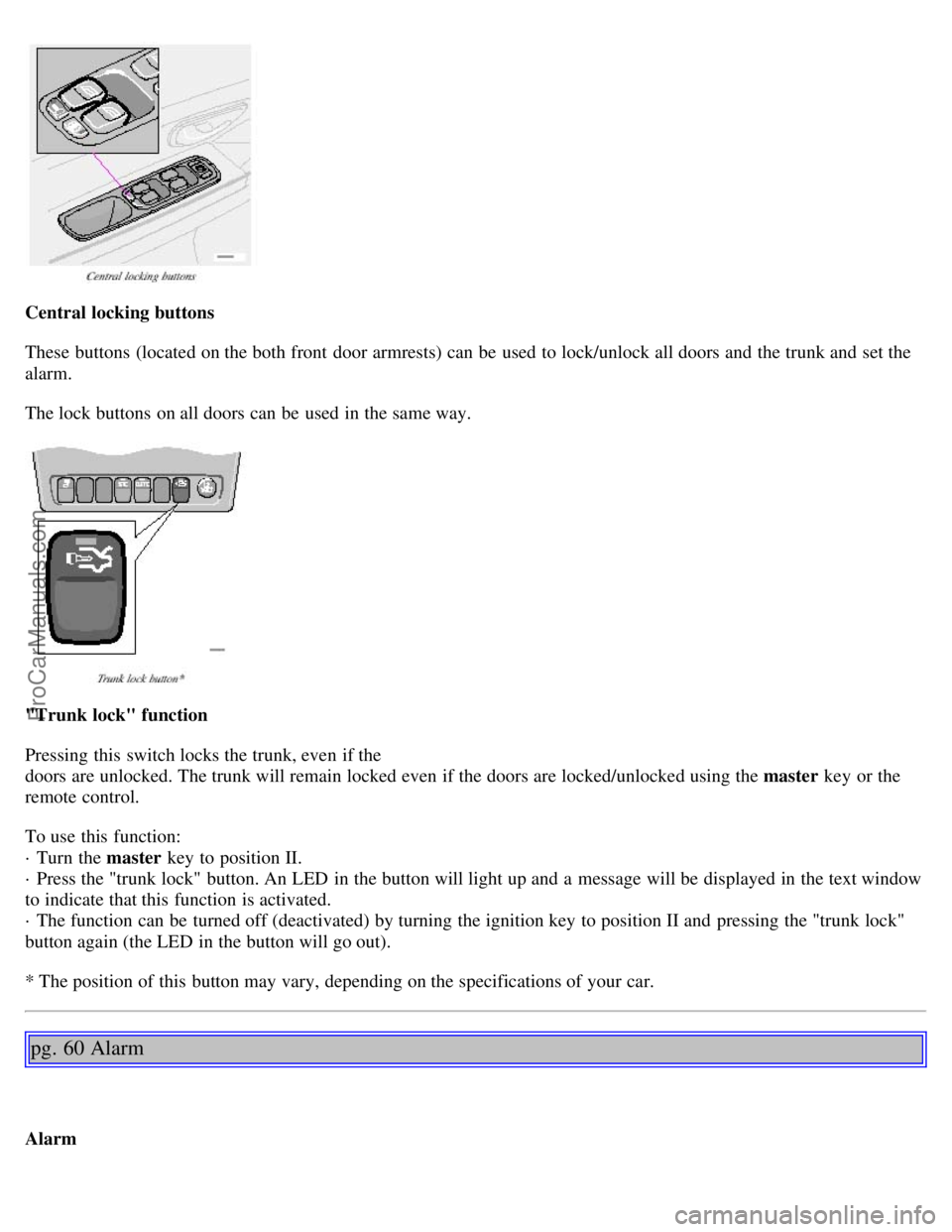
Central locking buttons
These buttons (located on the both front door armrests) can be used to lock/unlock all doors and the trunk and set the
alarm.
The lock buttons on all doors can be used in the same way.
"Trunk lock" function
Pressing this switch locks the trunk, even if the
doors are unlocked. The trunk will remain locked even if the doors are locked/unlocked using the master key or the
remote control.
To use this function:
· Turn the master key to position II.
· Press the "trunk lock" button. An LED in the button will light up and a message will be displayed in the text window
to indicate that this function is activated.
· The function can be turned off (deactivated) by turning the ignition key to position II and pressing the "trunk lock"
button again (the LED in the button will go out).
* The position of this button may vary, depending on the specifications of your car.
pg. 60 Alarm
Alarm
ProCarManuals.com
Page 45 of 106

The alarm is automatically set (armed) whenever you lock your car.
When armed (set), the alarm continuously monitors a number of points on the car. The following conditions will set off
the alarm:
· The hood is forced opened.
· The trunk is forced opened.
· A door is forced opened.
· The ignition switch is tampered with.
· If there is movement in the passenger compartment (if the car is equipped with the optional movement sensor).
· The car is lifted or towed (if the car is equipped with the optional inclination sensor).
· The battery is disconnected (while the alarm is set).
Arming (setting) the alarm
Press the LOCK button on the remote control, lock the car using the key in the driver's door or press the central lock
button on one of the front doors with the door open. One long flash of the turn signals will confirm that the alarm is
set.
Disarming the alarm
Press the UNLOCK button on the remote control or unlock the doors with the key.
Turning off (stopping) the alarm
If the alarm is sounding, it can be stopped by pressing the UNLOCK button on the remote control or by unlocking the
driver's door with the key.
Visual alarm signal
The visual alarm signal is given by flashing all turn signals and turning on the interior lighting for approximately 5
minutes.
Audible alarm signal
An audible alarm signal is given by a battery powered siren. One alarm cycle lasts for 25 seconds.
"Panic" function
In an emergency situation, this feature can be used to attract attention.
Activate the "panic" function by pressing the red button on the remote control (see illustration on page 57
) for at least
3 seconds or by pressing this button twice within 3 seconds. The turn signals will flash, the interior lights will go on
and the car's horn will sound.
The function can be turned off by pressing any of the buttons on the remote control or will stop automatically
after 25 seconds. When a button is pressed, there is a 5 second delay before the panic alarm is deactivated.
NOTE: This button will NOT unlock the car.
pg. 61 Alarm
ProCarManuals.com
Page 47 of 106

Child safety locks - rear doors
The controls are located on the rear door jambs. Use a screwdriver to adjust these controls.
A The door cannot be opened from the inside. Normal operation from the outside.
B The door lock functions normally.
WARNING!
Remember, in the event of an accident, the rear seat passengers cannot open the doors from the inside with the
buttons in position A.
Contents | Top of Page
ProCarManuals.com
Page 88 of 106

Internal CD changer
CD
Station scan - press
TV (option on certain models)
External CD changer (option)
7. Radio - Station seek up/down
CD - Selecting next/previous track
8. Radio - Manual station selection
CD - Fast forward/backward
9. CD eject
10. Dolby Pro Logic - switching on
11. 2 channel stereo
12 3 channel stereo
13. CD slot
14. CD random play
15. Program type
Active Sound Control (ON or OFF)
16. News
17. Traffic information
18. Automatic presetting of radio
stations
19. Display
pg.132 Audio systems HU-611/HU-801
Switch on/off
Press the knob to switch on or turn off the radio.
Volume control
Turn the knob clockwise to increase volume. Volume control is electronic and does not have an end stop. If you have
a key pad in the steering wheel, increase or decrease the volume with the + or- buttons.
Bass
ProCarManuals.com