Page 71 of 240
’01MY CELICA U (L/O 0008)
672001 CELICA (20766U)
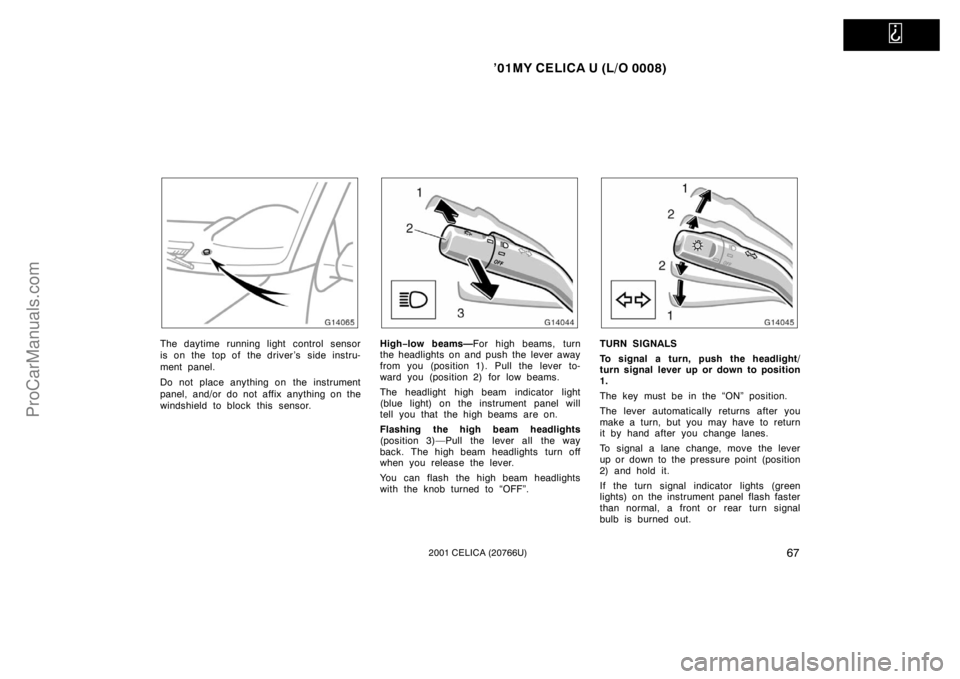
The daytime running light control sensor
is on the top of the driver’s side instru-
ment panel.
Do not place anything on the instrument
panel, and/or do not affix anything on the
windshield to block this sensor.High−low beams— For high beams, turn
the headlights on and push the lever away
from you (position 1). Pull the lever to-
ward you (position 2) for low beams.
The headlight high beam indicator light
(blue light) on the instrument panel will
tell you that the high beams are on.
Flashing the high beam headlights
(position 3)—Pull the lever all the way
back. The high beam headlights turn off
when you release the lever.
You can flash the high beam headlights
with the knob turned to “OFF”.TURN SIGNALS
To signal a turn, push the headlight/
turn signal lever up or down to position
1.
The key must be in the “ON” position.
The lever automatically returns after you
make a turn, but you may have to return
it by hand after you change lanes.
To signal a lane change, move the lever
up or down to the pressure point (position
2) and hold it.
If the turn signal indicator lights (green
lights) on the instrument panel flash faster
than normal, a front or rear turn signal
bulb is burned out.
ProCarManuals.com
Page 197 of 240
’01MY CELICA U (L/O 0008)
1922001 CELICA (20766U)
Tools:
�Rag or paper towel
�Funnel (only for adding fluid)
Checking power steering fluid
Parts (if level is low):
�Automatic transmission fluid
DEXRON �II or III
Tools:
�Rag or paper towel
�Funnel (only for adding fluid)
Checking battery condition
Tools:
�Warm water
�Baking soda
�Grease
�Conventional wrench (for terminal
clamp bolts)
Checking and replacing fuses
Parts (if replacement is necessary):
�Fuse with same amperage rating as
original
Adding washer fluid
Parts:
�Water
�Washer fluid containing antifreeze
(for winter use) Tools:
�Funnel
Replacing light bulbs
Parts:
�Bulb with same number and wattage
rating as original (See charts in
“Replacing light bulbs—” in Section
7 −3.)
Tools:
�Screwdriver
ProCarManuals.com
Page 210 of 240
’01MY CELICA U (L/O 0008)
2052001 CELICA (20766U)
DO−IT −YOURSELF MAINTENANCE
Electrical components
Checking battery condition 206
. . . . . . . . . . . . . . . . . . . . . . . . . . . . . . . . . .
Battery recharging precautions 207
. . . . . . . . . . . . . . . . . . . . . . . . . . . . . . .
Checking and replacing fuses 208
. . . . . . . . . . . . . . . . . . . . . . . . . . . . . . . .
Adding washer fluid 209
. . . . . . . . . . . . . . . . . . . . . . . . . . . . . . . . . . . . \
. . . . .
Replacing light bulbs 210
. . . . . . . . . . . . . . . . . . . . . . . . . . . . . . . . . . . . \
. . . .
SECTION 7− 3
ProCarManuals.com
Page 215 of 240

’01MY CELICA U (L/O 0008)
2102001 CELICA (20766U)
NOTICE
Do not use engine antifreeze or any
other substitute because it may dam-
age your vehicle’s paint.
Replacing light bulbs—
The following illustrations show how to
gain access to the bulbs. When replacing
a bulb, make sure the ignition switch and
light switch are off. Use bulbs with the
wattage ratings given in the table.
CAUTION
Halogen bulbs have pressurized gas
inside and require special handling.
They can burst or shatter if scratched
or dropped. Hold a bulb only by its
plastic or metal case. Do not touch
the glass part of a bulb with bare
hands.
The inside of the lens of exterior lights
such as headlights may temporarily fog up
when the lens becomes wet in the rain or
in a car wash. This is not a problem
because the fogging is caused by the
temperature difference between the outside
and inside of the lens, just like the
windshield fogged up in the rain. However,
if there is a large drop of water on the
inside of the lens, or if there is water
pooled inside the light, contact your
Toyota dealer.
NOTICE
Only use a bulb of the listed type.
Light bulbsBulbNo.WTy p e
Headlights
(low beam)—55A
Headlights
(high beam)900565B
Front fog light—55C
Parking lights—5D
Front turn signal
lights—21E
Front side marker
lights—5D
Rear turn signal
lights—21D
Stop/tail lights—21/5D
Back −up lights—18D
License plate lights—5D
Interior light
(with moon roof)—10E
Interior lights
(without moon roof)—8F
ProCarManuals.com
Page 216 of 240
’01MY CELICA U (L/O 0008)
2112001 CELICA (20766U)
Light bulbsBulbNo.WTy p e
Glove box light—1.2D
Luggage
compartment light—5F
A: H7 halogen bulbs
B: HB3 halogen bulbs
C: H3 halogen bulbs
D: Wedge base bulbs
E: Single end bulbs
F: Double end bulbs
—Headlights (low beam)
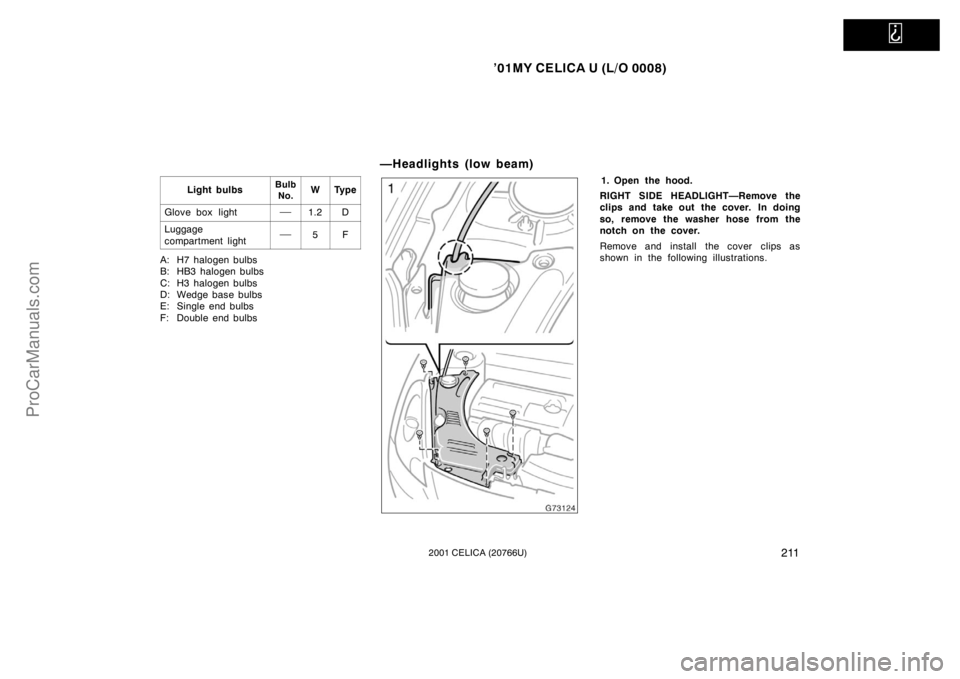
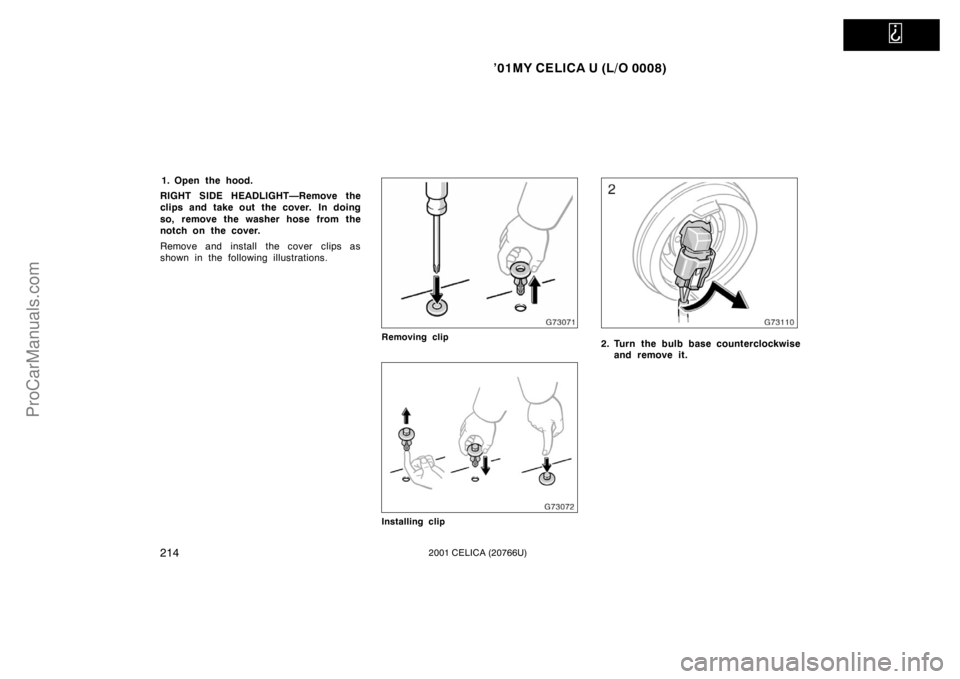
1. Open the hood.
RIGHT SIDE HEADLIGHT—Remove the
clips and take out the cover. In doing
so, remove the washer hose from the
notch on the cover.
Remove and install the cover clips as
shown in the following illustrations.
ProCarManuals.com
Page 217 of 240
’01MY CELICA U (L/O 0008)
2122001 CELICA (20766U)
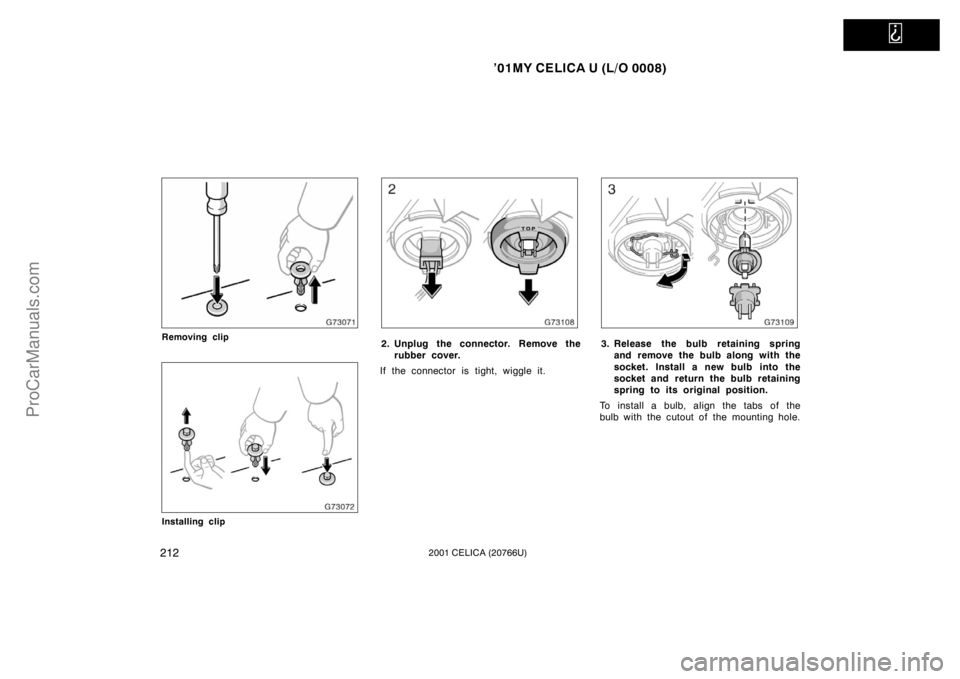
Removing clip
Installing clip
2. Unplug the connector. Remove therubber cover.
If the connector is tight, wiggle it.3. Release the bulb retaining spring and remove the bulb along with the
socket. Install a new bulb into the
socket and return the bulb retaining
spring to its original position.
To install a bulb, align the tabs of the
bulb with the cutout of the mounting hole.
ProCarManuals.com
Page 218 of 240
’01MY CELICA U (L/O 0008)
2132001 CELICA (20766U)
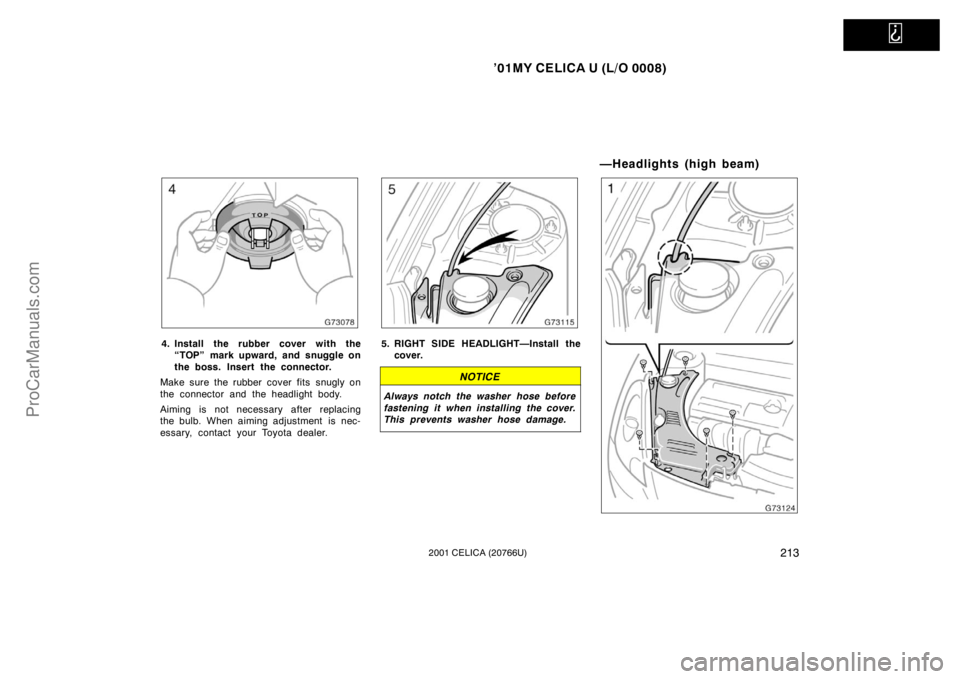
4. Install the rubber cover with the“TOP” mark upward, and snuggle on
the boss. Insert the connector.
Make sure the rubber cover fits snugly on
the connector and the headlight body.
Aiming is not necessary after replacing
the bulb. When aiming adjustment is nec-
essary, contact your Toyota dealer.5. RIGHT SIDE HEADLIGHT—Install the cover.
NOTICE
Always notch the washer hose before
fastening it when installing the cover.
This prevents washer hose damage.
—Headlights (high beam)
ProCarManuals.com
Page 219 of 240
’01MY CELICA U (L/O 0008)
2142001 CELICA (20766U)
1. Open the hood.
RIGHT SIDE HEADLIGHT—Remove the
clips and take out the cover. In doing
so, remove the washer hose from the
notch on the cover.
Remove and install the cover clips as
shown in the following illustrations.
Removing clip
Installing clip
2. Turn the bulb base counterclockwise and remove it.
ProCarManuals.com