2001 SAAB 9-5 fuel
[x] Cancel search: fuelPage 61 of 272

61 Instruments and controls
CHECK messages When the engine is started, CHECKING will
appear on the display for about four sec-
onds, while the SID checks are being per-
formed.
When a CHECK message is generated
while the car is being driven, a chime will
sound, INFO DISPL will illuminate on on the
main instrument panel, and the message
will appear on the SID. The number of mes-
sages that can be displayed by the SID
varies with the specification of the car.
If more than one CHECK message has
been generated, the
+ symbol will appear to
the left of the text on the display. The mes-
sages appear in order of priority.
If a new fault occurs while another message
is being displayed, the message relating to
the new one will appear for 10 seconds,
after which the display will return to the ear-
lier one.
Press CLEAR once to acknowledge a mes-
sage, whereupon it will be cleared from the
display. It will not be displayed again before
the ignition has been switched off and then
on again. The following messages may be displayed:
1 This message will be displayed approxi-
mately 600 miles (1,000 km) before the next
scheduled service is due, or when 365 days
have elapsed since the last service. The
message should be cleared at the time of that
service (see the Saab Warranties & Service
Record Booklet).
This message can also be deleted by first
briefly pressing the CLEAR button, then
depressing it a second time for at least eight
seconds until ”SERVICE” appears on the dis-
play and a chime sounds. The message can
only be deleted when it is shown on the SID.
Night panelTo improve night-driving conditions inside
the car, the Night Panel mode can be
selected. In this mode, the amount of infor-
mation displayed is reduced, and only the
most important instruments and displays
will be illuminated.
When the Night Panel button is pressed,
only the speedometer will be illuminated (up
to the 87-mph or 140-km/h graduation), all
the other instruments illumination being
extinguished and their needles moved to
zero. Both the SID and the ACC displays will
be extinguished and the backlighting for
switches and other controls will be dimmed.
Note: All indicator and warning lights,
together with the display of CHECK mes-
sages, will operate as normal, except ”Out-
door temperature (Frost warning)”, see
page 58. Message See
page
FRONT LIGHT FAILURE 205
REAR LIGHT FAILURE 208
FOG LIGHT FAILURE 209
BRAKE LIGHT FAILURE 208
WASHER FLUID LEVEL LOW 204
FILL COOLANT FLUID 196
REPLACE KEY BATTERY 37
KEY NOT ACCEPTED 45
SERVICE THEFT ALARM 45
TRANSMISSION OVERHEATING 162
TIGHTEN FUEL FILLER CAP 154
TIME FOR SERVICE
1)
242
ProCarManuals.com
Page 62 of 272

62 Instruments and controlsThe following conditions will wake up the
respective displays in the Night-Panel
mode:
Setting of the Audio system, SID or ACC
(display comes on for ten seconds).
CHECK message generated in the SID.
High engine revs cause the rev counter to
be illuminated until the engine speed has
fallen again.
If the quantity of fuel remaining falls below
4 gallons (15 liters), the fuel gauge will be
illuminated.
If the engine temperature rises above nor-
mal, the temperature gauge will be illumi-
nated.
If the speed of the car exceeds 84 mph
(135 km/h), the entire speedometer will
be illuminated.
In cars with automatic transmission, if the
selector lever is moved from D to position
3, 2 or 1, the selector indication on the
main instrument panel will be illuminated.
To restore the displays and lighting to the
normal mode, press the Night-Panel button.
Units and language versionsThe SID has four sets of units:
CHECK messages can be displayed in six
language options: English, Swedish,
German, French, Italian and Spanish. Selecting units and language 1 Press CLEAR and SET simultaneously
for four seconds until a chime sounds.
2 Press or to select the required
units.
3 Touch SET.
4 Press or to select the required
language.
5 Touch SET.
Clock Set the clock by means of the two buttons
under the digital clock on the left of the dis-
play.
When the ignition key is in the OFF position
or removed, the clock can be illuminated
(approx. 10 seconds) by pressing one of
the SID buttons (not the NIGHT PANEL but-
ton). METRIC IMP. 1 IMP. 2 US
km miles miles miles
km/h mph mph mph
liters UK gal UK gal US gal
°C °F °C °F
24-hour 12-hour 12-hour 12-hour
IB1156
CLEAR
ProCarManuals.com
Page 77 of 272

77 Instruments and controls
Programming IIIt is also possible to customize the ACC system, e.g. to adapt to
driving and weather conditions.
Function Operation in AUTO mode
after Programming II Standard operation
in AUTO mode
The A/C compressor will not
activate unless the outdoor
temperature is above 55
°F
(+13°C).
–This function saves fuel by
delaying the activation of the
A/C compressor. However,
in wet weather it is advisable
to have the A/C compressor
running when outdoor tem-
peratures are below
57°
(+14°C), as the A/C system
reduces the likelihood of the
windows’ fogging up.
A/C compressor cuts
in when outdoor tem-
perature is above 41
°F
(+5°C)
Recirculation will be
switched on if the speed of
the car is less than 6 mph (10
km/h) and will be switched off
when the speed has risen
above 20 mph (30 km/h), but
not if the ECON mode has
been programmed according
to ”Programming II”.
–This function is useful to
prevent fumes being drawn
into the car in traffic jams.
Recirculation is
switched on about
45 seconds after start-
ing if the outdoor tem-
perature is above 86
°F
(+30°C) and the
selected temperature
for the cabin is well
below the actual tem-
perature in both tem-
perature zones.
The heating will come on
about five seconds after the
engine has started if the out-
door temperature is below
41°F (+5°C).
–This function helps to pre-
vent ice or mist forming on
the rear window in cold,
damp weather. Fuel con-
sumption may increase
slightly.
Rear-window heating
can only be switched
on manually.
ProCarManuals.com
Page 103 of 272

103 Saab 9-5 Audio System
Installation of car phone
(option)Provision has been made on the Saab 9-5
for the installation of a hands-free car
phone.
A car-phone mount is available as an acces-
sory.
Your Saab dealer has details of proper
phone installation procedures. Roof loads can negatively affect tele-
communication.
Provision for hands-free phone
Car phone connects to car’s circuitry.
External antenna is fitted.
Microphone for hands-free phone use
incorporated in overhead panel at front.
Audio System mute function when phone
activated.
Phone conversation amplified through
Audio System speakers.
TELEPHONE appears on the SID when
phone in use. Volume level for ongoing conversation
can be adjusted by volume controls on
steering wheel or on Audio System
module (see also ”Volume-preset mode”,
page 97).
If the sound is distorted, adjust by means
of the volume control on
telephone set
.
Phone battery charging when phone is in
its cradle.
Please refer to the instructions supplied with
the phone for details of how to make and
receive calls. In order to fully utilize the
hands-free function, certain circuits must be
available from the telephone to be installed.
Your authorized Saab dealer has this infor-
mation available.
WARNING
To prevent crashes while using a cell
phone:
Don’t use the phone in distracting traf-
fic situations. Turn it off if traffic is
heavy.
Dial sensibly, at a stoplight or safely off
the road.
Consider installing hands-free or
speaker phone.
Avoid stressful and intense phone
conversations.
Acquaint yourself with the legal provi-
sions governing the use of car phones
while driving.
Do not use the phone when refueling
the vehicle. Gasoline fumes are highly
explosive.
NOTEThe A-pillar area (area beside the wind-
shield) and the headlining of your Saab
contain padding designed to reduce head
injuries. No modifications to these areas
should be made unless done by your
authorized Saab dealer.
ProCarManuals.com
Page 104 of 272
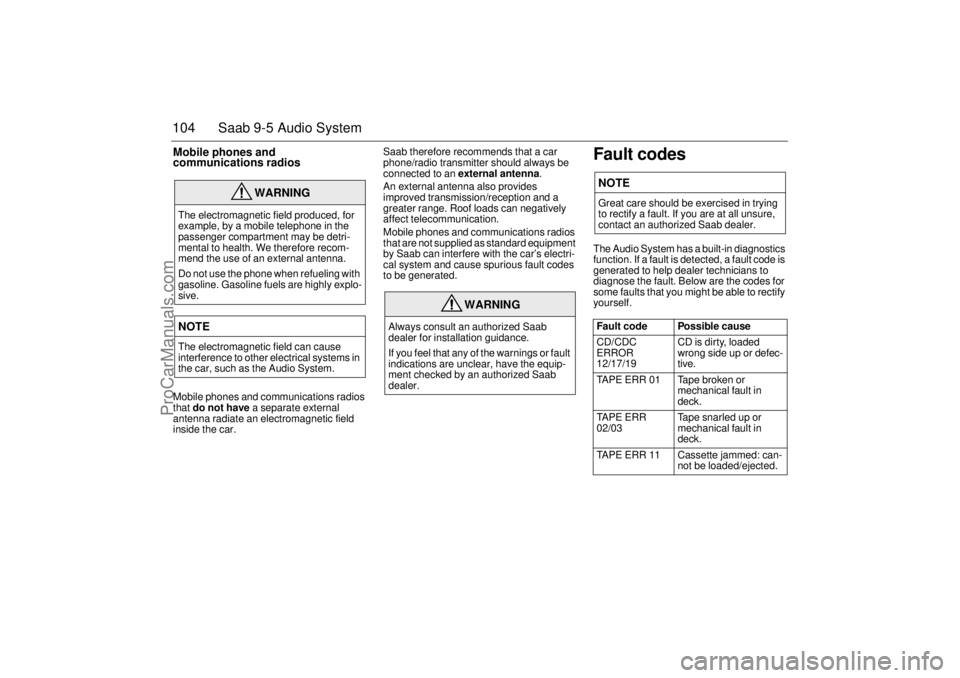
104 Saab 9-5 Audio SystemMobile phones and
communications radios Mobile phones and communications radios
that do not have a separate external
antenna radiate an electromagnetic field
inside the car.Saab therefore recommends that a car
phone/radio transmitter should always be
connected to an external antenna.
An external antenna also provides
improved transmission/reception and a
greater range. Roof loads can negatively
affect telecommunication.
Mobile phones and communications radios
that are not supplied as standard equipment
by Saab can interfere with the car’s electri-
cal system and cause spurious fault codes
to be generated.
Fault codesThe Audio System has a built-in diagnostics
function. If a fault is detected, a fault code is
generated to help dealer technicians to
diagnose the fault. Below are the codes for
some faults that you might be able to rectify
yourself.
WARNING
The electromagnetic field produced, for
example, by a mobile telephone in the
passenger compartment may be detri-
mental to health. We therefore recom-
mend the use of an external antenna.
Do not use the phone when refueling with
gasoline. Gasoline fuels are highly explo-
sive.NOTEThe electromagnetic field can cause
interference to other electrical systems in
the car, such as the Audio System.
WARNING
Always consult an authorized Saab
dealer for installation guidance.
If you feel that any of the warnings or fault
indications are unclear, have the equip-
ment checked by an authorized Saab
dealer.
NOTEGreat care should be exercised in trying
to rectify a fault. If you are at all unsure,
contact an authorized Saab dealer.
Fault code Possible cause
CD/CDC
ERROR
12/17/19 CD is dirty, loaded
wrong side up or defec-
tive.
TAPE ERR 01 Tape broken or
mechanical fault in
deck.
TAPE ERR
02/03 Tape snarled up or
mechanical fault in
deck.
TAPE ERR 11 Cassette jammed: can-
not be loaded/ejected.
ProCarManuals.com
Page 119 of 272

119 Interior equipment and trunk
Interior equipment
and trunk Seats ................................ 120
Steering-wheel
adjustment ..................... 124
Rear-view mirrors ........... 125
Electric windows ............. 127
Sunroof ............................ 128
Sun visors........................ 130
Ashtrays........................... 130
Glove compartment ........ 131
Cup holders ..................... 133
Trunk ................................ 134
Spare wheel and tools .... 144
Fuel filler flap................... 145
Opening the fuel filler flap
in an emergency............ 145
IB394
ProCarManuals.com
Page 145 of 272

145 Interior equipment and trunk
Fuel filler flapThe fuel filler flap is opened by means of a
button on the driver’s door. The flap is
spring-loaded, so it opens slightly automat-
ically when released.
Refueling, see page 154.
Opening the fuel filler
flap in an emergencyIf the fuel filler flap fails to open after the
button on the driver’s door has been
pressed, it can be opened manually from
inside the trunk.
9-5 Sedan:
Start by checking fuse 25 (see page 217).
A thin cable on the right-hand side in the
trunk is connected to the catch for the filler
flap. To open the flap, pull the yellow plastic
arrow on the end of the cable. 9-5 Wagon:
Start by checking fuse 25 (see page 217).
On the right-hand side of the luggage com-
partment, in the storage locker, is a thin wire
that is tied to the locking arm of the filler flap.
To open the flap pull the yellow plastic arrow
attached to the end of the wire.
IB1231
To open filler flap in an emergency,
9-5 Wagon
IB467
To open fuel filler flap in an emergency
9-5 Sedan
IB466
Button for releasing filler flap
ProCarManuals.com
Page 147 of 272

147 Starting and driving
Starting and driving
IB597
Ignition switch ................. 148
Starting the engine .......... 149
Important considerations
for driving ....................... 151
Refueling .......................... 154
Engine Break-In Period ... 157
Gear changing ................. 158
Cruise control .................. 166
Braking ............................. 167
Traction Control System . 169
Economical motoring ...... 170
Driving in cold weather ... 172 Driving in hot weather .... 173
Towing a trailer ................ 174
Driving with a roof rack
load ................................. 176
Driving with a load .......... 179
Driving considerations
with compact spare
wheel/tire fitted .............. 180
Driving with the trunk
lid/tailgate open ............. 180
Driving in deep water ...... 180
Towing the car ................. 181 Jump starting ................... 183
Parking brake ................... 185
Parking .............................. 185
ProCarManuals.com