Page 164 of 341

3-25
Playing a Cassette Tape
Your tape player is built to work best with tapes that are
up to 30 to 45 minutes long on each side. Tapes longer
than that are so thin they may not work well in this
player. The longer side with the tape visible should face
to the right. If the ignition is on, but the radio is off, the
tape can be inserted and will begin playing. If you hear
nothing but a garbled sound, the tape may not be in
squarely. Press the eject symbol to remove the tape and
start over.
While the tape is playing, use the VOL, FAD, BAL,
TREB, MID, BASS, EQ, SEEK and SCAN controls just
as you do for the radio. The display will show TAPE and
an arrow showing which side of the tape is playing. The
tape player automatically begins playing the other side
when it reaches the end of the tape.
Your tape bias is set automatically when a metal or
chrome tape is inserted. If you want to insert a tape
when the ignition is off, first press the cassette eject
symbol or the RCL knob.
If an error appears on the radio display, the tape won't
play because of an error.
TIGHT TAPE is displayed when the tape is tight and
the player can't turn the tape hubs. Remove the tape.Hold the tape with the open end down and try to turn the
right hub counterclockwise with a pencil. Turn the tape
over and repeat. If the hubs do not turn easily, your
tape may be damaged and should not be used in the
player. Try a new tape to make sure your player is
working properly.
BROKEN TAPE is displayed when the tape is broken.
Try a new tape.
WRAPPED TAPE is displayed when the tape is
wrapped around the tape head. Attempt to get the
cassette out. Try a new tape.
If any error occurs repeatedly or if an error can't be
corrected, please contact your dealer. If your radio
displays an error message, write it down and provide it
to your dealer when reporting the problem.
�� (1): Press this button to advance quickly to another
part of the tape. Press the button again to return to
playing speed. The radio will play the last selected
station while the tape advances. You may select stations
during FWD operation by using TUNE.
While in FWD mode the display will show FREQ and
FWD and two right arrows. If the radio is playing a
RDS station the display will show the station name and
two right arrows.
Page 168 of 341
3-29
Radio Calibration
Your audio system has been calibrated for your vehicle
from the factory. If CALIBRATE appears on the display
it means that your radio has not been configured
properly for your vehicle and must be returned to the
dealership for service.
Personal Choice Radio Controls
(If Equipped)
With this feature, your vehicle will recall the latest radio
settings as adjusted the last time your vehicle was
operated. This feature allows two different drivers to
store and recall their own radio settings for AM and FM
presets, last tuned station, volume, tone and audio
source (radio, cassette or CD). The settings recalled by
the radio are determined by which transmitter was used
to enter the vehicle. After the UNLOCK button is
pressed on the transmitter and the ignition is in ON, the
radio settings will automatically adjust to where they
were last set by the identified driver. All vehicles are
shipped with this feature on. This feature can be
disabled by your dealer if desired.
Theft-Deterrent Feature Non-RDS Radios
(If Equipped)
THEFTLOCK� is designed to discourage theft of your
radio. The feature works automatically by learning a
portion of the Vehicle Identification Number (VIN).
If the radio is moved to a different vehicle, it will not
operate and LOC will be displayed.
With THEFTLOCK activated, your radio will not
operate if stolen.
Theft-Deterrent Feature RDS Radios
(If Equipped)
THEFTLOCK� is designed to discourage theft of your
radio. The feature works automatically by learning a
portion of the Vehicle Identification Number (VIN).
If the radio is moved to a different vehicle, it will not
operate and LOCKED will be displayed.
When the radio and vehicle are turned off, the blinking
red light indicates that THEFTLOCK is armed.
With THEFTLOCK activated, your radio will not
operate if stolen.
Page 169 of 341
3-30 Audio Steering Wheel Controls
(If Equipped)
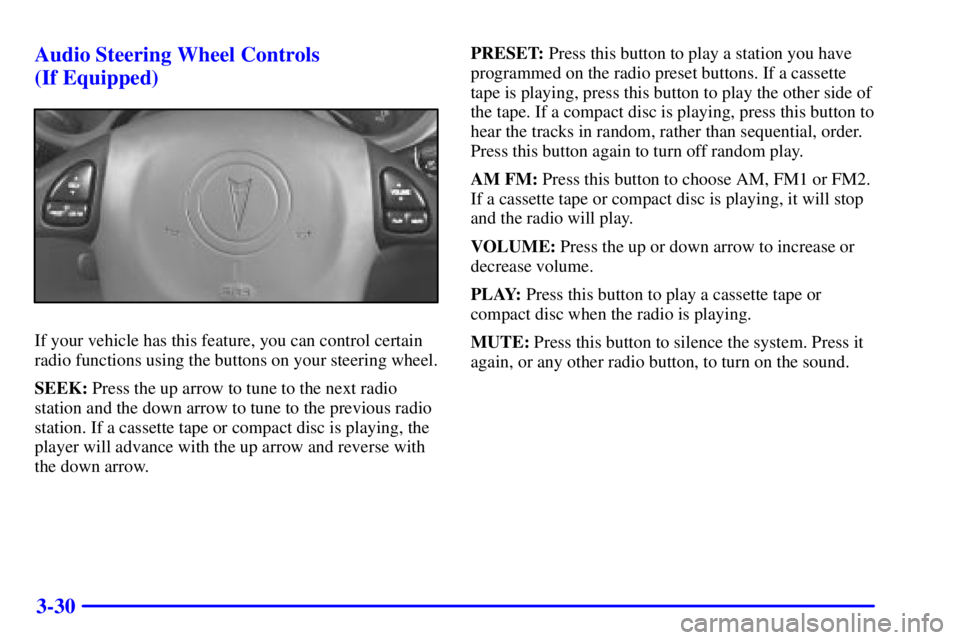
If your vehicle has this feature, you can control certain
radio functions using the buttons on your steering wheel.
SEEK: Press the up arrow to tune to the next radio
station and the down arrow to tune to the previous radio
station. If a cassette tape or compact disc is playing, the
player will advance with the up arrow and reverse with
the down arrow.PRESET: Press this button to play a station you have
programmed on the radio preset buttons. If a cassette
tape is playing, press this button to play the other side of
the tape. If a compact disc is playing, press this button to
hear the tracks in random, rather than sequential, order.
Press this button again to turn off random play.
AM FM: Press this button to choose AM, FM1 or FM2.
If a cassette tape or compact disc is playing, it will stop
and the radio will play.
VOLUME: Press the up or down arrow to increase or
decrease volume.
PLAY: Press this button to play a cassette tape or
compact disc when the radio is playing.
MUTE: Press this button to silence the system. Press it
again, or any other radio button, to turn on the sound.