Page 245 of 436

3-34
When a traffic announcement comes on the tuned
radio station or a related network station, you will
hear it, even if the volume is muted or a compact disc is
playing. If the compact disc player was being used, the
compact disc will stay in the player and resume play at
the point where it stopped.
INFO: If the current station has a message, INFO
will appear on the display. Press this button to see the
message. If the whole message does not appear on the
display, parts of the message will appear every three
seconds until the message is completed. To see the parts
of the message faster than every three seconds, press this
button again. A new group of words will appear on the
display. Once the complete message has been displayed,
INFO will disappear from the display until another new
message is received.
P
-TYPE: This button is used to turn on and off
Program Type (PTY) selections. PTY and the light next
to the button will turn on. The last selected PTY will
appear on the display for five seconds. Turn the P
-TYPE
knob to select the PTY you want to listen to. Press the
SEEK SCAN arrows to find radio stations of the PTY
you want to listen to. The last PTY selected will be used
for seek or scan modes. If a station with the selected PTY is not found, NONE
FOUND will appear on the display. If both P
-TYPE and
TRAF are on, the radio will search for stations with
traffic announcements and the selected PTY.
To use the P
-TYPE interrupt feature, press and hold
the P
-TYPE button until you hear a beep on the PTY
you want to interrupt on. When you are listening to a
compact disc, the last selected RDS FM station will
interrupt play if that selected PTY format is broadcast.
PUSHBUTTONS: The six numbered pushbuttons let
you return to your favorite Program Types (PTYs).
These buttons have factory PTY presets. You can set up
to 12 PTYs (six FM1 and six FM2) by performing the
following steps:
1. Press P
-TYPE, if it is not already on.
2. Press AM FM to select FM1 or FM2.
3. Turn the P
-TYPE knob to select a PTY.
4. Press and hold one of the six numbered buttons
until you hear a beep. Whenever you press that
numbered button, the PTY you set will return.
5. Repeat the steps for each pushbutton.
Page 252 of 436
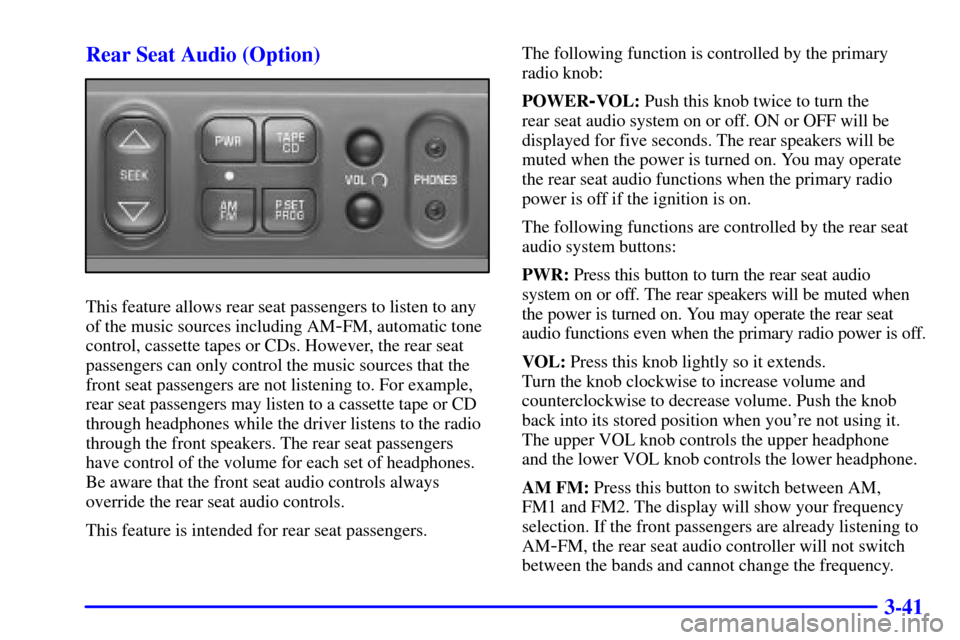
3-41 Rear Seat Audio (Option)
This feature allows rear seat passengers to listen to any
of the music sources including AM
-FM, automatic tone
control, cassette tapes or CDs. However, the rear seat
passengers can only control the music sources that the
front seat passengers are not listening to. For example,
rear seat passengers may listen to a cassette tape or CD
through headphones while the driver listens to the radio
through the front speakers. The rear seat passengers
have control of the volume for each set of headphones.
Be aware that the front seat audio controls always
override the rear seat audio controls.
This feature is intended for rear seat passengers.The following function is controlled by the primary
radio knob:
POWER
-VOL: Push this knob twice to turn the
rear seat audio system on or off. ON or OFF will be
displayed for five seconds. The rear speakers will be
muted when the power is turned on. You may operate
the rear seat audio functions when the primary radio
power is off if the ignition is on.
The following functions are controlled by the rear seat
audio system buttons:
PWR: Press this button to turn the rear seat audio
system on or off. The rear speakers will be muted when
the power is turned on. You may operate the rear seat
audio functions even when the primary radio power is off.
VOL: Press this knob lightly so it extends.
Turn the knob clockwise to increase volume and
counterclockwise to decrease volume. Push the knob
back into its stored position when you're not using it.
The upper VOL knob controls the upper headphone
and the lower VOL knob controls the lower headphone.
AM FM: Press this button to switch between AM,
FM1 and FM2. The display will show your frequency
selection. If the front passengers are already listening to
AM
-FM, the rear seat audio controller will not switch
between the bands and cannot change the frequency.
Page 253 of 436
3-42
SEEK: Press the up arrow to tune to the next higher
station and stay there. Press the down arrow to tune to
the next lower station and stay there. The display will
show your selection. The sound will mute while seeking.
The SEEK button is inactive if the AM FM mode on the
front radio is in use.
While listening to a cassette tape, press the up arrow to
hear the next selection on the tape. Press the down arrow
to go back to the previous selection. The SEEK button is
inactive if the tape mode on the front radio is in use.
While listening to a CD, press the up arrow to hear the
next selection on the CD. Press the down arrow to go
back to the start of the current selection (if more than
eight seconds have played). The SEEK button is inactive
if the CD mode on the front radio (if equipped) or the
CD changer is in use.
P.SET PROG: The front passengers must be listening to
something different for each of these functions to work:
�Press this button to seek through your preset radio
stations set on your primary radio pushbuttons.
The display will show your selections.
�When a cassette tape is playing, press this button
to go to the other side of the tape.TAPE CD: With a cassette tape in the player and the
radio playing, press this button to play a cassette tape.
Press TAPE CD to switch between the tape and compact
disc if both are loaded. Press AM FM to return to the
radio when a cassette tape or compact disc is playing.
The inactive tape or CD will remain safely inside the
radio for future listening.
Theft-Deterrent Feature
THEFTLOCK� is designed to discourage theft of
your radio. The feature works automatically by learning
a portion of the Vehicle Identification Number (VIN).
If the radio is moved to a different vehicle, it will not
operate and LOCKED will be displayed.
When the radio and vehicle are turned off, the blinking
red light indicates that THEFTLOCK is armed.
With THEFTLOCK activated, your radio will not
operate if stolen.
Page 254 of 436
3-43 Audio Steering Wheel Controls
(If Equipped)
If your vehicle has this feature, you can control certain
radio functions using the buttons on your steering wheel.
SEEK: Press the up arrow to tune to a higher radio
station and the down arrow to tune to a lower radio
station. The sound will mute while seeking. When
playing a cassette tape or compact disc, press SEEK
to hear the next selection.
AM/FM: Press this button to choose AM or FM.
PRESET: Press this button to play a station you
have programmed on the radio preset buttons.
VOL: Press the up or down arrow to increase or
decrease volume.
PLAY: Press this button to play a loaded cassette tape
or compact disc when the radio is playing.
MUTE: Press this button to silence the system.
Press it again to turn on the sound. This button may
be used when listening to the radio, a cassette tape or
a compact disc.