Page 167 of 436
2-75
5. Add one peg at a time until your garage door opener
operates with the compartment door closed when
you press the button.
Storage Bin
At the base of the center instrument panel console,
there is a storage bin. To open the bin, lift the latch
release and the door will fold down.
Inside the bin, you will find a tray that slides out.
Slide the tray all the way toward the rear of the vehicle
until the tray locks onto the plastic tabs at the end of the
guide rails. The tray can hold CDs or cassettes in the
center area. You can also store cassettes in the left and
right side area. The tray can be removed for cleaning
or when you want to replace the selection of CDs or
cassettes. Slide the tray back into the storage bin before
closing the bin door. The tray can also be placed in the
glove box for locked storage if desired.
Page 168 of 436
2-76
Removing and Replacing the TrayTo remove the tray, slide it almost all the way out.
Don't let the tray lock over the plastic tabs at the end
of the guide rails (A). Lift the tray out of the guide rails.
The rubber mat under the tray also lifts out for cleaning.
When the rubber mat is put back in, be sure the tabs at
the back of the mat are seated in the slots at the back of
the storage bin.
The dividers in the tray can be removed by squeezing
the plastic tabs on the bottom of the dividers, while
pulling up. Put the dividers back in by sliding them
down until the tabs click into place.
To reinstall the tray, line up the guides on the bottom
of the tray with the guide rails in the storage bin door.
Slide the tray back in.
Page 172 of 436
2-80 Convenience Center (Option)
CAUTION:
If the convenience center isn't secured properly,
it can move around in a collision or sudden stop.
People in the vehicle could be injured. Be sure to
secure the convenience center properly.
The convenience center comes with the optional
stowable seat. It provides extra storage space for the
rear of the vehicle.
To open the convenience center, pull up on the door
latch located in the front. The convenience center cover
has two automatic prop rods to hold it up and in place.
To close the convenience center cover you must pull one
of the prop rod linkages toward you while holding onto
the door latch and lower the convenience center cover
to close it.Removing the Convenience Center
1. Make sure that all items are off of the convenience
center and that it is empty.
2. Turn the hand knob counterclockwise until the
knob is loose.
3. Lift up on the hand knob to grab a hold of the
convenience center.
4. Lift up on the convenience center while pulling it
toward you and pull it out.
Replacing the Convenience Center
1. The stowable seat must be properly installed in
the vehicle. See ªStowable Seatº in the Index for
more information. If the stowable seat is not in the
vehicle with the convenience center, the convenience
center will not be locked into the correct position in
the vehicle.
2. Make sure that the convenience center is closed.
3. Lift the convenience center up and into the rear
of the vehicle.
Page 173 of 436
2-81
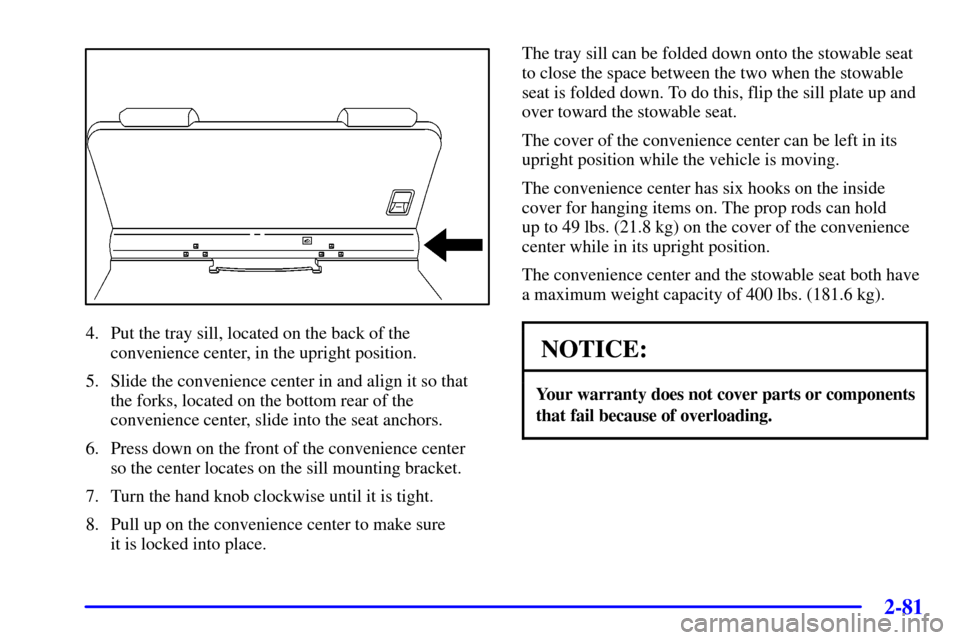
4. Put the tray sill, located on the back of the
convenience center, in the upright position.
5. Slide the convenience center in and align it so that
the forks, located on the bottom rear of the
convenience center, slide into the seat anchors.
6. Press down on the front of the convenience center
so the center locates on the sill mounting bracket.
7. Turn the hand knob clockwise until it is tight.
8. Pull up on the convenience center to make sure
it is locked into place.The tray sill can be folded down onto the stowable seat
to close the space between the two when the stowable
seat is folded down. To do this, flip the sill plate up and
over toward the stowable seat.
The cover of the convenience center can be left in its
upright position while the vehicle is moving.
The convenience center has six hooks on the inside
cover for hanging items on. The prop rods can hold
up to 49 lbs. (21.8 kg) on the cover of the convenience
center while in its upright position.
The convenience center and the stowable seat both have
a maximum weight capacity of 400 lbs. (181.6 kg).
NOTICE:
Your warranty does not cover parts or components
that fail because of overloading.
Page 176 of 436
2-84
To prevent damage or loss of cargo as you're driving,
check now and then to make sure the luggage carrier
and cargo are still securely fastened.
Your luggage carrier has
release knobs set in the
ends of each crossrail.
Turn the release knobs counterclockwise to unlock the
crossrails. Slide the crossrails forward or backward as
needed, to accommodate loads of various sizes.
After repositioning the crossrails, be sure to tighten the
release knobs by turning them clockwise. This will lock
the crossrails in place.
Use the tie-down loops
on the slider to help
secure large loads.
Sun Visors
To block out glare, you can swing down the visors.
You can also remove them from the center mount and
swing them to the side.
Visor Vanity Mirrors
Pull down the sun visor. Flip up the cover to expose the
vanity mirror.
Lighted Visor Vanity Mirrors (If Equipped)
Pull down the sun visor. Flip up the cover to expose the
vanity mirror. The lamps will come on when you open
the cover.
Page 181 of 436

2-89
The light will be red in the event of an OnStar system
malfunction. If this occurs press the OnStar button to
attempt to contact an advisor. If the connection is made,
the advisor will assist you with steps to take to make
sure that the system is functioning properly. If you
cannot contact the advisor, take your vehicle to your
dealership as soon as possible for assistance.
Safety and Security Services
�Automatic Notification of Air Bag
Deployment
-- If an air bag deploys, a priority
emergency signal is automatically sent to the center.
An advisor will locate your vehicle's position, try to
contact you and assist you in the situation. If the
center is unable to contact you, an emergency service
provider will be contacted.
�Stolen Vehicle Tracking
-- Call the center at
1
-888-4-ONSTAR (1-888-466-7827) to report your
vehicle stolen. The system can then locate and track
your vehicle and the advisor will be able to notify
the proper authorities.
�Roadside Assistance with Location
-- For vehicle
breakdowns, press the OnStar button. An advisor
will contact the appropriate help.�Remote Diagnostics
-- If an instrument panel light
comes on, the center can perform a check of the
engine on
-board computer. An advisor can then
recommend what action needs to be taken.
�OnStar MED
-NET -- Med-Net can store your
personal medical history and provide it to emergency
personnel if necessary. (Requires activation and
additional fee.)
�Accident Assist
-- An advisor can provide
step
-by-step guidance following an accident.
�Remote Door Unlock
-- To contact the center,
call 1
-888-4-ONSTAR. You will be required to
provide your security information. An advisor will
send a command to your vehicle to unlock itself.
The advisor can delay unlocking your vehicle.
Remote Door Unlock is disabled 48 hours after the
vehicle is parked to maintain the battery charge.
�Vehicle Locator Service
-- To contact the center,
call 1
-888-4-ONSTAR. You will be required to
provide your security information. An advisor will
send a command to your vehicle to sound the horn
and/or flash the lamps.
In order to provide you with excellent service, calls with
the OnStar Center may be monitored or recorded.
Page 187 of 436
2-95
The main components of the instrument panel are the following:
A. Side Vents
B. Front Vents
C. Turn Signal/Multifunction Lever
D. Hazard Warning Flasher Switch
E. Instrument Panel Cluster
F. Center Vents
G. Audio System
H. Side Vents
I. Exterior Lamp Control
J. Hood Release
K. Audio Steering Wheel Controls (Option)
L. HornM. Ignition Switch
N. Audio Steering Wheel Controls (Option)
O. Climate Controls
P. Rear Fan Controls (Option)
Q. Cupholder Tray
R. Accessory Power Outlet
S. Storage Bin
T. Instrument Panel Switchbank
U. Glove Box
V. Front Vents
W. Instrument Panel Fuse Block
Page 193 of 436

2-101
Brake System Warning Light
When the ignition is on, the brake system warning light
will come on when you set your parking brake. The light
will stay on if your parking brake doesn't release fully.
If it stays on after your parking brake is fully released,
it means you have a brake problem.
Your vehicle's hydraulic brake system is divided into
two parts. If one part isn't working, the other part can
still work and stop you. For good braking, though,
you need both parts working well.
If the warning light comes on, there could be a brake
problem. Have your brake system inspected right away.
United States Canada
This light should come on briefly when you turn the
ignition key to RUN.If it doesn't come on, then have it fixed so it will be
ready to warn you if there's a problem.
If the light comes on while you are driving, pull off the
road and stop carefully. You may notice that the pedal
is harder to push. Or, the pedal may go closer to the
floor. It may take longer to stop. If the light is still on,
have the vehicle towed for service. See ªAnti
-Lock
Brake System Warning Lightº and ªTowing Your
Vehicleº in the Index.
CAUTION:
Your brake system may not be working properly
if the brake system warning light is on. Driving
with the brake system warning light on can lead
to an accident. If the light is still on after you've
pulled off the road and stopped carefully, have
the vehicle towed for service.