Page 72 of 258
Sun shade
Open and close the sun shade by sliding it
forward or backward.
WARNING
cIn an accident you could be thrown
from the vehicle through an open
sunroof. Always use seat belts and
child restraints.
c
Do not allow anyone to stand up or
extend any portion of their body out of
the opening while the vehicle is in
motion or while the sunroof is closing.
CAUTION
c
Remove water drops, snow, ice or
sand from the sunroof before opening.
cDo not place heavy objects on the
sunroof or surrounding area.
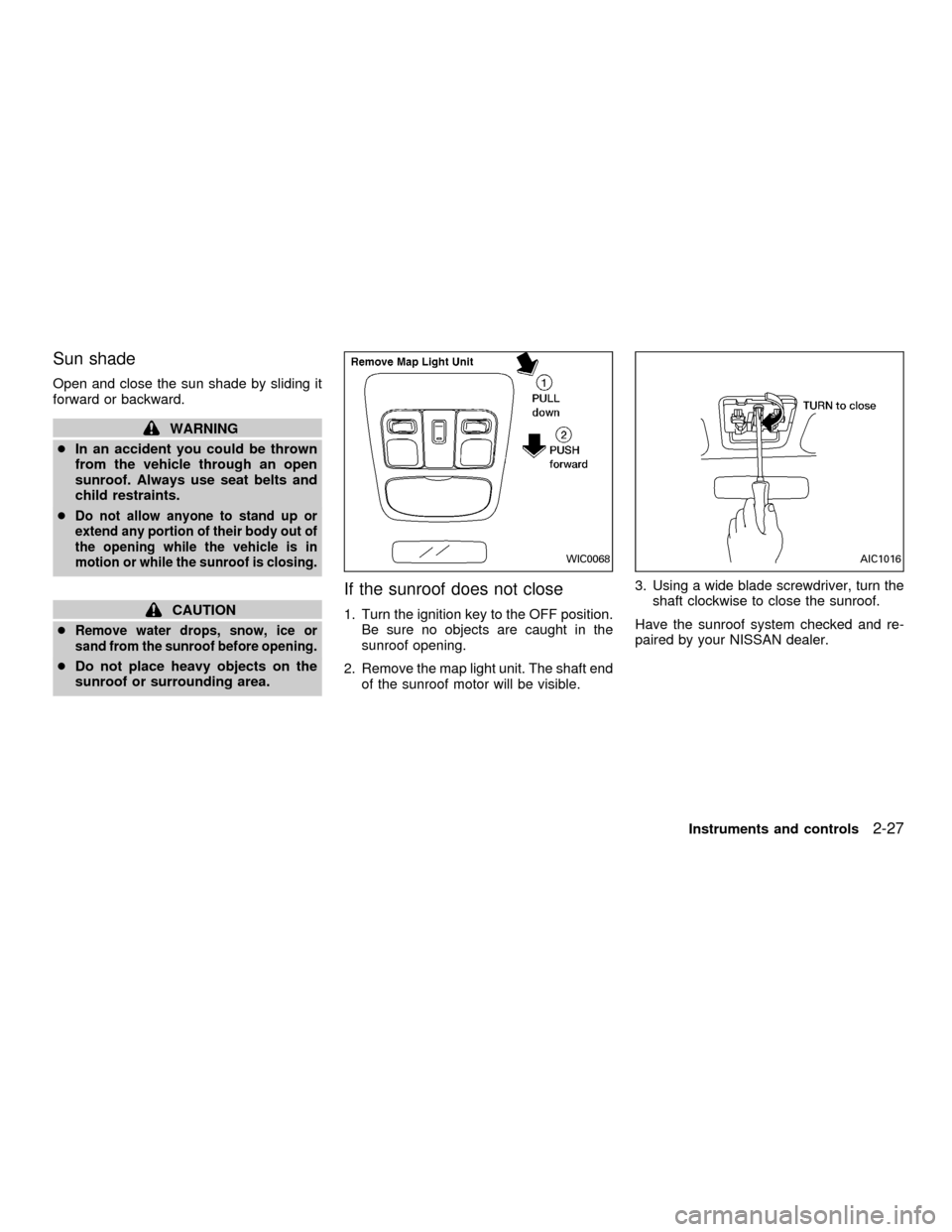
If the sunroof does not close
1. Turn the ignition key to the OFF position.
Be sure no objects are caught in the
sunroof opening.
2. Remove the map light unit. The shaft end
of the sunroof motor will be visible.3. Using a wide blade screwdriver, turn the
shaft clockwise to close the sunroof.
Have the sunroof system checked and re-
paired by your NISSAN dealer.
WIC0068AIC1016
Instruments and controls2-27
ZX
Page 74 of 258

The light illuminates when the trunk lid is
opened. When the trunk lid is closed, the
light goes off.The Integrated HomeLinkTUniversal Trans-
ceiver provides a convenient way to consoli-
date the functions of up to three individual
hand-held transmitters into one built-in de-
vice.
Integrated HomeLinkTUniversal Trans-
ceiver:
cWill operate most Radio Frequency (RF)
devices such as garage doors, gates,
home and office lighting, entry door locks
and security systems.
cIs powered by your vehicle's battery. No
separate batteries are required. If the
vehicle's battery is discharged or is dis-
connected, HomeLinkTwill retain all pro-
gramming.Once the Integrated HomeLinkTUniver-
sal Transceiver is programmed, retain
the original transmitter for future pro-
gramming procedures (i.e., new vehicle
purchases). Upon sale of the vehicle, the
programmed Integrated HomeLinkTUni-
versal Transceiver buttons should be
erased for security purposes. For addi-
tional information refer to ``Program-
ming the Integrated HomeLinkTUniver-
sal Transceiver'' later in this section.
TRUNK LIGHT INTEGRATED HOMELINKT
UNIVERSAL TRANSCEIVER (if
so equipped)
Instruments and controls2-29
ZX
Page 80 of 258

3 Pre-driving checks and adjustments
Keys .......................................................................3-2
Nissan vehicle immobilizer system
(NVIS) keys .......................................................3-2
Doors ......................................................................3-2
Locking with key ................................................3-3
Locking with inside lock knob............................3-3
Locking with power door lock switch.................3-4
Child safety rear door lock ................................3-5
Multi-remote control system (if so equipped).........3-5
How to use multi-remote control system...........3-5
Battery replacement ..........................................3-8
Hood .......................................................................3-9
Trunk lid................................................................3-10
Opener operation ............................................3-10Key operation ..................................................3-10
Interior trunk lid release (if so equipped) ........3-11
Fuel filler lid ..........................................................3-12
Opener operation ............................................3-12
Fuel filler cap ...................................................3-12
Steering wheel .....................................................3-14
Tilt operation ....................................................3-14
Sunvisors ..............................................................3-14
Vanity mirrors ..................................................3-14
Mirrors ..................................................................3-15
Inside mirror.....................................................3-15
Outside mirror remote control .........................3-15
ZX
Page 81 of 258
NISSAN VEHICLE IMMOBILIZER
SYSTEM (NVIS) KEYS
You can only start your vehicle using the
keys which are supplied by your NISSAN
dealer. Each key has a transponder chip in
the key head which is electronically regis-
tered to your vehicle's NVIS. These keys
can be used for all the key locks on your
vehicle.
Never leave these keys in the vehicle.
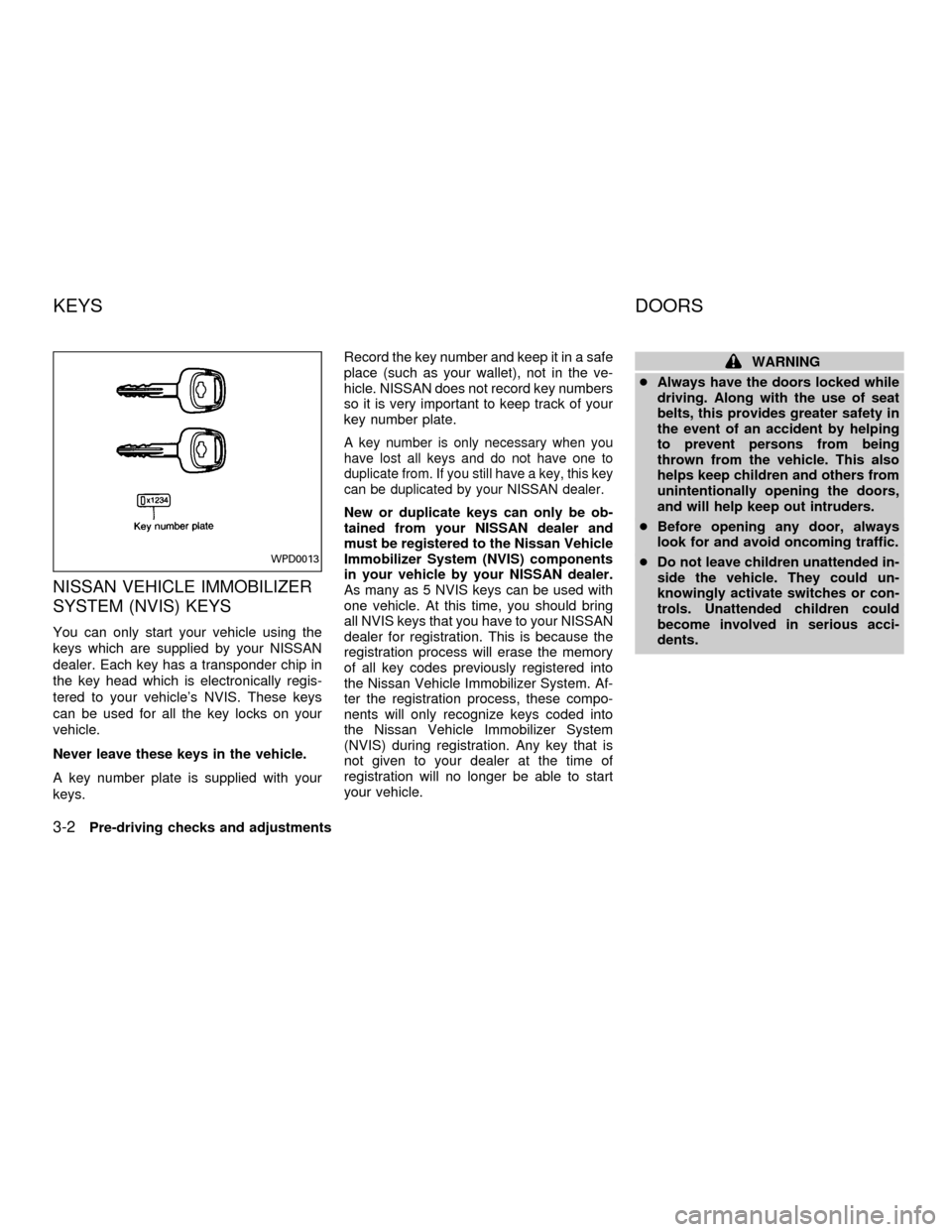
A key number plate is supplied with your
keys.Record the key number and keep it in a safe
place (such as your wallet), not in the ve-
hicle. NISSAN does not record key numbers
so it is very important to keep track of your
key number plate.
A key number is only necessary when you
have lost all keys and do not have one to
duplicate from. If you still have a key, this key
can be duplicated by your NISSAN dealer.
New or duplicate keys can only be ob-
tained from your NISSAN dealer and
must be registered to the Nissan Vehicle
Immobilizer System (NVIS) components
in your vehicle by your NISSAN dealer.
As many as 5 NVIS keys can be used with
one vehicle. At this time, you should bring
all NVIS keys that you have to your NISSAN
dealer for registration. This is because the
registration process will erase the memory
of all key codes previously registered into
the Nissan Vehicle Immobilizer System. Af-
ter the registration process, these compo-
nents will only recognize keys coded into
the Nissan Vehicle Immobilizer System
(NVIS) during registration. Any key that is
not given to your dealer at the time of
registration will no longer be able to start
your vehicle.
WARNING
cAlways have the doors locked while
driving. Along with the use of seat
belts, this provides greater safety in
the event of an accident by helping
to prevent persons from being
thrown from the vehicle. This also
helps keep children and others from
unintentionally opening the doors,
and will help keep out intruders.
cBefore opening any door, always
look for and avoid oncoming traffic.
cDo not leave children unattended in-
side the vehicle. They could un-
knowingly activate switches or con-
trols. Unattended children could
become involved in serious acci-
dents.
WPD0013
KEYS DOORS
3-2Pre-driving checks and adjustments
ZX
Page 82 of 258
LOCKING WITH KEY
Manual
To lock the door, turn the key toward the
front of the vehicle. To unlock, turn it toward
the rear.
Power
For vehicles equipped with the theft warn-
ing system,the power door lock system
allows you to lock or unlock all doors simul-
taneously.
Turning the front door key to the front of the
vehicle locks all doors.
Turning the front door key one time to the
rear of the vehicle unlocks the corresponding
door. From that position, returning the key to
neutral (where the key can only be removed
and inserted) and turning it to the rear again
within 5 seconds unlocks all doors.
LOCKING WITH INSIDE LOCK
KNOB
Manual
To lock a door without the key, move the
inside lock knob to the lock position.
When locking a door this way, be certain not
to leave the key inside the vehicle.
Power
For vehicles equipped with the theft
warning system,moving the inside lock
APD1024APD1011AIC1012
Pre-driving checks and adjustments3-3
ZX
Page 83 of 258
knob (driver side only) to the lock position
locks all doors.
When the inside lock knob (driver side
only) is moved to the lock position with
the key in the ignition and any door
open, all doors will lock and then unlock
automatically.
LOCKING WITH POWER DOOR
LOCK SWITCH
To lock all the doors without a key, push the
door lock switch (driver or front passenger
side), to the lock position. When locking the
door this way, be certain not to leave the
key inside the vehicle.
When the power door lock switch (driver or
passenger side) is moved to the lock posi-
tion with the key in the ignition and any door
open, all doors will lock and then unlock
automatically.
APD1014LPD0003
3-4Pre-driving checks and adjustments
ZX
Page 84 of 258
CHILD SAFETY REAR DOOR
LOCK
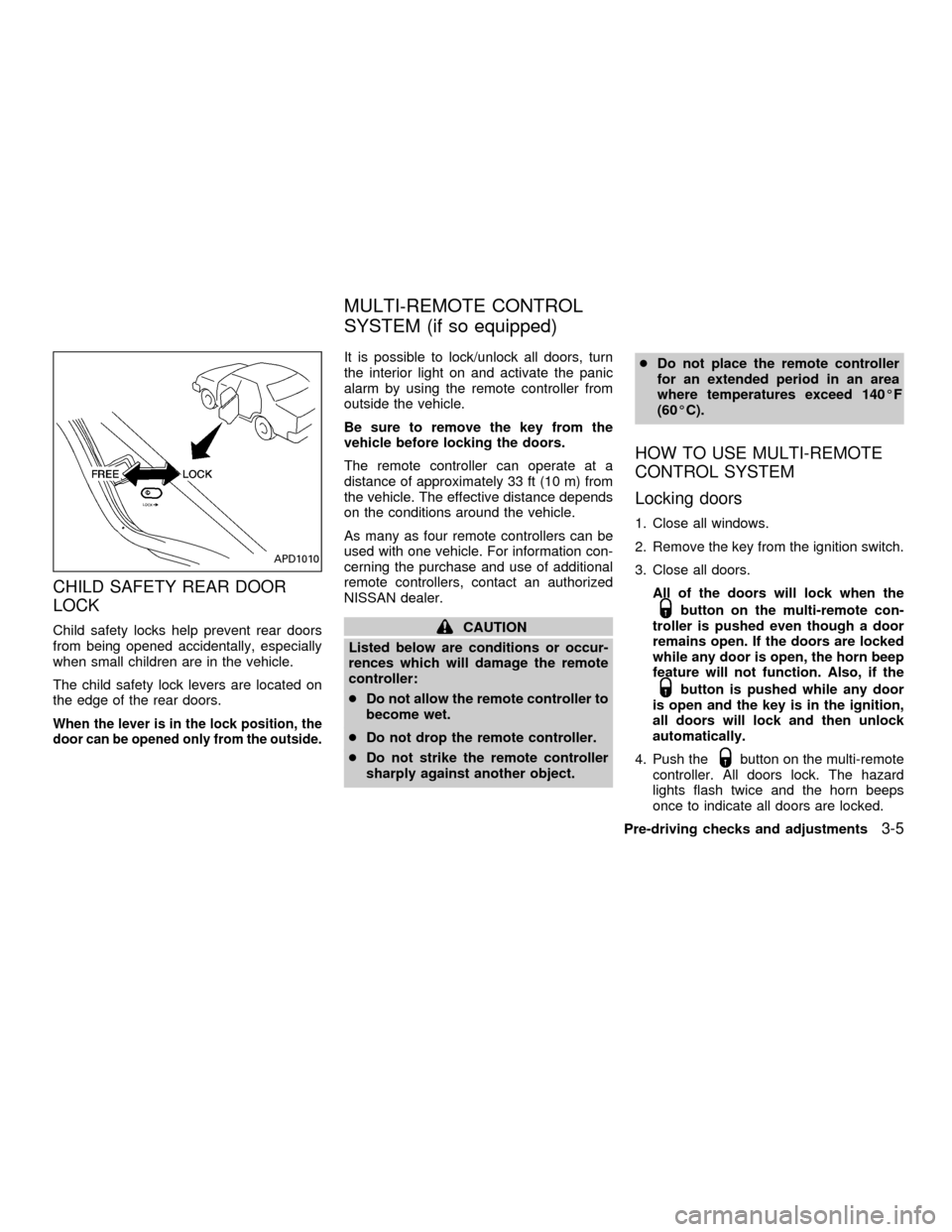
Child safety locks help prevent rear doors
from being opened accidentally, especially
when small children are in the vehicle.
The child safety lock levers are located on
the edge of the rear doors.
When the lever is in the lock position, the
door can be opened only from the outside.
It is possible to lock/unlock all doors, turn
the interior light on and activate the panic
alarm by using the remote controller from
outside the vehicle.
Be sure to remove the key from the
vehicle before locking the doors.
The remote controller can operate at a
distance of approximately 33 ft (10 m) from
the vehicle. The effective distance depends
on the conditions around the vehicle.
As many as four remote controllers can be
used with one vehicle. For information con-
cerning the purchase and use of additional
remote controllers, contact an authorized
NISSAN dealer.
CAUTION
Listed below are conditions or occur-
rences which will damage the remote
controller:
cDo not allow the remote controller to
become wet.
cDo not drop the remote controller.
cDo not strike the remote controller
sharply against another object.cDo not place the remote controller
for an extended period in an area
where temperatures exceed 140ÉF
(60ÉC).
HOW TO USE MULTI-REMOTE
CONTROL SYSTEM
Locking doors
1. Close all windows.
2. Remove the key from the ignition switch.
3. Close all doors.
All of the doors will lock when the
button on the multi-remote con-
troller is pushed even though a door
remains open. If the doors are locked
while any door is open, the horn beep
feature will not function. Also, if the
button is pushed while any door
is open and the key is in the ignition,
all doors will lock and then unlock
automatically.
4. Push the
button on the multi-remote
controller. All doors lock. The hazard
lights flash twice and the horn beeps
once to indicate all doors are locked.
APD1010
MULTI-REMOTE CONTROL
SYSTEM (if so equipped)
Pre-driving checks and adjustments3-5
ZX
Page 85 of 258
cWhen thebutton is pushed with all
doors locked, the hazard lights flash
twice and the horn beeps once as a
reminder that the doors are already
locked.
The horn may or may not beep once.
Refer to ``Silencing the horn beep fea-
ture'' later in this section for details.
Unlocking doors
1. Push thebutton on the multi-
remote controller. Only the driver's side
door unlocks.
2. Push the
button on the multi-
remote controller again within five sec-onds. The passenger doors unlock.
3. The interior light comes on and stays on
for 30 seconds when the light switch is in
the O position.Releasing the trunk lid
1. Push the trunk button on the multi-
WPD0004
3-6Pre-driving checks and adjustments
ZX