Page 50 of 381
41 Easy-entry/exit feature
Te ch n i c a l
data Instruments
and controlsOperationDrivingInstrument
cluster displayPractical hints Car care Index Easy-entry / exit feature
With the easy-entry/exit feature activated, the steering
wheel tilts upwards and the driver’s seat moves
rearwards.
This allows easier entry into and exit from the vehicle
when the driver’s door is opened. However, the engine
must be turned off.
See page 121 for activating/deactivating the easy-entry /
exit feature.When the electronic key is inserted in the starter switch
and the driver’s door is closed, the steering wheel and
the driver’s seat return to the last position set for it.
Wa r n i n g !
You must ensure that no one can become trapped
or injured by the moving steering wheel and the
driver’s seat with the easy-entry / exit feature
activated and you open the driver’s door or remove
the electronic key from the starter switch. Do not
leave children unattended in the vehicle, or with
access to an unlocked vehicle. Unsupervised use of
vehicle equipment may cause serious personal
injury.
Page 51 of 381
42 Seats
Te ch n i c a l
data Instruments
and controlsOperationDrivingInstrument
cluster displayPractical hints Car care Index
Front seat adjustment
To operate the front power seat adjustment switches,
turn the electronic key in starter switch to position 1
or 2 (with a front door open, the power seats can also be
operated with the electronic key removed or in starter
switch position 0).
Wa r n i n g !
Do not adjust the driver’s seat while driving.
Adjusting the seat while driving could cause the
driver to lose control of the vehicle.Never ride in a moving vehicle with the seat back
reclined. Sitting in an excessively reclined position
can be dangerous. You could slide under the seat
belt in a collision. If you slide under it, the belt
would apply force at the abdomen or neck. That
could cause serious or fatal injuries. The seat back
and seat belts provide the best restraint when the
wearer is in an upright position and belts are
properly positioned on the body.Never place hands under seat or near any moving
parts while a seat is being adjusted.
When leaving the vehicle always remove the
electronic key from the starter switch, and lock
your vehicle. The power seats can also be operated with the
driver’s or front passenger door open. Do not leave
children unattended in the vehicle, or with access
to an unl ocked vehic l e. Uns upervi s ed us e of vehi cl e
equipment may cause serious personal injury.
Page 88 of 381
79 Steering wheel adjustment
Te ch n i c a l
data Instruments
and controlsOperationDrivingInstrument
cluster displayPractical hints Car care Index Steering wheel adjustment (electrical)
To adjust the steering wheel position, turn the electronic
key in starter switch to position 1 or 2. With the driver’s
door open, the steering wheel can also be operated with
the electronic key removed or in starter switch
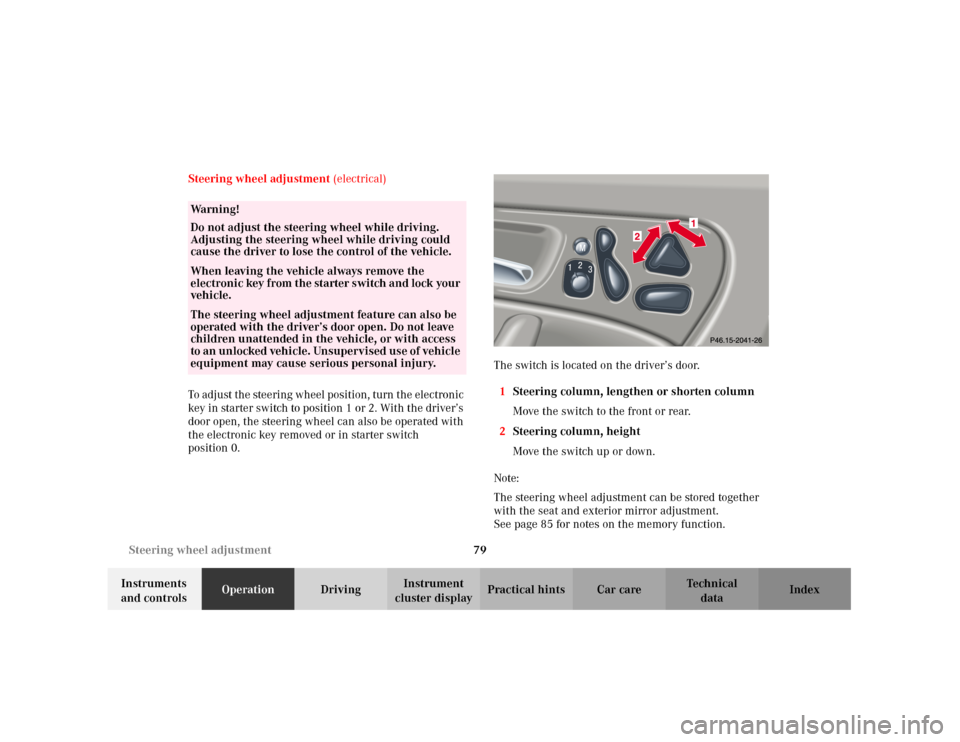
position 0.The switch is located on the driver’s door.
1Steering column, lengthen or shorten column
Move the switch to the front or rear.
2Steering column, height
Move the switch up or down.
Note:
The steering wheel adjustment can be stored together
with the seat and exterior mirror adjustment.
See page 85 for notes on the memory function.
Wa r n i n g !
Do not adjust the steering wheel while driving.
Adjusting the steering wheel while driving could
cause the driver to lose the control of the vehicle.When leaving the vehicle always remove the
electroni c key f rom t he sta rter s wi tch a nd lock your
vehicle.The steering wheel adjustment feature can also be
operated with the driver’s door open. Do not leave
children unattended in the vehicle, or with access
to a n un locked vehi cle. Un supervi sed use of vehicl e
equipment may cause serious personal injury.
Page 99 of 381

90 Instrument cluster
Te ch n i c a l
data Instruments
and controlsOperationDrivingInstrument
cluster displayPractical hints Car care Index
Activating instrument cluster display
The instrument cluster is activated by:
•Opening the door
1.
•Pressing button (1) on the instrument cluster
1.
•Turning the electronic key in starter switch to
position 1 or 2.
•Switching on the exterior lamps.
1 The instrument cluster is activated for approximately 30 seconds.Instrument cluster illumination
The instrument cluster illumination is dimmed or
brightened automatically to suit daylight lighting
conditions.
The instrument cluster illumination will also be
adjusted when the vehicle’s exterior lamps are switched
on.Display illumination, changing basic settings for driving
at dusk or in darkness:
Rotate adjusting knob (1) clockwise – instrument lamp
intensity increases.
Rotate adjusting knob (1) counterclockwise –
instrument lamp intensity decreases.
Note:
It is not possible to select a basic brightness setting in
daylight – the intensity is adjusted automatically.
Page 129 of 381
120 Multifunction steering wheel, multifunction display
Te ch n i c a l
data Instruments
and controlsOperationDrivingInstrument
cluster displayPractical hints Car care Index
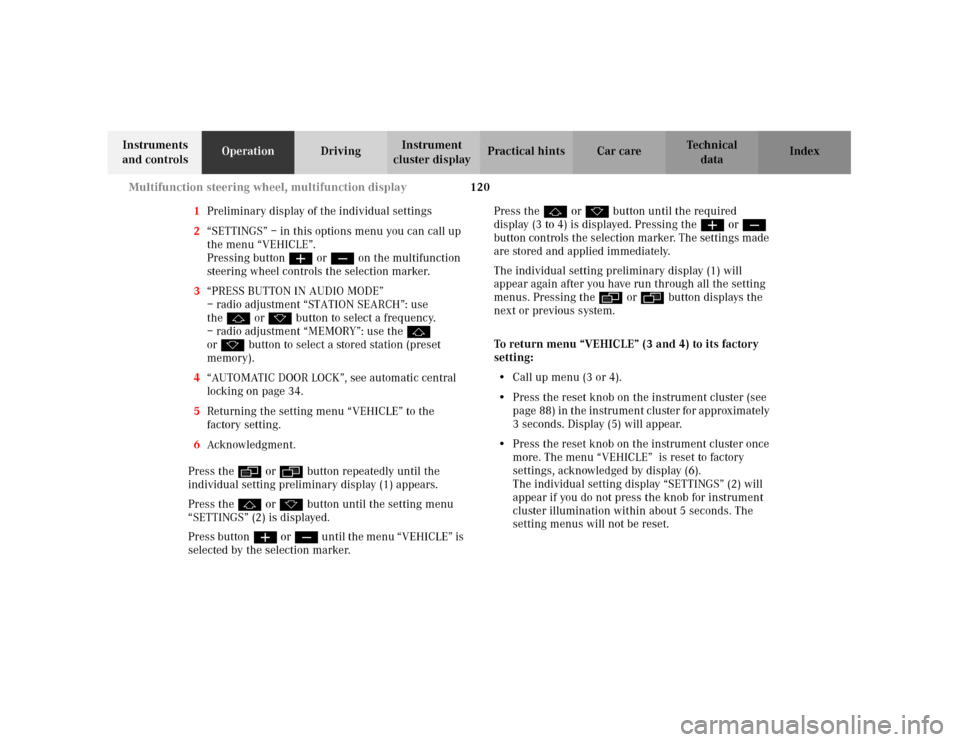
1Preliminary display of the individual settings
2“SETTINGS” – in this options menu you can call up
the menu “VEHICLE”.
Pressing buttonæ orç on the multifunction
steering wheel controls the selection marker.
3“PRESS BUTTON IN AUDIO MODE”
– radio adjustment “STATION SEARCH”: use
thej ork button to select a frequency.
– radio adjustment “MEMORY”: use the j
ork button to select a stored station (preset
memory).
4“AUTOMATIC DOOR LOCK”, see automatic central
locking on page 34.
5Returning the setting menu “VEHICLE” to the
factory setting.
6Acknowledgment.
Press the è or ÿ button repeatedly until the
individual setting preliminary display (1) appears.
Press the j or k button until the setting menu
“SETTINGS” (2) is displayed.
Press buttonæ orç un til the m en u “ VE HICLE” is
selected by the selection marker.Press the j or k button until the required
display (3 to 4) is displayed. Pressing the æ orç
button controls the selection marker. The settings made
are stored and applied immediately.
The individual setting preliminary display (1) will
appear again after you have run through all the setting
menus. Pressing the è or ÿ button displays the
next or previous system.
To return menu “VEHICLE” (3 and 4) to its factory
setting:
•Call up menu (3 or 4).
•Press the reset knob on the instrument cluster (see
p age 88 ) in t he in str umen t c luste r fo r app rox imately
3 seconds. Display (5) will appear.
•Press the reset knob on the instrument cluster once
more. The menu “VEHICLE” is reset to factory
settings, acknowledged by display (6).
The individual setting display “SETTINGS” (2) will
appear if you do not press the knob for instrument
cluster illumination within about 5 seconds. The
setting menus will not be reset.
Page 142 of 381
133 Exterior lamp switch
Te ch n i c a l
data Instruments
and controlsOperationDrivingInstrument
cluster displayPractical hints Car care Index Locator lighting
After unlocking the vehicle with the electronic main key
during darkness, the fog lamps, parking lamps,
taillamps and license plate lamps switch on for
approximately 40 seconds.
The exterior lamps will be switched off when opening
the driver’s door.
See “Individual settings” – “LIGHTING” on page 117 for
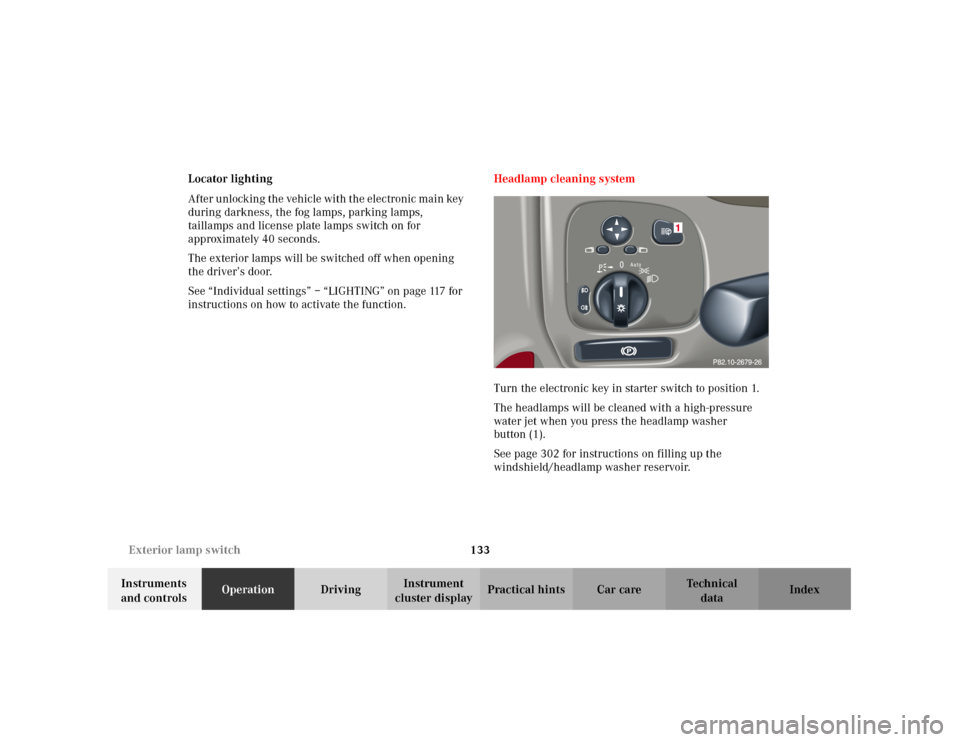
instructions on how to activate the function. Headlamp cleaning system
Turn the electronic key in starter switch to position 1.
The headlamps will be cleaned with a high-pressure
water jet when you press the headlamp washer
button (1).
See page 302 for instructions on filling up the
windshield/headlamp washer reservoir.
Page 195 of 381
186 Interior equipment
Te ch n i c a l
data Instruments
and controlsOperationDrivingInstrument
cluster displayPractical hints Car care Index
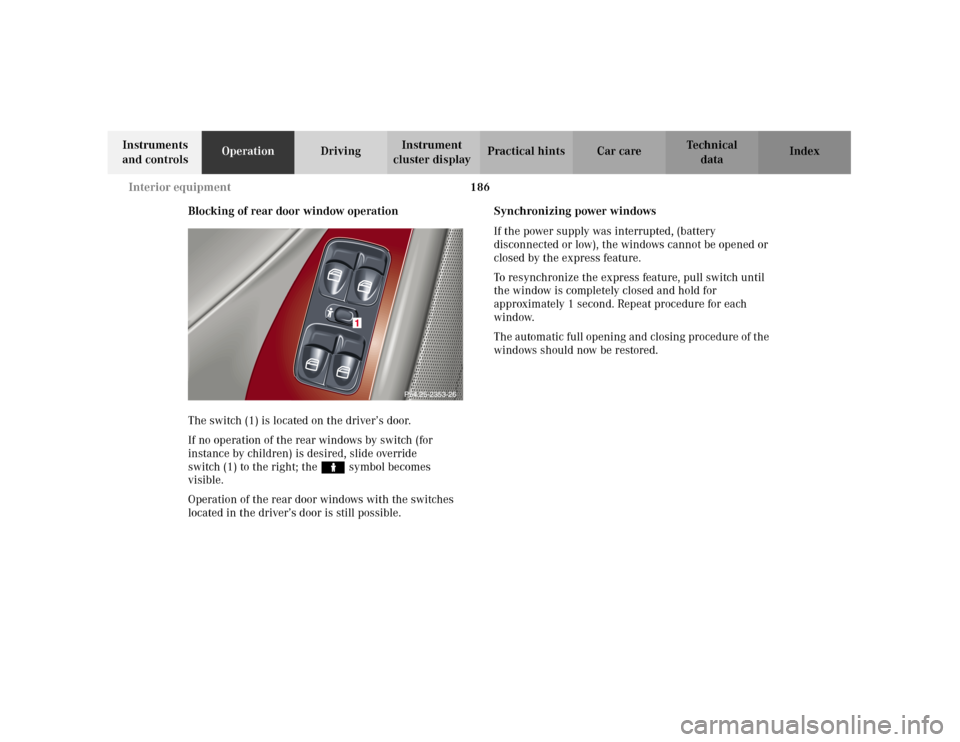
Blocking of rear door window operation
The switch (1) is located on the driver’s door.
If no operation of the rear windows by switch (for
instance by children) is desired, slide override
switch (1) to the right; the N symbol becomes
visible.
Operation of the rear door windows with the switches
located in the driver’s door is still possible.Synchronizing power windows
If the power supply was interrupted, (battery
disconnected or low), the windows cannot be opened or
closed by the express feature.
To resynchronize the express feature, pull switch until
the window is completely closed and hold for
approximately 1 second. Repeat procedure for each
window.
The automatic full opening and closing procedure of the
windows should now be restored.
Page 198 of 381
189 Interior equipment
Te ch n i c a l
data Instruments
and controlsOperationDrivingInstrument
cluster displayPractical hints Car care Index Interior lighting
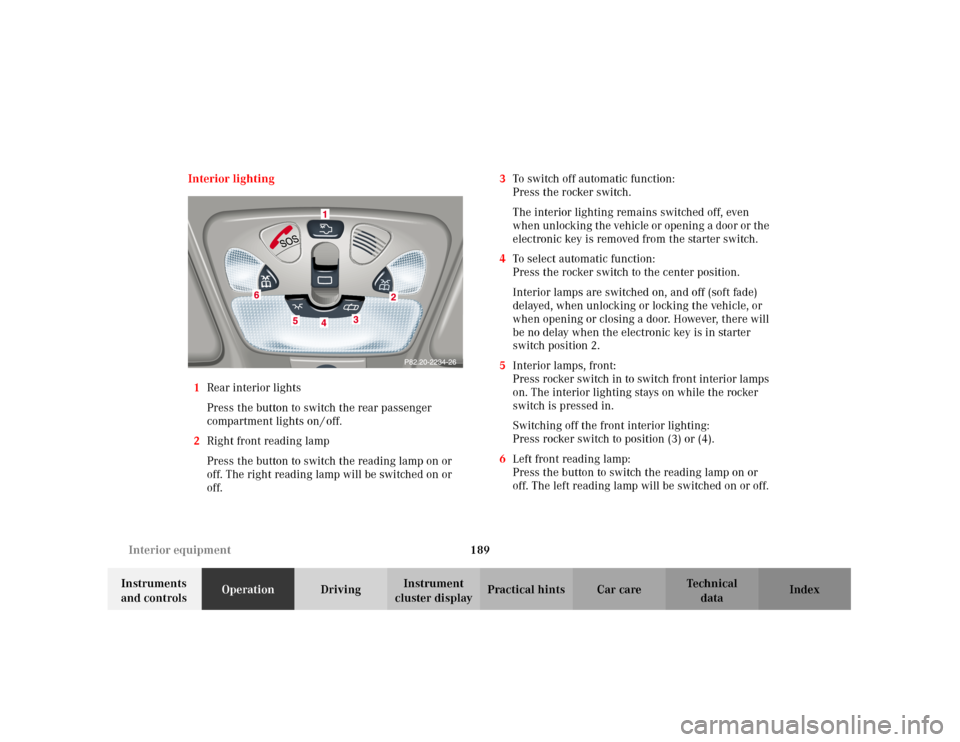
1Rear interior lights
Press the button to switch the rear passenger
compartment lights on / off.
2Right front reading lamp
Press the button to switch the reading lamp on or
off. The right reading lamp will be switched on or
off.3To switch off automatic function:
Press the rocker switch.
The interior lighting remains switched off, even
when unlocking the vehicle or opening a door or the
electronic key is removed from the starter switch.
4To select automatic function:
Press the rocker switch to the center position.
Interior lamps are switched on, and off (soft fade)
delayed, when unlocking or locking the vehicle, or
when opening or closing a door. However, there will
be no delay when the electronic key is in starter
switch position 2.
5Interior lamps, front:
Press rocker switch in to switch front interior lamps
on. The interior lighting stays on while the rocker
switch is pressed in.
Switching off the front interior lighting:
Press rocker switch to position (3) or (4).
6Left front reading lamp:
Press the button to switch the reading lamp on or
off. The left reading lamp will be switched on or off.