Page 64 of 326
Control
s Nea r th e Steerin g Whee l
Headlight s
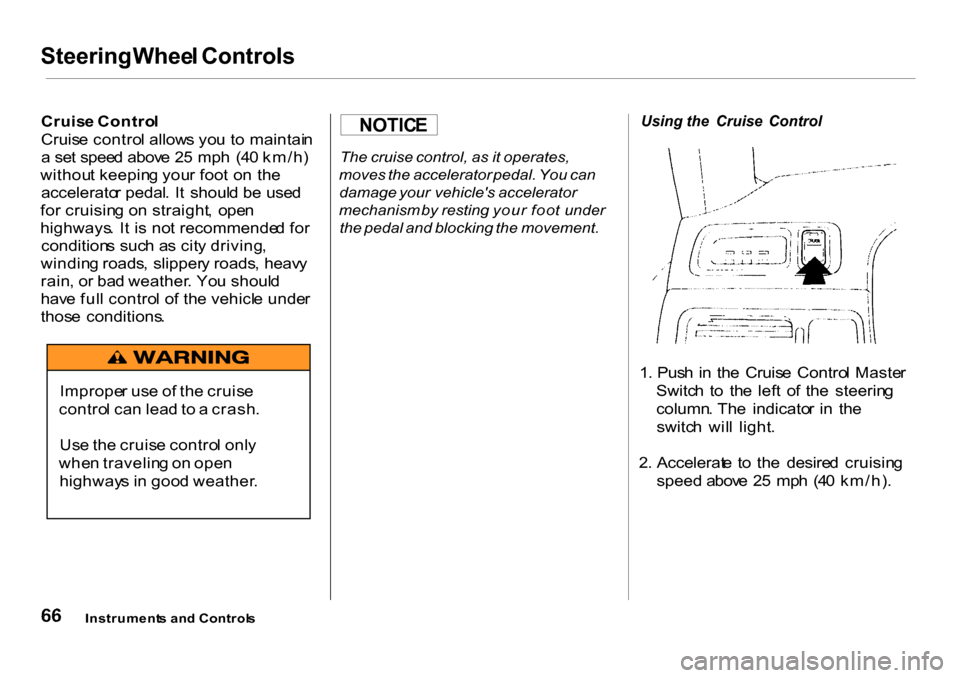
Th e rotatin g switc h o n th e lef t leve r
control s th e lights . Turnin g thi s switc
h to th e positio n turn s
o n th e parkin g lights , taillights ,
instrumen t pane l lights , side-marke r
lights , an d rea r licens e plat e lights .Turnin
g th e switc h t o th e
positio n turn s o n th e headlights .I
f yo u leav e th e light s o n wit h th e
ignitio n switc h in ACCESSOR Y (I )
o r LOC K (0) , yo u wil l hea r a
reminde r beepe r whe n yo u ope n th e
driver' s door .
T o chang e betwee n lo w beam s an d
hig h beams , pul l th e tur n signa l leve r
unti l yo u hea r a click , the n le t go .
Th e blu e hig h bea m indicato r wil l
ligh t (se e pag e 5 5 ) . T
o flas h th e hig h beams , pul l th e
tur n signa l leve r bac k lightly , the n
releas e it . Th e hig h beam s wil l com e
o n an d g o off .
Th e hig h beam s wil l sta y o n fo r a s
lon g a s yo u hol d th e leve r back , n o
matte r wha t positio n th e headligh t
switc h is in .
Daytim e Runnin g Light s
(Canadia n Models )
Wit h th e headligh t switc h off , th e
hig h bea m headlight s com e o n wit h
reduce d brightnes s whe n yo u tur n
th e ignitio n switc h t o O N (II ) an d
releas e th e parkin g brake . The y
remai n o n unti l yo u tur n th e ignitio n
off , eve n if yo u se t th e parkin g brake .
Th e headlight s rever t t o norma l
operatio n whe n yo u tur n the m o n
wit h th e switch .
Instrument s an d Control s
Page 65 of 326
Control
s Nea r th e Steerin g Whee l
Instrumen t Pane l Brightnes s
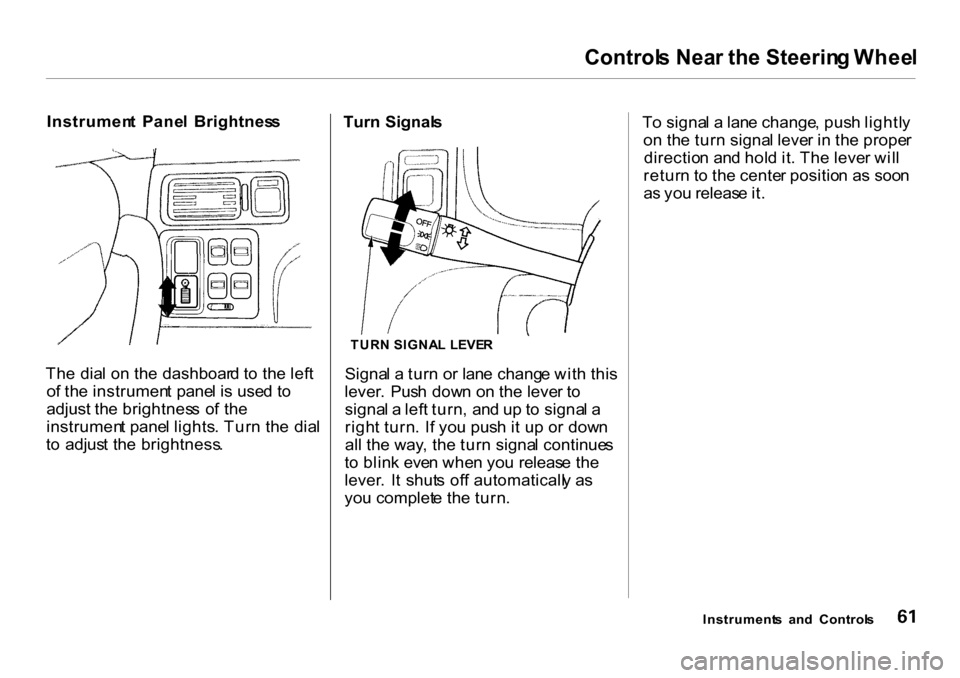
Th e dia l o n th e dashboar d t o th e lef t
o f th e instrumen t pane l i s use d t o
adjust the brightnes s o f th e
instrumen t pane l lights . Tur n th e dia l
t o adjus t th e brightness . Turn
Signal s
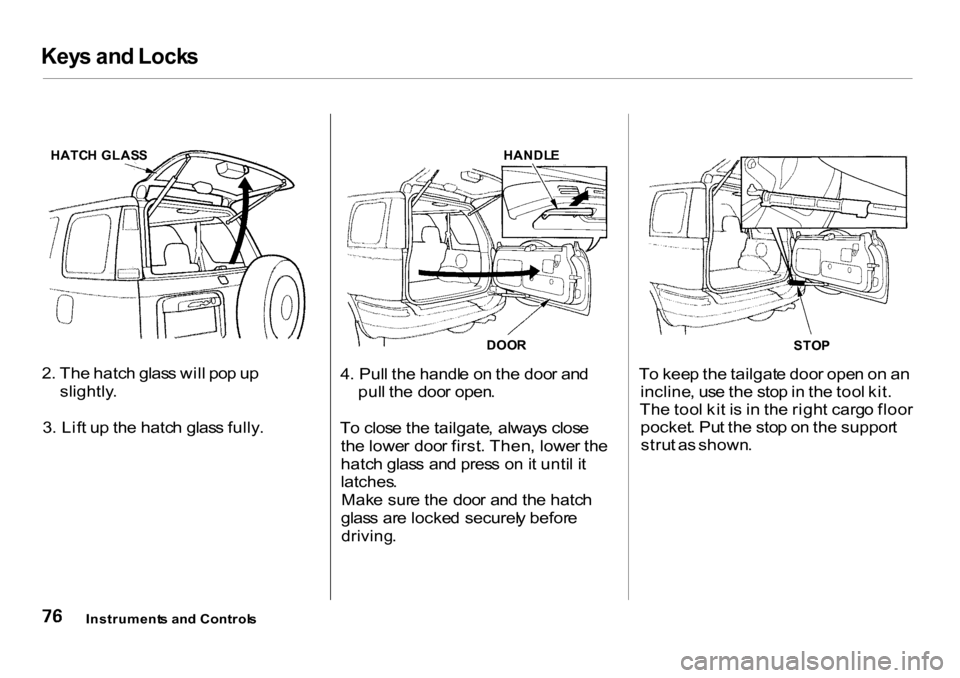
TUR N SIGNA L LEVE R
Signa l a tur n o r lan e chang e wit h thi s
lever . Pus h dow n o n th e leve r t o
signa l a lef t turn , an d u p t o signa l a
righ t turn . I f yo u pus h i t u p o r dow n
al l th e way , th e tur n signa l continue s
t o blin k eve n whe n yo u releas e th e
lever . I t shut s of f automaticall y a s
yo u complet e th e turn . T
o signa l a lan e change , pus h lightl y
o n th e tur n signa l leve r i n th e prope r
directio n an d hol d it . Th e leve r wil l
retur n t o th e cente r positio n a s soo n
a s yo u releas e it .
Instrument s an d Control s
Page 67 of 326

Control
s Nea r th e Steerin g Whee l
Rea r Windo w Wipe r an d Washe r
Th e rea r windo w wipe r switc h is
locate d nex t t o th e windshiel d wipe r
switch .
T o activat e th e rea r windshiel d wiper ,
tur n th e switc h "ON" . Th e wipe r
operate s intermittently . I t yo u wis h
t o us e th e wipe r an d washer , tur n
an d hol d th e switc h on e positio n u p
fro m "ON" . T o us e th e washe r only ,
tur n an d hol d th e switc h on e positio n
dow n fro m "OFF" . Hazar
d Warnin g
Pus h th e re d butto n betwee n th e
cente r ai r vent s t o tur n o n th e hazar d
warnin g light s (four-wa y flashers) .
Thi s cause s al l fou r outsid e tur n
signal s an d bot h indicator s in th e
instrumen t pane l t o flash . Us e th e
hazar d warnin g light s if yo u nee d to
par k in a dangerou s are a nea r heav y
traffic , o r i f you r vehicl e is disabled .Rea
r Windo w Defogge r
Th e rea r windo w defogge r wil l clea r
fog , frost , an d thi n ic e fro m th e
window . Pus h th e defogge r butto n to
tur n it o n an d off . Th e ligh t i n th e
butto n light s t o sho w th e defogge r i s
on . I f yo u d o no t tur n it off , th e
defogge r wil l shu t itsel f of f afte r
abou t 2 5 minutes . I t als o shut s of f
whe n yo u tur n of f th e ignition . Yo u
hav e t o tur n it o n agai n whe n yo u
restar t th e vehicle .
Instrument s an d Control s
CONTINUED
Page 69 of 326
Control
s Nea r th e Steerin g Whee l
T o adjus t th e steerin g whee l upwar d
o r downward :
1 . Pus h th e leve r unde r th e steerin g
colum n al l th e wa y down .
2 . Mov e th e steerin g whee l t o th e
desire d position , makin g sur e th e
whee l point s towar d you r chest ,
no t towar d you r face . Mak e sur e
yo u ca n se e th e instrumen t pane l
gauge s an d th e indicato r lights . 3
. Pus h th e leve r u p t o loc k th e
steerin g whee l i n tha t position .
4 . Mak e sur e yo u hav e securel y
locke d th e steerin g whee l i n plac e
b y tryin g t o mov e i t u p an d down .
Instruments an d Control s
Page 70 of 326
Steering
Wheel Controls
Cruis e Contro l
Cruis e contro l allow s yo u t o maintai n
a se t spee d abov e 2 5 mp h (4 0 km/h )
withou t keepin g you r foo t o n th e
accelerato r pedal . I t shoul d b e use d
fo r cruisin g o n straight , ope n
highways . I t i s no t recommende d fo r
condition s suc h a s cit y driving ,
windin g roads , slipper y roads , heav y
rain , o r ba d weather . Yo u shoul d
hav e ful l contro l o f th e vehicl e unde r
thos e conditions . The
cruise control, as it operates,
moves the accelerator pedal. You can
damage your vehicle's accelerator
mechanism by resting your foo t under
the pedal and blocking the movement.
Using
the Cruise Control
1 . Pus h i n th e Cruis e Contro l Maste r
Switc h t o th e lef t o f th e steerin g
column . Th e indicato r i n th e
switc h wil l light .
2 . Accelerat e t o th e desire d cruisin g
speed above 2 5 mp h (40 km/h) .
Instrument s an d Control s
Imprope
r us e o f th e cruis e
contro l ca n lea d to a crash .
Us e th e cruis e contro l onl y
whe n travelin g o n ope n
highway s i n goo d weather .
NOTIC
E
Page 71 of 326
Steerin
g Whee l Control s
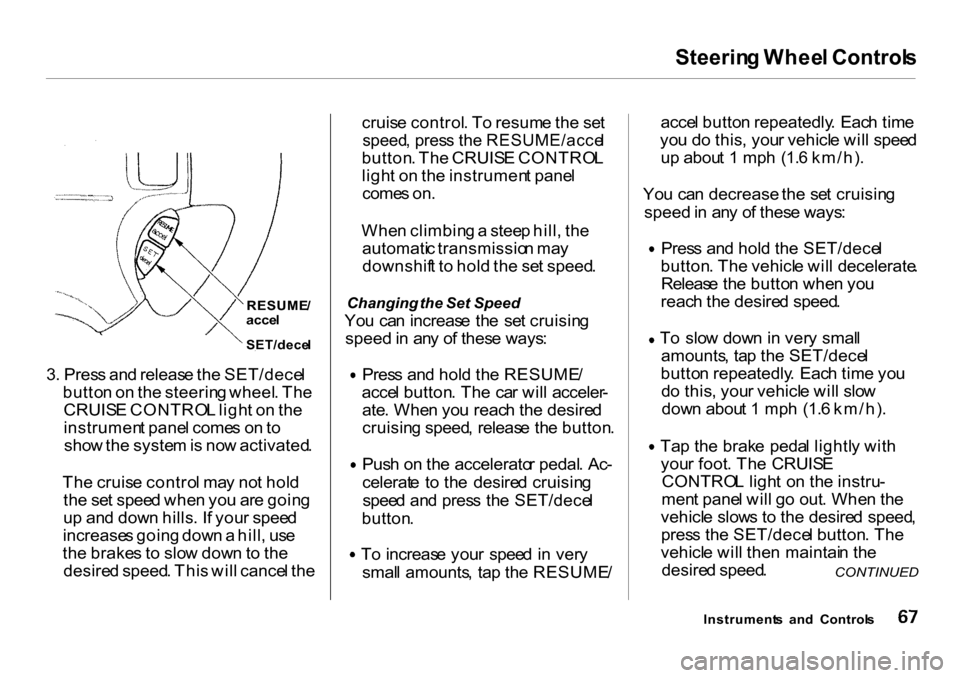
3 . Pres s an d releas e th e SET/dece l
butto n o n th e steerin g wheel . Th e
CRUIS E CONTRO L ligh t o n th e
instrumen t pane l come s o n to
sho w th e syste m is no w activated .
Th e cruis e contro l ma y no t hol d
th e se t spee d whe n yo u ar e goin g
u p an d dow n hills . I f you r spee d
increase s goin g dow n a hill , us e
th e brake s t o slo w dow n to th e
desire d speed . Thi s wil l cance l th e cruis
e control . T o resum e th e se t
speed , pres s th e RESUME/acce l
button . Th e CRUIS E CONTRO L
ligh t o n th e instrumen t pane l
come s on .
Whe n climbin g a stee p hill , th e
automati c transmissio n ma y
downshif t t o hol d th e se t speed .
Changing the Set Speed
Yo u ca n increas e th e se t cruisin g
speed in an y o f thes e ways : Pres
s an d hol d th e RESUME /
acce l button . Th e ca r wil l acceler -
ate . Whe n yo u reac h th e desire d
cruisin g speed , releas e th e button . Pus
h o n th e accelerato r pedal . Ac -
celerat e t o th e desire d cruisin g
spee d an d pres s th e SET/dece l
button . T
o increas e you r spee d in ver y
smal l amounts , ta p th e RESUME /acce
l butto n repeatedly . Eac h tim e
yo u d o this , you r vehicl e wil l spee d
u p abou t 1 mp h (1. 6 km/h) .
Yo u ca n decrease the se t cruisin g
speed in an y o f thes e ways : Pres
s an d hol d th e SET/dece l
button . Th e vehicl e wil l decelerate .
Releas e th e butto n whe n yo u
reac h th e desire d speed .
T o slo w dow n in ver y smal l
amounts , ta p th e SET/dece l
butto n repeatedly . Eac h tim e yo u
d o this , you r vehicl e wil l slo w
dow n abou t 1 mp h (1. 6 km/h) .
Ta p th e brak e peda l lightl y wit h
you r foot . Th e CRUIS E
CONTRO L ligh t o n th e instru -
men t pane l wil l g o out . Whe n th e
vehicl e slow s t o th e desire d speed ,
pres s th e SET/dece l button . Th e
vehicl e wil l the n maintai n th e
desire d speed .
Instrument s an d Control s
CONTINUED
RESUME
/
acce l
SET/dece l
Page 74 of 326
Key
s an d Lock s
LOCK (0) — Yo u ca n inser t o r
remov e th e ke y onl y i n thi s position .
T o switc h fro m ACCESSOR Y to
LOCK , yo u mus t pus h th e ke y i n
slightl y a s yo u tur n it . I f you r vehicl e
ha s a n automati c transmission , i t
mus t als o b e in Park . Th e anti-thef t
loc k wil l loc k th e steerin g colum n
whe n yo u remov e th e key .
I f the fron t wheel s ar e turned , the
anti-thef t loc k ma y sometime s mak e
i t difficul t t o tur n th e ke y fro m
LOC K to ACCESSORY . Firml y tur n
the steerin g whee l t o th e lef t o r t o
th e righ t a s yo u tur n th e key . ACCESSOR
Y (I ) — In thi s position ,
yo u ca n operat e th e audi o syste m
an d th e accessor y powe r socket .
O N (II ) — Thi s i s th e norma l ke y
positio n whe n driving . Al l feature s
an d accessorie s o n th e vehicl e ar e
usable . Severa l o f th e light s o n the
instrumen t pane l com e o n a s a tes t
whe n yo u tur n th e ignitio n switc h
fro m ACCESSOR Y to ON .
STAR T (III ) — Us e thi s positio n
onl y t o star t th e engine . Th e switc h
return s t o O N (II ) whe n yo u le t g o o f
th e key .
Yo u wil l hea r a reminde r beepe r i f
yo u leav e th e ke y i n th e ignitio n
switc h i n th e LOC K (0 ) o r
ACCESSOR Y (I ) positio n an d ope n
th e driver' s door . Remov e the key t o
tur n of f th e beeper . Doo
r Lock s
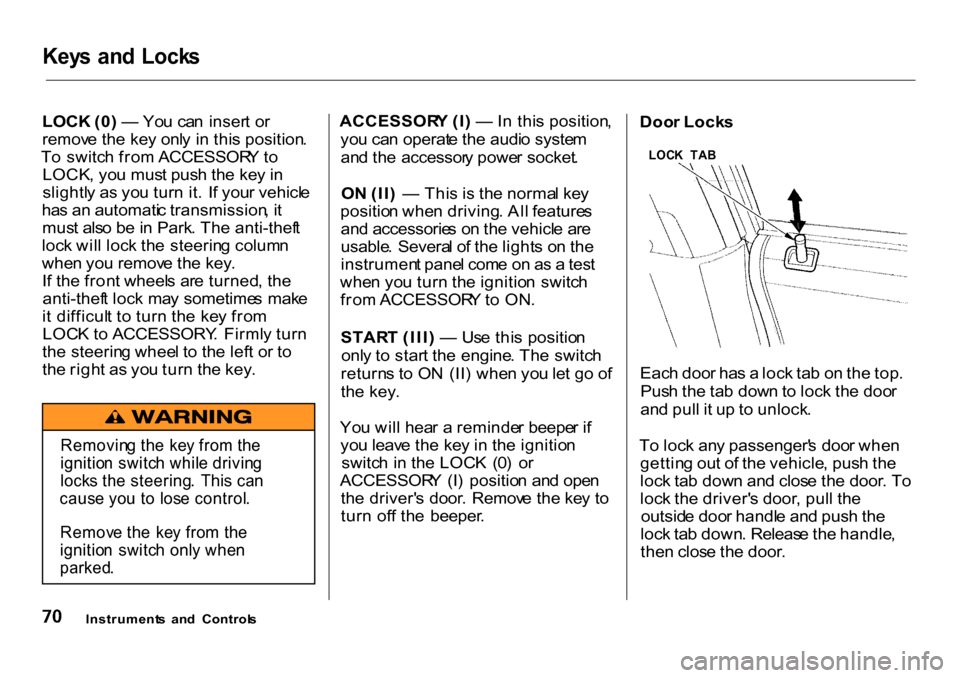
Eac h doo r ha s a loc k ta b o n th e top .
Pus h th e ta b dow n to loc k th e doo r
an d pul l i t u p to unlock .
T o loc k an y passenger' s doo r whe n
gettin g ou t o f th e vehicle , pus h th e
loc k ta b dow n an d clos e th e door . T o
loc k th e driver' s door , pul l th e
outsid e doo r handl e an d pus h th e
loc k ta b down . Releas e th e handle ,
the n clos e th e door .
Instrument s an d Control s
LOC
K TA B
Removin g th e ke y fro m th e
ignitio n switc h whil e drivin g
lock s th e steering . Thi s ca n
caus e yo u t o los e control .
Remov e th e ke y fro m th e
ignitio n switc h onl y whe n
parked .
Page 80 of 326
Key
s an d Lock s
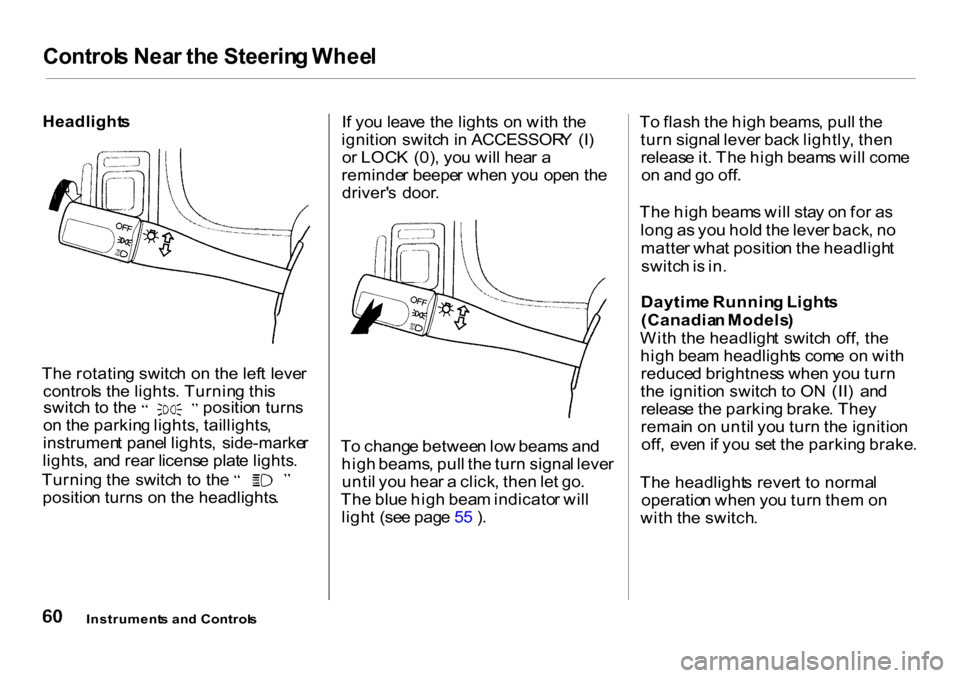
HATC H GLAS S
2 . Th e hatc h glas s wil l po p u p
slightly .
3 . Lif t u p th e hatc h glas s fully .
HANDL
E
DOO R
4 . Pul l th e handl e o n th e doo r an d
pul l th e doo r open .
T o clos e th e tailgate , alway s clos e
th e lowe r doo r first . Then , lowe r th e
hatc h glas s an d pres s o n it unti l i t
latches .
Mak e sur e th e doo r an d th e hatc h
glas s ar e locke d securel y befor e
driving .
STO
P
T o kee p th e tailgat e doo r ope n o n a n
incline , us e th e sto p in th e too l kit .
Th e too l ki t i s i n th e righ t carg o floo r
pocket . Pu t th e sto p o n th e suppor t
stru t a s shown .
Instrument s an d Control s