Page 147 of 325
�µ�µ
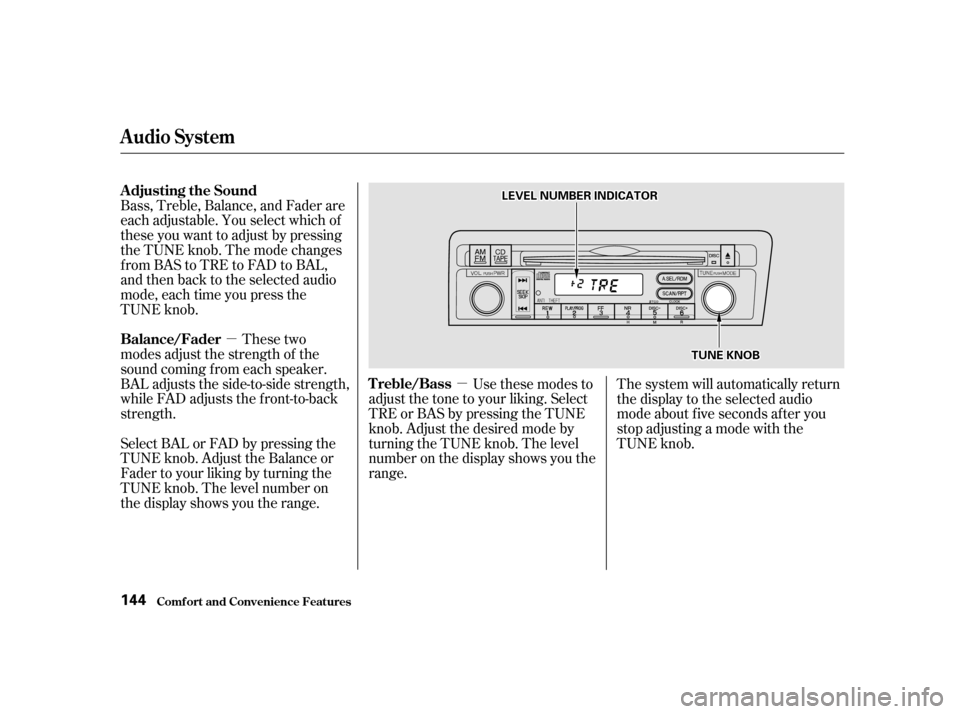
Bass, Treble, Balance, and Fader are
each adjustable. You select which of
these you want to adjust by pressing
the TUNE knob. The mode changes
fromBAStoTREtoFADtoBAL,
and then back to the selected audio
mode, each time you press the
TUNE knob.
These two
modes adjust the strength of the
sound coming f rom each speaker.
BAL adjusts the side-to-side strength,
while FAD adjusts the f ront-to-back
strength.
Select BAL or FAD by pressing the
TUNE knob. Adjust the Balance or
Fader to your liking by turning the
TUNE knob. The level number on
the display shows you the range. Use these modes to
adjust the tone to your liking. Select
TRE or BAS by pressing the TUNE
knob. Adjust the desired mode by
turning the TUNE knob. The level
number on the display shows you the
range. The system will automatically return
the display to the selected audio
mode about f ive seconds af ter you
stop adjusting a mode with the
TUNE knob.
Comf ort and Convenience Feat ures
Audio System
Adjusting the Sound
Balance/Fader
Treble/Bass
144
L LEE V
V E
EL
L N
NUUMM B
BEER
R I
INND DI
ICCA A T
TO
OR R
T
TU
UN NEE K
KNNO OBB
Page 148 of 325
You can use the instrument panel
brightness control dial to adjust the il-
lumination of the audio system (see
page ). The audio system
illuminates when the parking lights
are on, even if the radio is turned of f .
The display of your audio system
usually shows the time when the
ignition switch is in ACCESSORY (I)
or ON (II). It shows the operation
mode of the radio, CD player, or
optional CD changer/cassette player
when you operate them, and goes
back to the time display after five
seconds.You can set the time only when the
clock is displayed.
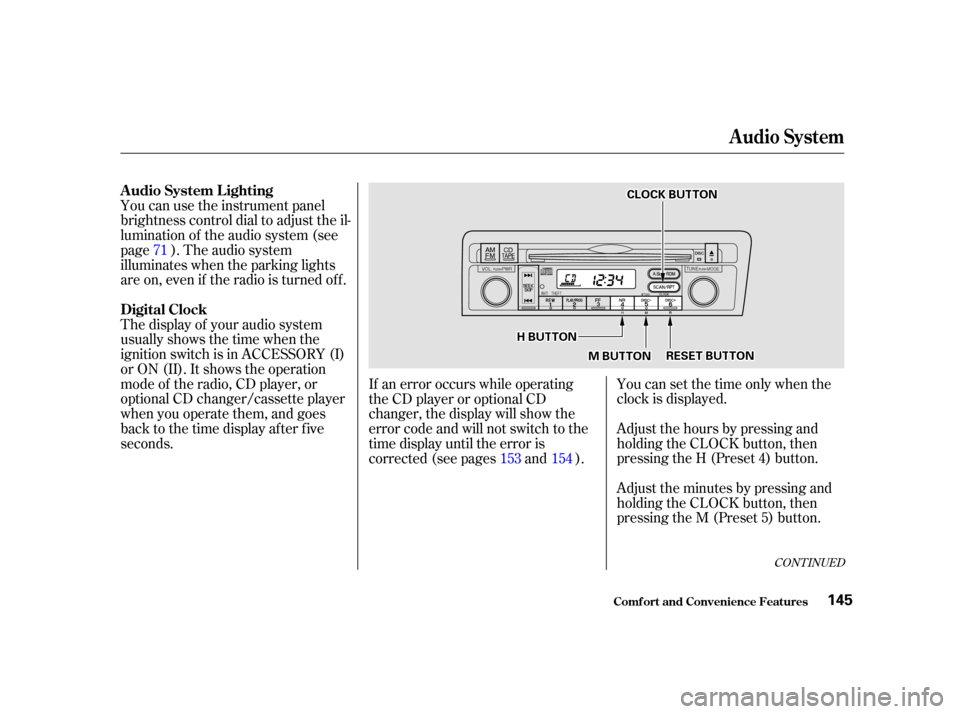
Adjust the hours by pressing and
holding the CLOCK button, then
pressing the H (Preset 4) button.
Adjust the minutes by pressing and
holding the CLOCK button, then
pressing the M (Preset 5) button.
If an error occurs while operating
the CD player or optional CD
changer, the display will show the
error code and will not switch to the
time display until the error is
corrected (see pages and ).
71
153 154
CONT INUED
A udio System L ighting
Digital Clock
Audio System
Comf ort and Convenience Feat ures145
C CLLOOC CKK B
BUUT TT
TO
ON N
M
M B
BUUT TT
TO
ON N R
RE
ES
SE ET
T B
BUUT TT
TO
ON N
H
H
B
BUUT TT
TO
ON N
Page 149 of 325

You can quickly set the time to the
nearest hour. If the displayed time is
bef ore the half hour, the clock is set
back to the previous hour by
pressing and holding the CLOCK
button, then pressing the RESET
(Preset 6) button. If the displayed
time is af ter the half hour, the clock
is set forward to the beginning of the
next hour.Your Honda’s radio can receive the
complete AM and FM bands.
Those bands cover these f requen-
cies:
AM band:
530 to 1,710 kilohertz
FM band:
87.7 to 107.9 megahertz
Radio stations on the AM band are
assigned f requencies at least ten
kilohertz apart (530, 540, 550).
Stations on the FM band are
assigned f requencies at least 0.2
megahertz apart (87.9, 88.1, 88.3).Stations must use these exact
f requencies. It is f airly common f or
stations to round-of f the f requency in
their advertising, so your radio could
display a f requency of 100.9 even
though the announcer may identif y
the station as ‘‘FM101.’’
1:06 would RESET to 1:00.
1:52 would RESET to 2:00.
For example:
Audio System
Comf ort and Convenience Feat ures
Radio Frequencies
146
Page 150 of 325
CONT INUED
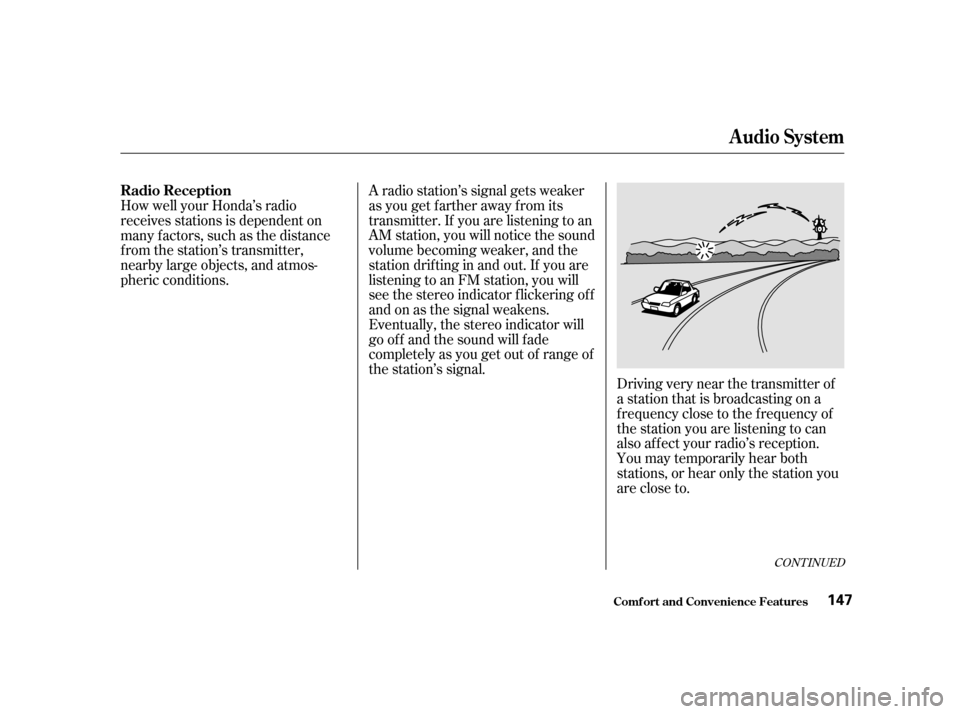
Driving very near the transmitter of
a station that is broadcasting on a
f requency close to the f requency of
the station you are listening to can
also af f ect your radio’s reception.
You may temporarily hear both
stations,orhearonlythestationyou
are close to.
A radio station’s signal gets weaker
as you get f arther away f rom its
transmitter. If you are listening to an
AM station, you will notice the sound
volume becoming weaker, and the
stationdriftinginandout.If youare
listening to an FM station, you will
see the stereo indicator f lickering of f
and on as the signal weakens.
Eventually, the stereo indicator will
go of f and the sound will f ade
completely as you get out of range of
the station’s signal.
How well your Honda’s radio
receives stations is dependent on
many f actors, such as the distance
from the station’s transmitter,
nearby large objects, and atmos-
pheric conditions.
Audio System
Comf ort and Convenience Feat ures
Radio Reception
147
Page 151 of 325
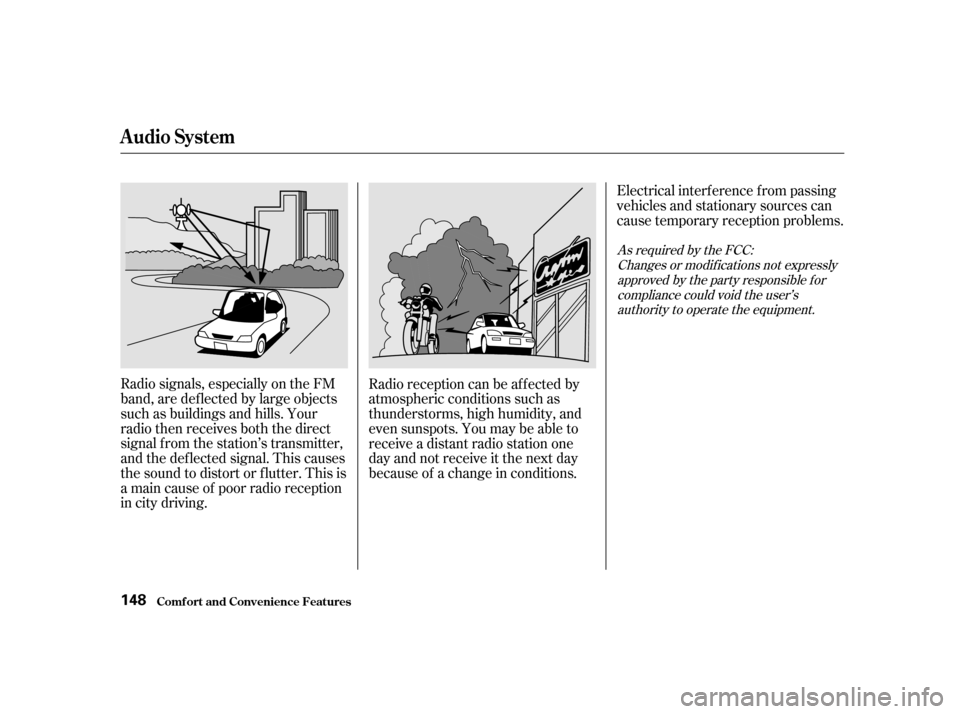
Radio signals, especially on the FM
band, are def lected by large objects
such as buildings and hills. Your
radio then receives both the direct
signal f rom the station’s transmitter,
and the def lected signal. This causes
the sound to distort or flutter. This is
a main cause of poor radio reception
in city driving.Radio reception can be af f ected by
atmospheric conditions such as
thunderstorms, high humidity, and
even sunspots. You may be able to
receive a distant radio station one
day and not receive it the next day
because of a change in conditions.Electrical interf erence f rom passing
vehicles and stationary sources can
cause temporary reception problems.
As required by the FCC:
Changes or modif ications not expresslyapproved by the party responsible f orcompliance could void the user’sauthority to operate the equipment.
Audio System
Comf ort and Convenience Feat ures148
Page 152 of 325
CONT INUED
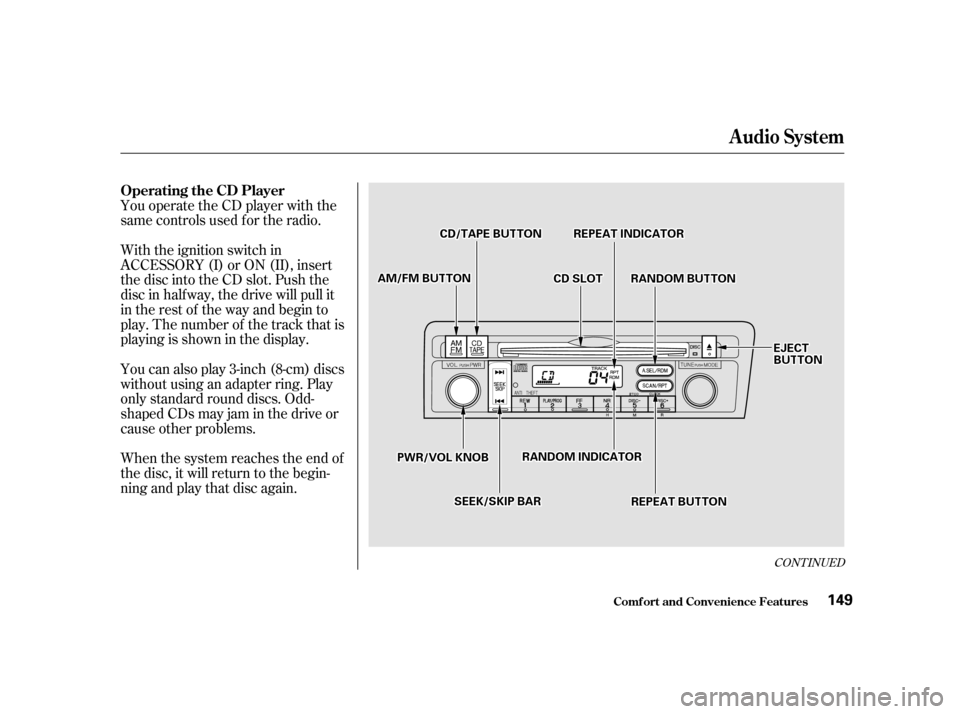
You operate the CD player with the
same controls used f or the radio.
With the ignition switch in
ACCESSORY (I) or ON (II), insert
the disc into the CD slot. Push the
disc in half way, the drive will pull it
in the rest of the way and begin to
play. The number of the track that is
playing is shown in the display.
You can also play 3-inch (8-cm) discs
without using an adapter ring. Play
only standard round discs. Odd-
shaped CDs may jam in the drive or
cause other problems.
When the system reaches the end of
the disc, it will return to the begin-
ning and play that disc again.
Audio System
Comf ort and Convenience Feat ures
Operating the CD Player
149
C CDD S
SLLOOT T
A
A
M
M /
/F
FM M B
BUUT TT
TO
ON N
P
P W
WR R//V
V O
OL L K
KNNO OBB
C
CD
D /
/T
T A
A P
PE
E B
BUUT TT
TO
ON N R
REEP
PE
EA
A T
T I
INND DI
ICCA A T
TO
OR R
R
RA A N
ND DO
OM M B
BUUT TT
TO
ON N
S
SE EE
EK
K/ /S
SK KIIPP B
BAA R
R
R
RA
A N
ND DO
OM M I
INND DI
ICCA A T
TO
OR R
R
RE EP
PE
EA
A T
T B
BUUT TT
TO
ON N E
E
J
JEE C
CT T
B
BU UT TT
TO
ON N
Page 153 of 325

�µ
�µ
Each time you press and release the side of the SEEK/SKIP bar,
the system skips forward to the
beginning of the next track. Press
the sidetoskipbackwardtothe
beginning of the current track. Press
it again to skip to the beginning of
the previous track.
If you eject the disc, but do not
remove it from the slot, the system
will automatically reload the disc
af ter 15 seconds and put the CD
player in pause mode. To begin
playing the disc, press the CD button. Press the eject button to remove the
disc f rom the drive. If you turn the system of f while a CD
is playing, either with the PWR/VOL
knob or by turning off the ignition,
the disc will stay in the drive. When
youturnthesystembackon,theCD
will begin playing where it lef t of f . You can switch to the radio while a
CD is playing by pressing the AM/
FM button. Press the CD button to
return to playing the CD. The CD
will begin playing where it lef t of f . You can use the SEEK/SKIP bar
while a disc is playing to select
passages and change tracks.
To move rapidly within a track, press
andholdtheSEEK/SKIPbar.Press
the side to move f orward. You
will see CUE in the display. Press the
side to move backward. You
will see REW displayed. Release the
bar when the system reaches the
point you want. This feature,
when activated, plays the tracks on
the CD in random order, rather than
in the order they are recorded on the
CD. To activate Random Play, press
the RDM button. You will see RDM
in the display. The system will then
select and play tracks randomly.
This continues until you deactivate
RandomPlaybypressingtheRDM
button again. To activate the Repeat
f eature, press and release the RPT
button. You will see RPT in the
display. The system continuously
replays the current track. Press the
RPT button again to turn it off.
Audio System
Comf ort and Convenience Feat ures
RANDOM PLAY REPEAT
150
Page 154 of 325

�´�µ�´
�µ
Load the desired CDs in the
magazine and load the magazine in
the changer according to the
instructions that came with the unit.
Play only standard round discs. Odd-
shaped CDs may jam in the drive or
cause other problems.
To select the CD changer, press the
CD button. The disc and track
numbers will be displayed. To select a dif f erent disc, press the
DISC (Preset 6) or DISC
(Preset 5) button. The next disc in
the changer is loaded and played
when you press the DISC button.
DISC loads and plays the previous
disc. If you select an empty slot in
the magazine, the changer will, af ter
f inding that slot empty, try to load
the CD in the next slot. This
continues until it f inds a CD to load
and play.
If you eject the in-dash CD while it is
playing, the system will automatically
switch to the CD changer and begin
play where it lef t of f . If there are no
CDs in the changer, the display will
flash. You will have to select another
mode (AM or FM) with the button.
When you switch back to CD mode,
the system selects the same unit (in-
dash or changer) that was playing
when you switched out of CD mode.
To use the SKIP, REPEAT, and
RANDOM f unctions, ref er to the in-
dash player operating instructions.
A trunk-mounted Compact Disc
changer is available f or your vehicle.
It holds up to six discs, providing
several hours of continuous
entertainment. You operate this CD
changer with the same controls used
f or the in-dash CD player.
If you load a CD in the in-dash player
while the changer is playing a CD,
the system will stop the changer and
begin playing the in-dash CD. To
select the changer again, press the
CD button. Play will begin where it
left off. Use the CD button to switch
between the player and the changer.
Audio System
Comf ort and Convenience Feat ures
Operating the CD Changer
(Optional)
151