Page 18 of 24
Special effects playback
Still playback/ Frame-to-frame playback (on remote control)
1. Press the STILL/F.ADV key while in playback mode. The playback
picture becomes still.
2. Press the STILL/F.ADV key again. Each time the control is pressed,
the pictures are played back one frame at a time.
The still playback feature can also be used in REW (reverse) mode.
If still playback/or frame-to-frame playback is engaged for five minutes or
longer, the VCP will automatically begin playback to protect the tape.
Automatic tracking is automatically activated the moment the VCP is
turned ON or a cassette is inserted.
If a videocassette is in poor shape (i.e., badly recorded), any tracking
adjustment may result in failure. The VCP will eject the videocassette.
Encore (on remote control)
²Press the ENCORE control while in playback mode.
The VCP will reverse to the previous five seconds of the selection and
then operate at normal playback mode.
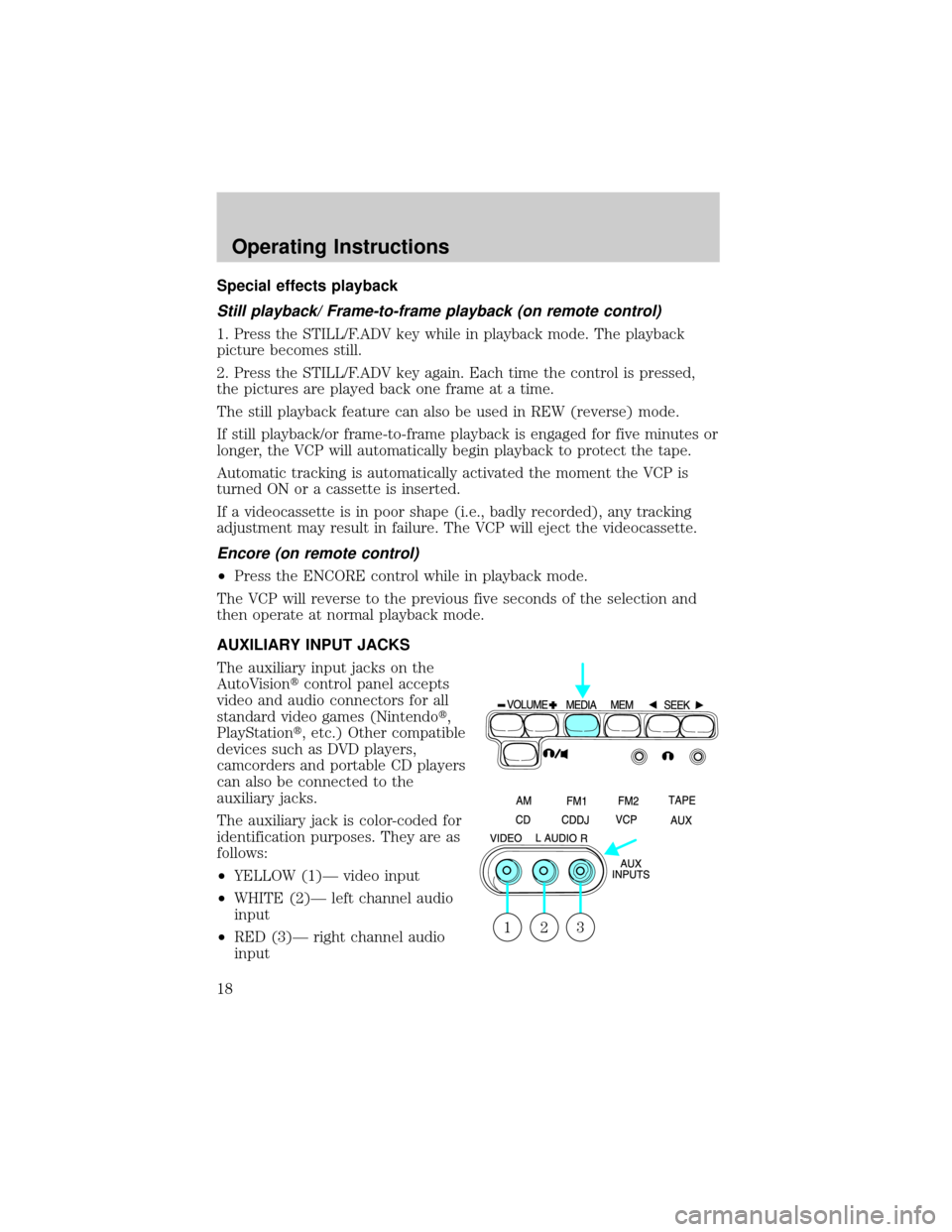
AUXILIARY INPUT JACKS
The auxiliary input jacks on the
AutoVisiontcontrol panel accepts
video and audio connectors for all
standard video games (Nintendot,
PlayStationt, etc.) Other compatible
devices such as DVD players,
camcorders and portable CD players
can also be connected to the
auxiliary jacks.
The auxiliary jack is color-coded for
identification purposes. They are as
follows:
²YELLOW (1)Ð video input
²WHITE (2)Ð left channel audio
input
²RED (3)Ð right channel audio
input
321
Operating Instructions
18
Page 19 of 24
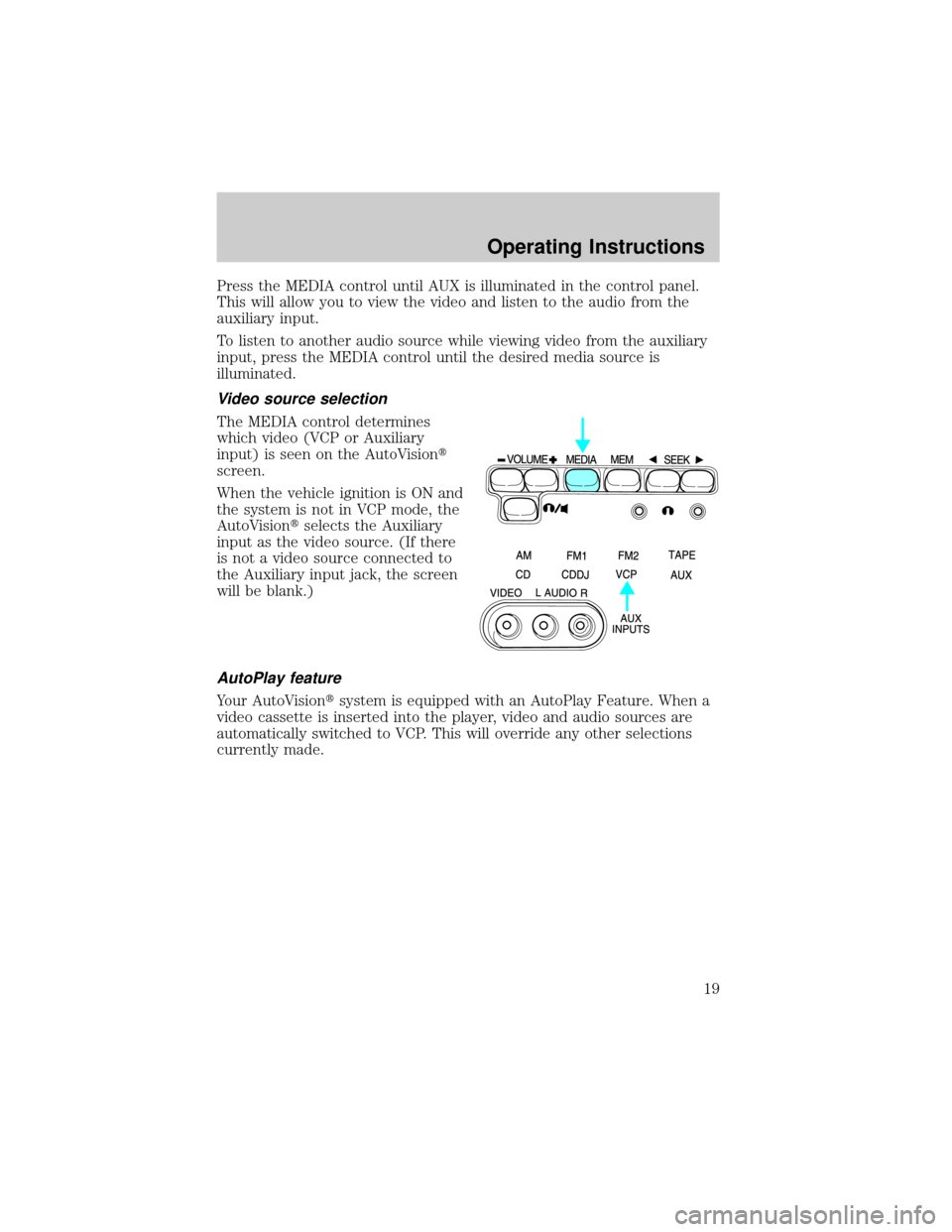
Press the MEDIA control until AUX is illuminated in the control panel.
This will allow you to view the video and listen to the audio from the
auxiliary input.
To listen to another audio source while viewing video from the auxiliary
input, press the MEDIA control until the desired media source is
illuminated.
Video source selection
The MEDIA control determines
which video (VCP or Auxiliary
input) is seen on the AutoVisiont
screen.
When the vehicle ignition is ON and
the system is not in VCP mode, the
AutoVisiontselects the Auxiliary
input as the video source. (If there
is not a video source connected to
the Auxiliary input jack, the screen
will be blank.)
AutoPlay feature
Your AutoVisiontsystem is equipped with an AutoPlay Feature. When a
video cassette is inserted into the player, video and audio sources are
automatically switched to VCP. This will override any other selections
currently made.
Operating Instructions
19
Page 20 of 24
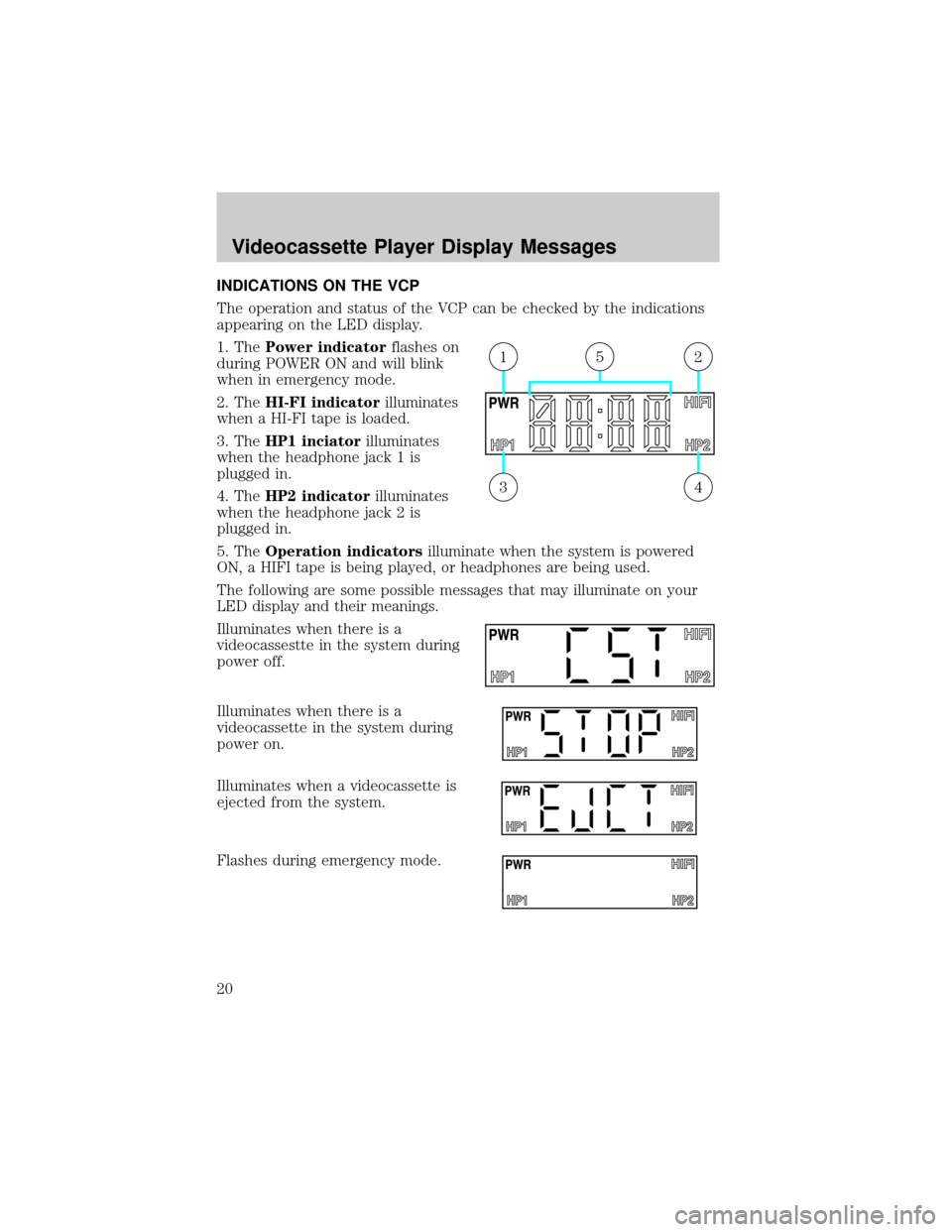
INDICATIONS ON THE VCP
The operation and status of the VCP can be checked by the indications
appearing on the LED display.
1. ThePower indicatorflashes on
during POWER ON and will blink
when in emergency mode.
2. TheHI-FI indicatorilluminates
when a HI-FI tape is loaded.
3. TheHP1 inciatorilluminates
when the headphone jack 1 is
plugged in.
4. TheHP2 indicatorilluminates
when the headphone jack 2 is
plugged in.
5. TheOperation indicatorsilluminate when the system is powered
ON, a HIFI tape is being played, or headphones are being used.
The following are some possible messages that may illuminate on your
LED display and their meanings.
Illuminates when there is a
videocassestte in the system during
power off.
Illuminates when there is a
videocassette in the system during
power on.
Illuminates when a videocassette is
ejected from the system.
Flashes during emergency mode.
43
215
Videocassette Player Display Messages
20
Page 21 of 24
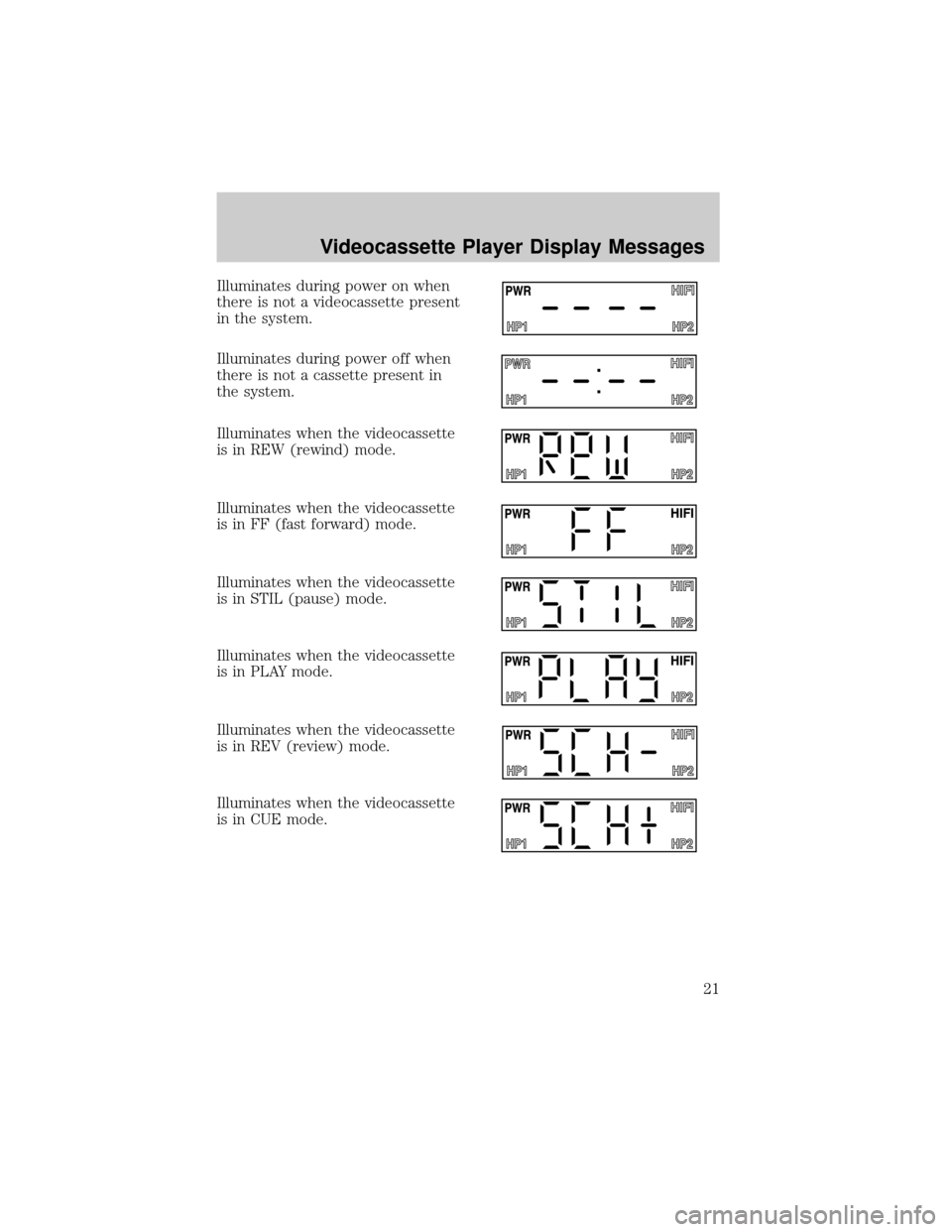
Illuminates during power on when
there is not a videocassette present
in the system.
Illuminates during power off when
there is not a cassette present in
the system.
Illuminates when the videocassette
is in REW (rewind) mode.
Illuminates when the videocassette
is in FF (fast forward) mode.
Illuminates when the videocassette
is in STIL (pause) mode.
Illuminates when the videocassette
is in PLAY mode.
Illuminates when the videocassette
is in REV (review) mode.
Illuminates when the videocassette
is in CUE mode.
Videocassette Player Display Messages
21
Page 22 of 24
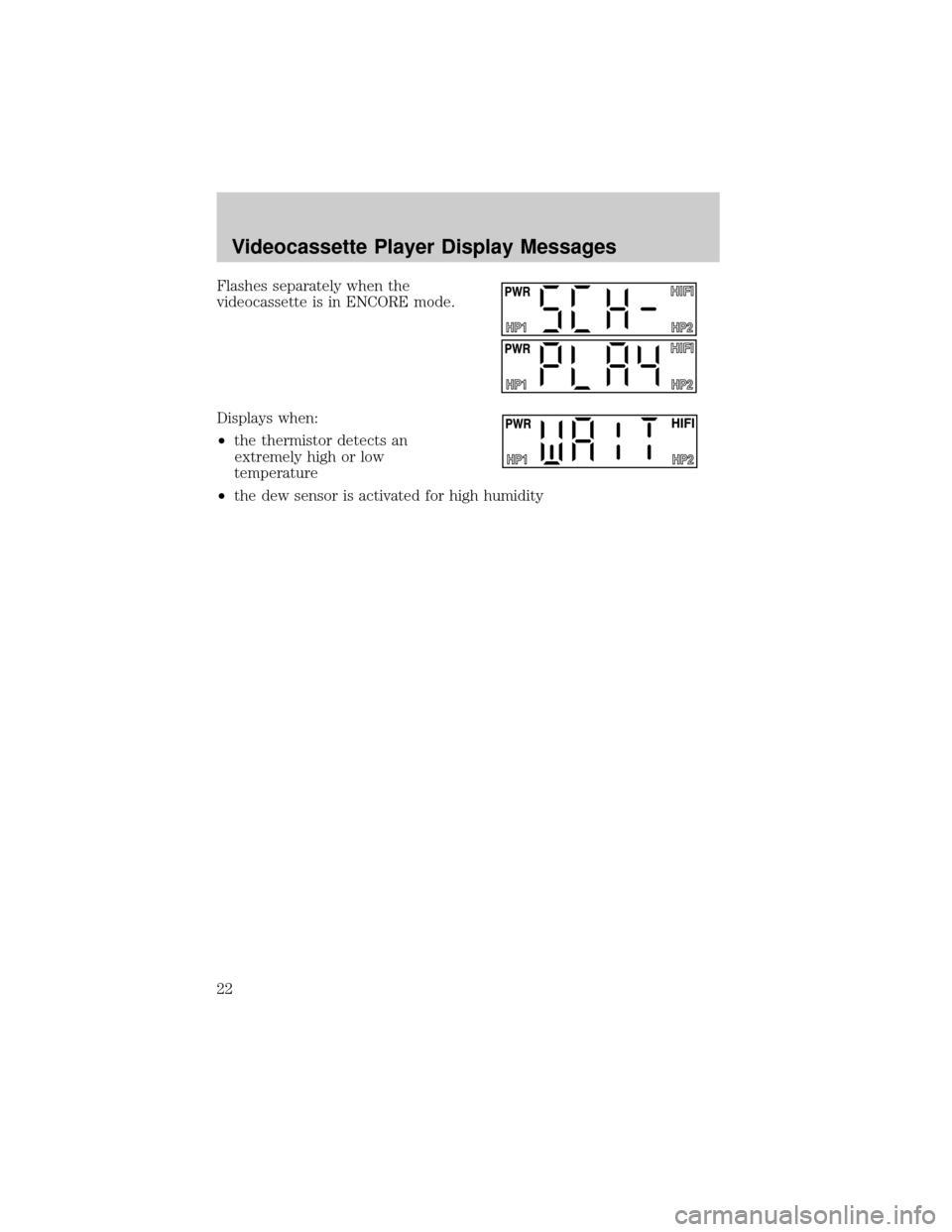
Flashes separately when the
videocassette is in ENCORE mode.
Displays when:
²the thermistor detects an
extremely high or low
temperature
²the dew sensor is activated for high humidity
Videocassette Player Display Messages
22