2001 FIAT MAREA time
[x] Cancel search: timePage 131 of 330

Marea- Marea Weekend
2000 range ©
Electrical equipment
Protection and security devices
55.
PROTECTION AND SAFETY DEVICES
All the vehicle supply lines were designed taking into account the most up-to-date directives in terms of
safety and protection, especially to prevent fires.
There are 2 types of protection:
- active protection, aims to reduce the causes of faults "at source"
- passive protection, aims to limit the effects of a fault as much as possible
The first category includes a carefully designed wiring layout with wires positioned and carefully anchored
on tracks that are repaired and protected if necessary.
The cables connected to the alternator and the motor were modified for this reason by adding protective
caps etc. A strengthened sheath was also introduced for some of the more exposed sections of wiring.
The passive protection includes all interventions to reduce faults due to high current (overload, short cir
cuit).
All system fuses were rated based on the nominal absorbtion of the loads activated at the same time, to
ensure intervention in cases of a clear short circuit.
The introduction of a box containing 4 maxifuses with other fuses connected on the outside means all
the supplies can be protected except for the cable that connects the battery to the starter motor and the
cable that connects the starter motor to the recharging alternator. These cables are therefore protected by a
strengthened supplementary sheath.
In "MAXI" fusebox A:
EFI electronic injection fuse (petrol)
GLOW: plug fuse (diesel)
IGN: ignition switch fuse
J/B2 fuse master supply .
J/B1 fuse master supply
Next to the box.
B: fan fuse (see table)
C: ABS 60A fuse
D: second fan fuse: 40A (JTD)
115961 1998
iFil 30A IJ/B21 BOA
fiGNl 4OA IJTBTI BOA
1910JTD
IGLOWl 60A P7B21 80A
MGNI 40A IJ/Bll 80A
FUSE B
30A engine petrol without air conditioner
40A 1596 with air conditioning, JTD
50A 1998 wth air conditioning
Copyright by Fiat Auto 1
Page 139 of 330

Marea-Marea Weekend Electrical equipment
2000 range (§) Location of components on the car
55.
LOCATION OF RELAYS AND FUSES ON THE VEHICLE (BONNET - Petrol engine types)
Fi998l152B 273 274 i * *
3B-3C Power fusebox
96 Power fuse protecting ABS
98 Headlamp washer intermittent function
122 Engine cooling fan low speed relay
123 Engine cooling fan high speed timer
124 Air condiitoning compressor control relay
129 Power fuse protecting engine coling fan
150 Injection system relay feed
151 Lambda probe control relay for fuel pump
and injectors
152 Fuse protecting injection system
152A Fuse protecting injection system
152B Fuse protecting injection system
273 Fuse protecting automatic transmission
system
274 Fuse protecting automatic transmission
system
276 Starter enablement relay
(••) Versions with air conditioning
(*) With automatic transmission
Copyright by Fiat Auto 9
Page 140 of 330

Electrical equipment Marea-Marea Weekend
Location of components on the car 2000 range (§)
55.
LOCATION OF RELAYS AND FUSES ON THE VEHICLE (BONNET - Diesel engine types )
152
3B/C Power fusebox
96 Power fuse protecting A.B.S
98 Headlamp washer intermittent function
122 Engine cooling fan low speed relay
123 Engine cooling fan high speed timer
124 Air condiitoning compressor control relay
129 Engine cooling fan protection power fuse
129A Power fuse protecting engine cooling fan
no. 2
152 Fuse protecting injection system
303 Fuse protecting diesel preheating
304 Diesel preheating protection relay.
346 Additional heater relay
347 Additional heater relay
348 Additional heater remote control swictch
349 Additional heater protection fuse
369 Engone cooling fan remote control switch
(••) Versions with air conditioning
10 Print n° 506.763/23
Page 149 of 330

Marea-Marea Weekend # *»
2000 range ©
Electrical system
Radio System
55.
GENERAL DESCRIPTION
The car radio reception and playing system has been developed with the acoustic properties of the pas
senger compartment in mind to offer outstanding sound reproduction at all times.
The system is installed on the car directly during production, without subsequent interventions. All wires
are integral with the car wiring.
The system includes:
- radio
- front speakers (with separate tweeters)
- rear speakers
- radio supply leads
- radio and speaker connection leads
- radio controls on steering wheel
- coaxial aerial connection lead
- stylus aerial on roof
- connection lead for CD changer, located in boot.
LOCATION OF SYSTEM COMPONENTS
Component key
1 Radio
2 Radio controls on steering wheel
3 Front speaker
4 Front tweeter
5 Rear speaker
6 Aerial
7 Coaxial aerial lead
8 Lead for CD changer
9 CD player/changer
Copyright by Fiat Auto XII-00 - Update 19
Page 163 of 330

Marea- Marea Weekend
2000 range @
Electrical system
Radio System
55.
OPERATION
ON/OFF
The set can be turned on and off in two ways.
1. Press knob A (VOL).
2. Turn on/off by means of car ignition switch. This function may be set in the EXPERT control level.
Manual activation and deactivation are possible at all times in this case.
Note: // the EXPERT "IGN" function is not active, the radio goes off automatically 20 minutes after the
engine is turned off.
ADJUSTING VOLUME AND SOUND
Volume
Adjust to required volume by means of knob A (VOL),
the display shows: «VOL 00» D «V0L 31».
Adjusitng sound
For each of the settings BASS, TREBLE, FADER, BALANCE, LOUDNESS:
1. Select functions by pressing the AUD key once or more.
2. Select the required sound setting by means of key A or select the basic setting: press the AUD key for
longer than 2 seconds until the display shows «CENTER» Or «- -«.
3. Finish adjustment: press the AUD key several times until the display shows «V0L ...».
NOTE: the radio comes with a sound reproduction condition memory specific to each source type.. This
makes it possible to set different sound geometries (FADER, BALANCE) and frequency responses
(BASS, TREBLE, LOUDNESS) for radio, cassette and phone sources (Automatic Sound Memory
function)..After about 5 seconds, the control level with the current settings is automatically aban
doned.
Copyright by Fiat Auto XII 00 - Update 33
4F033L01
Page 168 of 330

Electrical system Marea- Marea Weekend
Radio System 2000 range @
55.
Tuning RDS programmes (IS LEARN) function (see EXP)
The IS LEARN function (which can be run only after activating the EXPERT function) can be used to
store up to 30 programmes in the IS memory (virtual memory area that does not correspond to storage
keys).
Stored programmes can be called up one by one as described in the EXP section.
The IS memory is useful when the station selection keys are restored or when the tuning stops on a new
reception field and you do not wish to deleted stored stations from preset keys.
Starting the automatic IS LEARN function
Use the BN key to select the range «FM 1», «FM 2» or «FM 3».
Press the SRC key for longer than 2 seconds. «IS ...» will appear on the display, the receiver starts the
search.
If an attempt is made to start the IS LEARN search without the IS mode being active (see EXPERT), the
display will show the message "EXPERT".
NOTE: Always wait for the end of the automatic intelligent search (IS).
If no reception is possible, the automatic intelligent research may stay on, e.g. in an underground garage
or if the aerial is defective. In this case, the automatic search can be interrupted by pressing one of the
station selection keys from 1 to 6.
The automatic intelligent search IS ensures up to 30 stations can be stored with optimum reception.
During automatic intelligent search IS, RDS programmes are stored first ordered by programme code, fol
lowed by FM stations.
Calling up the contents of the IS memory
Stations can be called up from the memory in the required direction by giving a short press to one of the
keys A or B. «IS-SCAN» appears on the display during station selection.
Programme types (PTY)
Many radio programmes offer the programme type service (PTY) in the FM range (FM1, FM 2, FM3) The
message «NEWS» is displayed during a news programme, for example.
The PTY function activates a search filter that allows the radio to tune only to stations that broadcast pro
grammes with a preset PTY code.
Programme types
The types of programme offered by a radio station vary according to the type of programme transmitted.
NEWS News and topical matters
AFFAIRS Politics and events
INFO Special information programmes
SPORT Sports broadcasts
EDUCATE Education and training
DRAMA Radio plays and readings
CULTURE Culture, church and religion
SCIENCE Science
VARIED Various
POP Pop music (hits and chart music)
ROCK M Rock music
EASY M Easy listening
LIGHT M Light classical music
CLASSICS Classical music
OTHER M Unclassified music programmes
(*) differs from phone-in function, activated only
WEATHER Weather forecasts
FINANCE Financial news
CHILDREN Children's programmes
SOCIAL A Social information
RELIGION Religious and philosophical
broadcasts
PHONE IN Listeners' phone-ins (*)
TRAVEL Tourist information
LEISURE Leisure, hobbies and pastimes
JAZZ Jazz music
COUNTRY Country music
NATIONAL National broadcasts
OLDIES Golden Oldies
FOLK M Folk music
DOCU Special documentaries
NO PTY No identification code
the handsfree connection for mobile phone
38 XII-00 - Update Publication no. 506.763/24
Page 170 of 330
Electrical system
Radio System
55.
Scanning stored stations (SCAN)
The SCAN function allows automatic scanning of stored stations.
With IS LEARN OFF (EXP):
- short press: scan of all preset stations (keys 1-6) for all FM bands, or the 6 MW stations, or the 6 LW
stations
- press for more than 2 seconds: scan of all stations receivable on the FM band.
With IS LEARN ON (EXP):
- short press: scan of all preset stations (keys 1-6) for all FM bands
- press for longer than 2 seconds: scan IS LEARN
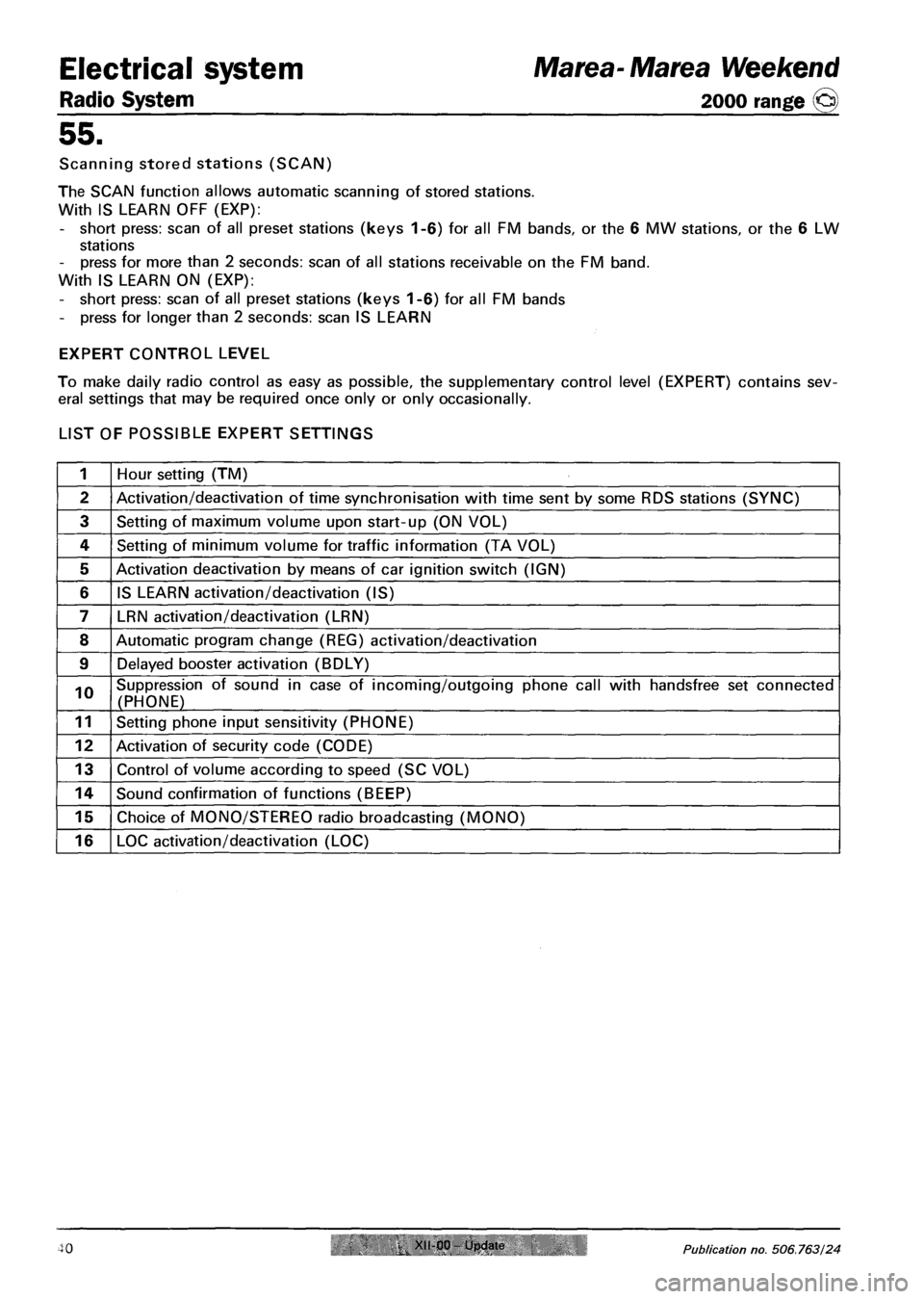
EXPERT CONTROL LEVEL
To make daily radio control as easy as possible, the supplementary control level (EXPERT) contains sev
eral settings that may be required once only or only occasionally.
LIST OF POSSIBLE EXPERT SETTINGS
1 Hour setting (TM)
2 Activation/deactivation of time synchronisation with time sent by some RDS stations (SYNC)
3 Setting of maximum volume upon start-up (ON VOL)
4 Setting of minimum volume for traffic information (TA VOL)
5 Activation deactivation by means of car ignition switch (IGN)
6 IS LEARN activation/deactivation (IS)
7 LRN activation/deactivation (LRN)
8 Automatic program change (REG) activation/deactivation
9 Delayed booster activation (BDLY)
10 Suppression of sound in case of incoming/outgoing phone call with handsfree set connected
(PHONE)
11 Setting phone input sensitivity (PHONE)
12 Activation of security code (CODE)
13 Control of volume according to speed (SC VOL)
14 Sound confirmation of functions (BEEP)
15 Choice of MONO/STEREO radio broadcasting (MONO)
16 LOC activation/deactivation (LOC)
Marea- Marea Weekend
2000 range ©
40 XII-00 Update Publication no. 506.763/24
Page 171 of 330

Marea- Marea Weekend Electrical system
2000 range (Q) Radio System
55.
ALTERING EXPERT SETTINGS
Turning on EXPERT
Depress the EXP key for 2 seconds until «EXPERT» appears on the display.
4F041LL01
Choosing options
Select the settings to be checked or altered using keys A or B.
Example: Setting maximum volume upon start-up. (N.3): use keys A or B to select the required option
(e.g. ONVOL 13), the display shows «ONVOL 13». The selected station is played at the set speed.
Altering the setting
Turn the volume knob to set the required volume, the display shows "ONVOL 20", for example.
Turn the knob clockwise: increase the value; turn the knob anticlockwise: reduce the value.
Concluding the setting
Set the next function using keys A or B
Alternatively, press the EXP for 2 seconds until "EXIT" appears on the display. EXPERT mode is closed
(except for the code and clock).
POSSIBLE SETTINGS
1 - set time
«TM 2:13» appears, for example.
Turn the volume knob to set hours and minutes:
- turn fast to adjust hours
- turn slow to adjust minutes
Give a short press to the EXP key to start the clock.
2 - activate/deactivate synchronisation of the clock with the time sent by some RDS stations
- turn volume knob clockwise: «SYNC ON»: the built-in clock goes forward (synchronisation) toward
RDS information.
- turn the knb anticlockwise: »SYNC OFF».
Synchronisation may be deactivated in places where no RDS TIMER signal is received.
NOTE: The signal sent by the stations may often be incorrect.
Copyright by Fiat Auto XII 00 - Update 41