Page 273 of 460
3-40
After a track has been deleted, the remaining tracks are
moved up the list. When another track is added to the
song list, the tracks will be added to the end of the list.
To delete the entire SONG LIST perform the
following steps:
1. The disc player must be on.
2. Press SONG LIST to turn song list on. S
-LIST
will appear on the display.
3. Press and hold SONG LIST for more than
four seconds. A beep will be heard, followed by
two beeps after two seconds and a final beep will
be heard after four seconds. S
-LIST EMPTY will
appear on the display indicating that the song list
has been deleted.
If a disc is ejected, and the song list contains saved
tracks from that disc, those tracks are automatically
deleted from the song list.
To end SONG LIST mode, press the SONG LIST
button. One beep will be heard and S
-LIST will be
removed from the display.
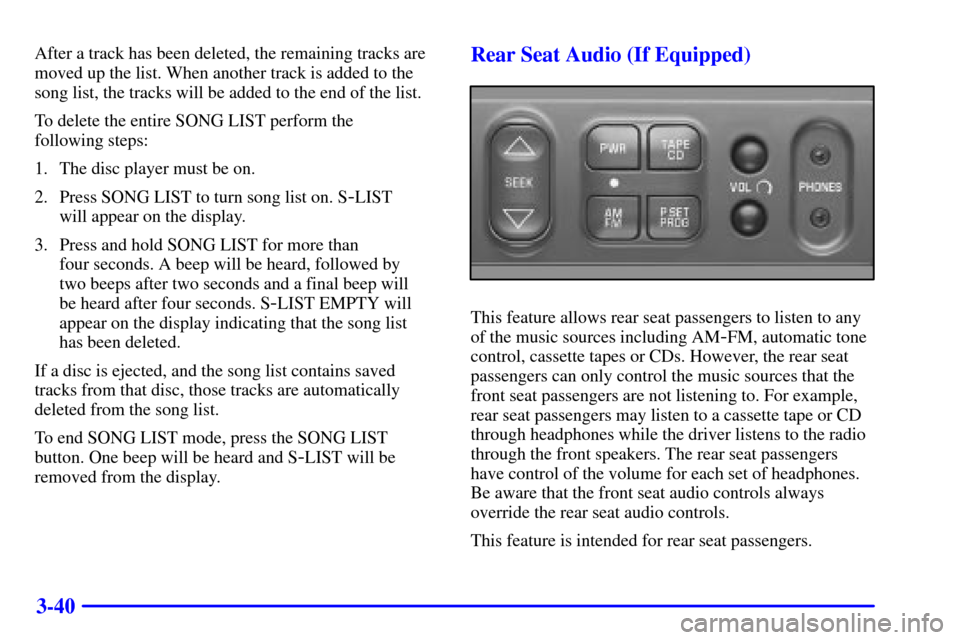
Rear Seat Audio (If Equipped)
This feature allows rear seat passengers to listen to any
of the music sources including AM
-FM, automatic tone
control, cassette tapes or CDs. However, the rear seat
passengers can only control the music sources that the
front seat passengers are not listening to. For example,
rear seat passengers may listen to a cassette tape or CD
through headphones while the driver listens to the radio
through the front speakers. The rear seat passengers
have control of the volume for each set of headphones.
Be aware that the front seat audio controls always
override the rear seat audio controls.
This feature is intended for rear seat passengers.
Page 274 of 460

3-41
The following function is controlled by the primary
radio knob:
POWER
-VOL: Push this knob twice to turn the
rear seat audio system on or off. ON or OFF will be
displayed for five seconds. The rear speakers will be
muted when the power is turned on. You may operate
the rear seat audio functions when the primary radio
power is off if the ignition is on.
The following functions are controlled by the rear seat
audio system buttons:
PWR: Press this button to turn the rear seat audio
system on or off. The rear speakers will be muted when
the power is turned on. You may operate the rear seat
audio functions even when the primary radio power
is off.
VOL: Press this knob lightly so it extends. Turn the
knob clockwise to increase volume and counterclockwise
to decrease volume. Push the knob back into its stored
position when you're not using it. The upper VOL knob
controls the upper headphone and the lower VOL knob
controls the lower headphone.AM FM: Press this button to switch between AM,
FM1 and FM2. The display will show your frequency
selection. If the front passengers are already listening to
AM-FM, the rear seat audio controller will not switch
between the bands and cannot change the frequency.
SEEK: Press the up arrow to tune to the next higher
station and stay there. Press the down arrow to tune to
the next lower station and stay there. The display will
show your selection. The sound will mute while seeking.
The SEEK button is inactive if the AM FM mode on
the front radio is in use.
While listening to a cassette tape, press the up arrow to
hear the next selection on the tape. Press the down arrow
to go back to the previous selection. The SEEK button
is inactive if the tape mode on the front radio is in use.
While listening to a CD, press the up arrow to hear the
next selection on the CD. Press the down arrow to go
back to the start of the current selection (if more than
eight seconds have played). The SEEK button is inactive
if the CD mode on the front radio (if equipped) or the
CD changer is in use.
Page 276 of 460
3-43 Understanding Radio Reception
AM
The range for most AM stations is greater than for FM,
especially at night. The longer range, however, can
cause stations to interfere with each other. AM can
pick up noise from things like storms and power lines.
Try reducing the treble to reduce this noise if you ever
get it.
FM Stereo
FM stereo will give you the best sound, but FM signals
will reach only about 10 to 40 miles (16 to 65 km).
Tall buildings or hills can interfere with FM signals,
causing the sound to come and go.
Tips About Your Audio System
Hearing damage from loud noise is almost undetectable
until it is too late. Your hearing can adapt to higher
volumes of sound. Sound that seems normal can be
loud and harmful to your hearing. Take precautions by
adjusting the volume control on your radio to a safe
sound level before your hearing adapts to it.To help avoid hearing loss or damage:
�Adjust the volume control to the lowest setting.
�Increase volume slowly until you hear comfortably
and clearly.
NOTICE:
Before you add any sound equipment to your
vehicle
-- like a tape player, CB radio, mobile
telephone or two
-way radio -- be sure you can
add what you want. If you can, it's very
important to do it properly. Added sound
equipment may interfere with the operation of
your vehicle's engine, Delphi Delco Electronics
radio or other systems, and even damage them.
Your vehicle's systems may interfere with the
operation of sound equipment that has been
added improperly.
So, before adding sound equipment, check with
your dealership and be sure to check Federal
rules covering mobile radio and telephone units.
Page 384 of 460
6-33
CAUTION:
Batteries have acid that can burn you and gas
that can explode. You can be badly hurt if you
aren't careful. See ªJump Startingº in the Index
for tips on working around a battery without
getting hurt.
Contact your dealer to learn how to prepare your vehicle
for longer storage periods.
Also, for your audio system, see ªTheft
-Deterrent
Featureº in the Index.
Bulb Replacement
For the type of bulbs, see ªReplacement Bulbsº in
the Index.
For any bulb changing procedure not listed in this
section, contact your dealer's service department.
Halogen Bulbs
CAUTION:
Halogen bulbs have pressurized gas inside and
can burst if you drop or scratch the bulb. You or
others could be injured. Be sure to read and
follow the instructions on the bulb package.
Headlamps
To replace the headlamp bulb(s) do the following:
1. Open the hood.
2. Remove the front turn signal/parking lamp assembly.
See ªFront Turn Signal/Parking Lampsº later in
this section.
Page 436 of 460
7-15
Part B: Owner Checks and Services
Listed in this part are owner checks and services which
should be performed at the intervals specified to help
ensure the safety, dependability and emission control
performance of your vehicle.
Be sure any necessary repairs are completed at once.
Whenever any fluids or lubricants are added to your
vehicle, make sure they are the proper ones, as shown
in Part D.
At Each Fuel Fill
It is important for you or a service station attendant
to perform these underhood checks at each fuel fill.
Engine Oil Level Check
Check the engine oil level and add the proper oil if
necessary. See ªEngine Oilº in the Index for
further details.Engine Coolant Level Check
Check the engine coolant level and add DEX
-COOL�
coolant mixture if necessary. See ªEngine Coolantº in
the Index for further details.
Windshield Washer Fluid Level Check
Check the windshield washer fluid level in the
windshield washer tank and add the proper fluid
if necessary. See ªWindshield Washer Fluidº in
the Index for further details.
At Least Once a Month
Tire Inflation Check
Make sure tires are inflated to the correct pressures.
Don't forget to check your spare tire. See ªTiresº in
the Index for further details.
Cassette Deck Service
Clean cassette deck. Cleaning should be done every
50 hours of tape play. See ªAudio Systemsº in the
Index for further details.