2001 CHEVROLET VENTURE display
[x] Cancel search: displayPage 233 of 460

2-120
When shifting into REVERSE (R) and an object is
detected, one of the following will occur:
A chime will sound the first time an object is detected,
if the object is between 20 inches (0.5 cm) and
5 feet (1.5 m) away.
Rear parking assist can detect objects 3 inches (7.6 cm)
and wider, and at least 10 inches (25.4 cm) tall, but it
cannot detect objects that are above liftgate level. In
order for the rear sensors to recognize an object, it must
be within operating range.If the rear parking assist system is not functioning
properly, the display will flash red, indicating that there is
a problem, unless the disable switch is on. The light
will also flash red when the vehicle is shifting into
REVERSE (R), if a trailer was attached to your vehicle, or
if a bicycle or an object was on the back of, or hanging out
of your liftgate during your last drive cycle. The light will
continue to flash whenever in REVERSE (R) until your
vehicle is driven forward at least 15 mph (25 km/h)
without any obstructions behind the vehicle.
It will also flash red if the ultrasonic sensors are not kept
clean. So be sure to keep your rear bumper free of mud,
dirt, snow, ice and slush or the system may not work
properly. If after cleaning the rear bumper and driving
forward at least 15 mph (25 km/h), the display continues
to flash red, see your dealer.
It may also flash red if your vehicle is moving in
REVERSE (R) at a speed greater than 3 mph (5 km/h).
Other conditions that may affect system performance
include things like the vibrations from a jackhammer or
the compression of air brakes on a very large truck.
As always, drivers should use care when backing up a
vehicle. Always look behind you, being sure to check for
other vehicles, obstructions and blind spots. For cleaning
instructions, see ªCleaning Your Vehicleº in the Index.
Page 242 of 460
3-9
Audio Systems
Your audio system has been designed to operate easily
and give years of listening pleasure. You will get the
most enjoyment out of it if you acquaint yourself with it
first. Find out what your audio system can do and how
to operate all its controls, to be sure you're getting the
most out of the advanced engineering that went into it.
If you have power door locks, your vehicle has a feature
called Retained Accessory Power (RAP). With RAP,
you can play your audio system even after the ignition
is off. See ªRetained Accessory Powerº in the Index.
Setting the Clock for Systems without Radio
Data System
Press and hold the HR or MIN arrow for two seconds.
Then press the HR arrow until the correct hour appears.
Press and hold the MIN arrow until the correct minute
appears. The clock may be set with the ignition on
or off.
Setting the Clock for Systems with Radio
Data System
Press and hold the HR or MN buttons, located below the
tune knob, for two seconds. Then press and hold HR
until the correct hour appears. AM or PM will appear on
the display. Press and hold MN until the correct minute
appears. The clock may be set with the ignition on or
off. The clock symbol will appear on the display in
time
-set mode.
Press and hold the H button until the correct hour
appears. AM will appear on the display for morning
hours. Press and hold the M button until the correct
minute appears. The clock may be set with the ignition
on or off.
To set the clock to the time of an FM station broadcasting
Radio Data System (RDS) information, press and hold
HR and MN or the H and M buttons at the same time
for two seconds until UPDATED and the clock symbol
appear on the display. If the time is not available from the
station, NO UPDAT will appear on the display instead.
Page 243 of 460
3-10 AM-FM Stereo
Playing the Radio
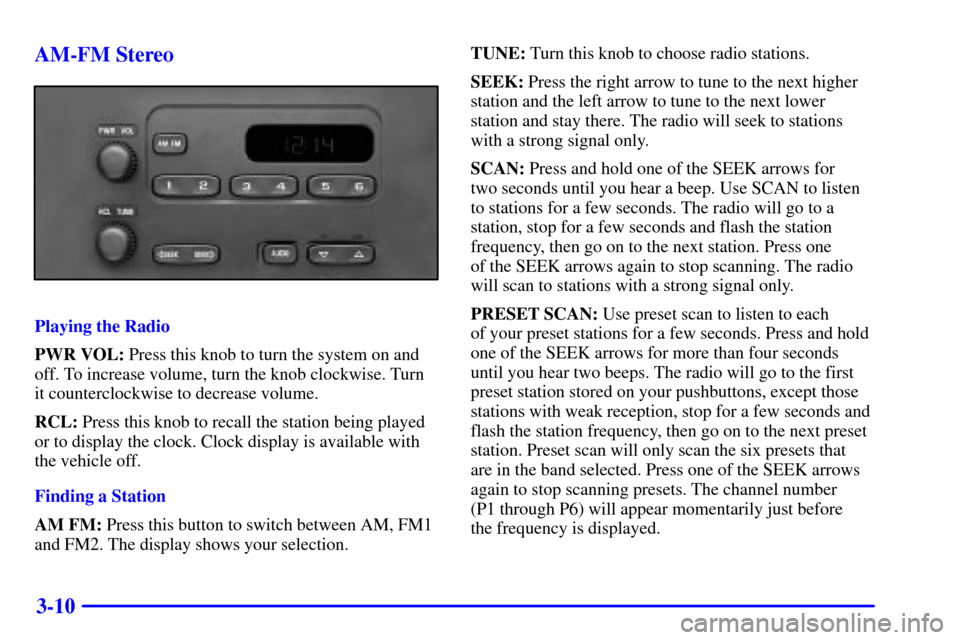
PWR VOL: Press this knob to turn the system on and
off. To increase volume, turn the knob clockwise. Turn
it counterclockwise to decrease volume.
RCL: Press this knob to recall the station being played
or to display the clock. Clock display is available with
the vehicle off.
Finding a Station
AM FM: Press this button to switch between AM, FM1
and FM2. The display shows your selection.TUNE: Turn this knob to choose radio stations.
SEEK: Press the right arrow to tune to the next higher
station and the left arrow to tune to the next lower
station and stay there. The radio will seek to stations
with a strong signal only.
SCAN: Press and hold one of the SEEK arrows for
two seconds until you hear a beep. Use SCAN to listen
to stations for a few seconds. The radio will go to a
station, stop for a few seconds and flash the station
frequency, then go on to the next station. Press one
of the SEEK arrows again to stop scanning. The radio
will scan to stations with a strong signal only.
PRESET SCAN: Use preset scan to listen to each
of your preset stations for a few seconds. Press and hold
one of the SEEK arrows for more than four seconds
until you hear two beeps. The radio will go to the first
preset station stored on your pushbuttons, except those
stations with weak reception, stop for a few seconds and
flash the station frequency, then go on to the next preset
station. Preset scan will only scan the six presets that
are in the band selected. Press one of the SEEK arrows
again to stop scanning presets. The channel number
(P1 through P6) will appear momentarily just before
the frequency is displayed.
Page 244 of 460

3-11
PUSHBUTTONS: The six numbered pushbuttons
let you return to your favorite stations. You can set up
to 18 stations (six AM, six FM1 and six FM2) by
performing the following steps:
1. Turn the radio on.
2. Press AM FM to select the band.
3. Tune in the desired station.
4. Press and hold one of the six numbered buttons until
you hear a beep. Whenever you press that numbered
button, the station you set will return.
5. Repeat the steps for each pushbutton.
Setting the Tone
BASS: Press and release AUDIO repeatedly until
BAS appears on the display. Then press and hold the
up arrow to increase bass. ªBº and a positive number
will appear on the display. Press and hold the down
arrow to decrease bass. B and a negative number will
appear on the display. B and a zero will appear on the
display when the bass level is set to the middle position.
Release the up or down arrow when you find the bass
level you want or when the maximum or minimum level
is reached.TREBLE: Press and release AUDIO until TRE appears
on the display. Then press and hold the up arrow to
increase treble. ªTº and a positive number will appear
on the display. Press and hold the down arrow to
decrease treble. T and a negative number will appear
on the display. T and a zero will appear on the display
when the treble level is set to the middle position.
Release the up or down arrow when you find the treble
level you want or when the maximum or minimum level
is reached. If a station is weak or noisy, you may want
to decrease the treble.
To set bass or treble to the middle position, select the
desired tone control. Then press and hold AUDIO for
more than two seconds until you hear a beep. B and a
zero or T and a zero will appear on the display. To set all
of the tone controls and speaker controls to the middle
position, end out of audio mode. Then press and hold
AUDIO for more than two seconds until you hear a
beep. CEN will appear on the display.
Page 245 of 460

3-12
Adjusting the Speakers
BALANCE: Press and release AUDIO until BAL
appears on the display. Then press and hold the up arrow
to move the sound to the right speakers or the down
arrow to move the sound to the left speakers. ªRº and
a number will appear on the display when the sound is
balanced toward the right speakers. ªLº and a number
will appear on the display when the sound is balanced
toward the left speakers. L and a zero will appear on the
display when the the sound is balanced between the
speakers. Release the up or down arrow when you find
the speaker balance you want or when the maximum
or minimum level is reached.
FADE: Press and release AUDIO until FAD appears
on the display. Then press and hold the up arrow to
move the sound to the front speakers or the down arrow
to move the sound to the rear speakers. ªFº and a
number will appear on the display when the sound is
balanced toward the front speakers. ªRº and a number
will appear on the display when the sound is balanced
toward the rear speakers. F and a zero will appear on
the display when the the sound is balanced between the
speakers. Release the up or down arrow when you find
the speaker balance you want or when the maximum or
minimum level is reached.To set balance or fade to the middle position, select the
desired speaker control. Then press and hold AUDIO for
more than two seconds until you hear a beep. L and a
zero or F and a zero will appear on the display. To set all
of the tone controls and speaker controls to the middle
position, end out of audio mode. Then press and hold
AUDIO for more than two seconds until you hear a
beep. CEN will appear on the display.
Radio Calibration
Your audio system has been calibrated for your vehicle
from the factory. If CAL appears on the display it means
that your radio has not been configured properly for
your vehicle and must be returned to the dealership
for service.
Page 246 of 460
3-13 AM-FM Stereo with Compact Disc Player
with Radio Data System (RDS) and
Automatic Tone Control (If Equipped)
Playing the Radio
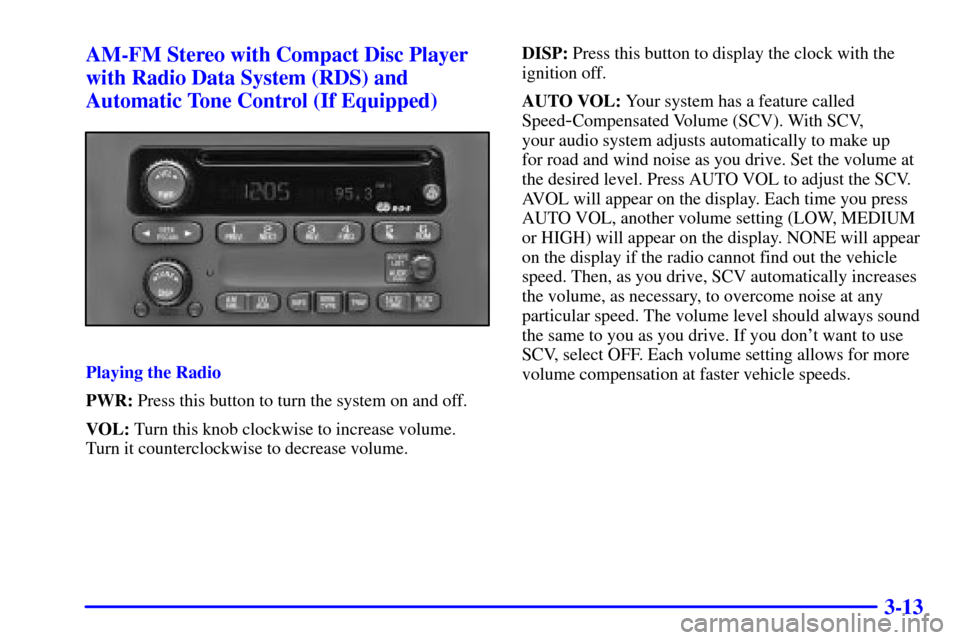
PWR: Press this button to turn the system on and off.
VOL: Turn this knob clockwise to increase volume.
Turn it counterclockwise to decrease volume.DISP: Press this button to display the clock with the
ignition off.
AUTO VOL: Your system has a feature called
Speed
-Compensated Volume (SCV). With SCV,
your audio system adjusts automatically to make up
for road and wind noise as you drive. Set the volume at
the desired level. Press AUTO VOL to adjust the SCV.
AVOL will appear on the display. Each time you press
AUTO VOL, another volume setting (LOW, MEDIUM
or HIGH) will appear on the display. NONE will appear
on the display if the radio cannot find out the vehicle
speed. Then, as you drive, SCV automatically increases
the volume, as necessary, to overcome noise at any
particular speed. The volume level should always sound
the same to you as you drive. If you don't want to use
SCV, select OFF. Each volume setting allows for more
volume compensation at faster vehicle speeds.
Page 247 of 460

3-14
Finding a Station
AM FM: Press this button to switch between AM, FM1
and FM2. The display shows your selection.
TUNE: Turn this knob to choose radio stations.
SEEK: Press the right arrow to tune to the next higher
station and the left arrow to tune to the next lower
station and stay there.
PUSHBUTTONS: The six numbered pushbuttons
let you return to your favorite stations. You can set up
to 18 stations (six AM, six FM1 and six FM2) by
performing the following steps:
1. Turn the radio on.
2. Press AM FM to select the band.
3. Tune in the desired station.
4. Press AUTO TONE to select the equalization that
best suits the type of station selected.
5. Press and hold one of the six numbered buttons.
The radio will produce one beep. Whenever you
press that numbered button, the station you set
will return and the auto tone equalization that
you selected will also be automatically selected
for that button.
6. Repeat the steps for each pushbutton.P SCAN: Press and hold one of the arrows for more
than two seconds. The radio will produce one beep.
Use P SCAN to listen to each of your favorite stations
stored on your pushbuttons for a few seconds. The radio
will scan through each of the stations stored on your
pushbuttons, except those stations with weak reception.
The auto tone setting stored for that pushbutton will
be automatically chosen. Press P SCAN or one of the
pushbuttons again to stop scanning. SCAN will be
displayed whenever the tuner is in the P SCAN mode.
The channel number (P1 through P6) will appear with
the frequency. In FM mode, this function will scan
through the current band such as FM1 or FM2.
Setting the Tone
BASS: Press and release the P
-TYPE LIST/AUDIO
knob until BASS appears on the display. Then turn the
knob clockwise to increase bass and counterclockwise
to decrease bass. The display will show the bass level.
When you use this control, the radio's auto tone setting
will switch to manual and the auto tone display will go
blank. To set the tone and speaker controls to the middle
position, press and hold the P
-TYPE LIST/AUDIO
knob when no tone or speaker control is active. The
radio will produce one beep and display ALL with the
level display in the middle position.
Page 248 of 460

3-15
TREB: Press and release the P-TYPE LIST/AUDIO
knob until TREB appears on the display. Turn the knob
clockwise to increase treble and counterclockwise to
decrease treble. The display will show the treble level.
When you use this control, the radio's auto tone setting
will switch to manual and the auto tone display will go
blank. If a station is weak or noisy, you may want to
decrease the treble.
AUTO TONE: This feature allows you to choose preset
bass and treble equalization settings designed for rock,
news, pop, jazz, classic and country stations. TONE and
the preset equalization setting will appear on the display
when you press AUTO TONE. Each time you press it,
another setting will appear on the display. The manual
setting allows tone control to return to the bass and
treble controls. Use the pushbuttons and the AUTO
TONE button to program auto tone for station presets.Adjusting the Speakers
BALANCE: Press and release the P
-TYPE
LIST/AUDIO knob until BAL appears on the display.
Turn the knob clockwise to move the sound to the right
speakers and counterclockwise to move the sound to the
left speakers. The middle position balances the sound
between the speakers. The display will show the speaker
balance. To set the control to the middle position,
select the control and press and hold the P
-TYPE
LIST/AUDIO knob. The radio will produce one beep
and set the display level to the middle position.
FADE: Press and release the P
-TYPE LIST/AUDIO
knob until FADE appears on the display. Turn the knob
clockwise to move the sound to the front speakers
and counterclockwise to move the sound to the rear
speakers. The middle position balances the sound
between the speakers. The display will show the
speaker balance.