2001 CHEVROLET CAMARO stop start
[x] Cancel search: stop startPage 97 of 363
2-39
Manual Transmission Operation
5-Speed
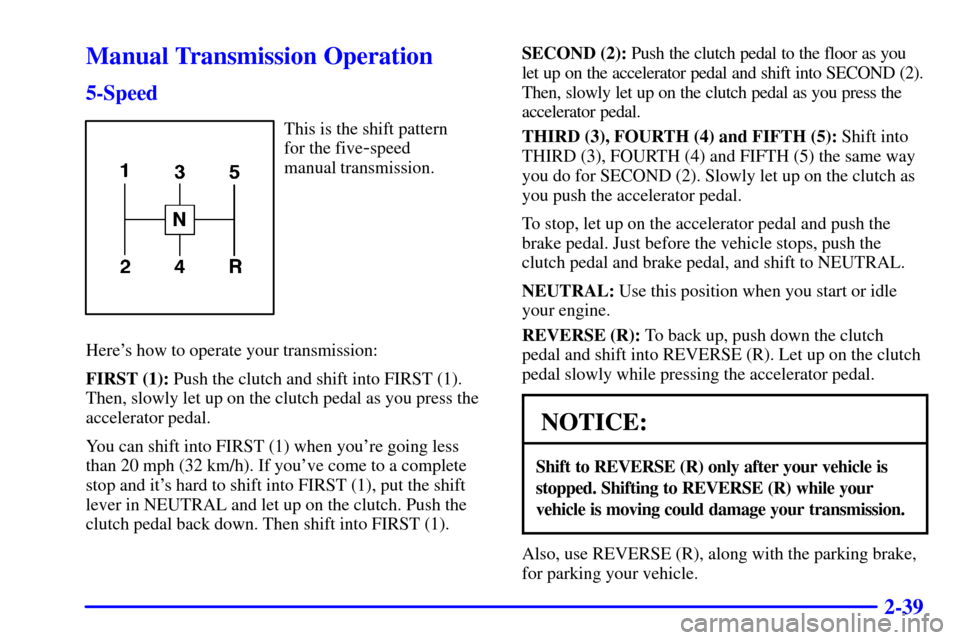
This is the shift pattern
for the five
-speed
manual transmission.
Here's how to operate your transmission:
FIRST (1): Push the clutch and shift into FIRST (1).
Then, slowly let up on the clutch pedal as you press the
accelerator pedal.
You can shift into FIRST (1) when you're going less
than 20 mph (32 km/h). If you've come to a complete
stop and it's hard to shift into FIRST (1), put the shift
lever in NEUTRAL and let up on the clutch. Push the
clutch pedal back down. Then shift into FIRST (1).SECOND (2): Push the clutch pedal to the floor as you
let up on the accelerator pedal and shift into SECOND (2).
Then, slowly let up on the clutch pedal as you press the
accelerator pedal.
THIRD (3), FOURTH (4) and FIFTH (5): Shift into
THIRD (3), FOURTH (4) and FIFTH (5) the same way
you do for SECOND (2). Slowly let up on the clutch as
you push the accelerator pedal.
To stop, let up on the accelerator pedal and push the
brake pedal. Just before the vehicle stops, push the
clutch pedal and brake pedal, and shift to NEUTRAL.
NEUTRAL: Use this position when you start or idle
your engine.
REVERSE (R): To back up, push down the clutch
pedal and shift into REVERSE (R). Let up on the clutch
pedal slowly while pressing the accelerator pedal.
NOTICE:
Shift to REVERSE (R) only after your vehicle is
stopped. Shifting to REVERSE (R) while your
vehicle is moving could damage your transmission.
Also, use REVERSE (R), along with the parking brake,
for parking your vehicle.
Page 98 of 363

2-40 6-Speed
This is the shift pattern
for the six
-speed
manual transmission.
Here's how to operate your transmission:
FIRST (1): Push the clutch pedal and shift into
FIRST (1). Then, slowly let up on the clutch pedal as
you press the accelerator pedal.
You can shift into FIRST (1) when you're going less
than 20 mph (30 km/h). If you've come to a complete
stop and it's hard to shift into FIRST (1), put the shift
lever in NEUTRAL and let up on the clutch. Press the
clutch pedal back down. Then shift into FIRST (1).
SECOND (2): Press the clutch pedal as you let up
on the accelerator pedal and shift into SECOND (2).
Then, slowly let up on the clutch pedal as you press the
accelerator pedal.THIRD (3), FOURTH (4), FIFTH (5) and SIXTH
(6): Shift into THIRD (3), FOURTH (4), FIFTH (5) and
SIXTH (6) gear the same way you do for SECOND (2).
Slowly let up on the clutch pedal as you press the
accelerator pedal.
To stop, let up on the accelerator pedal and press the
brake pedal. Just before the vehicle stops, press the
clutch pedal and brake pedal, and shift to NEUTRAL.
NEUTRAL: Use this position when you start or idle
your engine.
REVERSE (R): To back up, push down the clutch
pedal and shift into REVERSE (R). Let up on the clutch
pedal slowly while pressing the accelerator pedal. If you
shift from SIXTH (6) into REVERSE (R), the shift lever
must be first placed in the NEUTRAL position centered
between SECOND (2) and THIRD (3) prior to shifting
into REVERSE (R).
Your six
-speed manual transmission has a feature that
allows you to safely shift into REVERSE (R) while the
vehicle is rolling at less than 5 mph (8 km/h).
If you have turned your ignition off and want to
park your vehicle in REVERSE (R), you will have to
move the shift lever quickly to the right, then forward
into gear.
Page 110 of 363
2-52 Windshield Wipers
You can control the windshield wipers by turning the
band with the wiper symbol on it, located on the turn
signal/multifunction lever.
For a single wiping cycle, turn the band to MIST. Hold
it there until the wipers start, then let go. The wipers will
stop after one cycle. If you want more cycles, hold the
band on MIST longer.
You can set the wiper speed for a long or short delay
between wipes. This can be very useful in light rain or
snow. Turn the band to choose the delay time. The
closer to LO, the shorter the delay.
For steady wiping at low speed, turn the band away
from you to the LO position. For high
-speed wiping,
turn the band further, to HI. To stop the wipers, turn the
band to OFF.
Damaged wiper blades may prevent you from seeing
well enough to drive safely. To avoid damage, be sure to
clear ice and snow from the wiper blades before using
them. If they're frozen to the windshield, carefully
loosen or thaw them. If your blades do become
damaged, get new blades or blade inserts.
Heavy snow or ice can overload your wipers. A circuit
breaker will stop them until the motor cools. Clear away
snow or ice to prevent an overload.
Windshield Washer
There is a paddle with the word PUSH on it at the top of
the turn signal/multifunction lever. To spray washer
fluid on the windshield, push the paddle. The washer
will continue to spray until you release the paddle. The
wipers will clear the window and wipe a few more times
before stopping or returning to the previous setting.
See ªWindshield Washer Fluidº in the Index.
CAUTION:
In freezing weather, don't use your washer until
the windshield is warmed. Otherwise the washer
fluid can form ice on the windshield, blocking
your vision.
Page 145 of 363
2-87
If the light comes on while you are driving, pull off the
road and stop carefully. You may notice that the pedal is
harder to push. Or, the pedal may go closer to the floor.
It may take longer to stop. If the light is still on, have the
vehicle towed for service. See ªTowing Your Vehicleº in
the Index.
CAUTION:
Your brake system may not be working properly
if the brake system warning light is on. Driving
with the brake system warning light on can lead
to an accident. If the light is still on after you've
pulled off the road and stopped carefully, have
the vehicle towed for service.
When the ignition is on, the brake system warning light
will also come on when you set your parking brake. The
light will stay on if your parking brake doesn't release
fully. If it stays on after your parking brake is fully
released, it means you have a brake problem.
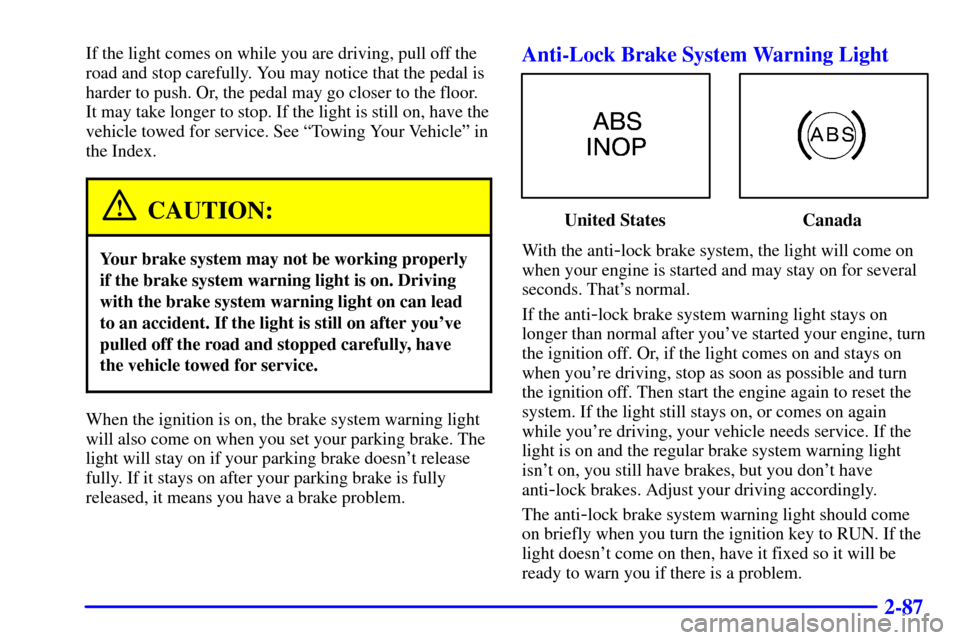
Anti-Lock Brake System Warning Light
United States Canada
With the anti
-lock brake system, the light will come on
when your engine is started and may stay on for several
seconds. That's normal.
If the anti
-lock brake system warning light stays on
longer than normal after you've started your engine, turn
the ignition off. Or, if the light comes on and stays on
when you're driving, stop as soon as possible and turn
the ignition off. Then start the engine again to reset the
system. If the light still stays on, or comes on again
while you're driving, your vehicle needs service. If the
light is on and the regular brake system warning light
isn't on, you still have brakes, but you don't have
anti
-lock brakes. Adjust your driving accordingly.
The anti
-lock brake system warning light should come
on briefly when you turn the ignition key to RUN. If the
light doesn't come on then, have it fixed so it will be
ready to warn you if there is a problem.
Page 146 of 363
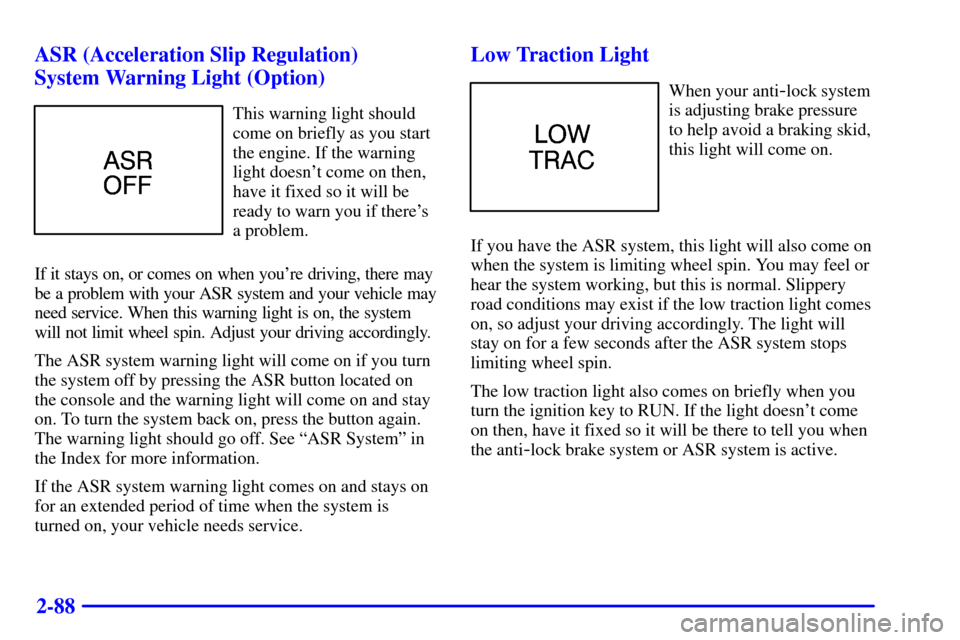
2-88 ASR (Acceleration Slip Regulation)
System Warning Light (Option)
This warning light should
come on briefly as you start
the engine. If the warning
light doesn't come on then,
have it fixed so it will be
ready to warn you if there's
a problem.
If it stays on, or comes on when you're driving, there may
be a problem with your ASR system and your vehicle may
need service. When this warning light is on, the system
will not limit wheel spin. Adjust your driving accordingly.
The ASR system warning light will come on if you turn
the system off by pressing the ASR button located on
the console and the warning light will come on and stay
on. To turn the system back on, press the button again.
The warning light should go off. See ªASR Systemº in
the Index for more information.
If the ASR system warning light comes on and stays on
for an extended period of time when the system is
turned on, your vehicle needs service.
Low Traction Light
When your anti-lock system
is adjusting brake pressure
to help avoid a braking skid,
this light will come on.
If you have the ASR system, this light will also come on
when the system is limiting wheel spin. You may feel or
hear the system working, but this is normal. Slippery
road conditions may exist if the low traction light comes
on, so adjust your driving accordingly. The light will
stay on for a few seconds after the ASR system stops
limiting wheel spin.
The low traction light also comes on briefly when you
turn the ignition key to RUN. If the light doesn't come
on then, have it fixed so it will be there to tell you when
the anti
-lock brake system or ASR system is active.
Page 149 of 363

2-91
If the light stops flashing and remains on steady, see
ªIf the Light Is On Steadyº following.
If the light continues to flash, when it is safe to do so,
stop the vehicle. Find a safe place to park your vehicle.
Turn the key off, wait at least 10 seconds and restart the
engine. If the light remains on steady, see ªIf the Light
Is On Steadyº following. If the light is still flashing,
follow the previous steps, and drive the vehicle to your
dealer or qualified service center for service.
If the Light Is On Steady
You may be able to correct the emission system
malfunction by considering the following:
Did you recently put fuel into your vehicle?
If so, reinstall the fuel cap, making sure to fully install
the cap. See ªFilling Your Tankº in the Index. The
diagnostic system can determine if the fuel cap has been
left off or improperly installed. A loose or missing fuel
cap will allow fuel to evaporate into the atmosphere. A
few driving trips with the cap properly installed should
turn the light off.
Did you just drive through a deep puddle of water?
If so, your electrical system may be wet. The condition
will usually be corrected when the electrical system
dries out. A few driving trips should turn the light off.Are you low on fuel?
As your engine starts to run out of fuel, your engine may
not run as efficiently as designed since small amounts of
air are sucked into the fuel line causing a misfire. The
system can detect this. Adding fuel should correct this
condition. Make sure to install the fuel cap properly.
See ªFilling Your Tankº in the Index. It will take a few
driving trips to turn the light off.
Have you recently changed brands of fuel?
If so, be sure to fuel your vehicle with quality fuel. See
ªFuelº in the Index. Poor fuel quality will cause your
engine not to run as efficiently as designed. You may
notice this as stalling after start
-up, stalling when you put
the vehicle into gear, misfiring, hesitation on acceleration
or stumbling on acceleration. (These conditions may go
away once the engine is warmed up.) This will be detected
by the system and cause the light to turn on.
If you experience one or more of these conditions,
change the fuel brand you use. It will require at least one
full tank of the proper fuel to turn the light off.
If none of the above steps have made the light turn off,
have your dealer or qualified service center check the
vehicle. Your dealer has the proper test equipment and
diagnostic tools to fix any mechanical or electrical
problems that may have developed.
Page 172 of 363

3-18
PREV (1): Press this button or the left SEEK arrow to
go to the previous track if the current selection has been
playing for less than eight seconds. If the PREV button
is pressed and the current selection has been playing for
more than eight seconds, it will go to the beginning of
the current selection. If you hold the button or press it
more than once, the player will continue moving back
through the disc. The sound will mute while seeking.
RDM (2): Press this button to hear the tracks in random,
rather than sequential, order. RANDOM will show on
the display. Press RDM again to turn off random play.
RDM is reset to off when the disc is ejected.
NEXT (3): Press this button or the right SEEK arrow to
go to the next track. If you hold the button or press it more
than once, the player will continue moving forward
through the disc. The sound will mute while seeking.
REV (4): Press and hold this button to quickly reverse
within a track. Release it to play the passage. You can
use the counter reading on the display to locate a
passage easily.
(5): This button has no function when playing a
compact disc.
FWD (6): Press and hold this button to advance quickly
within a track. Release it to resume playing. You can use the
counter reading on the display to locate a passage easily.RECALL: Press this button to see which track is
playing. Press it again within five seconds to see how
long it has been playing (elapsed time). The track
number also appears when you change the volume or
when a new track starts to play.
AM FM: Press this button to play the radio when a disc
is in the player. The letters CD will go off the display.
CD AUX: Press this button to change to the disc
function when the radio is on. A CD icon will appear on
the display when the disc is in the player, whether it is
active or not. If your system is equipped with a remote
playback device, pressing this button a second time will
allow the remote device to play.
EJECT: Press this button to remove the disc. The radio
will play. The disc will start at the first track when you
reinsert it.
If you turn off the ignition or radio with a disc in the
player, it will stay in the player. When you turn on the
ignition or system, the disc will start playing where it
was stopped. If you press EJECT but don't remove the
disc, the player will pull the disc back in to protect it
after about one minute. If you leave a compact disc
in the player while listening to the radio, it may
become warm.
Page 189 of 363

4-7
Avoid needless heavy braking. Some people drive
in spurts
-- heavy acceleration followed by heavy
braking
-- rather than keeping pace with traffic.
This is a mistake. Your brakes may not have time to
cool between hard stops. Your brakes will wear out
much faster if you do a lot of heavy braking. If you
keep pace with the traffic and allow realistic following
distances, you will eliminate a lot of unnecessary
braking. That means better braking and longer
brake life.
If your engine ever stops while you're driving, brake
normally but don't pump your brakes. If you do,
the pedal may get harder to push down. If your engine
stops, you will still have some power brake assist.
But you will use it when you brake. Once the power
assist is used up, it may take longer to stop and the
brake pedal will be harder to push.
Anti-Lock Brakes (ABS)
Your vehicle has anti-lock brakes (ABS). ABS is
an advanced electronic braking system that will help
prevent a braking skid.
When you start your engine, or when you begin to
drive away, your anti
-lock brake system will check
itself. You may hear a momentary motor or clicking
noise while this test is going on, and you may even
notice that your brake pedal moves or pulses a little.
This is normal.
United States Canada
If there's a problem with the anti
-lock brake system,
this warning light will stay on. See ªAnti
-Lock Brake
System Warning Lightº in the Index.