Page 5 of 321
iii
Section
3
Comfort Controls and Audio Systems
Section
4
Your Driving and the Road
Section
5
Table of Contents (cont'd)
Defensive Driving
Drunken Driving
Control of a Vehicle
Braking
SteeringDriving Tips for Various Road Conditions
Recreational Vehicle Towing
Loading Your Vehicle
Towing a Trailer Heating and Air Conditioning
Setting the Radio ClockRadio/Cassette Player
Hazard Warning Flashers
Jump Starting
Towing Your VehicleEngine Overheating
Changing a Flat Tire
If You're Stuck
Problems on the Road
Page 108 of 321
3-
3-1
Section 3 Comfort Controls and Audio Systems
In this section, you'll find out how to operate the comfort control and audio systems offered with your vehicle.
Be sure to read about the particular systems supplied with your vehicle.
3
-2 Comfort Controls
3
-4 Air Conditioning
3
-4 Heating
3
-4 Defogging and Defrosting
3
-5 Ventilation System
3
-6 Audio Systems
3
-6 Setting the Clock3
-7AM-FM Stereo
3
-9AM-FM Stereo with Cassette Tape Player
(If Equipped)
3
-12 Understanding Radio Reception
3
-12 Tips About Your Audio System
3
-13 Care of Your Cassette Tape Player
3
-14 Fixed Mast Antenna
Page 109 of 321
3-2
Comfort Controls
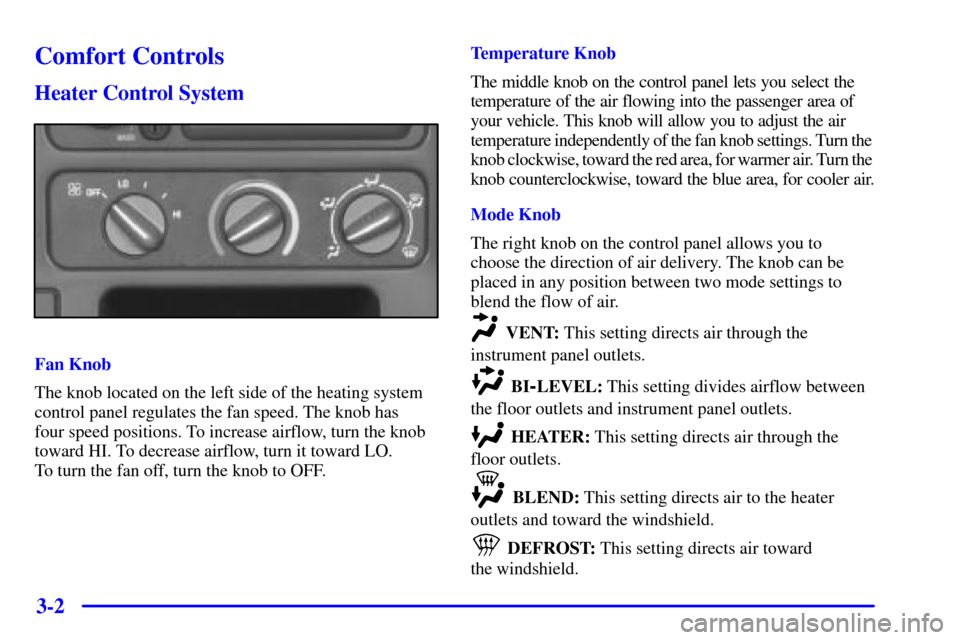
Heater Control System
Fan Knob
The knob located on the left side of the heating system
control panel regulates the fan speed. The knob has
four speed positions. To increase airflow, turn the knob
toward HI. To decrease airflow, turn it toward LO.
To turn the fan off, turn the knob to OFF.Temperature Knob
The middle knob on the control panel lets you select the
temperature of the air flowing into the passenger area of
your vehicle. This knob will allow you to adjust the air
temperature independently of the fan knob settings. Turn the
knob clockwise, toward the red area, for warmer air. Turn the
knob counterclockwise, toward the blue area, for cooler air.
Mode Knob
The right knob on the control panel allows you to
choose the direction of air delivery. The knob can be
placed in any position between two mode settings to
blend the flow of air.
VENT: This setting directs air through the
instrument panel outlets.
BI-LEVEL: This setting divides airflow between
the floor outlets and instrument panel outlets.
HEATER: This setting directs air through the
floor outlets.
BLEND: This setting directs air to the heater
outlets and toward the windshield.
DEFROST: This setting directs air toward
the windshield.
Page 110 of 321
3-3 Heater and Air Conditioning Control
System (If Equipped)
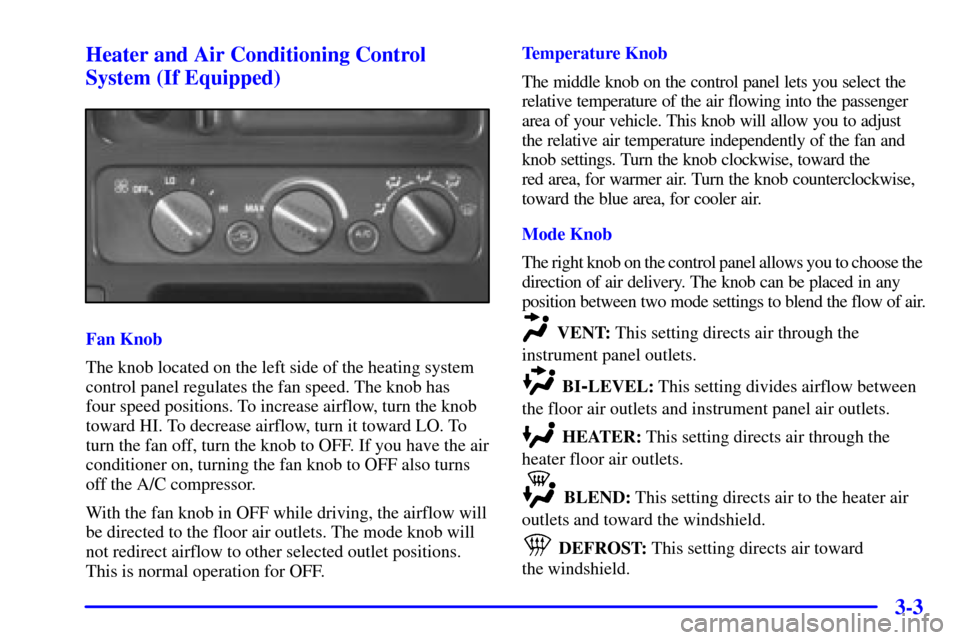
Fan Knob
The knob located on the left side of the heating system
control panel regulates the fan speed. The knob has
four speed positions. To increase airflow, turn the knob
toward HI. To decrease airflow, turn it toward LO. To
turn the fan off, turn the knob to OFF. If you have the air
conditioner on, turning the fan knob to OFF also turns
off the A/C compressor.
With the fan knob in OFF while driving, the airflow will
be directed to the floor air outlets. The mode knob will
not redirect airflow to other selected outlet positions.
This is normal operation for OFF.Temperature Knob
The middle knob on the control panel lets you select the
relative temperature of the air flowing into the passenger
area of your vehicle. This knob will allow you to adjust
the relative air temperature independently of the fan and
knob settings. Turn the knob clockwise, toward the
red area, for warmer air. Turn the knob counterclockwise,
toward the blue area, for cooler air.
Mode Knob
The right knob on the control panel allows you to choose the
direction of air delivery. The knob can be placed in any
position between two mode settings to blend the flow of air. VENT: This setting directs air through the
instrument panel outlets.
BI-LEVEL: This setting divides airflow between
the floor air outlets and instrument panel air outlets.
HEATER: This setting directs air through the
heater floor air outlets.
BLEND: This setting directs air to the heater air
outlets and toward the windshield.
DEFROST: This setting directs air toward
the windshield.
Page 111 of 321

3-4 Air Conditioning
On hot days, open the windows long enough to let hot
air inside escape. This reduces the time it takes for your
vehicle to cool down. Then keep your windows closed
for the air conditioner to work its best.
A/C: Press this button to turn the air conditioning on
and off. The system will cool and dehumidify the air
inside the vehicle when the A/C light is on.
Air conditioning will be automatically disabled when
the outside temperature drops below a level at which air
conditioning is ineffective.
With the A/C on, turn the temperature knob to MAX for
maximum cooling. This setting also puts the system in
the recirculation mode and helps to maximize your air
conditioner's performance and your vehicle's fuel economy.
RECIRCULATION: Pressing the
RECIRCULATION button limits the amount of outside
dust and odors entering your vehicle. This button will be
automatically disabled anytime the mode knob is turned to
BLEND or DEFROST mode. (The recirculation indicator
light will come on even though the recirculation button is
not selected). This setting also cools the air the fastest.
After the vehicle's interior reaches a comfortable
temperature, turn the temperature knob clockwise, to
place the air conditioning system in the normal mode.
Heating
The heater works best if you keep your windows closed
while using it. On cold days, use the HEATER or BI
-LEVEL
setting with the temperature knob in the red area.
If you use the engine coolant heater before starting your
engine in cold weather, 20�F (
-8�C) or lower, your
heating system will produce warmer air faster, to heat
the passenger compartment in cold weather.
The use of an engine coolant heater also reduces the
time it takes for the engine to reach normal operating
temperature, and shortens the time it takes the heater to
reach full output. For more information, see
ªEngine Coolant Heaterº in the Index.
Defogging and Defrosting
On cool, humid days, use BLEND to keep the windshield
and side windows clear. Use DEFROST to remove fog or
ice from the windshield in extremely humid or cold
conditions. Use DEFROST with the temperature knob
toward the red area and the fan control toward HI.
Page 113 of 321

3-6
Ventilation Tips
�Keep the hood and front air inlet free of ice, snow or
any other obstruction (such as leaves). The heater
and defroster will work far better, reducing the
chance of fogging the inside of your windows.
�When you enter a vehicle in cold weather, turn
the fan to HI for a few moments before driving.
This helps clear the intake ducts of snow and
moisture, and reduces the chance of fogging the
inside of your windows.
�Keep the air path under the front seats clear of objects.
This helps air to circulate throughout your vehicle.
�The use of hood air deflectors may adversely affect the
performance of the heating and air conditioning system.Audio Systems
Your audio system has been designed to operate easily
and give years of listening pleasure. You will get the
most enjoyment out of it if you acquaint yourself with it
first. Find out what your audio system can do and how
to operate all its controls, to be sure you're getting the
most out of the advanced engineering that went into it.
Setting the Clock
Press SET. Within five seconds, press and hold the
SEEK right arrow until the correct minute appears on
the display. Press and hold the SEEK left arrow until the
correct hour appears on the display.

