Page 190 of 392

3-22
�� (3): Press and hold this button to quickly reverse
within a track. You will hear sound.
�� (4): Press and hold this button to quickly advance
within a track. You will hear sound.
SIDE (5): Press this button to select the next disc in the
magazine. Each time you press SIDE, the disc number on
the radio display will go to that of the next available CD.
If a CD cannot be played, its number will be skipped
when selecting discs while using the SIDE button.
If your vehicle is equipped with the AM
-FM Stereo
with Compact Disc Player and Automatic Tone Control,
pushbutton (5) is not labeled ªSIDE,º but still functions
as described.
RAND (6): Press this button to enter the random play
mode. RAND will appear on the display. While in this
mode, tracks and discs will be played in random order.
Press the button again to turn off the random feature and
return to normal operation.
RECALL: Press this button to see what track is
currently playing. Press RECALL again within
five seconds to see how long the track has been playing.
EL TM will appear on the display when in elapsed time
mode. When a new track starts to play, the track number
will also appear. Press RECALL a third time and the
time of day will be displayed.SOURCE: Press this button to play a CD if you have a
magazine loaded in the changer and the radio is playing.
To return to the radio while a CD is playing, press
AM
-FM. You can also press this button to switch
between a cassette tape, CD or the CD changer if all
three are loaded.
Personal Choice Radio Controls
(If Equipped)
With this feature, your vehicle will recall the latest radio
settings as adjusted the last time your vehicle was
operated. This feature allows two different drivers to
store and recall their own radio settings for AM and
FM presets, last tuned station, volume, tone and audio
source (radio, cassette or CD). The settings recalled
by the radio are determined by which transmitter
(ª1º or ª2º) was used to enter the vehicle. The number
on the back of the transmitter corresponds to driver 1 or
to driver 2. After the unlock button is pressed on the
transmitter and the ignition is in RUN, the radio settings
will automatically adjust to where they were last set by
the identified driver. The settings can also be changed by
pressing one of the MEMORY buttons (1 or 2) located
on the driver's door until you hear two beeps. When
changes are made, the new settings will be saved for
the driver.
Page 191 of 392

3-23 Theft-Deterrent Feature
THEFTLOCK� is designed to discourage theft of your
radio. It works by using a secret code to disable all radio
functions whenever battery power is removed.
If THEFTLOCK is active, the THEFTLOCK indicator
will flash when the ignition is off.
The THEFTLOCK feature for the radio may be used or
ignored. If ignored, the system plays normally and the
radio is not protected by the feature. If THEFTLOCK is
activated, your radio will not operate if stolen.
When THEFTLOCK is activated, the radio will display
LOC to indicate a locked condition anytime battery
power is removed. If your battery loses power for any
reason, you must unlock the radio with the secret code
before it will operate.
Activating the Theft
-Deterrent Feature
The instructions which follow explain how to enter your
secret code to activate the THEFTLOCK system. It is
recommended that you read through all nine steps
before starting the procedure.
If you allow more than 15 seconds to elapse between
any steps, the radio automatically reverts to time and
you must start the procedure over at Step 4.1. Write down any three or four
-digit number from
000 to 1999 and keep it in a safe place separate from
the vehicle.
2. Turn the ignition to ACCESSORY or RUN.
3. Turn the radio off.
4. Press the ª1º and ª4º buttons together. Hold
them down until
--- shows on the display.
Next you will use the secret code number which
you have written down.
5. Press MIN and 000 will appear on the display.
6. Press MIN again to make the last two digits agree
with your code.
7. Press HRS to make the first one or two digits agree
with your code.
8. Press AM
-FM after you have confirmed that the
code matches the secret code you have written down.
The display will show REP to let you know that you
need to repeat Steps 5 through 7 to confirm your
secret code.
9. Press AM
-FM and this time the display will show
SEC to let you know that your radio is secure.
Page 192 of 392

3-24
Unlocking the Theft-Deterrent Feature After a
Power Loss
Enter your secret code as follows; pause no more than
15 seconds between steps:
1. Turn the ignition on. LOC will appear on the display.
2. Press MIN and 000 will appear on the display.
3. Press MIN again to make the last two digits agree
with your code.
4. Press HRS to make the first one or two digits agree
with your code.
5. Press AM
-FM after you have confirmed that the
code matches the secret code you have written down.
The display will show SEC, indicating the radio is
now operable and secure.
If you enter the wrong code eight times, INOP will
appear on the display. You will have to wait an hour
with the ignition on before you can try again. When
you try again, you will only have three more chances
(eight tries per chance) to enter the correct code before
INOP appears.
If you lose or forget your code, contact your dealer.Disabling the Theft
-Deterrent Feature
Enter your secret code as follows; pause no more than
15 seconds between steps:
1. Turn the ignition to ACCESSORY or RUN.
2. Turn the radio off.
3. Press the ª1º and ª4º buttons together. Hold them
down until SEC shows on the display.
4. Press MIN and 000 will appear on the display.
5. Press MIN again to make the last two digits agree
with your code.
6. Press HRS to make the first one or two digits agree
with your code.
7. Press AM
-FM after you have confirmed that the
code matches the secret code you have written down.
The display will show
---, indicating that the radio
is no longer secured.
If the code entered is incorrect, SEC will appear on the
display. The radio will remain secured until the correct
code is entered.
When battery power is removed and later applied to a
secured radio, the radio won't turn on and LOC will
appear on the display.
To unlock a secured radio see ªUnlocking the Theft
-Deterrent
Feature After a Power Lossº earlier in this section.
Page 193 of 392
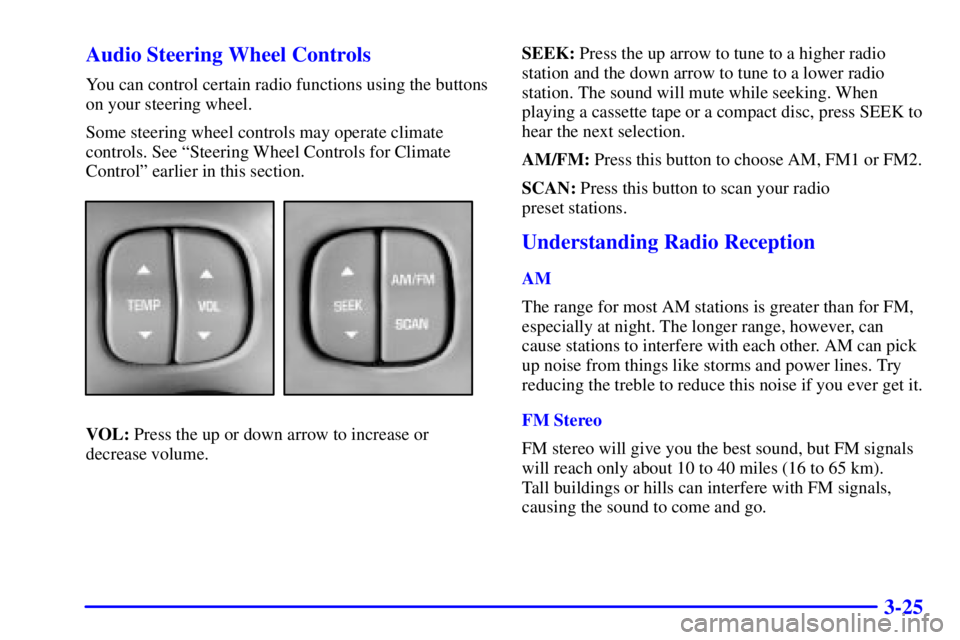
3-25 Audio Steering Wheel Controls
You can control certain radio functions using the buttons
on your steering wheel.
Some steering wheel controls may operate climate
controls. See ªSteering Wheel Controls for Climate
Controlº earlier in this section.
VOL: Press the up or down arrow to increase or
decrease volume.SEEK: Press the up arrow to tune to a higher radio
station and the down arrow to tune to a lower radio
station. The sound will mute while seeking. When
playing a cassette tape or a compact disc, press SEEK to
hear the next selection.
AM/FM: Press this button to choose AM, FM1 or FM2.
SCAN: Press this button to scan your radio
preset stations.
Understanding Radio Reception
AM
The range for most AM stations is greater than for FM,
especially at night. The longer range, however, can
cause stations to interfere with each other. AM can pick
up noise from things like storms and power lines. Try
reducing the treble to reduce this noise if you ever get it.
FM Stereo
FM stereo will give you the best sound, but FM signals
will reach only about 10 to 40 miles (16 to 65 km).
Tall buildings or hills can interfere with FM signals,
causing the sound to come and go.
Page:
< prev 1-8 9-16 17-24