2001 BMW SPORT WAGON wheel
[x] Cancel search: wheelPage 26 of 238
26n
Sports steering wheel
*
The controls integrated in the sports
steering wheel are provided so that you
can operate a number of accessories
quickly and without being distracted
from traffic conditions. You may oper-
ate:
>Selected radio functions as well as
the CD and cassette modes,
>the cruise control,
>selected cellular phone functions and
>the voice recognition
*
In order to operate a system via
the sports steering wheel, the cor-
responding systems must be acti-
vated.<
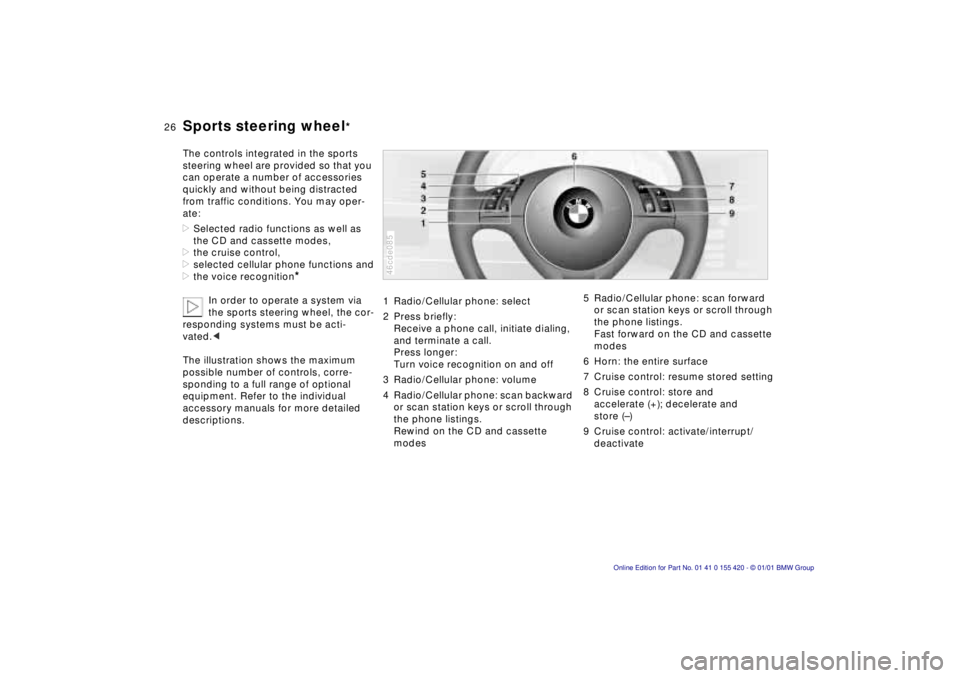
The illustration shows the maximum
possible number of controls, corre-
sponding to a full range of optional
equipment. Refer to the individual
accessory manuals for more detailed
descriptions.
1 Radio/Cellular phone: select
2 Press briefly:
Receive a phone call, initiate dialing,
and terminate a call.
Press longer:
Turn voice recognition on and off
3 Radio/Cellular phone: volume
4 Radio/Cellular phone: scan backward
or scan station keys or scroll through
the phone listings.
Rewind on the CD and cassette
modes46cde085
5 Radio/Cellular phone: scan forward
or scan station keys or scroll through
the phone listings.
Fast forward on the CD and cassette
modes
6 Horn: the entire surface
7 Cruise control: resume stored setting
8 Cruise control: store and
accelerate (+); decelerate and
store (–)
9 Cruise control: activate/interrupt/
deactivate
Page 34 of 238
34n
Locks and security systems:
Keys 36
Electronic vehicle immobilizer 37
Central locking system 38
Opening and closing –
from the outside 38
With the key 38
With the remote control 38
Opening and closing – from the inside 42
Luggage compartment lid/ Tailgate 43
Rear window 44
Luggage compartment 46
Alarm system 47
Electric power windows 49
Sliding/Tilt sunroof 50
Adjustments:
Seats 52
Steering wheel 56
Mirrors 56
Seat, mirror and steering wheel memory 58
Car Memory, Key Memory 60
Passenger safety systems:
Safety belts 61
Airbags 62
Transporting children safely 66Driving:
Steering/Ignition lock
68
Starting the engine 68
Switching off the engine 69
Parking brake 70
Manual transmission 70
Automatic transmission 72
Automatic transmission with Steptronic 75
Indicator/Headlamp flasher 78
Wiper/Washer system 78
Rear window defroster 80
Cruise control 81
Everything under control:
Odometer, outside temperature display 83
Tachometer 84
Energy control 84
Fuel gauge 84
Coolant temperature gauge 85
Service Interval Display 85
Check Control 86
Computer 89
Multi-information display (MID) 91
Digital clock in the MID 92
Computer in the MID 95
Page 35 of 238
IndexDataTechnologyRepairsCar careControlsOverview
Overview
Controls and features
Operation, care
and maintenance
Owner service procedures
Technical data
Index Advanced technology
35n
Technology for safety and
driving convenience:
Park Distance Control
(PDC)100
Automatic Stability Control plus
Traction (ASC+T)/Dynamic
Stability Control (DSC)102
Tire Pressure Control (RDC)103
Lamps:
Parking lamps/Low beams105
Instrument lighting105
High beams/Parking lamps106
Fog lamps106
Interior lamps106
Reading lamps107
Controlling the climate for
pleasant driving:
Air conditioner108
Automatic climate control114
Seat heating119
Steering wheel heating120
Roller sun blind120
Independent ventilation
system120Cabin convenience:
BMW Universal Transmitter121
Glove compartment124
Storage facilities124
Cellular phone125
Beverage holder 125
Ashtray, front126
Cigarette lighter126
Ashtray, rear127
Loading and transporting
cargo:
Through-loading system128
Ski bag129
sport wagon:
Luggage compartment132
Roll-up cover132
Partition net132
Storage areas in the luggage
compartment133
Cargo loading136
Roof-mounted luggage rack137
Page 47 of 238
IndexDataTechnologyRepairsCar careControlsOverview
47n
Alarm systemThe conceptThe vehicle alarm system responds:
>When a door, the hood or the lug-
gage compartment lid/tailgate is
opened.
>To movement inside the vehicle
(interior motion sensor).
>To variations in the vehicle tilt sensor
such as occur during attempts to
steal the wheels or tow the vehicle.
>To interruption of battery voltage.
The system responds to unauthorized
vehicle entry and attempted theft by
simultaneously activating the following:
>Sounding an acoustical alarm for
30 seconds.
>The hazard warning flashers are
activated for approx. five minutes.
>The high beams flash on and off in
the same rhythm.
To arm and disarm the
alarm systemWhen the vehicle is locked or unlocked
with the key or the remote control, the
alarm system is also simultaneously
armed or disarmed.
The interior motion sensor is activated
approx. 30 seconds after you have fin-
ished locking the car.
The system indicates that it has been
correctly armed by switching on the
hazard flashers for a single cycle and by
emitting an acoustical signal.
You can have different acknowl-
edgment signals set to confirm
arming and disarming.<
When the system is armed, you can still
gain access to the luggage compart-
ment lid/tailgate by pressing button 3
on the remote control (refer to page 41).
When you close the luggage compart-
ment lid/tailgate, it locks again.
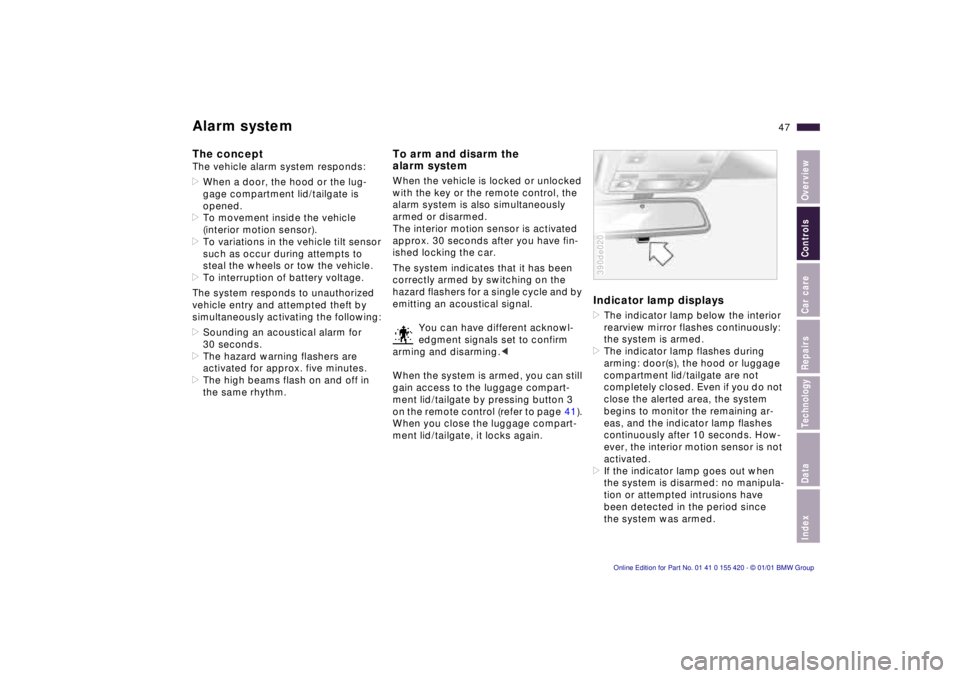
Indicator lamp displays>The indicator lamp below the interior
rearview mirror flashes continuously:
the system is armed.
>The indicator lamp flashes during
arming: door(s), the hood or luggage
compartment lid/tailgate are not
completely closed. Even if you do not
close the alerted area, the system
begins to monitor the remaining ar-
eas, and the indicator lamp flashes
continuously after 10 seconds. How-
ever, the interior motion sensor is not
activated.
>If the indicator lamp goes out when
the system is disarmed: no manipula-
tion or attempted intrusions have
been detected in the period since
the system was armed.390de020
Page 52 of 238
52n
For maximum safety, please comply
with the following instructions when ad-
justing a seat:
Never try to adjust your seat while
operating the vehicle. The seat
could respond with unexpected move-
ment, and the ensuing loss of vehicle
control could lead to an accident.
Wear the safety belt firmly against your
body at all times. In the event of a fron-
tal impact, a loose lap belt could slide
over your hips, leading to abdominal
injury. In addition, the safety belt's
restraint effectiveness is reduced if the
belt is worn loosely.
Never ride with the backrest reclined to
an extreme horizontal angle (especially
important for front passengers to
remember). Keep the backrest relatively
upright to minimize the risk of "sliding
under" the safety belt and sustaining
injury in an accident.
Do not slide the seats to the rear
when the vehicle is at an extreme angle
(on garage ramps or steep slopes, for
instance), to prevent the shoulder
strap's automatic height adjustment
mechanism from disengaging.<
Correct sitting postureTo reduce strain on the spinal column,
sit all the way back in the seat and rest
your back fully against the backrest.
The ideal sitting posture is achieved
with your head extending from your
spine in a straight line.
For long-distance driving, you may wish
to increase the backrest tilt-angle
slightly to reduce muscular tension.
Please remember that you should
always remain able to grasp the entire
periphery of the steering wheel without
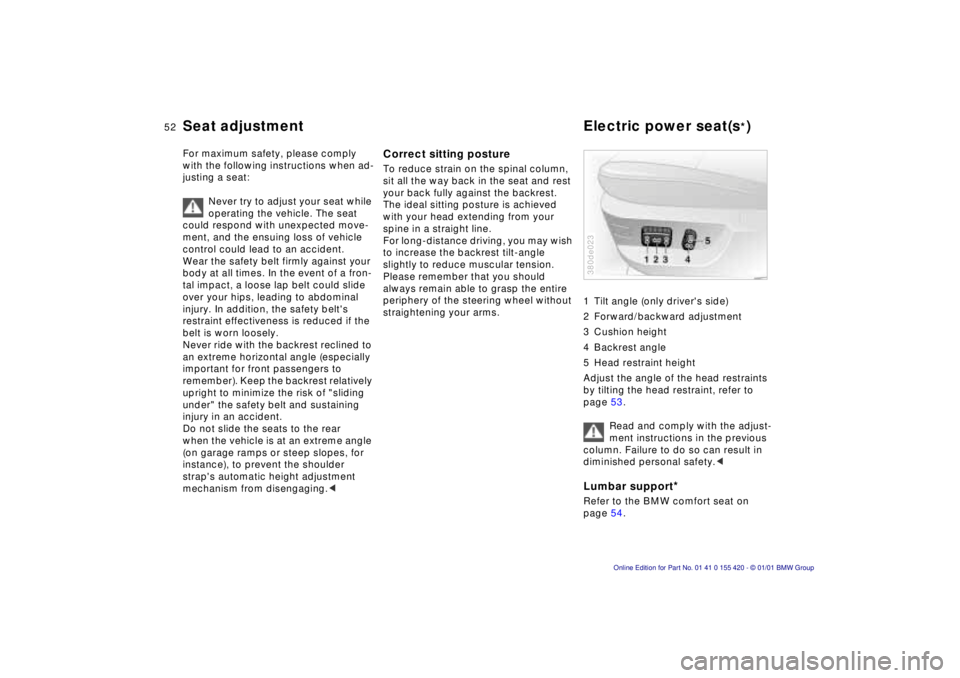
straightening your arms.1 Tilt angle (only driver's side)
2 Forward/backward adjustment
3 Cushion height
4 Backrest angle
5 Head restraint height
Adjust the angle of the head restraints
by tilting the head restraint, refer to
page 53.
Read and comply with the adjust-
ment instructions in the previous
column. Failure to do so can result in
diminished personal safety.<
Lumbar support
*
Refer to the BMW comfort seat on
page 54.380de023
Seat adjustment Electric power seat(s
*)
Page 56 of 238
56n
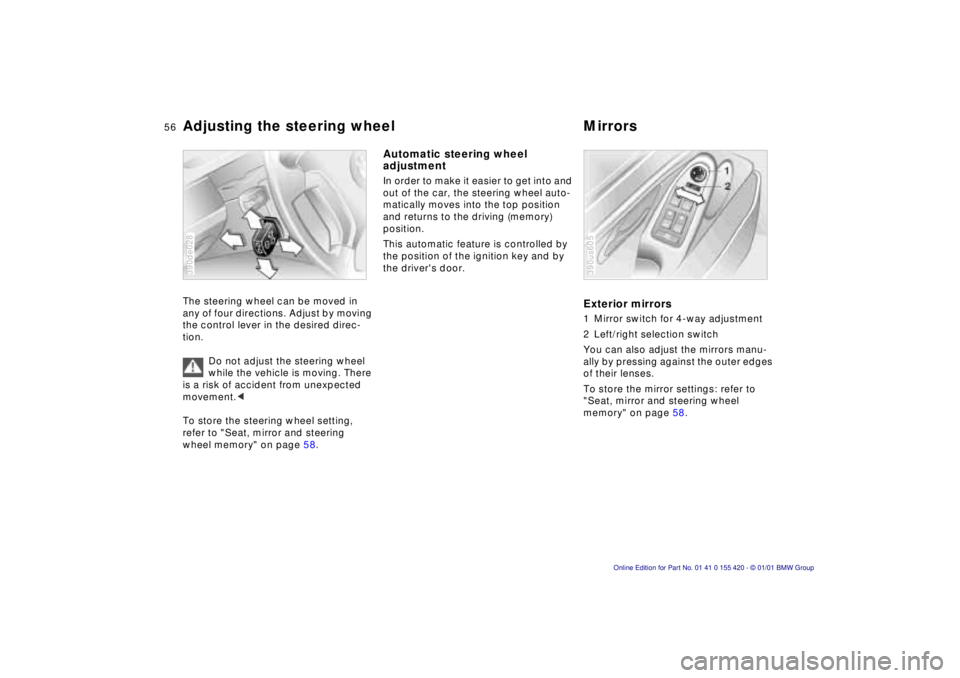
Adjusting the steering wheel MirrorsThe steering wheel can be moved in
any of four directions. Adjust by moving
the control lever in the desired direc-
tion.
Do not adjust the steering wheel
while the vehicle is moving. There
is a risk of accident from unexpected
movement.<
To store the steering wheel setting,
refer to "Seat, mirror and steering
wheel memory" on page 58.390de028
Automatic steering wheel
adjustment In order to make it easier to get into and
out of the car, the steering wheel auto-
matically moves into the top position
and returns to the driving (memory)
position.
This automatic feature is controlled by
the position of the ignition key and by
the driver's door.
Exterior mirrors1 Mirror switch for 4-way adjustment
2 Left/right selection switch
You can also adjust the mirrors manu-
ally by pressing against the outer edges
of their lenses.
To store the mirror settings: refer to
"Seat, mirror and steering wheel
memory" on page 58.390us605
Page 58 of 238
58n
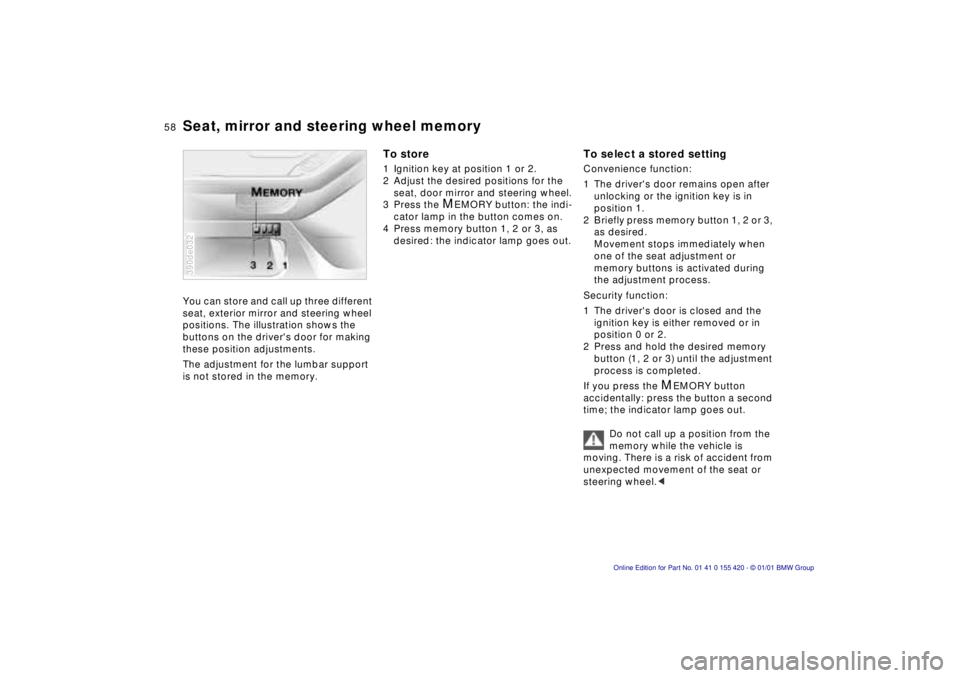
Seat, mirror and steering wheel memoryYou can store and call up three different
seat, exterior mirror and steering wheel
positions. The illustration shows the
buttons on the driver's door for making
these position adjustments.
The adjustment for the lumbar support
is not stored in the memory.390de032
To store1 Ignition key at position 1 or 2.
2 Adjust the desired positions for the
seat, door mirror and steering wheel.
3 Press the
M
EMORY button: the indi-
cator lamp in the button comes on.
4 Press memory button 1, 2 or 3, as
desired: the indicator lamp goes out.
To select a stored settingConvenience function:
1 The driver's door remains open after
unlocking or the ignition key is in
position 1.
2 Briefly press memory button 1, 2 or 3,
as desired.
Movement stops immediately when
one of the seat adjustment or
memory buttons is activated during
the adjustment process.
Security function:
1 The driver's door is closed and the
ignition key is either removed or in
position 0 or 2.
2 Press and hold the desired memory
button (1, 2 or 3) until the adjustment
process is completed.
If you press the
M
EMORY button
accidentally: press the button a second
time; the indicator lamp goes out.
Do not call up a position from the
memory while the vehicle is
moving. There is a risk of accident from
unexpected movement of the seat or
steering wheel.<
Page 59 of 238
IndexDataTechnologyRepairsCar careControlsOverview
59n
Seat, mirror and steering wheel memoryPassenger side exterior mirror tilt
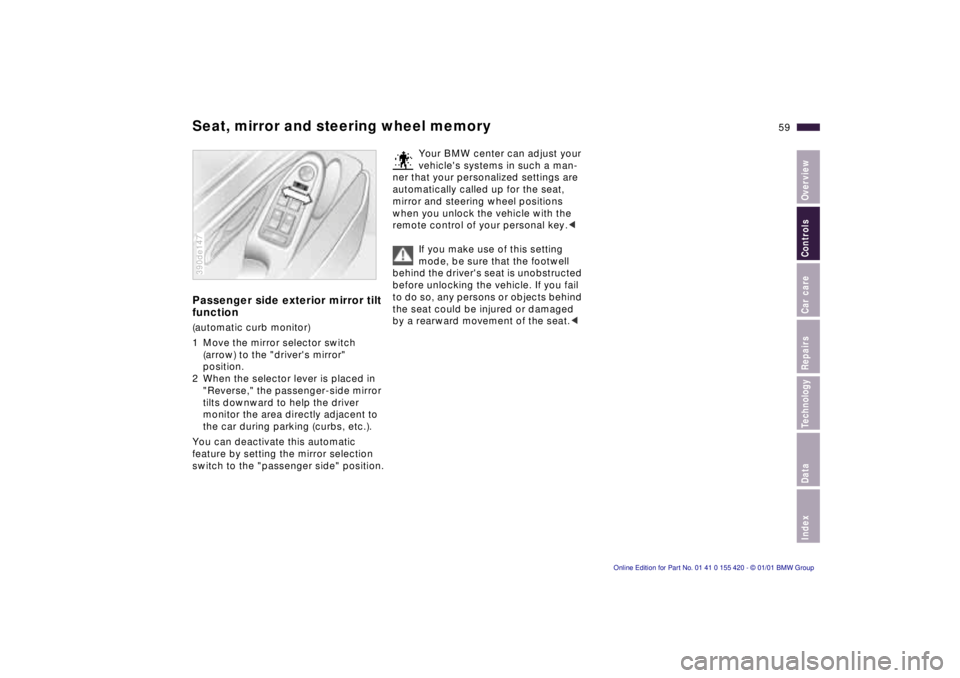
function(automatic curb monitor)
1 Move the mirror selector switch
(arrow) to the "driver's mirror"
position.
2 When the selector lever is placed in
"Reverse," the passenger-side mirror
tilts downward to help the driver
monitor the area directly adjacent to
the car during parking (curbs, etc.).
You can deactivate this automatic
feature by setting the mirror selection
switch to the "passenger side" position.390de147
Your BMW center can adjust your
vehicle's systems in such a man-
ner that your personalized settings are
automatically called up for the seat,
mirror and steering wheel positions
when you unlock the vehicle with the
remote control of your personal key.<
If you make use of this setting
mode, be sure that the footwell
behind the driver's seat is unobstructed
before unlocking the vehicle. If you fail
to do so, any persons or objects behind
the seat could be injured or damaged
by a rearward movement of the seat.<