Page 66 of 203
66n
Manual transmission Press the clutch pedal all the way down
each time you shift, pressing the
manual-shift gear lever into its proper
end position.
Depress the clutch when starting the
vehicle, too, otherwise, lockout will
prevent the engine from starting if the
clutch is not depressed.
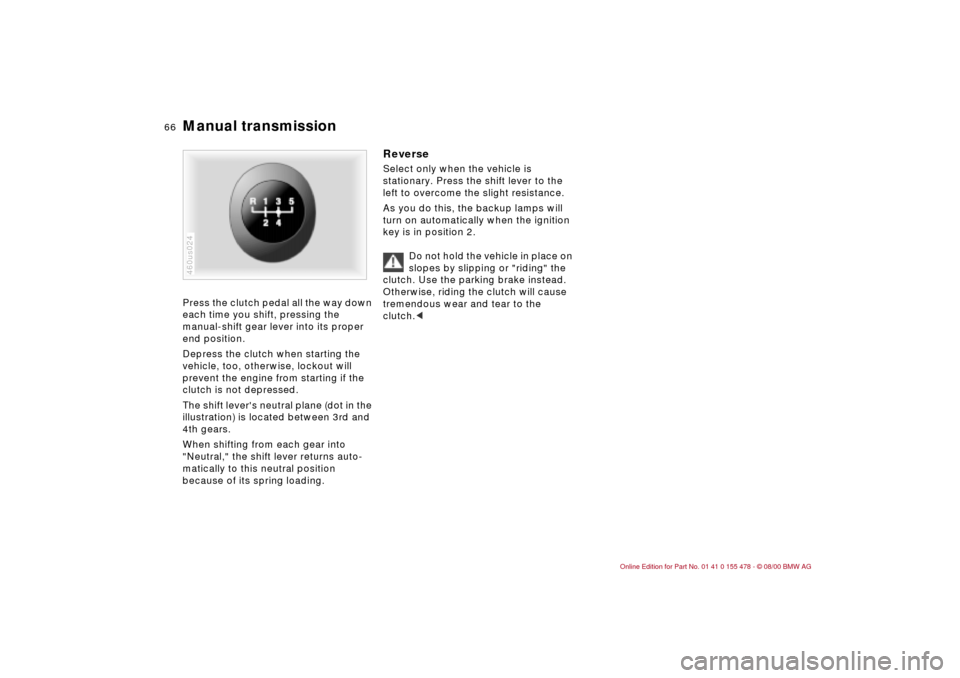
The shift lever's neutral plane (dot in the
illustration) is located between 3rd and
4th gears.
When shifting from each gear into
"Neutral," the shift lever returns auto-
matically to this neutral position
because of its spring loading.460us024
Reverse Select only when the vehicle is
stationary. Press the shift lever to the
left to overcome the slight resistance.
As you do this, the backup lamps will
turn on automatically when the ignition
key is in position 2.
Do not hold the vehicle in place on
slopes by slipping or "riding" the
clutch. Use the parking brake instead.
Otherwise, riding the clutch will cause
tremendous wear and tear to the
clutch.<
Page 69 of 203

69n
IndexDataTechnologyRepairsCar careControlsOverview
Automatic transmission with Steptronic
*
In the following situations, the Step-
tronic "thinks" for you in the manual
mode:
>In order to prevent the engine from
overrevving, the transmission shifts
automatically to the next higher gear
just before the engine speed cutoff
point.
>If you do not do anything to inter-
vene, it will automatically downshift
at lower speeds.
>In the kickdown mode, the transmis-
sion shifts down to the lowest gear
which is possible, depending on the
engine speed.
>Depending on the situation Ñ when
driving in adverse winter conditions,
for example Ñ you may also start out
in 2nd or 3rd gear.
Possible displays
P R N D SD M1 M2 M3 M4 M5
Electronic transmission control
module
If the indicator lamp comes on,
there is a malfunction in the
transmission system.
46cus005
Bring the vehicle to a stop. Move the
transmission selector lever to "P." Set
the parking brake and turn the engine
off (ignition key to position 0).
Wait a few seconds, then start the
engine.
If the indicator lamp goes out after a
few seconds, normal transmission
performance has been restored. You
may continue to drive as usual.
If the indicator lamp does not go out,
you can place the selector lever in all
positions. However, the vehicle will now
only operate in 3rd and 4th gear.
If this happens, avoid extreme engine
loads and consult the nearest BMW
center.
Do not work in the engine
compartment when a drive gear
(forward or reverse) is engaged. If you
do this, the vehicle could move.<
For towing or jump-starting, refer to the
information beginning on page 168.
Page 71 of 203

71n
IndexDataTechnologyRepairsCar careControlsOverview
Washer/Wiper system1 Intermittent mode or rain
sensor
*
Intermittent mode:
You can use rotary dial 6 to select from
four wipe intervals.
In addition, the wipe interval is varied
automatically depending on road
speed.
Rain sensor:
The rain sensor is positioned on the
windshield, directly ahead of the inte-
rior rearview mirror. When the rain
sensor is activated, the windshield
wiper is controlled automatically,
depending on the degree of wetness on
the windshield (in both snow and rain).
You do not have to be concerned with
switching the windshield wiper on or off
or adjusting the wipe interval between 46cde095
intermittent and full wipe. Instead, you
can concentrate fully on the traffic
conditions. This is especially important
under adverse weather conditions.
To activate the rain sensor:
From ignition key position 1 and up, you
can move the lever to position 1. The
wipers travel once across the wind-
shield, regardless of the weather.
You can leave the lever permanently in
position 1. It is then only necessary to
activate the rain sensor from ignition
key position 1 and up. To do this,
>turn rotary dial 6 briefly or
>use cleaning windshield 5.
To adjust the sensitivity of the rain
sensor:
Turn rotary dial 6.
Deactivating the rain sensor:
Put lever in position 0.
Turn the rain sensor off when
passing through an automatic car
wash. Failure to do so could result in
damage caused by undesired wiper
activation.<
2 Normal wiper speedWhen the vehicle is stationary, the
wipers switch automatically to intermit-
tent wipe (not on vehicles with rain
sensor).3 Fast wiper speedWhen the vehicle is stationary, the
wipers operate at normal speed (not
on vehicles with rain sensor).5 Cleaning windshieldThe system sprays washer fluid against
the windshield and activates the wipers
for a brief period.
If you pull the lever only briefly, the
system sprays washer fluid onto the
windshield without activating the
wipers.
Page 72 of 203

72n
Washer/Wiper system Rear window defroster Cleaning headlamps
*
When the vehicle's lighting system is
switched on, the headlamps will also be
cleaned every fifth timecleaning wind-
shield is activated.
Do not use the washers if there
is any danger that the fluid will
freeze on the windshield. If you do so,
your vision could be obscured. Use an
antifreeze agent. Refer to page 134.
Do not use the washers if the reservoir
is empty, otherwise, the washer pump
could be damaged.
*
automatically when the ignition key is in
position 2.The illustration shows the button set-up
for vehicles equipped with automatic
climate control. For other layouts, refer
to page 90.To activatePress the button: as long as the indi-
cator lamp remains on, the rear window
defroster continues at high output
(rapid thaw).
After the indicator lamp goes out, the
defroster continues operating at
reduced power for a limited period
before deactivating automatically. 462us036
To deactivatePress the button if the indicator lamp is
on.
Page 73 of 203
73n
IndexDataTechnologyRepairsCar careControlsOverview
Cruise controlStarting at about 20 mph (30 km/h), you
can maintain and store any vehicle
speed that you specify.
Do not use cruise control on
twisting roads, when high traffic
density prevents driving at a constant
speed, when the road surface is slick
(snow, rain, ice), or when the road
surface is loose (rocks, sand).
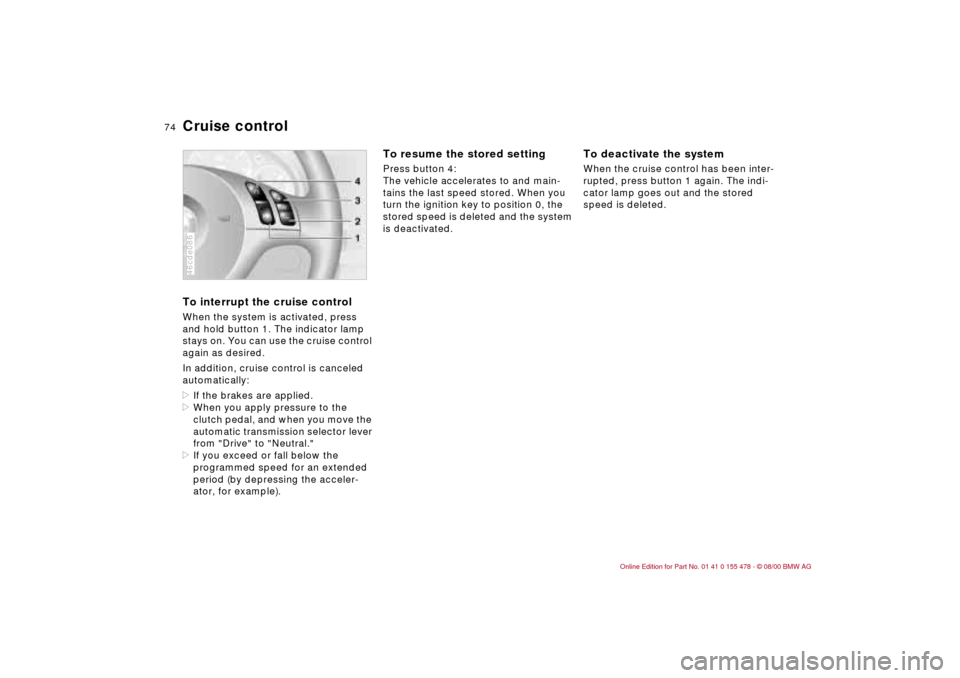
Press button 1. The indicator lamp in
the instrument cluster comes on. You
can now use the cruise control.46cde086
To store and maintain speed or to
acceleratePress button 3 briefly:
The system registers and maintains the
current vehicle speed. Every time you
tap the button, the speed increases by
approx. 0.6 mph (1 km/h).
Press and hold button 3:
The vehicle accelerates without pres-
sure on the accelerator pedal. When
you release the button, the system
registers and maintains the current
speed.
If, on a downhill gradient, the
engine braking effect is not
sufficient, the set cruise control speed
may be exceeded. Speed can drop on
uphill grades if the engine output is
insufficient.<
To deceleratePress button 2 briefly:
Whenever cruise control is active, your
speed will reduce by approx. 0.6 mph
(1 km/h) each time you tap the button.
Press and hold button 2:
With the cruise control active, the
system automatically reduces the
throttle opening to slow the vehicle.
When you release the button, the
system registers and maintains the
current speed.
Page 74 of 203
74n
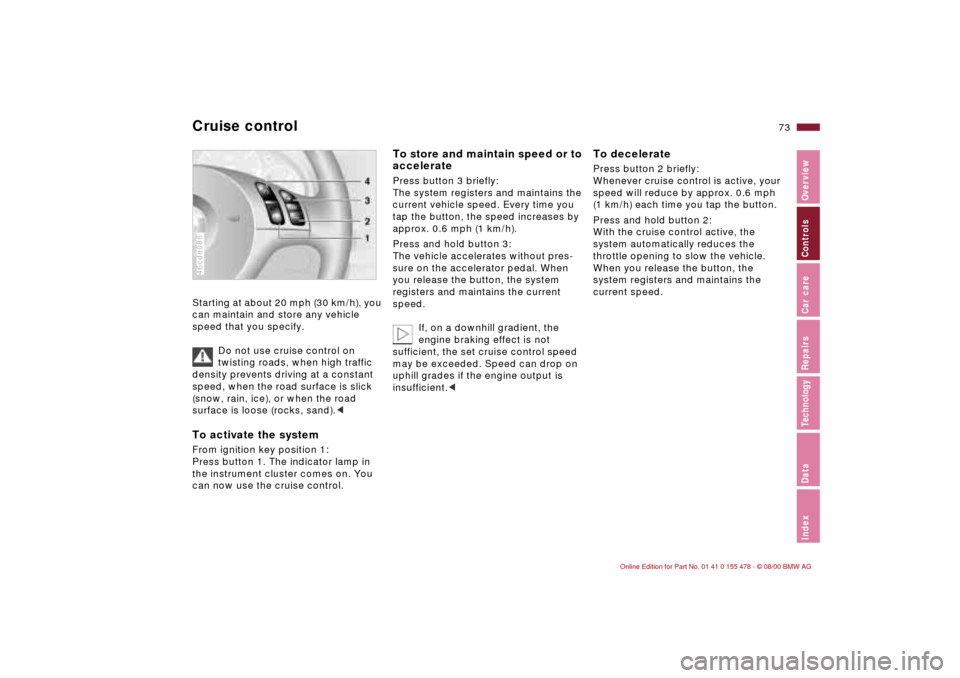
Cruise controlTo interrupt the cruise control When the system is activated, press
and hold button 1. The indicator lamp
stays on. You can use the cruise control
again as desired.
In addition, cruise control is canceled
automatically:
>If the brakes are applied.
>When you apply pressure to the
clutch pedal, and when you move the
automatic transmission selector lever
from "Drive" to "Neutral."
>If you exceed or fall below the
programmed speed for an extended
period (by depressing the acceler-
ator, for example).46cde086
To resume the stored settingPress button 4:
The vehicle accelerates to and main-
tains the last speed stored. When you
turn the ignition key to position 0, the
stored speed is deleted and the system
is deactivated.
To deactivate the system When the cruise control has been inter-
rupted, press button 1 again. The indi-
cator lamp goes out and the stored
speed is deleted.
Page 75 of 203
75n
IndexDataTechnologyRepairsCar careControlsOverview
1 Odometer You can activate the displays shown in
the illustration with the ignition key in
position 0 by pressing the button in the
instrument cluster (arrow).2 Trip odometerTo reset the trip odometer to zero,
press the button (arrow) with the igni-
tion key in position 1 and up.462us005
Avoid engine speeds in the red warning
zone of the gauge.
To protect the engine, the fuel supply is
automatically interrupted in this zone;
you will notice a loss of power.462us017
Indicates current fuel consumption in
mpg (in l/100 km on Canadian vehicles).
You can check your current driving
style to see whether it is conducive to
economy and minimum exhaust emis-
sions.
When the vehicle is stationary, the
display goes to "Maximum" (zero on
Canadian vehicles).462us018
Odometer Tachometer Energy Control
Page 76 of 203

76n
Fuel gauge Temperature gauge Service Interval Display When you switch on the ignition, the
indicator lamp comes on briefly to
confirm that the system is operational.
Once the indicator lamp stays on
continuously, there are still approx.
2 gallons (8 liters) of fuel remaining in
the fuel tank.
For fuel tank capacity, refer to page 187.
If the tilt of the vehicle varies (extended
driving in mountainous areas, for
example), there may be slight fluctua-
tions of the needle.
Fill the fuel tank well before it is
empty. Driving to the last drop of
fuel can result in damage to the engine
and/or the catalytic converter.<462us020
BlueThe engine is still cold. Drive at
moderate engine and vehicle speeds.RedWhen you switch on the ignition, the
indicator lamp comes on briefly to
confirm that the system is operational.
If the lamp comes on while operating
the vehicle: the engine is overheated.
Stop and switch the engine off immedi-
ately and allow it to cool down.Between the blue and red zonesNormal operating range. It is not
unusual for the needle to rise as far as
the edge of the red zone in response to
high outside temperatures or severe
operating conditions. Checking coolant
level: refer to page 137.460de082
Remaining distance for serviceThe displays shown in the illustration
appear for a few seconds when the
ignition key is in position 1 or after the
engine is started.
The next service due appears with the
message OILSERVICE or INSPECTION,
together with the distance remaining
before the next scheduled service.
The computer bases its calculations of
the remaining distance on the previous
driving style.
A flashing message and a "Ð" in front of
the number mean that the service
interval has already been exceeded by
the distance shown on the display.
Please contact your BMW center for an
appointment.46cus006