2000 VOLVO C70 light
[x] Cancel search: lightPage 50 of 89

Washing the car
· The car should be washed at regular intervals since dirt, dust, insects and tar spots adhere to the paint and may cause
damage.
NOTE: It is particularly important to wash the car frequently in the wintertime to prevent corrosion, when salt has
been used on the roads.
· When washing the car, do not expose it to direct sunlight. Use lukewarm water to soften the dirt before you wash
with a sponge, and plenty of water, to avoid scratching.
· Bird droppings: Remove from paintwork as soon as possible. Otherwise the finish may be permanently damaged.
· A detergent can be used to facilitate the softening of dirt and oil.
· A water-soluble grease solvent may be used in cases of sticky dirt. However, use a wash place equipped with a
drainage separator.
· Dry the car with a clean chamois and remember to clean the drain holes in the doors and rocker panels *.
· The power radio antenna must be dried after washing.
· Tar spots can be removed with kerosene or tar remover after the car has been washed.
· A stiff-bristle brush and lukewarm soapy water can be used to clean the wiper blades. Frequent cleaning improves
visibility considerably.
· Wash off the dirt from the underside (wheel housings, fenders, etc.).
· In areas of high industrial fallout, more frequent washing is recommended.
CAUTION: During high pressure washing, the spray mouthpiece must never be closer to the vehicle than 13" (30
cm). Do not spray into the locks.
· When washing or steam cleaning the engine, avoid spraying water or steam directly on the electrical components or
toward the rear side of the engine.
· After cleaning the engine, the spark plug wells should be inspected for water and blown dry if necessary.
Suitable detergents
Special car washing detergents should be used. A suitable mixture is about 2.5 fl. oz. (8.5 cl) of detergent to 2.6 US
gal. (10 liters) of warm water. After washing with a detergent the car should be well rinsed with clean water.
WARNING!
· When the car is driven immediately after being washed, apply the brakes several times in order to remove any
moisture from the brake linings.
· Engine cleaning agents should not be used when the engine is warm. This constitutes a fire risk.
ProCarManuals.com
Page 57 of 89

Brakes
Inspect brake pads, replace components as necessary I II II I I I II I
Brake fluid level
2 - check
I I I I I I
Steering/suspension
Tires
3, check pressure, wear and condition I
I II II I I I II I
Check power steering fluid level I I I I I
Body
Power antenna (clean) L L L L L L
Trunk/hood, hinges and latches L L L
Cabin air filter (see page 111)
R R R R R R
1) Replace at 105,000 miles (168,000 km)
2) Brake fluid should be changed at owner request every second year or 30,000 miles (48,000 km). The fluid
should be replaced once a year or every 15,000 miles (24,000 km) when driving under extremely hard
conditions (mountain driving, etc.).
3) Rotate tires at owner request.
The following items should be checked weekly by the driver (it takes only a few minutes):
Engine oil level, brake fluid level, radiator coolant level, operation of all lights, horns, windshield wipers, tire
pressure (all five tires), windshield washer fluid level
The following should also be carried out at regular intervals:
Washing (check all drain holes), polishing, cleaning
pg. 110 Servicing
Hoisting the car
If a garage jack is used to lift the car, the two jack attachments points should be used. They are specially reinforced to
bear the weight of the car. A garage jack can also be placed under the front of the engine support frame and under the
reinforced plate in the spare wheel well. Take care not to damage the splash guard under the engine. Ensure that the
jack is positioned so that the car cannot slide off it. Always use axle stands or similar structures.
If a twopost hoist is used to lift the car, the front lift arm pads should be positioned under the rear engine frame
ProCarManuals.com
Page 66 of 89

Generator
Rated output 1400 W
Max. current 100 A
Bulbs
BulbUS no.Power SocketNo/bulbs
Headlights
High beam H755W -2
Low beam H755W -2
Front parking lights/turn signals 3357NA30/7W/30/2.2cp W 2.5 x 15q2
Turn signals, rear -21W BAU 152
Side direction indicators -5W W 2.1x9.5 d2
Tail lights 675W/4cp BA 15 s4
Brake lights 115621W/32cp BA 15 s2
Backup lights 115621W/32cp BA 15 s2
Rear fog light 115621W/32cp BA 15 s1
Front fog lights H155 W P14.5s2
License plate light -5 W W 2.1x9.5d2
Door open warning light -3 W W 2.1x9.5d4
Door step courtesy lights -5W W 2.1x9.5d2
Trunk light -10 W SV 8.51
Glove compartment light -2 W BA 9s1
Vanity mirror lights -1.2 W -2
Instrument lighting -3 W W 2.1x9.5d3
Illumination, control panel -1.2 W W 2x4.6 d
gear selector (auto matic trans.) -1.2 W W 2x4.6d1
rear ashtray -1.2 W W 2x4.6d1
Instrument warning/indicator lights -1.2 W W 2x4.6d-
Front courtesy lights -5 W BA 9s2
Rear reading lights -5 W BA 9s2
All specifications are subject to change without notice.
pg. 127 Specifications
Dimensions and weights - Volvo C 70
Length 185.8 in. (472 cm)
ProCarManuals.com
Page 72 of 89

Incorrect code
If an incorrect code has been entered "rPt" is displayed. Enter the correct code.
After three unsuccessful coding attempts the set will lock and remain locked for two hours. "OFF" is displayed.
During this waiting period:
· the battery must be connected
· the ignition key must be turned to position I
· the unit must be turned on
Make sure the headlights are turned off to help prevent battery drain (please refer to page 24 for information on turning
the headlights off).
Enter the code again once this time has elapsed.
pg. 132 Radio SC -813
A - On/off switch
Push the button to switch on the radio. Press the button slightly longer to turn the radio off.
B - Volume control
Turn the button clockwise to increase the volume. The volume control is electronic and has no end stop.
C - Waveband selector
The desired waveband is set by pressing one of the waveband selector buttons. The frequency and waveband is shown
on the display.
NOTE: There are two FM wavebands and one AM waveband. This makes it possible to store 2 x 6 FM stations and 6
AM stations in memory.
ProCarManuals.com
Page 76 of 89

2 0 0 0
VOLVO C70
HomeLink® Universal Transceiver (option)
pg. 186 HomeLink® Universal Transceiver (option)
HomeLink® Universal Transceiver
This transceiver allows you to replace 3 hand -held transmitters with a single built-in device which can be installed in
your car on a sun visor or overhead console. This feature "learns" the radio frequency codes of most current
transmitters to operate garage doors, driveway gates, security lighting and home security systems. This transceiver is
powered by your car's electrical system.
NOTE: As a security precaution, the HomeLink® Universal Transceiver is designed to not function if the car has
been locked from the outside .
Programming the transceiver
1. Begin by erasing all 3 factory default channels by holding down the two outside buttons (buttons 1 and 3 in the
illustration above) on the HomeLink® Universal Transceiver until the indicator light on the transceiver begins to flash,
after approximately 20 seconds.
Release the buttons.
2. Hold the end of your hand -held transmitter 2 to 5 in. (5 to 12 cm) away from the HomeLink® surface, keeping the
indicator light in view. For placement questions, please contact HomeLink® at
1-800-355-3515 (Internet: www.HomeLink.jci.com).
3. Using both hands, simultaneously push the hand -held transmitter button and the HomeLink® button to be
programmed. Do not release the buttons until this step has been completed.
The HomeLink® indicator light will begin to flash, first slowly, then rapidly. When the indicator light flashes rapidly
ProCarManuals.com
Page 77 of 89

(indicating that the HomeLink® button has been successfully programmed), both buttons may be released.
The remaining two HomeLink® buttons can be programmed in the same way.
If, after several attempts, you do not successfully program the HomeLink® Universal Transceiver to learn the signal of
the hand -held transmitter, refer to the section "Programming rolling codes" or call the toll-free customer assistance
number: 1-800-355-3515 (Internet: www.HomeLink.jci.com).
WARNING!
· If you use the HomeLink® Universal Transceiver to open a garage door or gate, be sure that no one is near the gate
or door while it is in motion.
· Do not use the HomeLink® Universal Transceiver with any garage door opener that lacks safety "stop" and "reverse"
features as required by federal safety standards. (This includes any garage door opener model manufactured before
April 1, 1982). A garage door opener which cannot "detect" an object, signalling the door to "stop" and "reverse" does
not meet current federal safety standards. Using a garage door opener without these features increases the risk of
serious injury or death. For more information on this matter, call toll-free 1-800-355-3515 (Internet:
www.HomeLink.jci.com).
pg. 187 HomeLink® Universal Transceiver (option)
NOTE - Canadian residents:
During programming, your hand -held transmitter may automatically stop transmitting. To train your hand -held
transmitter, continue to hold the HomeLink® button (see steps 2, 3 under "Programming the transceiver") while you
press and repress ("cycle") your hand -held transmitter button every two seconds until the frequency signal has been
learned. The HomeLink® indicator light will flash slowly and then rapidly to indicate that the HomeLink® button has
been successfully programmed.
Programming rolling codes
Determine, in one of the following ways, if your garage door uses a rolling code system and is manufactured after
1996:
· Refer to the garage door opener's owner's manual for verification.
· The hand -held transmitter appears to program the HomeLink® Universal Transceiver but the transceiver does not
activate the garage door.
· Press the programmed HomeLink® button. The garage door opener has the rolling code feature if the HomeLink®
indicator light flashes rapidly and then glows steadily after approximately 2 seconds.
To train a garage door opener with the rolling code feature , follow these instructions after the transceiver has been
programmed (the aid of a second person may make the training quicker and easier):
1. Locate the training button on the garage door opener motor head unit . The exact location and color of the button
may vary. If you encounter difficulty, refer to the garage door opener owner's manual or call: 1-800-355-3515
(Internet: www.HomeLink.jci.com).
2. Press the "training" button on the garage door opener motor head unit until the "training" light comes on.
3. Firmly press and release the programmed HomeLink® button. Press and release the HomeLink® button a second
time to complete the training process.
ProCarManuals.com
Page 78 of 89

Some garage door openers may require you to do this procedure a third time to complete the training.
The programmed button on your HomeLink® Universal Transceiver should now operate your garage door opener. The
original hand -held transmitter can also be used, if necessary, to operate the garage door.
The remaining two buttons can be programmed in the same way. In the event of any problems in programming the
HomeLink® Universal Transceiver, call 1-800-355-3515 (Internet: www.HomeLink.jci.com).
Operating the HomeLink® Universal Transceiver
Once programmed, the HomeLink® Universal Transceiver can be used in place of hand -held transmitters.
To operate, press the programmed HomeLink® button to activate the garage door, driveway gate, security lighting,
home security system, etc.
The original hand -held transmitter can, of course, be used at any time.
Erasing programmed buttons
Individual buttons cannot be erased. To erase all three programmed buttons:
1. Hold down the two outside buttons on the HomeLink® Universal Transceiver until the indicator light begins to
flash, after approximately 20 seconds.
2. Release both buttons.
The HomeLink® buttons can be reprogrammed using the procedures described on the previous page.
(HomeLink® information is continued on the next page)
pg. 188 HomeLink® Universal Transceiver (option)
Reprogramming a single HomeLink® button
1. Press and hold the desired HomeLink® button. Do not release the button until step 3 has been completed.
2. When the indicator light begins to flash slowly (after approximately 20 seconds), position the hand -held transmitter
2 to 5 in. (5 to 12 cm) away from the HomeLink® surface.
3. Press and hold the hand -held transmitter button.
The HomeLink® indicator light will begin to flash, first slowly then rapidly. When the indicator light flashes rapidly,
release both buttons.
The previously programmed device has now been erased and the new device can be activated by pressing the
HomeLink® button that has just been programmed. This procedure will not affect any other programmed HomeLink®
buttons.
NOTE:
· Retain the original transmitter(s) for future programming procedures (i.e., if you purchase a new car).
· It is also suggested that if you sell your car, the programmed channels on the HomeLink® Universal Transceiver be
erased for security purposes.
ProCarManuals.com
Page 80 of 89
2 0 0 0
VOLVO C70
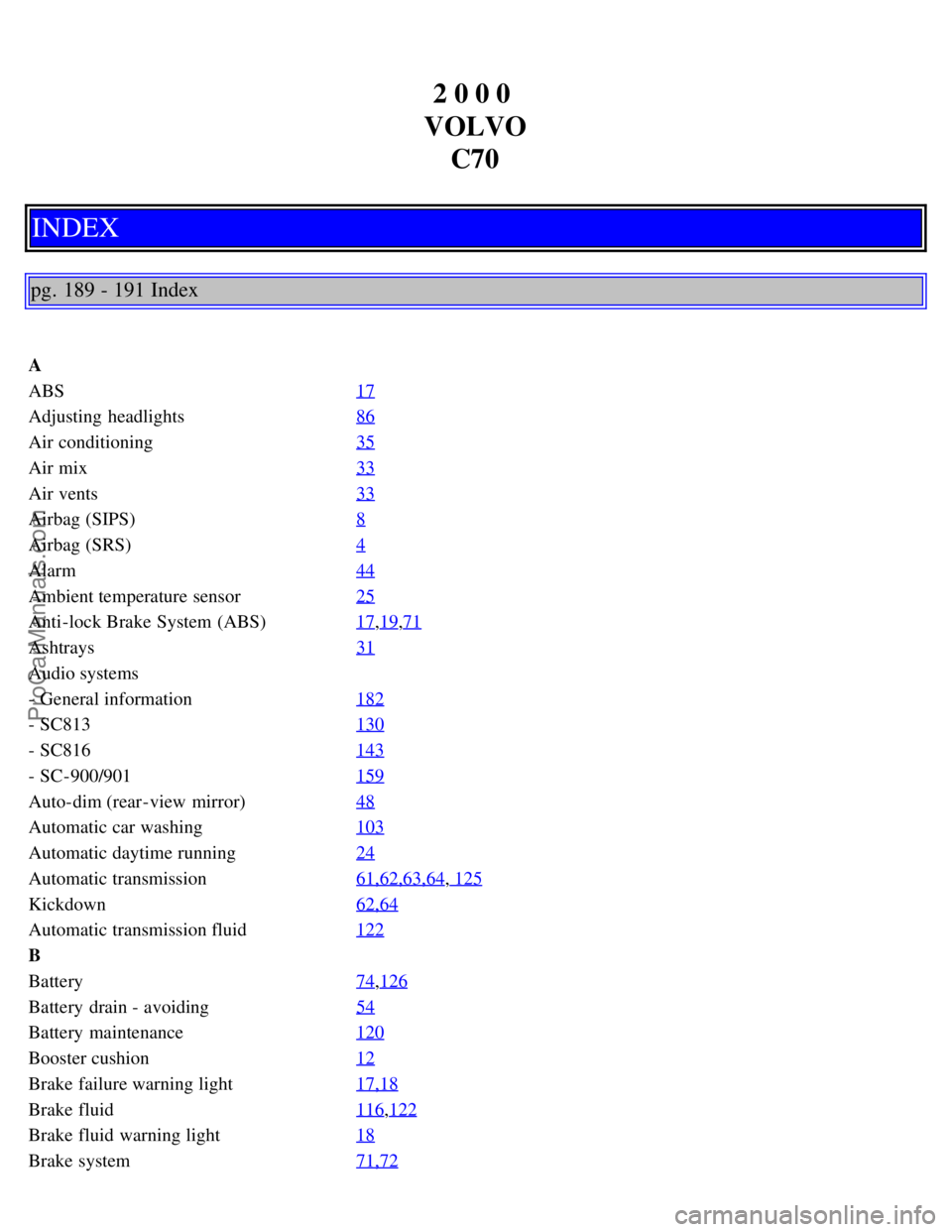
INDEX
pg. 189 - 191 Index
A
ABS 17
Adjusting headlights86
Air conditioning35
Air mix33
Air vents33
Airbag (SIPS)8
Airbag (SRS)4
Alarm44
Ambient temperature sensor25
Anti-lock Brake System (ABS)17,19,71
Ashtrays31
Audio systems
- General information182
- SC813130
- SC816143
- SC-900/901159
Auto-dim (rear -view mirror)48
Automatic car washing103
Automatic daytime running24
Automatic transmission61,62,63,64, 125
Kickdown62,64
Automatic transmission fluid122
B
Battery74
,126
Battery drain - avoiding54
Battery maintenance120
Booster cushion12
Brake failure warning light17,18
Brake fluid116,122
Brake fluid warning light18
Brake system71,72
ProCarManuals.com