Page 141 of 283

TUNDRA (34413U)
141
AM
FadingÐAM broadcasts are reflected by
the upper atmosphereÐespecially at night.
These reflected signals can interfere with
those received directly from the radio sta-
tion, causing the radio station to sound
alternately strong and weak.
Station interferenceÐWhen a reflected sig-
nal and a signal received directly from a
radio station are very nearly the same
frequency, they can interfere with each
other, making it difficult to hear the broad-
cast.
StaticÐAM is easily affected by external
sources of electrical noise, such as high
tension power lines, lightening, or electri-
cal motors. This results in static.
CARING FOR YOUR CASSETTE PLAYER
AND TAPES
For high performance from your cassette
player and tapes:
Clean the tape head and other parts regu-
larly.
�A dirty tape head or tape path can
decrease sound quality and tangle your
cassette tapes. The easiest way to
clean them is by using a cleaning tape.
(A wet type is recommended.)Use high- quality cassettes.
�Low- quality cassette tapes can cause
many problems, including poor sound,
inconsistent playing speed, and
constant auto- reversing. They can also
get stuck or tangled in the cassette
player.
�Do not use a cassette if it has been
damaged or tangled or if its label is
peeling off.
�Do not leave a cassette in the player
if you are not listening to it, especially
if it is hot outside.
�Store cassettes in their cases and out
of direct sunlight.
�Avoid using cassettes with a total play-
ing time longer than 100 minutes (50
minutes per side). The tape used in
these cassettes is thin and could get
stuck or tangled in the cassette player.
CARING FOR YOUR COMPACT DISC
PLAYER AND DISCS
�Use only compact discs labeled as
shown.
�Extremely high temperatures can keep
your compact disc player from working.
On hot days, use the air conditioning
to cool the vehicle interior before you
listen to a disc.
�Bumpy roads or other vibrations may
make your compact disc player skip.
ProCarManuals.com
Page 145 of 283
TUNDRA (34413U)
145
Part 1
OPERATION OF
INSTRUMENTS AND
CONTROLSÐ
Chapter 1- 8
Air conditioning system
�Controls
� Air flow selector settings
� Operating tips
� Instrument panel vents
ProCarManuals.com
Page 146 of 283
TUNDRA (34413U)
146
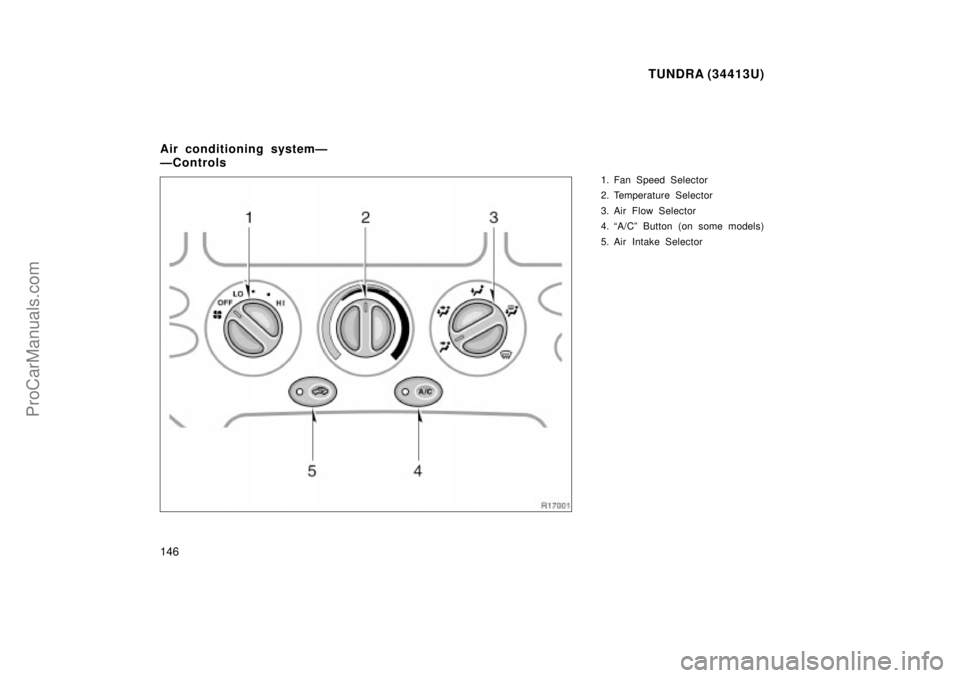
1. Fan Speed Selector
2. Temperature Selector
3. Air Flow Selector
4. A/Cº Button (on some models)
5. Air Intake Selector
Air conditioning systemÐ
ÐControls
ProCarManuals.com
Page 147 of 283
TUNDRA (34413U)
147
Fan speed selector
Turn the knob to adjust the fan speedÐto
the right to increase, to the left to de-
crease.
Temperature selector
Turn the knob to adjust the temperatureÐ
to the right to warm, to the left to cool.
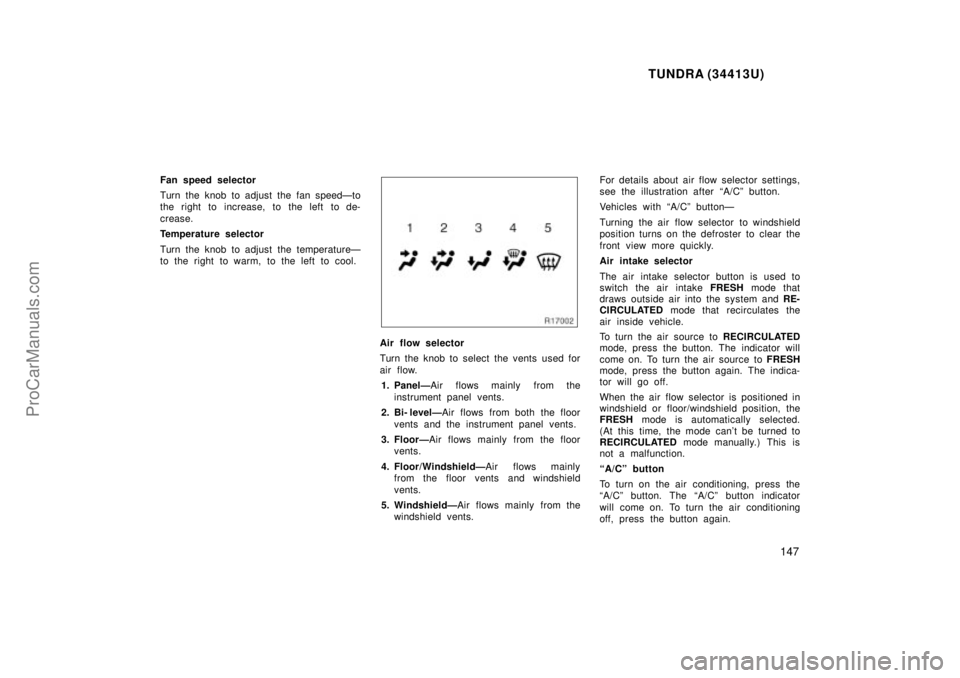
Air flow selector
Turn the knob to select the vents used for
air flow.1. PanelÐ Air flows mainly from the
instrument panel vents.
2. Bi- levelÐ Air flows from both the floor
vents and the instrument panel vents.
3. FloorÐ Air flows mainly from the floor
vents.
4. Floor/WindshieldÐ Air flows mainly
from the floor vents and windshield
vents.
5. WindshieldÐ Air flows mainly from the
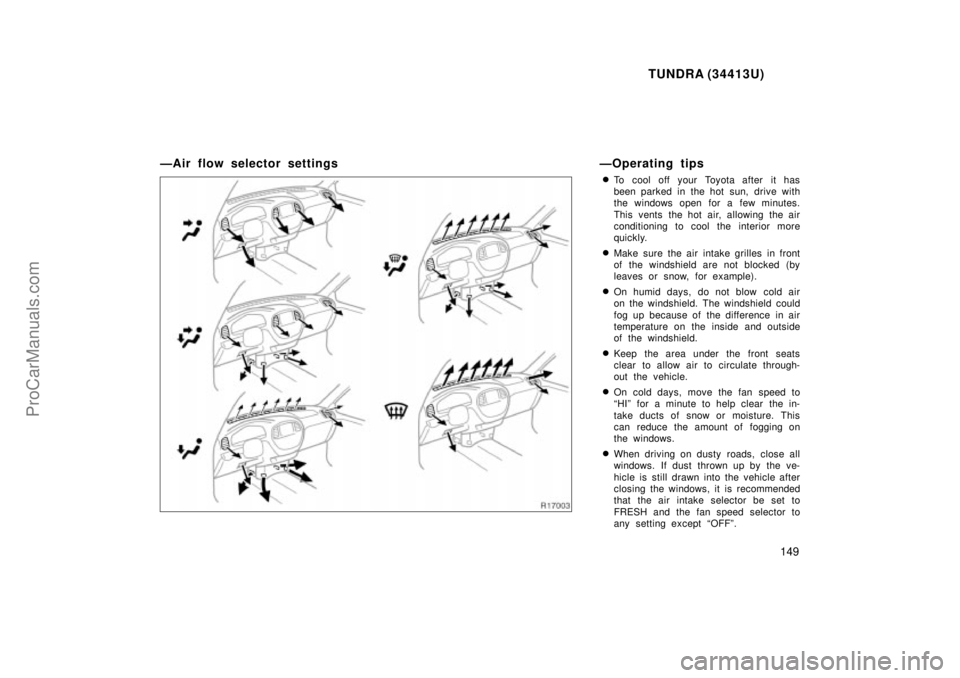
windshield vents. For details about air flow selector settings,
see the illustration after A/Cº button.
Vehicles with A/Cº buttonÐ
Turning the air flow selector to windshield
position turns on the defroster to clear the
front view more quickly.
Air intake selector
The air intake selector button is used to
switch the air intake
FRESH mode that
draws outside air into the system and RE-
CIRCULATED mode that recirculates the
air inside vehicle.
To turn the air source to RECIRCULATED
mode, press the button. The indicator will
come on. To turn the air source to FRESH
mode, press the button again. The indica-
tor will go off.
When the air flow selector is positioned in
windshield or floor/windshield position, the
FRESH mode is automatically selected.
(At this time, the mode can't be turned to
RECIRCULATED mode manually.) This is
not a malfunction.
A/Cº button
To turn on the air conditioning, press the
A/Cº button. The A/Cº button indicator
will come on. To turn the air conditioning
off, press the button again.
ProCarManuals.com
Page 148 of 283
TUNDRA (34413U)
148
If the A/Cº button indicator flashes, there
is a problem in the air conditioning system
and the air conditioning automatically
shuts off. If this happens, take your ve-
hicle to a Toyota dealer for service.
ProCarManuals.com
Page 149 of 283
TUNDRA (34413U)
149
ÐAir flow selector settingsÐOperating tips
�To cool off your Toyota after it has
been parked in the hot sun, drive with
the windows open for a few minutes.
This vents the hot air, allowing the air
conditioning to cool the interior more
quickly.
�Make sure the air intake grilles in front
of the windshield are not blocked (by
leaves or snow, for example).
�On humid days, do not blow cold air
on the windshield. The windshield could
fog up because of the difference in air
temperature on the inside and outside
of the windshield.
�Keep the area under the front seats
clear to allow air to circulate through-
out the vehicle.
�On cold days, move the fan speed to
HIº for a minute to help clear the in-
take ducts of snow or moisture. This
can reduce the amount of fogging on
the windows.
�When driving on dusty roads, close all
windows. If dust thrown up by the ve-
hicle is still drawn into the vehicle after
closing the windows, it is recommended
that the air intake selector be set to
FRESH and the fan speed selector to
any setting except OFFº.
ProCarManuals.com
Page 150 of 283

TUNDRA (34413U)
150�
If following another vehicle on a dusty
road, or driving in windy and dusty
conditions, it is recommended that the
air intake selector be temporarily set to
RECIRCULATE, which will close off the
outside passage and prevent outside
air and dust from entering the vehicle
interior.
Heating
For best results, set controls to:
Fan speedÐ Any setting except OFFº
TemperatureÐ To w a r d s WARM
(red zone)
Air intakeÐFRESH (outside air)
Air flowÐFLOOR
Air conditioningÐOFF
�For quick heating, select recirculated
air for a few minutes. To keep the
windows from fogging, select fresh af-
ter the vehicle interior has been
warmed.
�Press the A/Cº button on for dehumidi-
fied heating.
�Choose floor/windshield air flow to heat
the vehicle interior while defrosting or
defogging the windshield. Air conditioning
For best results, set controls to:
Fan speedÐ Any setting except OFFº
TemperatureÐ To w a r d s COLD
(blue zone)
Air intakeÐFRESH (outside air)
Air flowÐPANEL
Air conditioningÐON
�For quick cooling, move the air intake
selector to recirculate for a few min-
utes.
Ventilation
For best results, set controls to:
Fan speedÐ Any setting except OFFº
TemperatureÐ To w a r d s COLD
(blue zone)
Air intakeÐFRESH (outside air)
Air flowÐPANEL
Air conditioningÐOFF
Defogging
The inside of the windshield
For best results, set controls to:
Fan speedÐ Any setting except OFFº
TemperatureÐ To w a r d s WARM
(red zone) to heat;
COLD (blue zone) to cool
Air intakeÐFRESH (outside air)
Air flowÐWINDSHIELD
Turning the air flow selector to windshield
position turns on the defroster to clear the
front view more quickly.
Vehicles with A/Cº buttonÐ
Press the A/Cº button for dehumidified
heating or cooling. This setting clears the
front view more quickly.
�On humid days, do not blow cold air
on the windshieldÐthe difference be-
tween the outside and inside tempera-
tures could make the fogging worse.
ProCarManuals.com
Page 171 of 283

TUNDRA (34413U)
171
�
To allow proper operation of your
vehicle's ventilation system, keep
the inlet grilles in front of the wind-
shield clear of snow, leaves, or oth-
er obstructions.
�If you smell exhaust fumes in the
vehicle, drive with the windows
open. Have the cause immediately
located and corrected.
�Toyota does not recommend occu-
pying the rear cargo area when it
is fitted with a slide- in camper,
camper shell or other type cover
while the engine is running. This
caution applies to both driving and
stopped or parked situations with
the engine running. Particular care
should be taken to prevent exhaust
gases from entering camper bodies,
trailers or other enclosures on or
around your vehicle. If exhaust
fumes are detected, open all win-
dows and thoroughly ventilate the
area.
FUNCTIONS OF ENGINE OIL
Engine oil has the primary functions of
lubricating and cooling the inside of the
engine, and plays a major role in main-
taining the engine in proper working order.
ENGINE OIL CONSUMPTION
It is normal that an engine should con-
sume some engine oil during normal
engine operation. The causes of oil
consumption in a normal engine are as
follows.
�Oil is used to lubricate pistons, piston
rings and cylinders. A thin film of oil
is left on the cylinder wall when a pis-
ton moves downwards in the cylinder.
High negative pressure generated when
the vehicle is decelerating sucks some
of this oil into the combustion chamber.
This oil as well as some part of the oil
film left on the cylinder wall is burned
by the high temperature combustion
gases during the combustion process.
�Oil is also used to lubricate the stems
of the intake valves. Some of this oil
is sucked into the combustion chamber
together with the intake air and is
burned along with the fuel. High tem-
perature exhaust gases also burn the
oil used to lubricate the exhaust valve
stems.
The amount of engine oil consumed de-
pends on the viscosity of the oil, the
quality of the oil and the conditions the
vehicle is driven under.
More oil is consumed by high- speed driv-
ing and frequent acceleration and decel-
eration.
A new engine consumes more oil, since
its pistons, piston rings and cylinder walls
have not become conditioned.
When judging the amount of oil con-
sumption, note that the oil may become
diluted and make it difficult to judge
the true level accurately.
As an example, if a vehicle is used for
repeated short trips, and consumes a nor-
mal amount of oil, the dipstick may not
show any drop in the oil level at all, even
after 1000 km (600 miles) or more. This
is because the oil is gradually becoming
diluted with fuel or moisture, making it
appear that the oil level has not changed.
Facts about engine oil
consumption
ProCarManuals.com