Page 115 of 352

'00 AVALON U (L/O 9908)
11 4
Daytime running light system (all mod-
els in Canada and some models in the
U.S.A.)
The headlights turn on at reduced intensi-
ty when the parking brake is released with
the engine started, even with the light
switch in the OFFº position. They will not
go off until the ignition switch is turned
off.
To turn on the other exterior lights and
instrument panel lights, twist the knob to
the position 1.
Twist the knob to the position 2 to turn
to full intensity for driving at night.
High- Low beamsÐFor high beams, turn
the headlights on and push the lever away
from you (position 1). Pull the lever to-
ward you (position 2) for low beams.
The headlight high beam indicator light
(blue light) on the instrument panel will
tell you that the high beams are on.
Flashing the high beam headlights
(position 3)ÐPull the lever all the way
back. The high beam headlights turn off
when you release the lever.
You can flash the high beam headlights
with the knob turned to OFFº.TURN SIGNALS
To signal a turn, push the headlight/
turn signal lever up or down to position
1.
The key must be in the ONº position.
The lever automatically returns after you
make a turn, but you may have to return
it by hand after you change lanes.
To signal a lane change, move the lever
up or down to the pressure point (position
2) and hold it.
If the turn signal indicator lights (green
lights) on the instrument panel flash faster
than normal, a front or rear turn signal
bulb is burned out.
ProCarManuals.com
Page 116 of 352

'00 AVALON U (L/O9908)
11 5
HEADLIGHTS
To turn on the following lights: Twist
the headlight/turn signal lever knob.
Position 1ÐParking, tail, license plate,
side marker and instrument panel lights
Position 2ÐHeadlights and all of the
aboveThe lights automatically turn off after 30
seconds when all doors and trunk lid are
closed with the ignition key in the ACCº
or LOCKº position and the lever at posi-
tion 2, or after 20 minutes or more when
the door or trunk lid is kept open. The
lights also automatically turn off when the
driver 's door is opened with the lever at
position 1. If the doors are locked by the
wireless remote control transmitter, the
lights automatically turn off immediately.
To turn them on again, turn the key to the
ONº position or actuate the headlight
switch. If you are going to park for over
one week, make sure the headlight switch
is off.
NOTICE
To prevent the battery from being dis-
charged, do not leave the lights onfor a long period when the engine isnot running.
Daytime running light system (all mod-
els in Canada and some models in the
U.S.A.)
The headlights turn on at reduced intensi-
ty when the parking brake is released with
the engine started, even with the light
switch in the OFFº position. They will not
go off until the ignition switch is turned
off.
To turn on the other exterior lights and
instrument panel lights, twist the knob to
the position 1.
Twist the knob to the position 2 to turn
to full intensity for driving at night.
Headlights and turn signals
(without automatic light
control system)
ProCarManuals.com
Page 117 of 352

'00 AVALON U (L/O 9908)
11 6
High- Low beamsÐFor high beams, turn
the headlights on and push the lever away
from you (position 1). Pull the lever to-
ward you (position 2) for low beams.
The headlight high beam indicator light
(blue light) on the instrument panel will
tell you that the high beams are on.
Flashing the high beam headlights
(position 3)ÐPull the lever all the way
back. The high beam headlights turn off
when you release the lever.
You can flash the high beam headlights
with the knob turned to OFFº.TURN SIGNALS
To signal a turn, push the headlight/
turn signal lever up or down to position
1.
The key must be in the ONº position.
The lever automatically returns after you
make a turn, but you may have to return
it by hand after you change lanes.
To signal a lane change, move the lever
up or down to the pressure point (position
2) and hold it.
If the turn signal indicator lights (green
lights) on the instrument panel flash faster
than normal, a front or rear turn signal
bulb is burned out.
Emergency flashers
To turn on the emergency flashers,
push the switch.
All the turn signal lights will flash. To turn
them off, push the switch once again.
Turn on the emergency flashers to warn
other drivers if your vehicle must be
stopped where it might be a traffic hazard.
Always pull as far off the road as pos-
sible.
The turn signal light switch will not work
when the emergency flashers are operat-
ing.
ProCarManuals.com
Page 118 of 352
'00 AVALON U (L/O9908)
11 7
NOTICE
To prevent the battery from being dis-charged, do not leave the switch onlonger than necessary when the en-gine is not running.
Instrument panel light control
To adjust the brightness of the instru-
ment panel lights, turn the knob.
Front fog lights
To turn on the front fog lights, twist
the band of the headlight and turn sig-
nal switch lever. They will come on
only when the headlights are on low
beam.
ProCarManuals.com
Page 136 of 352
'00 AVALON U (L/O9908)
135
Operate the multi- information display
with the ignition switch on.
When the ignition switch is turned to
ONº, the last previously used mode dis-
played just before the ignition switch is
turned off will appear.
If the electrical power source has been
disconnected from the multi- information
display, the display will automatically be
set to the initial mode.
When the instrument panel lights are
turned on, the brightness of the display
will be reduced.LIGHTº button
This button is used to select the illumi-
nation pattern of the display.
Every time you push the LIGHTº button,
the display illuminates in the following or-
der.1. All the parts of the display are illumi- nated.
2. Clock, outside temperature gauge and compass are illuminated.
3. Illumination is off.
ÐBefore using
the multi- information display
ProCarManuals.com
Page 169 of 352

'00 AVALON U (L/O 9908)
168
Parking brake
Ty p e A
Ty p e B
When parking, firmly apply the parking
brake to avoid inadvertent creeping.
To set: Fully depress the parking brake
pedal. For better holding power, first de-
press the brake pedal and hold it while
setting the parking brake.
To release: Depress the parking brake
pedal while depressing the brake pedal.
To remind you that the parking brake is
set, the parking brake reminder light in
the instrument panel remains on until you
release the parking brake.
CAUTION
Before driving, be sure the parking
brake is fully released and the park-
ing brake reminder light is off.
Cruise control
The cruise control allows you to cruise
the vehicle at a desired speed over 40
km/h (25 mph) with your foot off the
accelerator pedal.
Your cruising speed can be maintained
although a slight speed change may occur
when driving up or down gradient, within
the limits of engine performance. On
steeper hills, a greater speed change will
occur so it is better to drive without the
cruise control.
When the cruise control is on, the driving
pattern of the automatic transmission is
fixed in the normal position, regardless of
the position of the selector switch.
ProCarManuals.com
Page 199 of 352

'00 AVALON U (L/O 9908)
198
Fan speed selector
Turn the knob to adjust the fan speedÐto
the right to increase, to the left to de-
crease.
Temperature selector
Turn the knob to adjust the temperatureÐ
to the right to warm, to the left to cool.
Knowledge for the two- temperature se-
lector operation
This air conditioning system has two inde-
pendent temperature selectors: left and
right (for the use of driver and front pas-
senger respectively).
�There are cases where the temperature
of the airflow may not accurately corre-
late on the driver and front passenger
side according to circumstances, even
if the left and right temperature selec-
tors are set at the same temperature.
If this situation occurs, use the fine
tune operation to adjust the air temper-
ature on one side.
Note: This manual dual temperature se-
lectors should generally only be used
as independent temperature settings for
the left and right.
�There are cases where one or both of
the airflow temperatures may not accu-
rately correlate with the set tempera-
ture according to circumstances, when
the airflow temperature settings on the
left and right are substantially different.
For example, if the left controller is set
at central or neutral temperature while
the right one is set at maximum heat-
ing or maximum cooling, or vice versa.
If this situation occurs, use the fine
tune operation to adjust the air temper-
ature on each side.
Air flow selector
Turn the knob to select the vents used for
air flow.1. PanelÐ Air flows mainly from the
instrument panel vents.
2. Bi- levelÐ Air flows from both the floor
vents and the instrument panel vents.
When you set the temperature selector
setting at about the center, warm air
flows out of the floor vents and rela-
tively low- temperature air flows out of
the center and side vents.
3. FloorÐ Air flows mainly from the floor
vents.
ProCarManuals.com
Page 207 of 352
'00 AVALON U (L/O 9908)
206
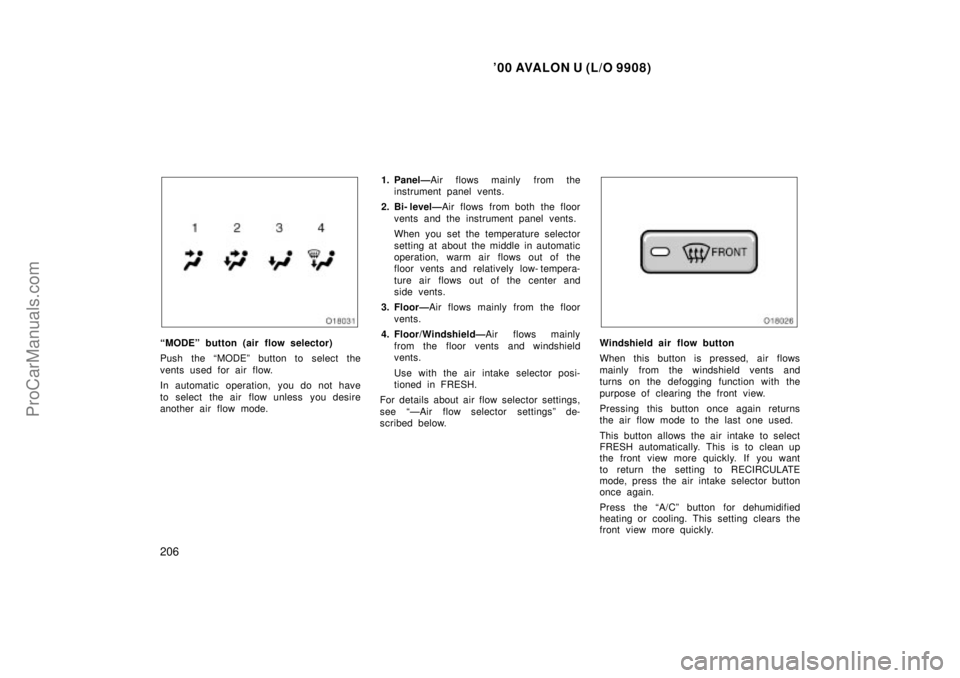
MODEº button (air flow selector)
Push the MODEº button to select the
vents used for air flow.
In automatic operation, you do not have
to select the air flow unless you desire
another air flow mode.1. PanelÐ
Air flows mainly from the
instrument panel vents.
2. Bi- levelÐ Air flows from both the floor
vents and the instrument panel vents.
When you set the temperature selector
setting at about the middle in automatic
operation, warm air flows out of the
floor vents and relatively low- tempera-
ture air flows out of the center and
side vents.
3. FloorÐ Air flows mainly from the floor
vents.
4. Floor/WindshieldÐ Air flows mainly
from the floor vents and windshield
vents.
Use with the air intake selector posi-
tioned in FRESH.
For details about air flow selector settings,
see ÐAir flow selector settingsº de-
scribed below.Windshield air flow button
When this button is pressed, air flows
mainly from the windshield vents and
turns on the defogging function with the
purpose of clearing the front view.
Pressing this button once again returns
the air flow mode to the last one used.
This button allows the air intake to select
FRESH automatically. This is to clean up
the front view more quickly. If you want
to return the setting to RECIRCULATE
mode, press the air intake selector button
once again.
Press the A/Cº button for dehumidified
heating or cooling. This setting clears the
front view more quickly.
ProCarManuals.com

