Page 137 of 352

'00 AVALON U (L/O 9908)
136
MODEº and RESET/ADJº buttons
These buttons are used to select the
item to be reset or adjusted.
Every time you push the MODEº button,
the display toggles in the following order.1. Hour
2. Minute
3. Year
4. Month
5. Day
6. English or metric unit selection of the outside temperature gauge and cruise
information display
7. Compass deviation calibration (zone)
8. Compass circling calibration
When the item desired to be corrected
appears, reset or adjust it by pushing the
RESET/ADJº button.
DISPLAYº button
This button is used to toggle the func-
tions of the cruise information display.
Every time you push the DISPLAYº but-
ton, the display toggles.
For more details, see ÐCruise
information displayº.CAUTION
Do not adjust the display while the
vehicle is moving. Be sure to adjust
the display only when the vehicle is
stopped.
ÐClock
The digital clock indicates the time.
If the electrical power source has been
disconnected, the time display will auto-
matically be set to 1:00 a.m.
To reset the hour: Push the MODEº but-
ton until the hour display appears and
blinks. Then push the RESET/ADJº but-
ton.
To reset the minutes: Push the MODEº
button until the minute display appears
and blinks. Then push the RESET/ADJº
button.
After resetting the clock, push the MODEº
button until the display returns to normal
calendar mode.
ProCarManuals.com
Page 215 of 352

214
OPERATION OF INSTRUMENTS AND
CONTROLS
Other equipment
Clock215
. . . . . . . . . . . . . . . . . . . . . . . . . . . . . . . . . . . . .\
. . . . . . . . . . . . . . .")
'00 AVALON U (L/O 9908)
214
OPERATION OF INSTRUMENTS AND
CONTROLS
Other equipment
Clock215
. . . . . . . . . . . . . . . . . . . . . . . . . . . . . . . . . . . . .\
. . . . . . . . . . . . . . . . .
Outside temperature gauge 215
. . . . . . . . . . . . . . . . . . . . . . . . . . . . . . . . . .
Cigarette lighter and ashtray 216
. . . . . . . . . . . . . . . . . . . . . . . . . . . . . . . . .
Power outlet 217
. . . . . . . . . . . . . . . . . . . . . . . . . . . . . . . . . . . . \
. . . . . . . . . . .
Glove box 219
. . . . . . . . . . . . . . . . . . . . . . . . . . . . . . . . . . . . \
. . . . . . . . . . . . . .
Garage door opener 220
. . . . . . . . . . . . . . . . . . . . . . . . . . . . . . . . . . . . \
. . . .
Auxiliary box 221
. . . . . . . . . . . . . . . . . . . . . . . . . . . . . . . . . . . . \
. . . . . . . . . . .
Coin holder 223
. . . . . . . . . . . . . . . . . . . . . . . . . . . . . . . . . . . . \
. . . . . . . . . . . .
Front cup holder 224
. . . . . . . . . . . . . . . . . . . . . . . . . . . . . . . . . . . . \
. . . . . . . .
Rear cup holder 225
. . . . . . . . . . . . . . . . . . . . . . . . . . . . . . . . . . . . \
. . . . . . . .
Floor mat 227
. . . . . . . . . . . . . . . . . . . . . . . . . . . . . . . . . . . . \
. . . . . . . . . . . . . .
SECTION 1- 9
ProCarManuals.com
Page 216 of 352
'00 AVALON U (L/O9908)
215
Clock (type A)
The digital clock indicates the time.
The key must be in the ONº position.
To reset the hour: Push the MODEº but-
ton until the hour display blinks. Then
push the ADJº button.
To reset the minutes: Push the MODEº
button until the minute display blinks.
Then push the ADJº button.
If the electrical power source has been
disconnected from the clock, the time dis-
play will automatically be set to 1:00 (one
o'clock).
When the instrument panel lights are
turned on, the brightness of the time in-
dication will be reduced.
Clock (type B)
For details, see Multi- information dis-
playк in Section 1- 5.
Outside temperature gauge
Ty p e A
Ty p e B
ProCarManuals.com
Page 220 of 352

'00 AVALON U (L/O9908)
219
NOTICE
�To prevent the battery from beingdischarged, do not use the poweroutlet longer than necessary whenthe engine is not running.
�Close the power outlet lid when thepower outlet is not in use. Insertinga foreign object other than the ap-
propriate plug that fits the outletmay cause electrical failure or shortcircuits.
The power outlet is not designed for
the following electric appliances even
though their power consumption is un-
der 115 VAC/100W. These appliances
may not operate properly.
�Appliances with high initial peak watt-
age: cathode- ray tube type televisions,
compressor- driven refrigerators, electric
pumps, electric tools, etc.
�Measuring devices which process pre-
cise data: medical equipment, measur-
ing instruments, etc.
�Other appliances requiring an extremely
stable power supply: microcomputer-
controlled electric blankets, touch sen-
sor lamps, etc.
Certain electrical appliances may cause
radio noise.
Glo ve bo x
To use the glove box, do this.
To open: Pull the lever.
With the instrument panel lights on, the
glove box light will come on when the
glove box is open.
To lock: Insert the master key and turn it
clockwise.
CAUTION
To reduce the chance of injury in
case of an accident or a sudden stop,
always keep the glove box door
closed while driving.
ProCarManuals.com
Page 271 of 352
'00 AVALON U (L/O 9908)
270
3. Remove the wheel ornament.
Pry off the wheel ornament, using the
beveled end of the wheel nut wrench as
shown.
CAUTION
Do not try to pull off the ornament by
hand. Take due care in handling the
ornament to avoid unexpected person-
al injury.
ÐLoosening wheel nuts
4. Loosen all the wheel nuts.
Always loosen the wheel nuts before rais-
ing the vehicle.
Turn the wheel nuts counterclockwise to
loosen. To get maximum leverage, fit the
wrench to the nut so that the handle is
on the right side, as shown above. Grab
the wrench near the end of the handle
and pull up on the handle. Be careful that
the wrench does not slip off the nut.
Do not remove the nuts yetÐjust unscrew
them about one- half turn.
ÐPositioning the jack
5. Position the jack at the correct jack point as shown.
Make sure the jack is positioned on a
level and solid place.
ÐRemoving wheel ornament
(steel wheels only)
ProCarManuals.com
Page 272 of 352
'00 AVALON U (L/O9908)
271
ÐRaising your vehicle
6. After making sure that no one is inthe vehicle, raise it high enough so
that the spare tire can be installed.
Remember you will need more ground
clearance when putting on the spare tire
than when removing the flat tire.
To raise the vehicle, insert the jack handle
into the jack (it is a loose fit) and turn it
clockwise. As the jack touches the vehicle
and begins to lift, double- check that it is
properly positioned.
CAUTION
Never get under the vehicle when the
vehicle is supported by the jack
alone.
ÐChanging wheels
7. Remove the wheel nuts and change tires.
Lift the flat tire straight off and put it
aside.
Roll the spare wheel into position and
align the holes in the wheel with the bolts.
Then lift up the wheel and get at least the
top bolt started through its hole. Wiggle
the tire and press it back over the other
bolts.
ProCarManuals.com
Page 273 of 352
'00 AVALON U (L/O 9908)
272
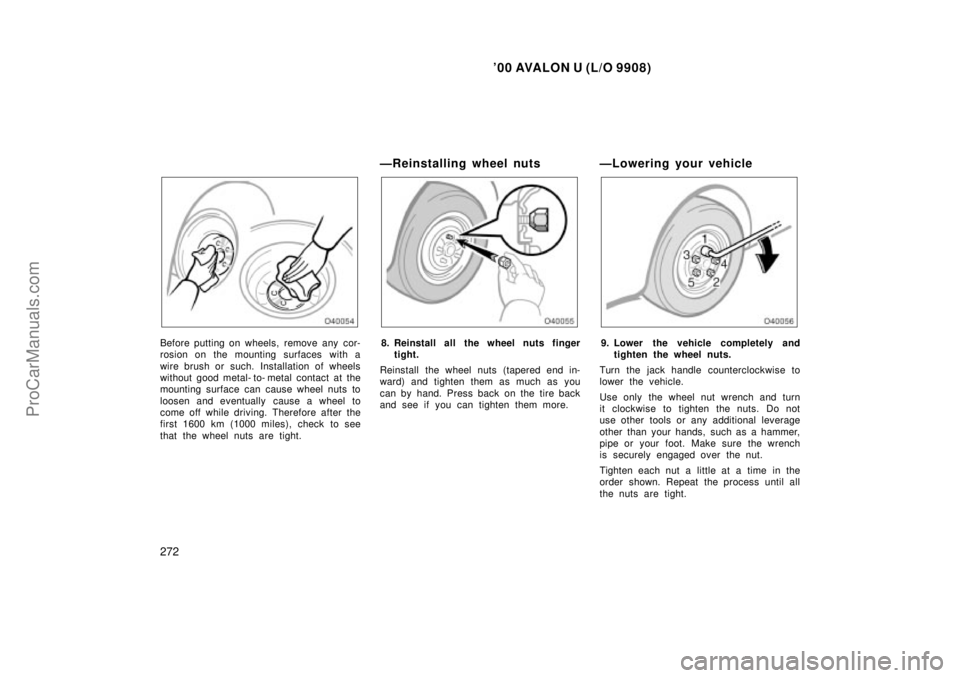
Before putting on wheels, remove any cor-
rosion on the mounting surfaces with a
wire brush or such. Installation of wheels
without good metal- to- metal contact at the
mounting surface can cause wheel nuts to
loosen and eventually cause a wheel to
come off while driving. Therefore after the
first 1600 km (1000 miles), check to see
that the wheel nuts are tight.
ÐReinstalling wheel nuts
8. Reinstall all the wheel nuts fingertight.
Reinstall the wheel nuts (tapered end in-
ward) and tighten them as much as you
can by hand. Press back on the tire back
and see if you can tighten them more.
ÐLowering your vehicle
9. Lower the vehicle completely and tighten the wheel nuts.
Turn the jack handle counterclockwise to
lower the vehicle.
Use only the wheel nut wrench and turn
it clockwise to tighten the nuts. Do not
use other tools or any additional leverage
other than your hands, such as a hammer,
pipe or your foot. Make sure the wrench
is securely engaged over the nut.
Tighten each nut a little at a time in the
order shown. Repeat the process until all
the nuts are tight.
ProCarManuals.com
Page 317 of 352

'00 AVALON U (L/O 9908)
316
If the level is low, add SAE J1703 or
FMVSS No.116 DOT 3 brake fluid to the
brake reservoir.
Remove and replace the reservoir cap by
hand. Fill the brake fluid to the dotted
line. This brings the fluid to the correct
level when you put the cap back on.
Use only newly opened brake fluid. Once
opened, brake fluid absorbs moisture from
the air, and excess moisture can cause a
dangerous loss of braking.
CAUTION
Take care when filling the reservoir
because brake fluid can harm your
eyes and damage painted surfaces. If
fluid gets in your eyes, flush your
eyes with clean water.
NOTICE
If you spill the fluid, be sure to wash it off with water to prevent it fromdamaging the parts or paint.
Checking power steering fluid
If hot
O.K. Close OpenIf cold
O.K.
If cold
add
If hot
add
Check the fluid level through the reser-
voir. If necessary, add automatic trans-
mission fluid DEXRON �II or III.
If the vehicle has been driven around 80
km/h (50 mph) for 20 minutes (a little
more in frigid temperatures), the fluid is
hot (60 �CÐ80 �C or 140 �FÐ175 �F). You
may also check the level when the fluid
is cold (about room temperature,
10 �CÐ30 �C or 50 �FÐ85 �F) if the engine
has not been run for about five hours. Clean all dirt from outside of the reservoir
tank and look at the fluid level. If the fluid
is cold, the level should be in the COLDº
range. Similarly, if it is hot, the fluid level
should be in the HOTº range. If the level
is at the low side of either range, add
automatic transmission fluid DEXRON
�II or
III to bring the level within the range.
To remove the reservoir cap, turn it coun-
terclockwise and lift up. To reinstall it,
turn it clockwise. After replacing the reser-
voir cap, visually check the steering box
case, vane pump and hose connections
for leaks or damage.
CAUTION
The reservoir tank may be hot so be
careful not to burn yourself.
NOTICE
Avoid overfilling, or the power steer-
ing could be damaged.
ProCarManuals.com


