Page 132 of 376

2-64
NOTICE:
Adding some electrical equipment to your vehicle
can damage it or keep other things from working
as they should. This wouldn't be covered by your
warranty. Check with your dealer before adding
electrical equipment, and never use anything that
exceeds the fuse rating.
Auxiliary Power Connection
(Power Drop)
The vehicle is equipped with auxiliary power
connections. This feature can be used to power
aftermarket electrical equipment added to the vehicle.
The connections are located on the passenger's side of
the vehicle, below the glove box.
OnStar� System (If Equipped)
OnStar is a vehicle communications service. The
following services are available through a subscription
with OnStar and are available 24 hours a day:
Emergency Services
�Automatic Notification of Air Bag Deployment
�Theft Notification and Stolen
-Vehicle Tracking
�Roadside Assistance with Location
�Remote Diagnostics
�OnStar MED
-NET
�Accident Assist
Convenience Services
�Remote Door Unlock
�Route Support
�Concierge Services
�Ride Assist
A complete user's guide is provided with the OnStar
System. For more information contact OnStar
at 1
-888-ONSTAR7.
Page 135 of 376
2-67
The main components of the instrument panel are:
A. Side Window Defogger Vents
B. Fog Lamp Switch
C. Multifunction Lever
D. Instrument Panel Cluster
E. Hazard Button
F. Full Floating Horn
G. Trip Computer/Driver Information Center (DIC)
H. Instrument Panel Vents
I. Interior Lamp ControlJ. Exterior Lamp Control
K. Tilt Wheel Control
L. Audio Steering Controls (If Equipped)
M. HUD Display Controls (If Equipped)
N. Comfort Controls
O. Ashtray and Cigarette Lighter
P. Audio System
Q. Glove Box
R. Instrument Panel Fuse Block
Page 141 of 376
2-73
If the light comes on while you are driving, pull off the
road and stop carefully. You may notice that the pedal is
harder to push. Or, the pedal may go closer to the floor.
It may take longer to stop. If the light is still on, have the
vehicle towed for service. (See ªTowing Your Vehicleº
in the Index.)
CAUTION:
Your brake system may not be working properly
if the brake system warning light is on. Driving
with the brake system warning light on can lead
to an accident. If the light is still on after you've
pulled off the road and stopped carefully, have
the vehicle towed for service.
When the ignition is on, the brake system warning light
will also come on when you set your parking brake.
The light will stay on if your parking brake doesn't
release fully. If it stays on after your parking brake is
fully released, it means you have a brake problem.
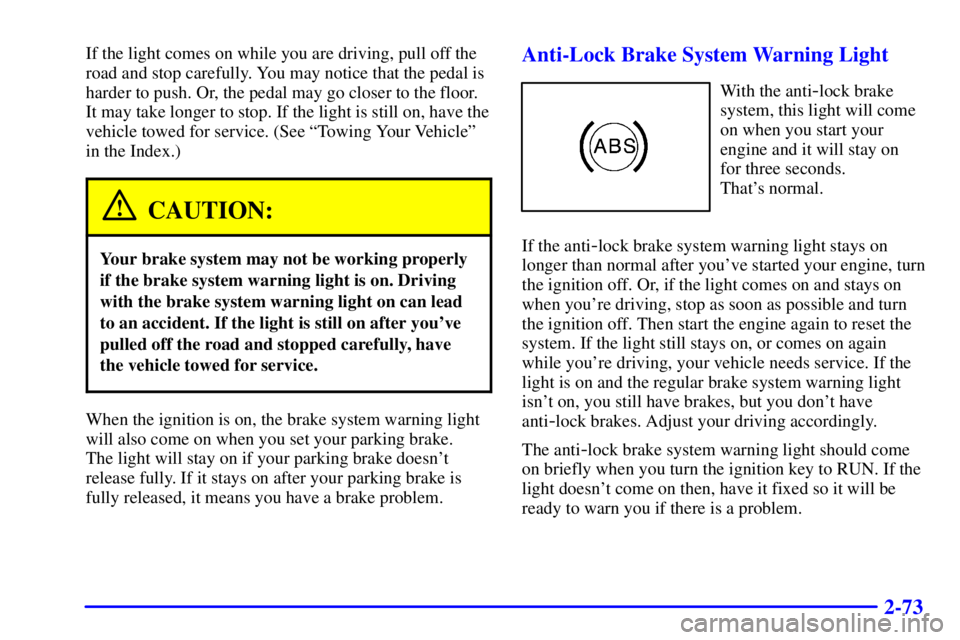
Anti-Lock Brake System Warning Light
With the anti-lock brake
system, this light will come
on when you start your
engine and it will stay on
for three seconds.
That's normal.
If the anti
-lock brake system warning light stays on
longer than normal after you've started your engine, turn
the ignition off. Or, if the light comes on and stays on
when you're driving, stop as soon as possible and turn
the ignition off. Then start the engine again to reset the
system. If the light still stays on, or comes on again
while you're driving, your vehicle needs service. If the
light is on and the regular brake system warning light
isn't on, you still have brakes, but you don't have
anti
-lock brakes. Adjust your driving accordingly.
The anti
-lock brake system warning light should come
on briefly when you turn the ignition key to RUN. If the
light doesn't come on then, have it fixed so it will be
ready to warn you if there is a problem.
Page 155 of 376
2-87
If You Can't See the HUD Image When the Ignition
Is On
�Is anything covering the HUD unit?
�Is the HUD dimmer setting bright enough?
�Is the HUD image adjusted to the proper height?
�Still no HUD image? Check the fuse in the
instrument panel fuse block. See ªFuses and Circuit
Breakersº in the Index.If the HUD Image Is Not Clear
�Is the HUD image too bright?
�Are the windshield and HUD lens clean?
The windshield is part of the HUD system. If you ever
have to have a new windshield, be sure to get one
designed for HUD. If you don't, the HUD image may
look blurred and out of focus.
Page 162 of 376

3-
3-1
Section 3 Comfort Controls and Audio Systems
In this section, you'll find out how to operate the comfort control and audio systems offered with your vehicle.
Be sure to read about the particular systems supplied with your vehicle.
3
-2 Comfort Controls
3
-2 Air Conditioning with Electronic Controls
3
-4 Air Conditioning with Automatic and
Auxiliary Temperature Control (If Equipped)
3
-8 Rear Window Defogger
3
-9 Ventilation System
3
-10 Audio Systems
3
-10 Setting the Clock
3
-10 AM-FM Stereo with Cassette Tape Player
3
-14 AM-FM Stereo with Compact Disc Player
(If Equipped)
3
-17 AM-FM Stereo with Compact Disc Player and
Equalizer (If Equipped)3
-20 Trunk-Mounted CD Changer (Option)
3
-23 Theft-Deterrent Feature
3
-26 Audio Steering Wheel Controls (If Equipped)
3
-27 Understanding Radio Reception
3
-27 Tips About Your Audio System
3
-28 Care of Your Cassette Tape Player
3
-29 Care of Your Compact Discs
3
-29 Care of Your Compact Disc Player
3
-29 Fixed Mast Antenna
3
-30 Backglass Antenna (If Equipped)
Page 163 of 376

3-2
Comfort Controls
Air Conditioning with Electronic Controls
With this system, you can control the heating, cooling
and ventilation in your vehicle. The system works best if
you keep your windows closed while using it.
Fan Knob
The left knob selects the amount of air you want. To turn
the fan off, turn the knob to OFF. The fan must be on to
run the air conditioning compressor.Temperature Knob
The center knob changes the temperature of the air
coming through the system. Turn this knob toward red
(clockwise) for warmer air. Turn it toward blue
(counterclockwise) for cooler air.
Mode Knob
The right knob has several settings to control the
direction of airflow:
MAX: This setting recirculates much of the air
inside your vehicle and sends it through the instrument
panel outlets. The air conditioning compressor will run
automatically in this setting unless the outside
temperature is below 38�F (3.3�C). (Even when the
compressor is running, you can control the temperature.)
UPPER: This setting brings in outside air and
directs it through the instrument panel outlets.
BI-LEVEL: This setting brings in outside air and
directs it two ways. Half of the air is directed through
the instrument panel outlets. Most of the remaining air is
directed through the floor ducts and a small amount to
the defrost and side window vents.
Page 166 of 376

3-5 Automatic Control
For the most efficient operation, you should set the
system temperature and press AUTO. The system will
select the best fan speed and airflow settings to keep you
comfortable. The air conditioning compressor will run if
the outside temperature is above 38�F (3.3�C).
You may notice a delay of three to four minutes before
the fan comes on.
Driver's Temperature Knob
The left knob sets the temperature for the entire system
when the light on DUAL button isn't lit. If the light is
lit, the knob sets the temperature for the driver. Turn the
knob toward red (clockwise) to raise the desired cabin
temperature. Turn it toward blue (counterclockwise) to
lower the temperature. The display will show your
selection for a few seconds, then the outside temperature
will be displayed.
Passenger's Temperature Knob
The right knob sets the desired cabin temperature for the
passenger and will automatically force the system into a
dual zone operation, lighting the dual zone button light.
Turn the right knob toward red (clockwise) to raise the
temperature. Turn it toward blue (counterclockwise) to
lower the temperature.Dual Zone Button Light
The dual zone button light indicates whether the system
is in single zone or dual zone operation. When there is
no desire for dual zone operation, push the lit dual zone
button to return to single zone operation. The dual zone
button light will go off.
The system will operate to achieve your comfort set
point as quick as possible. If you set the temperature for
60�F (16�C) or 90�F (32�C), the fan will go to its
highest speed, unless you manually select a lower speed.
The system will maintain full cold or full hot operation
at these settings.
Cold Weather Example: When you start the vehicle in
cold weather, (below freezing) or after being parked
overnight. If your Driver Set Temperature is 73�F (23�C)
and you are in Full Automatic mode, the system will
automatically move the temperature doors to full hot.
The blower will start out at a low speed and the blower
speed will increase as the engine warms up. The air will
be delivered to the floor. As the interior of the vehicle
warms up to your desired comfort point, the blower will
decrease and the temperature door will move to a cooler
position to maintain your desired comfort. As the cabin
warms up or the sun load increases the system could
switch to air delivered to the individual to the windshield
and the floor (DEFOG mode).
Page 171 of 376
3-10
Audio Systems
Your audio system has been designed to operate easily
and give years of listening pleasure. You will get the
most enjoyment out of it if you acquaint yourself with it
first. Find out what your audio system can do and how
to operate all its controls, to be sure you're getting the
most out of the advanced engineering that went into it.
Setting the Clock
Press and hold HR until the correct hour appears. Press
and hold MIN until the correct minute appears. There
will be a two
-second delay before the clock goes into
time
-set mode, and the colon on the display will blink
while in this mode.
AM-FM Stereo with Cassette Tape Player
Playing the Radio
POWER
-VOL: Push this knob to turn the system on
and off. To increase volume, turn the knob clockwise.
Turn it counterclockwise to decrease volume.
RECALL: Display the time with the ignition off by
pressing this button. When the radio is playing, press
this knob to recall the station frequency.


