2000 NISSAN PATHFINDER CD player
[x] Cancel search: CD playerPage 55 of 265

Driver's supplemental air bag (P.1-10)Cruise control
set switch
(P.5-17)
Outside mirror remote control
(P.3-15) Headlight/dimmer/turn signal switch (P.2-17)
Front fog light switch (P.2-20)Meter/gauge (P.2-3)
Windshield
and rear
window wiper/
washer
switch
(P.2-16)Hazard warning flasher switch (P.2-21)
Center ventilator (P.4-2)
Heater/air conditioner control (P.4-3)Compass/outside air temperature display (P.2-6)
Passenger supplemental air bag (P.1-10)
Side ventilator (P.4-2)
Glove box (P.2-26)
Cigarette lighter (P.2-23)
Radio/CD player (P.4-19)/clock (P.4-15)
Glass hatch/outside mirror
defogger switch (P.2-17)
Ignition switch/steering lock (P.5-6)Heated seat switch (P.2-22)
Tilting steering wheel adjust lever (P.3-13)Hood release handle (P.3-9) Fuse box cover (P.8-22)/Tray (P.2-24)Security indicator light (P.2-14) Cruise control main switch (P.5-17)
Instrument brightness control (P.2-18)
SIC1327
See the page indicated in parentheses for operating details.
INSTRUMENT PANEL2-2
Instruments and controls
Z
00.1.17/R50-D/V5
X
Page 110 of 265

4 Heater, air conditioner and audio systemsVentilators ................................................................. 4-2
Heater and air conditioner (Manual) ......................... 4-3
Controls ..................................................................... 4-3
Heater operation ....................................................... 4-4
Air conditioner operation ........................................... 4-5
Air flow charts ........................................................... 4-6
Heater and air conditioner (Automatic) ..................... 4-9
Automatic operation ................................................ 4-10
Manual operation .................................................... 4-10
Operating tips .......................................................... 4-11Servicing air conditioner .......................................... 4-11
Audio system........................................................... 4-12
FM radio reception .................................................. 4-12
AM radio reception .................................................. 4-13
FM-AM radio with cassette player .......................... 4-14
FM-AM radio with cassette player and compact disc
(CD) player .............................................................. 4-19
Antenna ................................................................... 4-25
CB radio or car phone ............................................ 4-26
Z
00.1.17/R50-D/V5
X
Page 123 of 265

FM-AM RADIO WITH CASSETTE
PLAYER
Audio main operationPower/Volume control:
Turn the ignition key to ACC or ON, then push
the Power/Volume control knob. The mode
(radio or cassette) which was playing immedi-
ately before the system was turned off re-
sumes playing. When no cassette is loaded,
the radio comes on. Pushing the
Power/Volume button again turns the system
off.
Turn the Power/Volume control knob to adjust
the volume.
SAA0348
4-14
Heater, air conditioner and audio systems
Z
00.1.17/R50-D/V5
X
Page 125 of 265
again continues the SEEK function. Once the
highest broadcasting station is reached, the
radio continues in the SEEK mode at the
lowest broadcast station.
Push the SEEK/SCAN tuning buttonfor more than 1.5 seconds. SCAN illuminates
in the display window. SCAN tuning begins
from low to high frequencies and stops at each
broadcasting station for five seconds. Pushing
the button again during this five second period
stops SCAN tuning and the radio remains
tuned to that station.
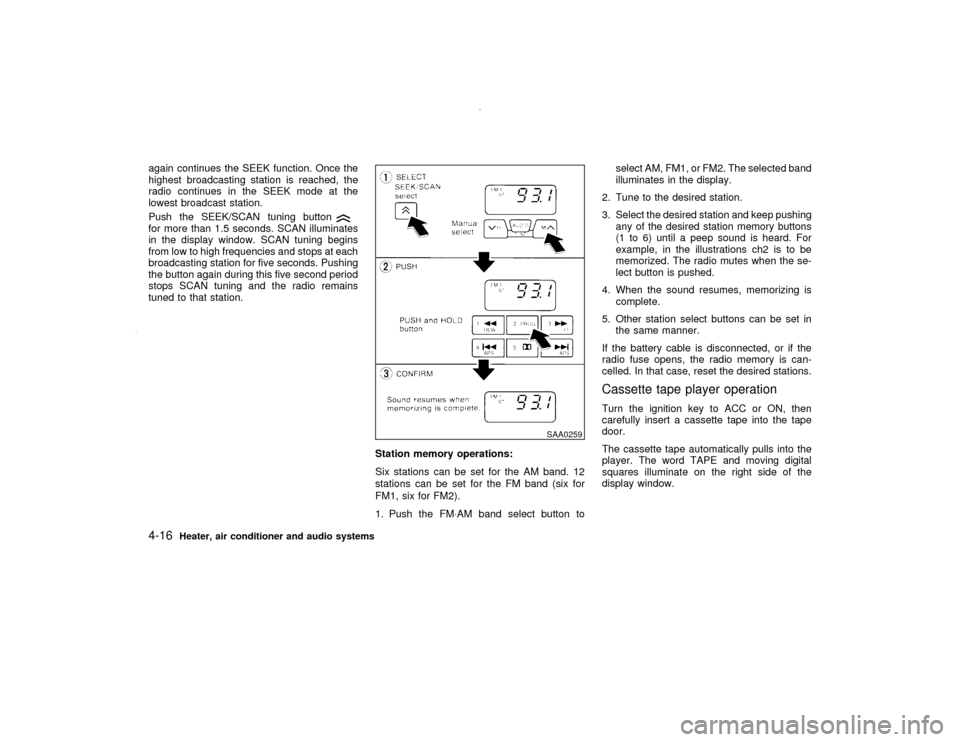
Station memory operations:
Six stations can be set for the AM band. 12
stations can be set for the FM band (six for
FM1, six for FM2).
1. Push the FM×AM band select button toselect AM, FM1, or FM2. The selected band
illuminates in the display.
2. Tune to the desired station.
3. Select the desired station and keep pushing
any of the desired station memory buttons
(1 to 6) until a peep sound is heard. For
example, in the illustrations ch2 is to be
memorized. The radio mutes when the se-
lect button is pushed.
4. When the sound resumes, memorizing is
complete.
5. Other station select buttons can be set in
the same manner.
If the battery cable is disconnected, or if the
radio fuse opens, the radio memory is can-
celled. In that case, reset the desired stations.
Cassette tape player operationTurn the ignition key to ACC or ON, then
carefully insert a cassette tape into the tape
door.
The cassette tape automatically pulls into the
player. The word TAPE and moving digital
squares illuminate on the right side of the
display window.
SAA0259
4-16
Heater, air conditioner and audio systems
Z
00.1.17/R50-D/V5
X
Page 126 of 265
CAUTION
Do not force the cassette tape into the
tape door. This could cause player dam-
age.
The cassette tape automatically changes di-
rections to play the other side when the first
side is complete. At this time, the moving
digital squares illuminate on the left side of the
display window.
Precaution on cassette player operation:
ITo maintain good quality sound, NISSAN
recommends using cassette tapes of 60
minutes or shorter in length.
ICassette tapes should be removed from the
player when not in use. Store cassettes in
their protective cases and away from direct
sunlight, heat, moisture and magnetic
sources.
IDirect sunlight can cause the cassette to
become deformed. The use of deformed
cassettes may cause the cassette to jam in
the player.
IDo not use cassettes with labels which arepeeling and loose. If used, the label could
jam in the player.
IIf a cassette has loose tape, insert a pencil
through one of the cassette hubs and re-
wind the tape firmly around the hubs. Loose
tape may cause tape jamming and waver-
ing sound quality.
IOver a period of time, the playback head,
capstan and pinch roller may collect a tape
coating residue as the tape is played. This
residue accumulation can cause weak or
wavering sound, and should be removed
periodically with a head cleaning tape. If the
residue is not removed periodically, the
player may need to be disassembled for
cleaning.
PLAY/STOP:
Push the PLAY/STOP button while the cas-
sette tape is playing to stop the tape. Push the
button again to play the tape.
FF (Fast Forward), REW
(Rewind):
Push either the FF or REW button for the
desired direction.
The FF or REW symbol illuminates in the
display.
To stop the FF or REW function, press the
or
again, or the
button.
APS (Automatic
Program Search) FF,
APS REW:
Push either the APS FF or APS REW button
while the cassette tape is playing. The tape
runs quickly, stops, then plays the next selec-
tion. Either the FF or REW symbol flashes in
the display while searching for the selection.
This system searches at the blank intervals
between selections. If there is a blank interval
within one selection or there is no interval
between selections, the system may not stop
in the desired or expected location.
PROG (Program):
Push the PROG (program) select button. The
moving digital squares illuminate on either the
right or left side of the display window to
indicate the side of program play.Dolby NR (Noise Reduction):
Push the Dolby NR button for Dolby NR en-
coded tapes to reduce high frequency tape
noise. The
indicator light comes on.
If in the clock display is in priority mode when
the Dolby NR button is pressed,
and
TAPE illuminate in the display window for
about 10 seconds. The clock mode then re-
Heater, air conditioner and audio systems
4-17
Z
00.1.17/R50-D/V5
X
Page 127 of 265

turns to the display window.
Dolby NR is manufactured under license from
Dolby Laboratories Licensing Corporation.
DOLBY NR and the double-D symbol are
trademarks of Dolby Laboratories Licensing
Corporation.
Metal or chrome tape usage:
The cassette player is automatically set to high
performance play when playing a metal or
chrome cassette tape.
TAPE EJECT:
Push the EJECT button. The cassette tape
automatically comes out.
SAA0349
4-18
Heater, air conditioner and audio systems
Z
00.1.17/R50-D/V5
X
Page 128 of 265

FM-AM RADIO WITH CASSETTE
PLAYER AND COMPACT DISC
(CD) PLAYER
Audio main operationHead unit
The tape deck employs a permalloy head
which allows for improved reproduction of high
frequency ranges. Noise is also greatly re-
duced by the combined use of the Dolby NR
(Noise Reduction) system. The auto loudness
circuit enhances the low frequency range au-
tomatically in both radio reception and tape
and CD playback.
Bose system (if so equipped)
A large output amplifier featuring a low distor-
tion ratio is connected directly to each speaker
unit to provide increased output and excellent
tonal quality. The equalizing circuit permits
regeneration of forcible base sound. This
equalizing circuit permits the sound efficiency
to be matched with the interior conditions of
your vehicle for a selection between ªnatural
soundº and ªhigh-fidelity soundº.
Power/Volume control:
Turn the ignition key to ACC or ON, and then
push the Power/Volume control knob while the
system is off to call up the mode (radio, tape orCD) which was playing immediately before the
system was turned off. When no CD or tape is
loaded, the radio will come on. While the
system is on, pushing the Power/Volume con-
trol knob turns the system off.
To turn the radio off, press the Power/Volume
control knob.
Turn the Power/Volume control knob to adjust
the volume.
Heater, air conditioner and audio systems
4-19
Z
00.1.17/R50-D/V5
X
Page 129 of 265
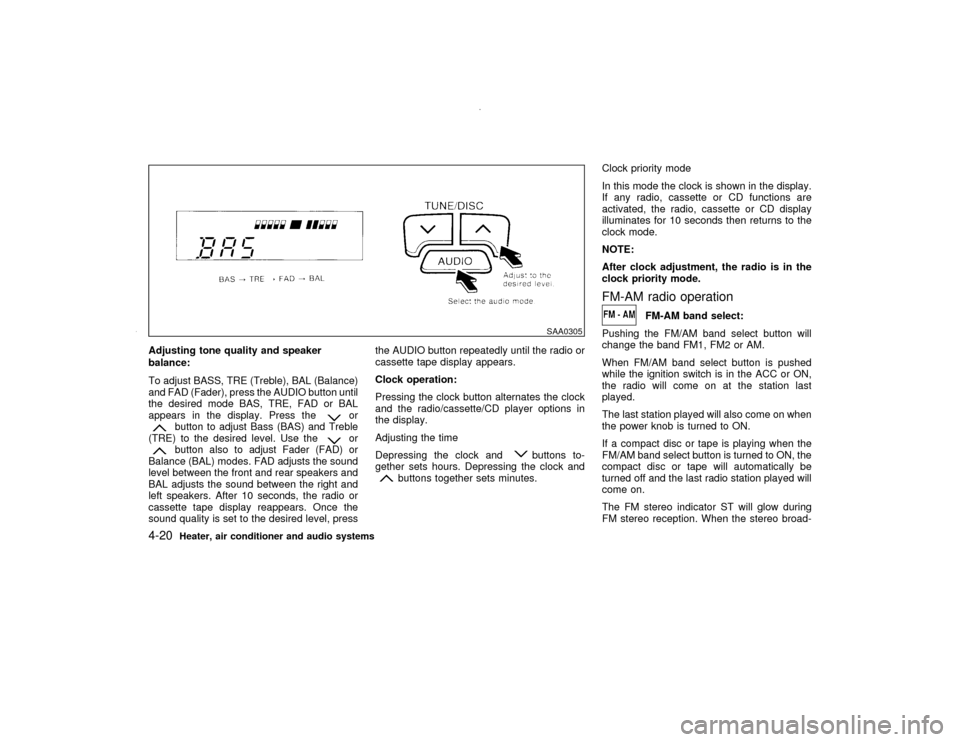
Adjusting tone quality and speaker
balance:
To adjust BASS, TRE (Treble), BAL (Balance)
and FAD (Fader), press the AUDIO button until
the desired mode BAS, TRE, FAD or BAL
appears in the display. Press the
or
button to adjust Bass (BAS) and Treble
(TRE) to the desired level. Use the
or
button also to adjust Fader (FAD) or
Balance (BAL) modes. FAD adjusts the sound
level between the front and rear speakers and
BAL adjusts the sound between the right and
left speakers. After 10 seconds, the radio or
cassette tape display reappears. Once the
sound quality is set to the desired level, pressthe AUDIO button repeatedly until the radio or
cassette tape display appears.
Clock operation:
Pressing the clock button alternates the clock
and the radio/cassette/CD player options in
the display.
Adjusting the time
Depressing the clock and
buttons to-
gether sets hours. Depressing the clock and
buttons together sets minutes.Clock priority mode
In this mode the clock is shown in the display.
If any radio, cassette or CD functions are
activated, the radio, cassette or CD display
illuminates for 10 seconds then returns to the
clock mode.
NOTE:
After clock adjustment, the radio is in the
clock priority mode.
FM-AM radio operation
FM-AM band select:
Pushing the FM/AM band select button will
change the band FM1, FM2 or AM.
When FM/AM band select button is pushed
while the ignition switch is in the ACC or ON,
the radio will come on at the station last
played.
The last station played will also come on when
the power knob is turned to ON.
If a compact disc or tape is playing when the
FM/AM band select button is turned to ON, the
compact disc or tape will automatically be
turned off and the last radio station played will
come on.
The FM stereo indicator ST will glow during
FM stereo reception. When the stereo broad-
SAA0305
4-20
Heater, air conditioner and audio systems
Z
00.1.17/R50-D/V5
X