2000 NISSAN MAXIMA battery
[x] Cancel search: batteryPage 82 of 239

3 Pre-driving checks and adjustmentsKeys .......................................................................... 3-2
Doors ......................................................................... 3-2
Locking with key ........................................................ 3-3
Locking with inside lock knob ................................... 3-3
Locking with power door lock switch ........................ 3-3
Child safety rear door lock ........................................ 3-4
Multi-remote control system (if so equipped)............ 3-4
How to use multi-remote control system .................. 3-4
Battery replacement .................................................. 3-7
Hood .......................................................................... 3-8
Trunk lid .................................................................... 3-9Opener operation ...................................................... 3-9
Key operation .......................................................... 3-10
Fuel filler lid ............................................................. 3-10
Opener operation .................................................... 3-10
Fuel filler cap ........................................................... 3-11
Steering wheel ........................................................ 3-12
Tilt operation ........................................................... 3-12
Sun visors ............................................................... 3-12
Mirrors ..................................................................... 3-13
Inside mirror ............................................................ 3-13
Outside mirrors ........................................................ 3-13
Z
00.1.17/A33-D/V5.0
X
Page 85 of 239

CHILD SAFETY REAR DOOR
LOCKChild safety locking helps prevent doors from
being opened accidentally, especially when
small children are in the vehicle.
When the lever is in the lock position, the
rear door can be opened only from the
outside.It is possible to lock/unlock all doors to release
the trunk lid and activate the panic alarm by
using the remote controller from outside the
vehicle.
Before locking the doors, make sure the
key is not left in the vehicle.
The remote controller can operate at a dis-
tance of approximately 33 ft (10 m) from the
vehicle. (The effective distance depends upon
the conditions around the vehicle.)
As many as four remote controllers can be
used with one vehicle. For information con-
cerning the purchase and use of additional
remote controllers, contact your NISSAN
dealer.
The multi-remote controller will not function
when:
Ithe battery is dead,
Ithe distance between the vehicle and the
remote controller is over 33 ft (10 m).
The panic alarm will not activate when the
key is in the ignition switch.
CAUTION
The following conditions or occurrences
will damage the remote controller.IDo not allow the remote controller to
become wet.
IDo not drop the remote controller.
IDo not strike the remote controller
sharply against another object.
IDo not place the remote controller for
an extended period in an area where
temperatures exceed 140ÉF (60ÉC).
If a multi-remote controller is lost or
stolen, NISSAN recommends erasing
the ID code of that controller. This will
prevent the controller from unautho-
rized use to unlock the vehicle. For in-
formation regarding the erasing proce-
dure, please contact an authorized
NISSAN dealer.
HOW TO USE MULTI-REMOTE
CONTROL SYSTEM
Setting hazard and horn chirp modeThis vehicle is set in hazard and horn chirp
mode when you first receive the vehicle.
In hazard and horn chirp mode, when the
LOCK button is pushed, the hazard indicator
SPA0086
MULTI-REMOTE CONTROL
SYSTEM (if so equipped)
3-4
Pre-driving checks and adjustments
Z
00.1.17/A33-D/V5.0
X
Page 88 of 239

controller forlonger than 0.5 seconds.
2. The theft warning alarm and headlights will
stay on for 30 seconds.
3. The panic alarm stops when:
IIt has run for 30 seconds, or
IThe LOCK or the UNLOCK button is
pressed, or
IThe panic button is pushed on the multi-
remote controller for longer than 0.5 sec-
onds.
BATTERY REPLACEMENTReplace the battery as follows:
1. Open the lid using a suitable tool.
2. Replace the battery with a new one.Recommended battery: Sanyo CR2025 or
equivalent
Make sure that theÅside faces the
bottom case.
3. Close the lid securely.
4. Push the remote controller button two or
three times to check its operation.
See your NISSAN dealer if you need any
assistance for replacement.
If the battery is removed for any reason
other than replacement, perform step 4
above.
IBe careful not to touch a circuit board
and a battery terminal.
IAn improperly disposed battery can
harm the environment. Always confirm
local regulations for battery disposal.
IThe remote controller is water-resistant;
however, if it does get wet, immediately
wipe completely dry.
IWhen changing batteries, do not let dust
or oil get on the controller.
FCC Notice:
Changes or modifications not expressly
approved by the manufacturer compliance
SPA1046
Pre-driving checks and adjustments
3-7
Z
00.1.17/A33-D/V5.0
X
Page 111 of 239

tion. Pushing the button again continues the
SEEK function. Once the highest broadcasting
station is reached, the radio continues in the
SEEK mode at the lowest broadcast station.
Push the SEEK/SCAN tuning button
or
for more than 1.5 seconds. SCAN illu-
minates in the display window. SCAN tuning
begins from high to low or low to high frequen-
cies and stops at each broadcasting station for
5 seconds. Pushing the button again during
this 5 second period stops SCAN tuning and
the radio remains tuned to that station.Station memory operations:
Six stations can be set for the AM band. 12
stations can be set for the FM band (six for
FM1, six for FM2).
1. Push the FM-AM band select button to
select AM, FM1, or FM2. The selected band
illuminates in the display.
2. Tune to the desired station.
3. Push the desired select button for more
than 1.5 seconds. For example, in the
illustrations ch2 is to be memorized. The
radio mutes when the select button is
pushed.
4. When the sound resumes, memorizing is
complete.
5. Other station select buttons can be set in
the same manner.
If the battery cable is disconnected, or if the
radio fuse opens, the radio memory is can-
celled. In that case, reset the desired stations.
Cassette tape player operationTurn the ignition key to ACC or ON, then
carefully insert a cassette tape into the tape
door.
The cassette tape automatically pulls into the
player. The word TAPE and moving digital
SAA0264
4-16
Heater, air conditioner and audio systems
Z
00.1.17/A33-D/V5.0
X
Page 116 of 239
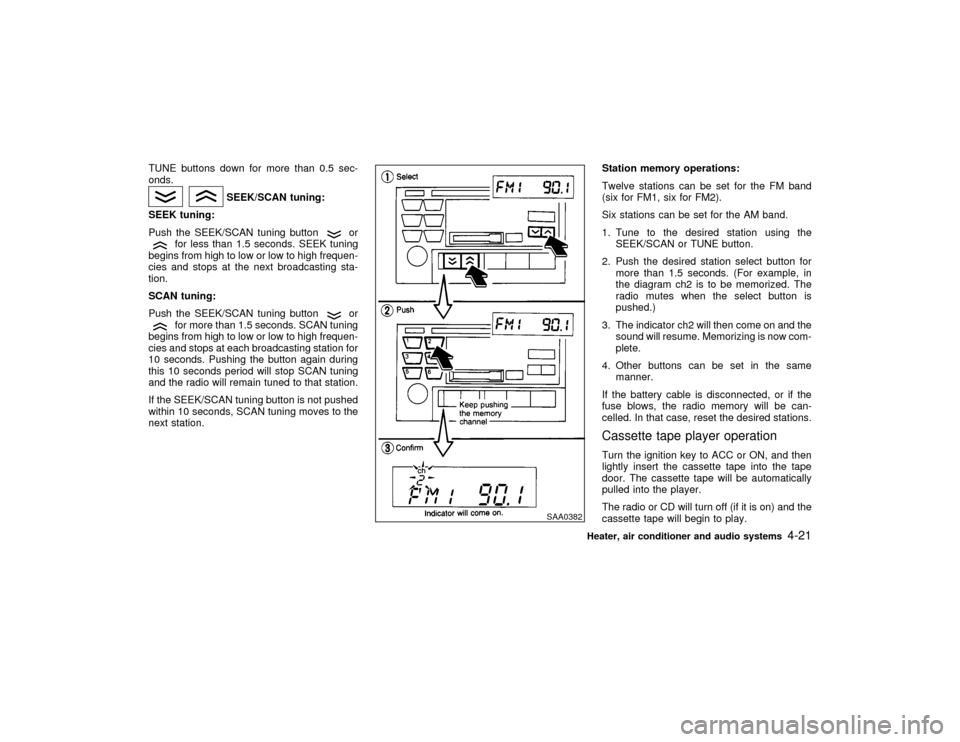
TUNE buttons down for more than 0.5 sec-
onds.
SEEK/SCAN tuning:
SEEK tuning:
Push the SEEK/SCAN tuning button
or
for less than 1.5 seconds. SEEK tuning
begins from high to low or low to high frequen-
cies and stops at the next broadcasting sta-
tion.
SCAN tuning:
Push the SEEK/SCAN tuning button
or
for more than 1.5 seconds. SCAN tuning
begins from high to low or low to high frequen-
cies and stops at each broadcasting station for
10 seconds. Pushing the button again during
this 10 seconds period will stop SCAN tuning
and the radio will remain tuned to that station.
If the SEEK/SCAN tuning button is not pushed
within 10 seconds, SCAN tuning moves to the
next station.Station memory operations:
Twelve stations can be set for the FM band
(six for FM1, six for FM2).
Six stations can be set for the AM band.
1. Tune to the desired station using the
SEEK/SCAN or TUNE button.
2. Push the desired station select button for
more than 1.5 seconds. (For example, in
the diagram ch2 is to be memorized. The
radio mutes when the select button is
pushed.)
3. The indicator ch2 will then come on and the
sound will resume. Memorizing is now com-
plete.
4. Other buttons can be set in the same
manner.
If the battery cable is disconnected, or if the
fuse blows, the radio memory will be can-
celled. In that case, reset the desired stations.
Cassette tape player operationTurn the ignition key to ACC or ON, and then
lightly insert the cassette tape into the tape
door. The cassette tape will be automatically
pulled into the player.
The radio or CD will turn off (if it is on) and the
cassette tape will begin to play.
SAA0382
Heater, air conditioner and audio systems
4-21
Z
00.1.17/A33-D/V5.0
X
Page 122 of 239

5 Starting and drivingPrecautions when starting and driving ...................... 5-2
Exhaust gas (Carbon monoxide) .............................. 5-2
Three way catalyst .................................................... 5-3
Avoiding collision and rollover................................... 5-3
Drinking alcohol/drugs and driving ............................ 5-4
Ignition switch............................................................ 5-4
Automatic transmission ............................................. 5-4
Manual transmission ................................................. 5-5
Key positions ............................................................. 5-6
Nissan Vehicle Immobilizer System ......................... 5-6
Before starting the engine ......................................... 5-7
Starting the engine .................................................... 5-7
Driving the vehicle ..................................................... 5-8
Automatic transmission ............................................. 5-8
Manual transmission ............................................... 5-11
Parking brake .......................................................... 5-13
Cruise control .......................................................... 5-14
Precautions on cruise control.................................. 5-14Cruise control operations ........................................ 5-14
Break-in schedule ................................................... 5-16
Increasing fuel economy ......................................... 5-16
Parking/parking on hills ........................................... 5-17
Power steering ........................................................ 5-18
Brake system .......................................................... 5-18
Braking precautions ................................................ 5-18
Anti-lock brake system (ABS) ................................ 5-19
Traction control system (if so equipped)................. 5-20
Cold weather driving ............................................... 5-21
Freeing a frozen door lock ...................................... 5-21
Anti-freeze ............................................................... 5-21
Battery ..................................................................... 5-21
Draining of coolant water ........................................ 5-21
Tire equipment ........................................................ 5-21
Special winter equipment ........................................ 5-21
Driving on snow or ice ............................................ 5-22
Engine block heater (if so equipped) ...................... 5-22
Z
00.1.17/A33-D/V5.0
X
Page 126 of 239

LOCK position, proceed as follows to remove
the key:
1. Move the selector lever into the P (Park)
position.
2. Turn the ignition key slightly in the ON
direction.
3. Turn the key toward the LOCK position.
4. Remove the key.
If the key is removed from the ignition switch,
the selector lever cannot be moved from P
(Park) position.The selector lever can be
moved if the ignition switch is in the ACC
position. This allows the vehicle to be
moved if the battery is discharged. The
selector lever can also be moved if the
ignition switch is in the ON position and the
foot brake pedal is depressed.
There is an OFF position in between LOCK
and ACC, although it does not show on the
lock cylinder. When the ignition is in OFF the
steering wheel is not locked.
In order for the steering wheel to be locked, it
must be turned about 1/6 of a turn counter-
clockwise from the straight up position.
To lock the steering wheel, turn the key to
the LOCK position. Remove the key. To
unlock the steering wheel, insert the keyand turn it gently while rotating the steer-
ing wheel slightly right and left.
WARNING
Never remove or turn the key to the
LOCK position while driving. The steer-
ing wheel will lock. This may cause the
driver to lose control of the vehicle and
could result in serious vehicle damage
or personal injury.
MANUAL TRANSMISSIONThe switch includes an anti-theft steering lock
device.
LOCK Normal parking position (0)
The ignition key can only be removed when
the switch is in this position.
On manual transmission models, to turn the
ignition key to LOCK from ACC or ON, first turn
the key to OFF and turn the key to LOCK while
pushing the key in.
In order for the steering wheel to be locked, it
must be turned about 1/6 of a turn clockwise
from the straight up position.
SSD0082C
Starting and driving
5-5
Z
00.1.17/A33-D/V5.0
X
Page 131 of 239

Shift lock releaseIf the battery charge is low, the select lever
may not move from the P position even with
the brake pedal depressed and the select lever
button pushed.To move the select lever, push the shift lock
release button and select lever button. The
select lever can be moved to N (Neutral).
To push the shift lock release button using a
screwdriver or other tool, follow the procedure
as illustrated.
If there is any problem moving the lever out of
P (Park) have your NISSAN dealer check the
automatic transmission system as soon as
possible.
WARNING
If the selector lever cannot be moved
from the P position while the engine is
running and the brake pedal is de-
pressed, the stop lights may not work.
Malfunctioning stop lights could cause
an accident injuring yourself and others.Accelerator downshift
Ð In D position ÐFor rapid passing or hill climbing, fully depress
the accelerator pedal to the floor. This shifts
the transmission down into second gear or first
gear, depending on the vehicle speed.
Overdrive switchEach time your vehicle is started, the transmis-
sion is automatically reset to overdrive ON.
ON: For normal driving the overdrive switch
is engaged. The transmission is up-
shifted into overdrive as the vehicle
speed increases.
The overdrive does not engage until the
engine has warmed up.
OFF: Changed for driving up and down long
slopes where engine braking would be
advantageous, push the overdrive
switch. The O/D OFF light illuminates.
SSD0151
SSD0110
5-10
Starting and driving
Z
00.1.17/A33-D/V5.0
X