2000 NISSAN MAXIMA ECO mode
[x] Cancel search: ECO modePage 104 of 239

WARNING
IThe air conditioner cooling function
operates only when the engine is run-ning.
IDo not leave children, impaired
adults, or pets alone in your vehicle.On hot, sunny days, temperatures in
a closed vehicle could quickly be-
come high enough to cause severe or
possibly fatal injuries to people or
animals.
IDo not use the recirculation mode for
long periods as it may cause the
interior air to become stale and the
windows to fog up.
IPositioning of the heating or air con-
ditioning controls should not be done
while driving, so full attention may be
given to vehicle operation.
Start the engine and operate the controls to
activate the air conditioner.
AUTOMATIC OPERATION
Cooling and/or dehumidified heating
(AUTO)This mode may be normally used all year
round as the system automatically works to
keep a constant temperature. Air flow distribu-
tion and fan speed are also controlled auto-
matically.
SAA0379
HEATER AND AIR CONDITIONER
(Automatic) (if so equipped)
Heater, air conditioner and audio systems
4-9
Z
00.1.17/A33-D/V5.0
X
Page 105 of 239

1. Push the AUTO button on. (AUTO will be
displayed.)
2. Turn the temperature set dial to the left or
right to set the desired temperature.
IAdjust the temperature set dial to about
75ÉF (24ÉC) for normal operation.
IThe temperature of the passenger compart-
ment will be maintained automatically. Air
flow distribution and fan speed are also
controlled automatically.Heating (ECON)The air conditioner does not activate. When
you need to heat only, use this mode.
1. Push the ECON (Economy) button on.
(ECON will be displayed.)
2. Turn the temperature set dial to the left or
right to set the desired temperature.
IThe temperature of the passenger compart-
ment will be maintained automatically. Air
flow distribution and fan speed are also
controlled automatically.
IDo not set the temperature lower than the
outside air temperature. Otherwise the sys-
tem may not work properly.
INot recommended if windows fog up.
Dehumidified defogging1. Push the DEF button
on. (The indica-
tor light on the button will come on.)
2. Turn the temperature set dial to the left or
right to set the desired temperature.
ITo quickly remove ice or fog from the
outside of the windows, push the manual
fan control button
and set to the maxi-
mum position
.
IAs soon as possible after the windshield is
clean, push the AUTO button to return to
the auto mode.
IWhen the DEF button
is pushed, the
air conditioner will automatically be turned
on at outside temperatures above 23ÉF
(þ5ÉC) to defog the windshield, and the air
recirculate mode will automatically be
turned off.
Outside air is drawn into the passenger
compartment to improve the defogging per-
formance.
MANUAL OPERATION
Fan speed controlPush the fan control button
to manually
control the fan speed.Push the AUTO button to return to automatic
control of the fan speed.
Air recirculationPush the air recirculation button
to recir-
culate interior air inside the vehicle. The indi-
cator light on the switch will come on.
Push it again to make the air inlet controlled
automatically (FRESH, REC/FRE and
RECIRCULATION). The indicator will go out.
The air recirculation button will not be acti-
vated when the air conditioner is in DEF mode.
Air flow controlPushing the manual air flow control button
selects the air outlet to:
: Air flows from center and side ventila-
tors.: Air flows from center and side ventila-
tors and foot outlets.: Air flows mainly from foot outlets.: Air flow from defroster and foot out-
lets.
To turn system offPush the OFF button.
4-10
Heater, air conditioner and audio systems
Z
00.1.17/A33-D/V5.0
X
Page 110 of 239
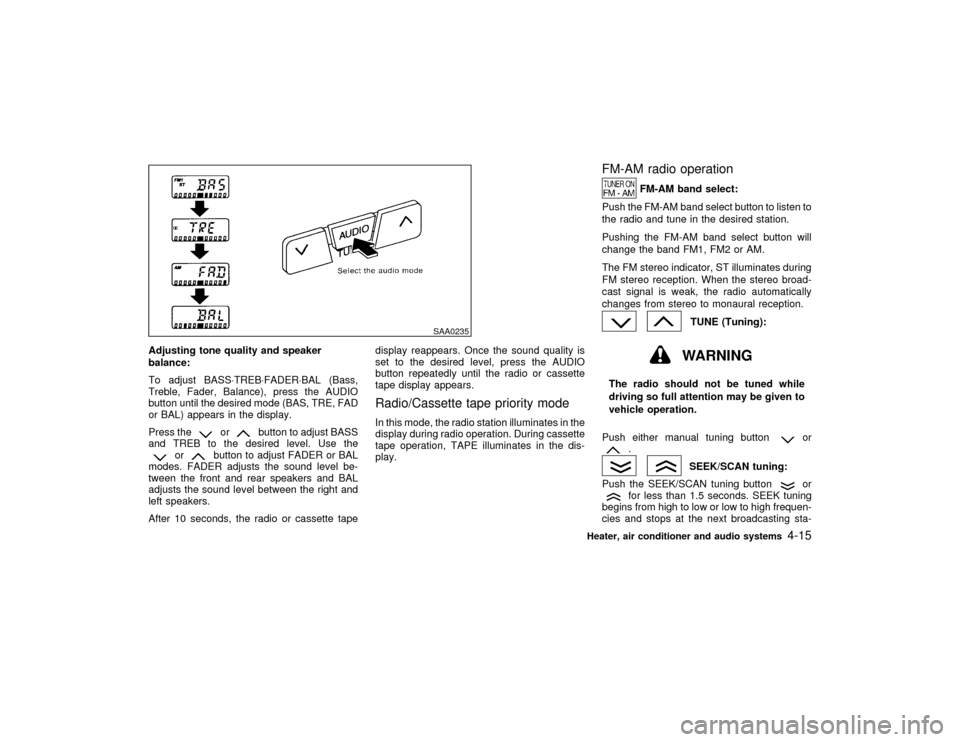
Adjusting tone quality and speaker
balance:
To adjust BASS×TREB×FADER×BAL (Bass,
Treble, Fader, Balance), press the AUDIO
button until the desired mode (BAS, TRE, FAD
or BAL) appears in the display.
Press the
or
button to adjust BASS
and TREB to the desired level. Use the
or
button to adjust FADER or BAL
modes. FADER adjusts the sound level be-
tween the front and rear speakers and BAL
adjusts the sound level between the right and
left speakers.
After 10 seconds, the radio or cassette tapedisplay reappears. Once the sound quality is
set to the desired level, press the AUDIO
button repeatedly until the radio or cassette
tape display appears.
Radio/Cassette tape priority modeIn this mode, the radio station illuminates in the
display during radio operation. During cassette
tape operation, TAPE illuminates in the dis-
play.
FM-AM radio operation
FM-AM band select:
Push the FM-AM band select button to listen to
the radio and tune in the desired station.
Pushing the FM-AM band select button will
change the band FM1, FM2 or AM.
The FM stereo indicator, ST illuminates during
FM stereo reception. When the stereo broad-
cast signal is weak, the radio automatically
changes from stereo to monaural reception.
TUNE (Tuning):WARNING
The radio should not be tuned while
driving so full attention may be given to
vehicle operation.
Push either manual tuning button
or
.
SEEK/SCAN tuning:
Push the SEEK/SCAN tuning button
or
for less than 1.5 seconds. SEEK tuning
begins from high to low or low to high frequen-
cies and stops at the next broadcasting sta-
SAA0235
Heater, air conditioner and audio systems
4-15
Z
00.1.17/A33-D/V5.0
X
Page 111 of 239

tion. Pushing the button again continues the
SEEK function. Once the highest broadcasting
station is reached, the radio continues in the
SEEK mode at the lowest broadcast station.
Push the SEEK/SCAN tuning button
or
for more than 1.5 seconds. SCAN illu-
minates in the display window. SCAN tuning
begins from high to low or low to high frequen-
cies and stops at each broadcasting station for
5 seconds. Pushing the button again during
this 5 second period stops SCAN tuning and
the radio remains tuned to that station.Station memory operations:
Six stations can be set for the AM band. 12
stations can be set for the FM band (six for
FM1, six for FM2).
1. Push the FM-AM band select button to
select AM, FM1, or FM2. The selected band
illuminates in the display.
2. Tune to the desired station.
3. Push the desired select button for more
than 1.5 seconds. For example, in the
illustrations ch2 is to be memorized. The
radio mutes when the select button is
pushed.
4. When the sound resumes, memorizing is
complete.
5. Other station select buttons can be set in
the same manner.
If the battery cable is disconnected, or if the
radio fuse opens, the radio memory is can-
celled. In that case, reset the desired stations.
Cassette tape player operationTurn the ignition key to ACC or ON, then
carefully insert a cassette tape into the tape
door.
The cassette tape automatically pulls into the
player. The word TAPE and moving digital
SAA0264
4-16
Heater, air conditioner and audio systems
Z
00.1.17/A33-D/V5.0
X
Page 115 of 239
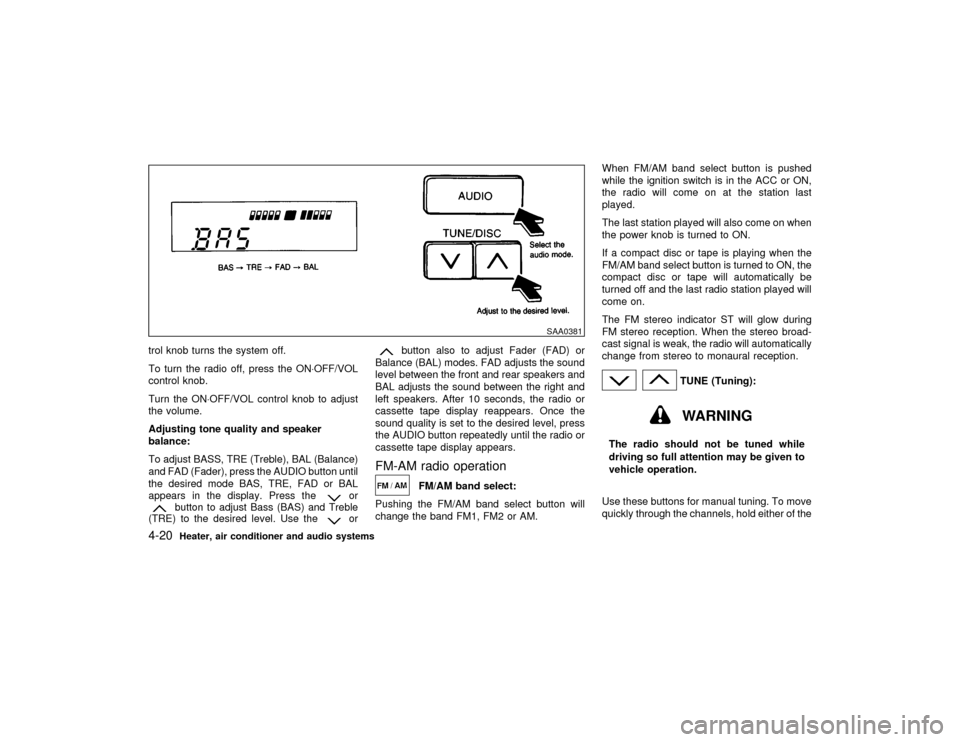
trol knob turns the system off.
To turn the radio off, press the ON×OFF/VOL
control knob.
Turn the ON×OFF/VOL control knob to adjust
the volume.
Adjusting tone quality and speaker
balance:
To adjust BASS, TRE (Treble), BAL (Balance)
and FAD (Fader), press the AUDIO button until
the desired mode BAS, TRE, FAD or BAL
appears in the display. Press the
or
button to adjust Bass (BAS) and Treble
(TRE) to the desired level. Use the
or
button also to adjust Fader (FAD) or
Balance (BAL) modes. FAD adjusts the sound
level between the front and rear speakers and
BAL adjusts the sound between the right and
left speakers. After 10 seconds, the radio or
cassette tape display reappears. Once the
sound quality is set to the desired level, press
the AUDIO button repeatedly until the radio or
cassette tape display appears.
FM-AM radio operation
FM/AM band select:
Pushing the FM/AM band select button will
change the band FM1, FM2 or AM.When FM/AM band select button is pushed
while the ignition switch is in the ACC or ON,
the radio will come on at the station last
played.
The last station played will also come on when
the power knob is turned to ON.
If a compact disc or tape is playing when the
FM/AM band select button is turned to ON, the
compact disc or tape will automatically be
turned off and the last radio station played will
come on.
The FM stereo indicator ST will glow during
FM stereo reception. When the stereo broad-
cast signal is weak, the radio will automatically
change from stereo to monaural reception.
TUNE (Tuning):WARNING
The radio should not be tuned while
driving so full attention may be given to
vehicle operation.
Use these buttons for manual tuning. To move
quickly through the channels, hold either of the
SAA0381
4-20
Heater, air conditioner and audio systems
Z
00.1.17/A33-D/V5.0
X
Page 120 of 239

Lightly wipe along the antenna with a
dampened soft cloth.If equipped with a genuine NISSAN cellular
phone, your NISSAN features a non-
directional microphone in the steering column
cover, so it is not necessary to look at or speak
directly into the microphone when calling. To
do so could detract from the driving operation
and cause an accident. See the car phone
manual for operation.
Some models are pre-wired to accept the
genuine NISSAN cellular phone. In addition,
the same model has the phone antenna built
into the rear glass window.
When installing a CB, ham radio or car phone
in your NISSAN, be sure to observe the follow-
ing cautions, otherwise the new equipment
may adversely affect the Engine control sys-
tem and other electronic parts.
WARNING
IA cellular telephone should not be
used while driving so full attention
may be given to vehicle operation.
Some jurisdictions prohibit the use of
cellular telephones while driving.IIf you must make a call while your
vehicle is in motion, the hands free
cellular phone operational mode (if
so equipped) is highly recommended.
Exercise extreme caution at all times
so full attention may be given to ve-
hicle operation.
IIf a conversation in a moving vehicle
requires you to take notes, pull off the
road to a safe location and stop your
vehicle before doing so.
CAUTION
IKeep the antenna as far as possible
away from the Engine Control Module
(ECM).
IKeep the antenna wire more than 8 in
(20 cm) away from the Multiport Fuel
Injection harness. Do not route the
antenna wire next to any harness.
IAdjust the antenna standing-wave ra-
tio as recommended by the manufac-
turer.
CAR PHONE OR CB RADIO
Heater, air conditioner and audio systems
4-25
Z
00.1.17/A33-D/V5.0
X
Page 128 of 239

IMake sure the area around the vehicle is
clear.
IMaintenance items listed here should be
checked periodically, e.g., each time you
check engine oil.
ICheck that all windows and lights are clean.
IVisually inspect tires for their appearance
and condition. Also check tires for proper
inflation.
ILock all doors.
IPosition seat and adjust head restraints.
IAdjust inside and outside mirrors.
IFasten seat belts and ask all passengers to
do likewise.
ICheck the operation of warning lights when
key is turned to the ON (3) position.1. Apply the parking brake.
2.Automatic transmission:
Move the selector lever to P (Park) or N
(Neutral). (P preferred.)
The selector lever cannot be moved out of
P (Park) position and into any of the other
gear positions if the key is removed from
the switch.
The starter is designed not to operate if the
selector lever is in one of the driving posi-
tions.
Manual transmission:
Move the shift lever to N (Neutral) position,
and depress the clutch pedal to the floor
while cranking the engine.
The starter is designed not to operate un-
less the clutch pedal is fully depressed.
3. Crank the enginewith your foot off the
accelerator pedalby turning the ignition
key to START. Release the key when the
engine starts. If the engine starts, but fails
to run, repeat the above procedure.
IIf the engine is very hard to start in
extremely cold or hot weather, de-
press the accelerator pedal and hold it
to help start the engine.IIn the summer, when restarting the
engine within 30 minutes after it has
been stopped, keep the accelerator
pedal fully depressed while starting.
CAUTION
Do not operate the starter for more than
10 seconds at a time. If the engine does
not start, turn the key off and wait 10
seconds before cranking again, other-
wise the starter could be damaged.
4.Warm-up
Allow the engine to idle for at least 30
seconds after starting. Drive at moderate
speed for a short distance first, especially in
cold weather.
BEFORE STARTING THE ENGINE STARTING THE ENGINE
Starting and driving
5-7
Z
00.1.17/A33-D/V5.0
X
Page 132 of 239

When cruising at a low speed or climb-
ing a gentle slope, you may feel uncom-
fortable shift shocks as the transmission
shifts between third and overdrive re-
peatedly. In this case, press the over-
drive switch. The O/D OFF indicator light
comes on at this time.
When driving conditions change, press the
overdrive switch again. The O/D OFF indicator
light goes out.
Remember not to drive at high speeds for
extended periods of time with the O/D OFF
light illuminated. This reduces the fuel
economy.
Fail-safeWhen the fail-safe operation occurs, the next
time the key is turned to the ON position, the
O/D OFF light will blink for approximately 8
seconds after coming on for 2 seconds. While
the vehicle can be driven under these circum-
stances please note that the automatic trans-
mission will be locked in third gear.
If the vehicle is driven under extreme con-
ditions, such as excessive wheel spinning
and subsequent hard braking, the fail-safe
system may be activated. This will occur
even if all electrical circuits are functioning
properly. In this case, turn the ignition keyOFF and wait for 3 seconds. Then turn the
key back to the ON position. The vehicle
should return to its normal operating con-
dition. If it does not return to its normal
operating condition, have your NISSAN
dealer check the transmission and repair if
necessary.
MANUAL TRANSMISSION
ShiftingTo change gears, or when up shifting or down
shifting depress the clutch pedal fully, shift into
the appropriate gear then release the clutch
slowly and smoothly.
On the five-speed transmission model, you
cannot shift directly from fifth gear into the R
(Reverse) position. First shift into the N (Neu-
tral) position, then into the R (Reverse) posi-
tion.
If it is difficult to move the shift lever into R
(Reverse) or 1 (Low gear), shift into N (Neu-
SSD0002
Starting and driving
5-11
Z
00.1.17/A33-D/V5.0
X