2000 MERCEDES-BENZ CLK-CLASS odometer
[x] Cancel search: odometerPage 99 of 299
Multifunction steering wheel, multifunction display
Te ch n ica l
data Instruments
and controlsOperationDrivingInstrument
cluster displayPractical hints Car care Index Press the button è or ÿ repeatedly until the
display (1) appears.
Press the j or k button until the display for trip
odometer memory “AFTER START” (1) and
“AFTER RESET” (2), or the display (3) for estimated
driving range remaining and fuel tank contents
appears.
Pressing the è or ÿ button displays the next or
previous system.
Note:
The “AFTER START” display (1) always appears when
the trip computer is called up.To reset the “AFTER START” (1) or “AFTER RESET” (2)
odometer memory at any time:
Call up the relevant display (1 or 2) using the j or
k button and press the Jbutton in the instrument
cluster until the values are reset to “0”.
The “AFTER START” trip odometer reading is
automatically reset after four hours of electronic key not
being in steering lock position 2.
99
ProCarManuals.com
Page 101 of 299
Multifunction steering wheel, multifunction display
Te ch n ica l
data Instruments
and controlsOperationDrivingInstrument
cluster displayPractical hints Car care Index Should any malfunctions be stored while driving, they
will reappear in the display (2) when the electronic key
is in steering lock position 0 or removed from the
steering lock.
Specific malfunctions can be recalled by pressing
button J. Each malfunction or warning message must
be acknowledged by pressing button J. Once all
messages are cancelled, the odometer display should
reappear.
Pressing the J button in the instrument cluster
immediately switches to the next malfunction message.
The malfunction message memory will be cleared when
the electronic key is turned in the steering lock to
position 1 or 2. Should any subsequent malfunctions
occur, they will be displayed in the malfunction
message memory.
Pressing the è or ÿ button displays the next or
previous system.Important!
Malfunction and warning messages are only indicated
for certain systems and displayed to a low level of detail.
The malfunction and warning messages are simply a
reminder with respect to the operation of certain
systems and do not replace the driver’s responsibility to
maintain the vehicle’s operating safety by having all
required maintenance and safety checks performed on
the vehicle and by bringing the vehicle to an authorized
Mercedes-Benz Center to address the malfunction and
warning messages. See page213.
101
ProCarManuals.com
Page 106 of 299

Flexible service system
Te ch n ica l
data Instruments
and controlsOperationDrivingInstrument
cluster displayPractical hints Car care Index
The service indicator disappears automatically after
30 seconds or if button J on the instrument cluster is
pressed.
Calling up service indicator manually:
Turn the electronic key in steering lock to position 1.
Call up the trip odometer and main odometer, by
pressing button è or ÿ on the multifunction
steering wheel until the display appears. See page90.
Press button j or k until the FSS indicator
appears.
Pressing the è or ÿ button displays the next or
previous system.
Important!
The FSS indicator is not an engine oil level indicator.
See page108 for engine oil level indicator.Notes:
When disconnecting vehicle battery for one or more
days at a time, such days will not be counted. Any such
days not counted by the FSS can be added by your
Mercedes-Benz Center.
The interval between services is determined by the type
of driving for which the vehicle is used. For example,
driving at extreme speeds, and cold starts combined
with short distance driving in which the engine does not
reach operating normal temperature, reduce the interval
between services.
106
ProCarManuals.com
Page 107 of 299

Flexible service system
Te ch n ica l
data Instruments
and controlsOperationDrivingInstrument
cluster displayPractical hints Car care Index Following a completed A or B service the
Mercedes-Benz Center sets the counter mileage to
10 000 miles (Canada: 15 000 km) and 365 days.
The counter can also be set by any individual. To do so:
Turn the electronic key in steering lock to position 2.
To call up the trip odometer and main odometer, press
button è or ÿ on the multifunction steering
wheel until the display appears. See page90.
Press button j or k until the FSS indicator
appears.
Press button Jon the instrument cluster for
approximately 2 seconds.The multifunction display will show the question:
“DO YOU WANT TO RESET SERVICE INTERVAL? –
CONFIRM BY PRESSING R”
Press button J on the instrument cluster again, and
hold until a signal sounds. The message “SERVICE
INTERVAL HAS BEEN RESET” appears in the
multifunction display.
The new service indicator is displayed with the reset
distance of 10 000 miles (Canada 15 000 km).
If the FSS counter was inadvertently reset, have a
Mercedes-Benz Center correct it.
However you choose to set your reference numbers, the
scheduled services as posted in the Service Booklet
must be followed to properly care for your vehicle.
107
ProCarManuals.com
Page 108 of 299
Engine oil level indicator
Te ch n ica l
data Instruments
and controlsOperationDrivingInstrument
cluster displayPractical hints Car care Index
Engine oil level indicator
To check the engine oil level, park vehicle on level
ground, with engine at normal operational temperature.
Check oil level approximately 5 minutes after stopping
the engine, allowing for the oil to return to the oil pan.Turn the electronic key in steering lock to position 2.
To call up the trip odometer and main odometer, press
button è or ÿ on the multifunction steering
wheel until the display appears. See page88.
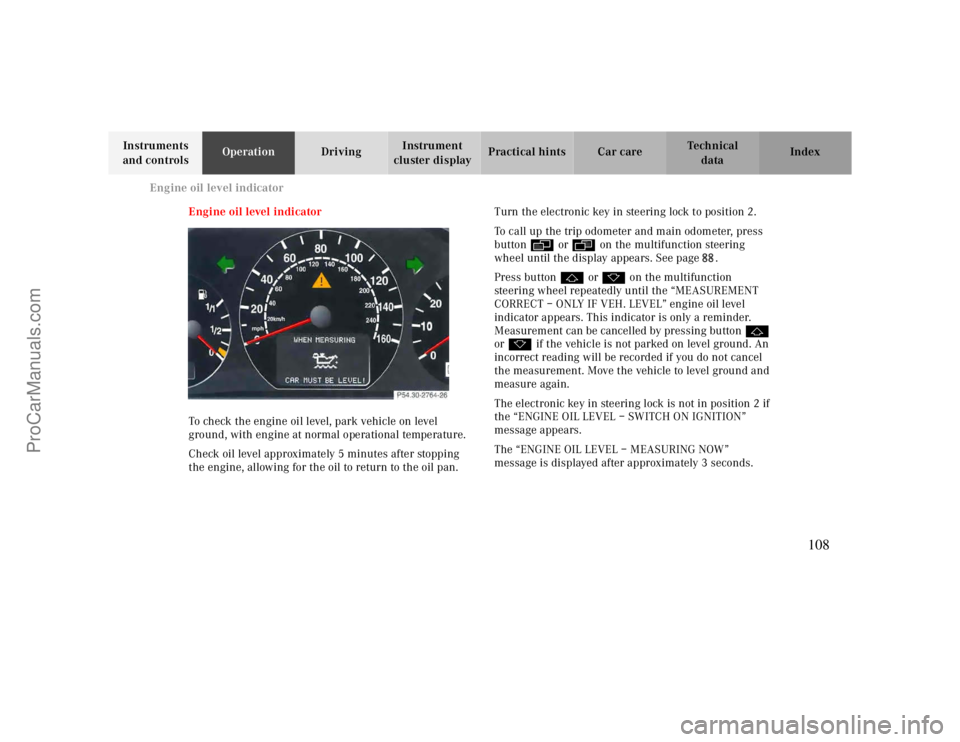
Press button j or k on the multifunction
steering wheel repeatedly until the “MEASUREMENT
CORRECT – ONLY IF VEH. LEVEL” engine oil level
indicator appears. This indicator is only a reminder.
Measurement can be cancelled by pressing button j
or k if the vehicle is not parked on level ground. An
incorrect reading will be recorded if you do not cancel
the measurement. Move the vehicle to level ground and
measure again.
The electronic key in steering lock is not in position 2 if
the “ENGINE OIL LEVEL – SWITCH ON IGNITION”
message appears.
The “ENGINE OIL LEVEL – MEASURING NOW”
message is displayed after approximately 3 seconds.
108
ProCarManuals.com
Page 296 of 299

M
O
Maintenance .............................................................. 163Malfunction and indicator lamps in the
instrument cluster ................................................. 208
Malfunction and warning messages ............................ 213Malfunction message memory ................................... 100Manual operation of sliding/pop-up roof .................... 267Multicontour seat.........................................................52Multifunction display..................................................84
Engine oil level indicator .........................................88ESS (Flexible service system) ...................................88Setting the audio volume...................................... 104Trip and mainodometer...........................................88
Multifunction steering wheel........................................84NNavigation system - Multifunction display ....................97
On-board diagnostic system........................................ 208Operator's Manual.......................................................... 8Outside temperature indicator ..................................... .82Overhead control panel ................................................ .21PPanic button ................................................................. 32Parcel net in front passenger footwell ........................ 155Parking ...................................................................... 187Parking brake............................................................. 184PARKING BRAKE - malfunction and
warning messages ................................................ 218
Power assistance ........................................................ 185Power seats, front......................................................... 44
Backrest................................................................... 51
Power windows........................................................... 141
Express opening and closing ................................. 142Synchronizing........................................................ 142
Problems with your vehicle ......................................... 14Product information
.................................................... 7
296
ProCarManuals.com
Page 298 of 299
TTachometer ..................................................................83Technical data ........................................................... 281
Electrical system .................................................... 282Main dimensions ................................................... 283Rims and tires........................................................ 282Weights ................................................................. 283
Tele Aid...................................................................... 166
Initiating an emergency call .................................. 167
Telephone ....................................................................92
General notes ........................................................ 156Incoming call ...........................................................96Redialing .................................................................94Telephone book........................................................92
Telephones and two-way radios .................................. 162Telescoping steering column
Adjusting .................................................................73Indicator lamp.........................................................212
Telescoping steering column -
malfunction and warning messages ....................... 221
The first 1 000 miles .................................................. 163Tire inflation pressure ............................................... 247Tires
Driving instructions .............................................. 187
Tow-away alarm............................................................ 43Towing the vehicle...................................................... 253Transmission selector lever,
manually unlocking ............................................... 255
Trip computer .............................................................. 98Trip odometer............................................................... 83Trunk........................................................................... 38
Opening......................................................................30Release switch ......................................................... 40
Trunk lamp ............................................................... 270VVehicle jack................................................................ 230Vehicle tools ................................................................229
298
ProCarManuals.com