Page 153 of 272

If you should become stuck in snow
or on a very slippery road surface,
try switching the Traction Controly
system off. This may allow excess
wheel spin to ªdigº the vehicle out
or enable a successful ªrockingº
maneuver.
If the Traction Controlysystem is
cycled excessively, the brake portion
of the system will shut down to
prevent the rear brakes from
overheating. A limited Traction Controlyfunction using only engine
torque reduction will still help control wheels from over-spinning. When
the rear brakes have cooled down, the system will again function
normally. Anti-lock braking is not affected by this condition and will
function normally during the cool down period.
AdvanceTracYStability Enhancement System (if equipped)
The AdvanceTracysystem helps the driver maintain the stability and
steerability of the vehicle. The system integrates anti-lock braking system
(ABS), Traction Controlyand a more advanced function to further
enhance the stability of the vehicle. The system shares many of the
electronic and mechanical elements already present in the Traction
Controlyand ABS systems.
The AdvanceTracyconstantly monitors the vehicle motion relative to
the driver's intended course. This is done by using added sensors that
compare the steering inputs from the driver with the actual motion of
the vehicle. When there is a discrepancy between the driver's inputs and
the vehicle motion, AdvanceTracychanges the force at each tire to help
control the vehicle. If the vehicle begins to rotate excessively left or
right, spin out, or slide sideways, the system will attempt to correct the
excessive motion. If the vehicle does not respond to steering inputs, the
system will attempt to increase the turning response of the vehicle.
The AdvanceTracyenhances stability during maneuvers that require all
available tire traction to control the vehicle. The benefits of the
AdvanceTracysystem are most noticeable when driving in wet/snowy/icy
road conditions and/or when performing emergency maneuvers. In an
emergency lane-change, the driver will experience better overall vehicle
traction, and have better control of the vehicle.
OFF
TRAC
Driving
153
Page 154 of 272

Driving conditions which may activate AdvanceTracyinclude:
²Taking a turn too fast
²Evasively maneuvering to avoid an accident, pedestrian or obstacle
²Hitting a patch of ice
²Changing lanes on a snow-rutted road
²Entering a snow-free road from a snow-covered side street
²Entering a paved road from a gravel road
²Hitting a curb while turning
²Driving on slick surfaces
The AdvanceTracysystem defaults to ON when the engine is started.
The system does not work when the vehicle is traveling backwards. In
reverse, ABS and Traction Controlywill continue to function. The
system uses ABS and Traction Controly(including control of the
engine) as well as its more advanced controls to enhance vehicle
stability.
The AdvanceTracyon/off control
button allows the driver to control
the availability of the Traction
Controlyand AdvanceTracy
system. This is independent of the
ABS function, which canNOTbe
switched off by the driver. The
AdvanceTracysystem status is
indicated by a warning indicator
light with a ªsliding carº icon in the
instrument cluster that will flash
when the system is active and an indicator light in the control button
that will illuminate when the system is turned OFF. In vehicles with a
message center (if equipped), the message ªADVANCETRAC OFFº is
displayed. If a failure is detected in the AdvanceTracysystem the
warning indicator light in the instrument cluster will stay ON. If the
warning indicator light in the instrument cluster remains ON while the
engine is running, have the system serviced immediately.
The AdvanceTracysystem continually monitors and checks all sensors
used in improving the stability of the vehicle. Some drivers may notice a
slight movement of the brake pedal when the system checks itself.
OFF
ATS
Driving
154
Page 156 of 272

If you cannot move the gearshift lever out of P (Park) with ignition in
the RUN position and the brake pedal depressed:
1. Apply the parking brake, turn ignition key to LOCK, then remove the
key.
2. Insert the key and turn it to OFF. Apply the brake pedal and shift to N
(Neutral).
3. Start the vehicle.
If it is necessary to use the above procedure to move the gearshift lever,
it is possible that a fuse has blown or the vehicle's brakelamps are not
operating properly. Refer toFuses and relaysin theRoadside
emergencieschapter.
Do not drive your vehicle until you verify that the brakelamps
are working.
If your vehicle gets stuck in mud or snow it may be rocked out by
shifting from forward and reverse gears, stopping between shifts, in a
steady pattern. Press lightly on the accelerator in each gear.
Do not rock the vehicle if the engine is not at normal operating
temperature or damage to the transmission may occur.
Do not rock the vehicle for more than a few minutes or damage
to the transmission and tires may occur or the engine may
overheat.
Always set the parking brake fully and make sure the gearshift is
latched in P (Park). Turn off the ignition whenever you leave
your vehicle.
If the parking brake is fully released, but the brake warning lamp
remains illuminated, the brakes may not be working properly.
See your dealer or a qualified service technician.
Driving with a 5±speed automatic transmission (if equipped)
Understanding gearshift positions
Pull the gearshift lever towards you and downward to the desired gear.
The gearshift positions are displayed on the floor console next to the
gearshift lever and on the instrument cluster.
Driving
156
Page 159 of 272
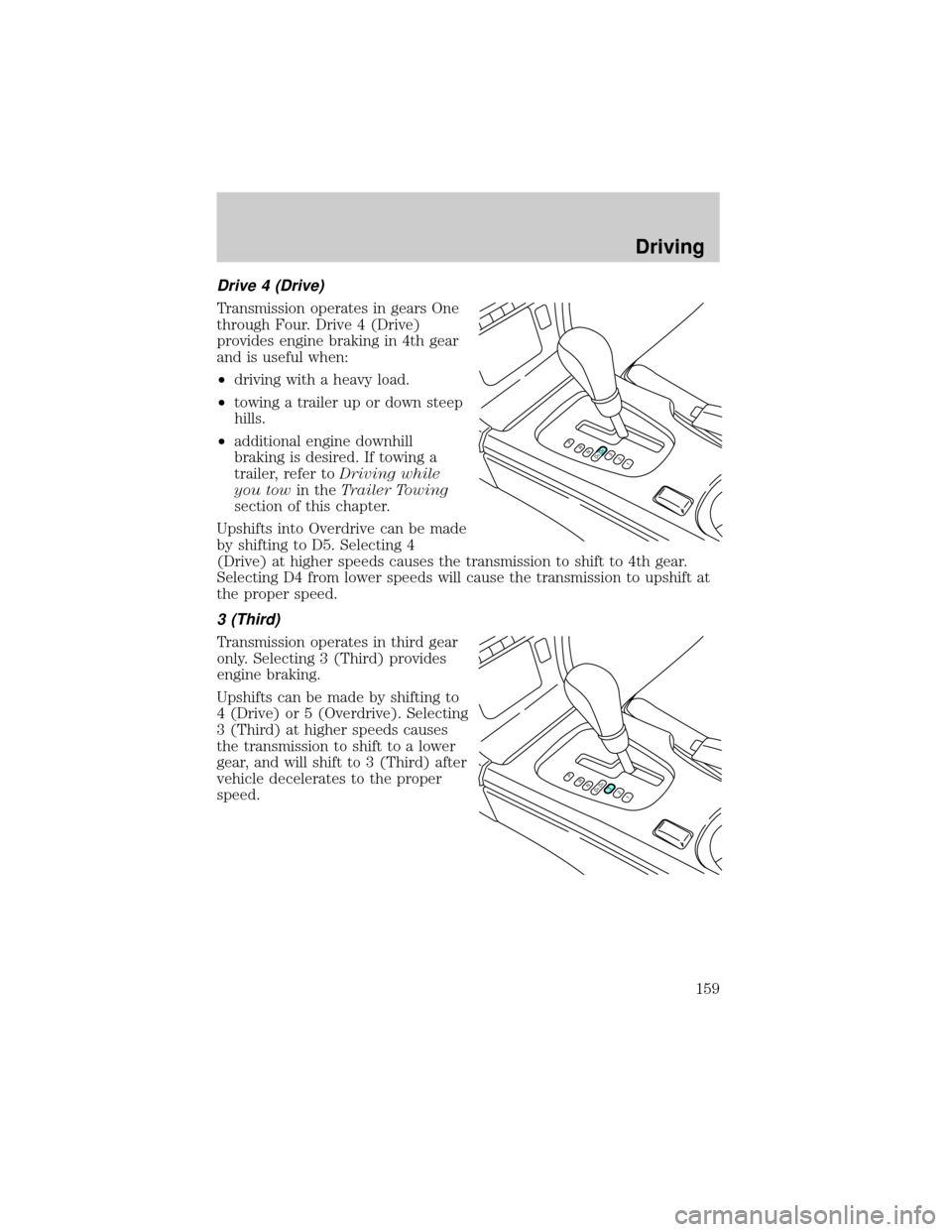
Drive 4 (Drive)
Transmission operates in gears One
through Four. Drive 4 (Drive)
provides engine braking in 4th gear
and is useful when:
²driving with a heavy load.
²towing a trailer up or down steep
hills.
²additional engine downhill
braking is desired. If towing a
trailer, refer toDriving while
you towin theTrailer Towing
section of this chapter.
Upshifts into Overdrive can be made
by shifting to D5. Selecting 4
(Drive) at higher speeds causes the transmission to shift to 4th gear.
Selecting D4 from lower speeds will cause the transmission to upshift at
the proper speed.
3 (Third)
Transmission operates in third gear
only. Selecting 3 (Third) provides
engine braking.
Upshifts can be made by shifting to
4 (Drive) or 5 (Overdrive). Selecting
3 (Third) at higher speeds causes
the transmission to shift to a lower
gear, and will shift to 3 (Third) after
vehicle decelerates to the proper
speed.
PRND5D4321
PRND5D4321
Driving
159
Page 160 of 272
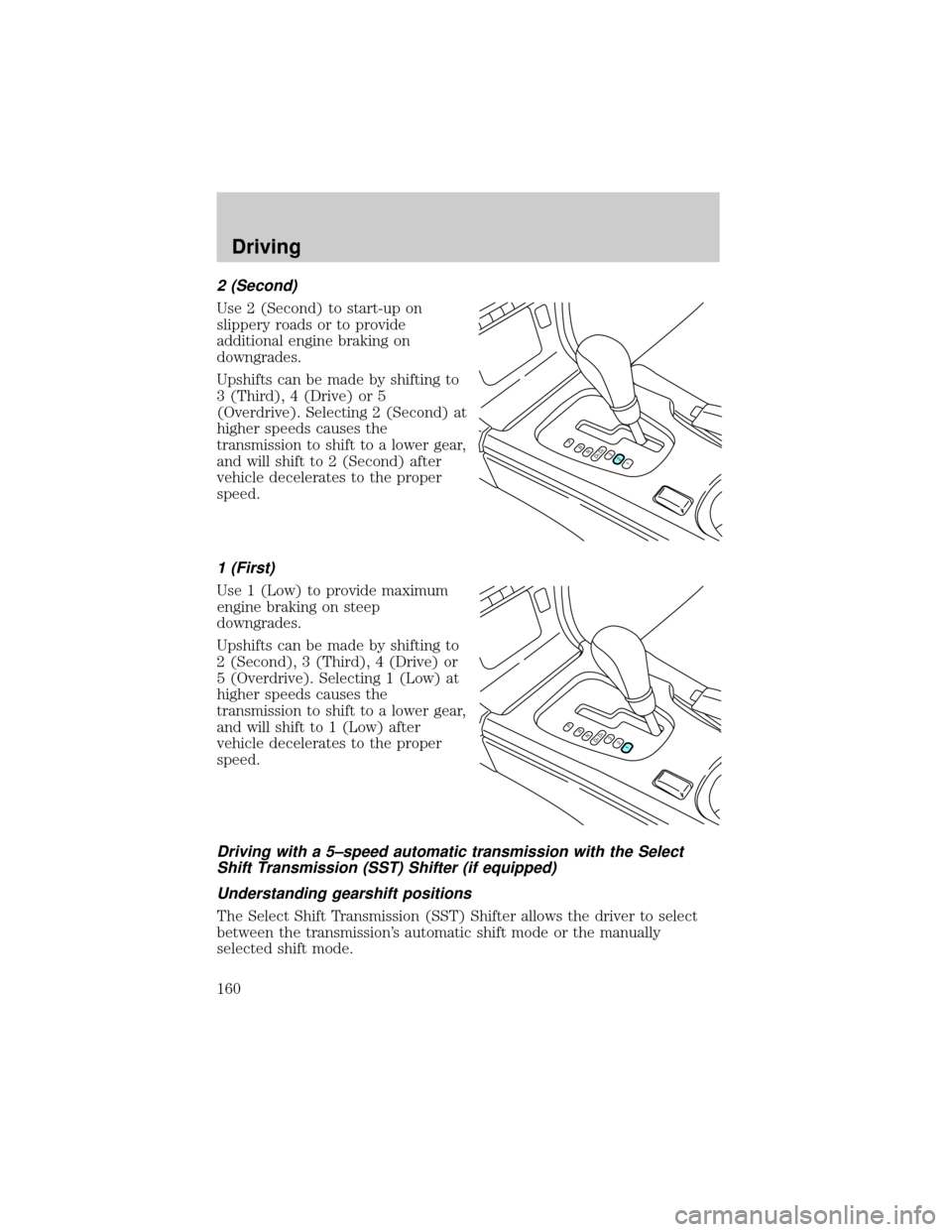
2 (Second)
Use 2 (Second) to start-up on
slippery roads or to provide
additional engine braking on
downgrades.
Upshifts can be made by shifting to
3 (Third), 4 (Drive) or 5
(Overdrive). Selecting 2 (Second) at
higher speeds causes the
transmission to shift to a lower gear,
and will shift to 2 (Second) after
vehicle decelerates to the proper
speed.
1 (First)
Use 1 (Low) to provide maximum
engine braking on steep
downgrades.
Upshifts can be made by shifting to
2 (Second), 3 (Third), 4 (Drive) or
5 (Overdrive). Selecting 1 (Low) at
higher speeds causes the
transmission to shift to a lower gear,
and will shift to 1 (Low) after
vehicle decelerates to the proper
speed.
Driving with a 5±speed automatic transmission with the Select
Shift Transmission (SST) Shifter (if equipped)
Understanding gearshift positions
The Select Shift Transmission (SST) Shifter allows the driver to select
between the transmission's automatic shift mode or the manually
selected shift mode.
PRND5D4321
PRND5D4321
Driving
160
Page 163 of 272
²If the gearshift lever is moved into the downshift (-) position more
than once in rapid succession, the transmission will only allow a
downshift into thenext lowergear to prevent possible engine and/or
transmission damage. Once the vehicle reaches below a specified entry
speed for the next lower gear, the transmission will allow another
downshift to occur if selected by the driver.
MANUAL TRANSMISSION OPERATION (IF EQUIPPED)
Using the clutch
Vehicles equipped with a manual transmission have a starter interlock
that prevents cranking the engine unless the clutch pedal is fully
depressed.
When starting a vehicle with a manual transmission, you must:
1. Make sure the parking brake is
fully set.
2. Depress the clutch pedal fully.
3. Put the gearshift lever in N
(Neutral).
1
2
45
R3
Driving
163
Page 164 of 272
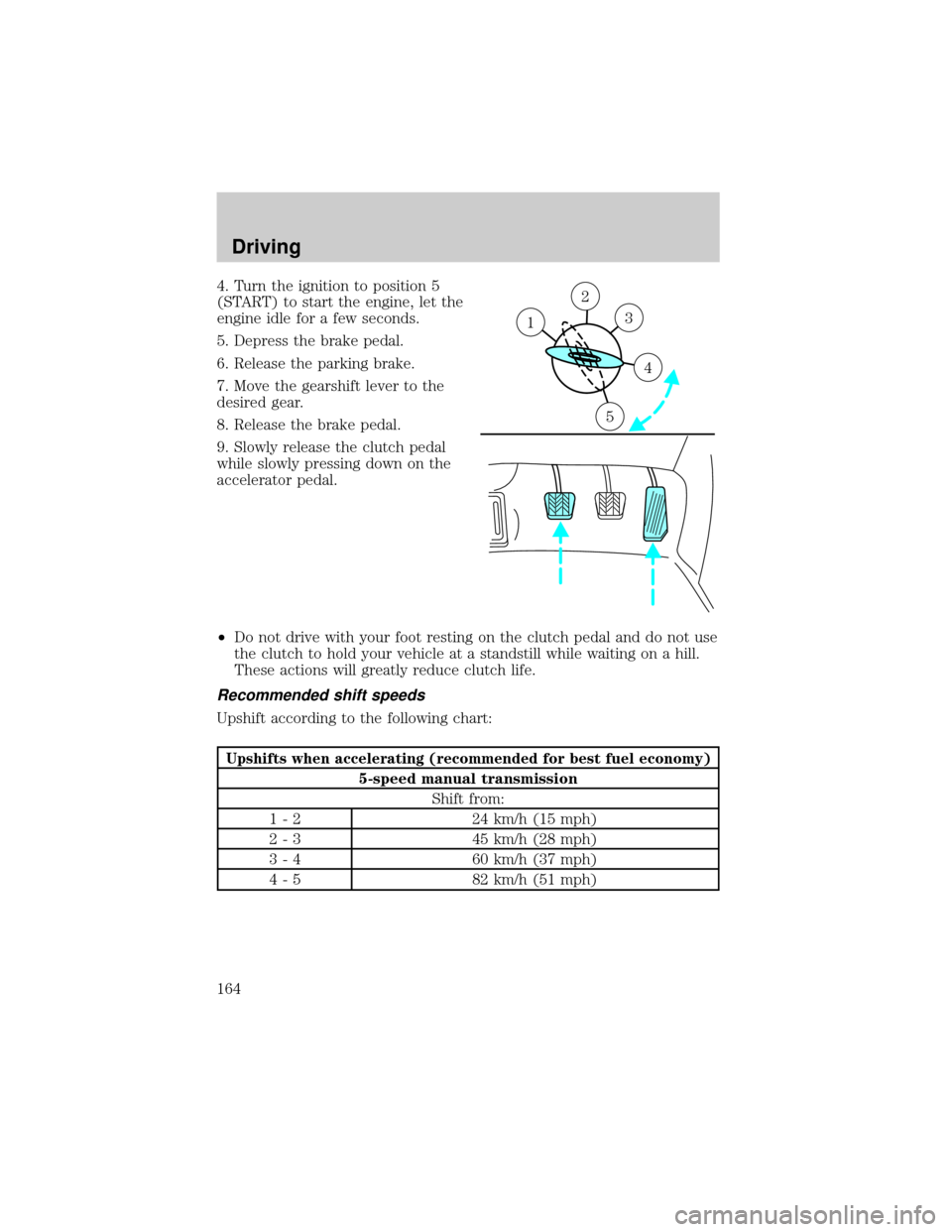
4. Turn the ignition to position 5
(START) to start the engine, let the
engine idle for a few seconds.
5. Depress the brake pedal.
6. Release the parking brake.
7. Move the gearshift lever to the
desired gear.
8. Release the brake pedal.
9. Slowly release the clutch pedal
while slowly pressing down on the
accelerator pedal.
²Do not drive with your foot resting on the clutch pedal and do not use
the clutch to hold your vehicle at a standstill while waiting on a hill.
These actions will greatly reduce clutch life.
Recommended shift speeds
Upshift according to the following chart:
Upshifts when accelerating (recommended for best fuel economy)
5-speed manual transmission
Shift from:
1 - 2 24 km/h (15 mph)
2 - 3 45 km/h (28 mph)
3 - 4 60 km/h (37 mph)
4 - 5 82 km/h (51 mph)
2
3
4
5
1
Driving
164
Page 166 of 272
Reverse
Make sure that your vehicle is at a complete stop before you shift into R
(Reverse). Failure to do so may damage the transmission.
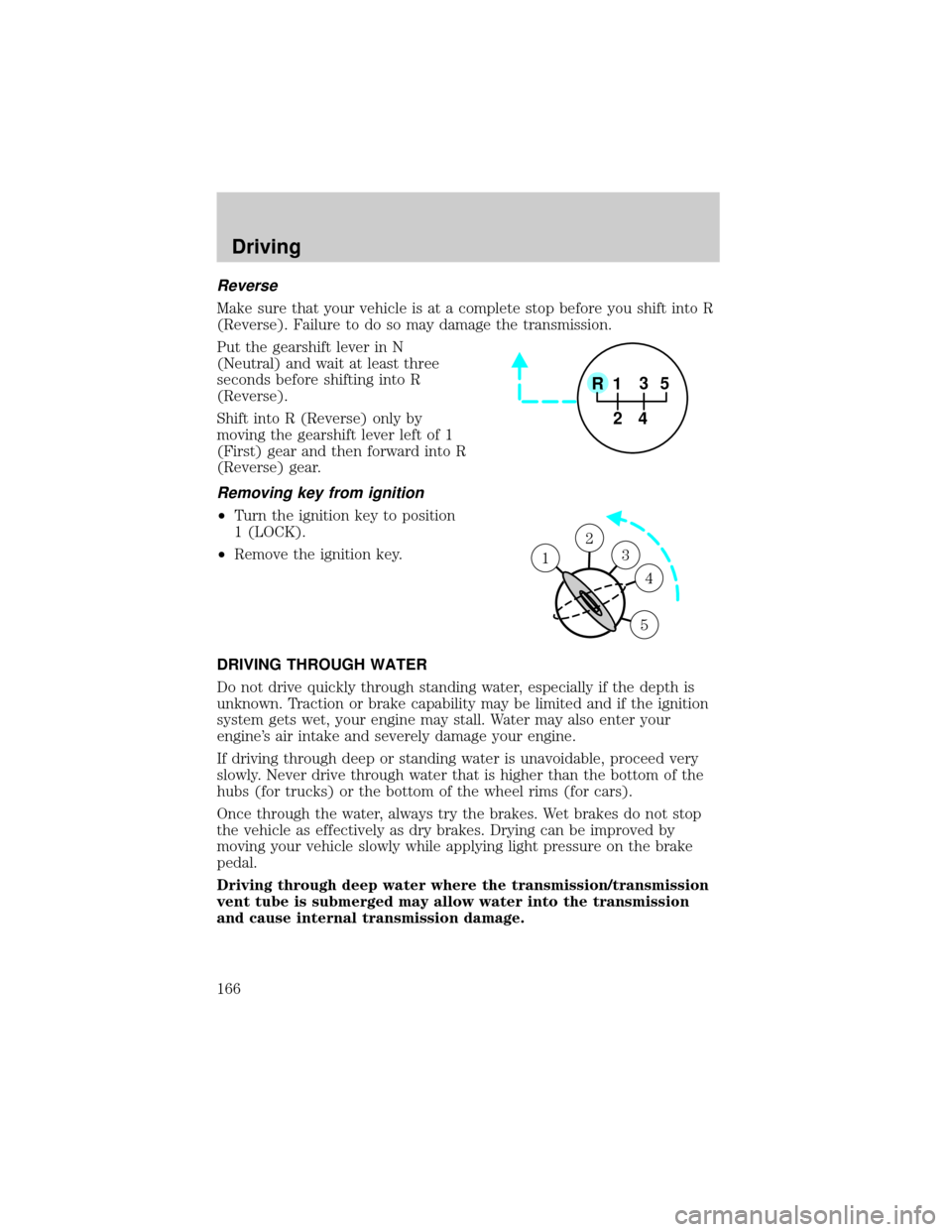
Put the gearshift lever in N
(Neutral) and wait at least three
seconds before shifting into R
(Reverse).
Shift into R (Reverse) only by
moving the gearshift lever left of 1
(First) gear and then forward into R
(Reverse) gear.
Removing key from ignition
²Turn the ignition key to position
1 (LOCK).
²Remove the ignition key.
DRIVING THROUGH WATER
Do not drive quickly through standing water, especially if the depth is
unknown. Traction or brake capability may be limited and if the ignition
system gets wet, your engine may stall. Water may also enter your
engine's air intake and severely damage your engine.
If driving through deep or standing water is unavoidable, proceed very
slowly. Never drive through water that is higher than the bottom of the
hubs (for trucks) or the bottom of the wheel rims (for cars).
Once through the water, always try the brakes. Wet brakes do not stop
the vehicle as effectively as dry brakes. Drying can be improved by
moving your vehicle slowly while applying light pressure on the brake
pedal.
Driving through deep water where the transmission/transmission
vent tube is submerged may allow water into the transmission
and cause internal transmission damage.
1
2
45
R3
1
2
3
4
5
1
Driving
166