2000 HONDA ODYSSEY headlights
[x] Cancel search: headlightsPage 219 of 352
Driving in Ba d Weathe r
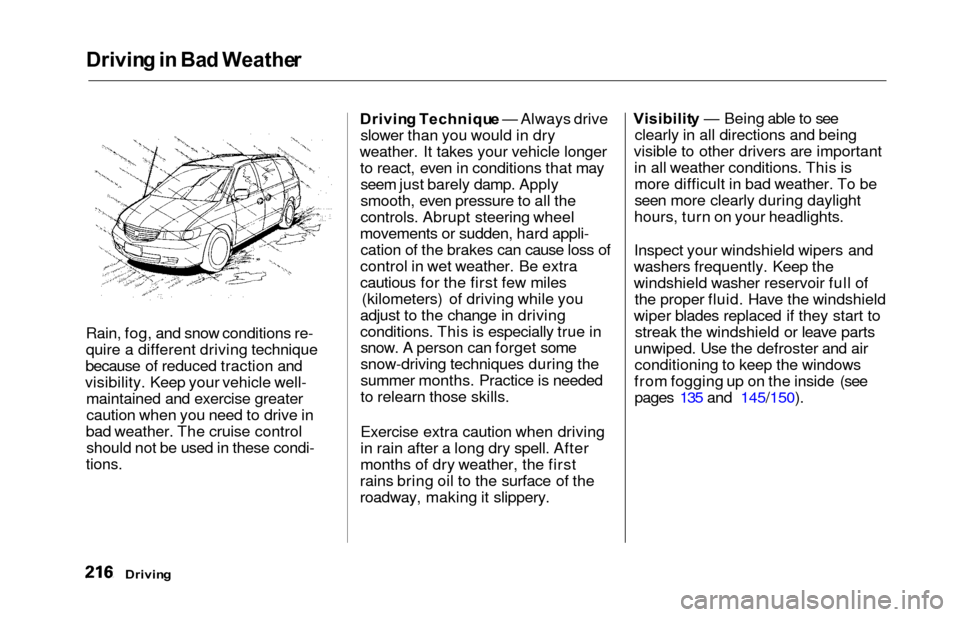
Rain, fog, and snow conditions re-
quire a different driving technique
because of reduced traction and
visibility. Keep your vehicle well- maintained and exercise greater
caution when you need to drive in
bad weather. The cruise control should not be used in these condi-
tions.
Drivin g Techniqu e — Always drive
slower than you would in dry
weather. It takes your vehicle longer to react, even in conditions that mayseem just barely damp. Apply
smooth, even pressure to all the
controls. Abrupt steering wheel
movements or sudden, hard appli- cation of the brakes can cause loss of
control in wet weather. Be extra
cautious for the first few miles (kilometers) of driving while you
adjust to the change in driving
conditions. This is especially true in snow. A person can forget some
snow-driving techniques during the
summer months. Practice is needed
to relearn those skills.
Exercise extra caution when driving
in rain after a long dry spell. After
months of dry weather, the first
rains bring oil to the surface of the
roadway, making it slippery. Visibilit
y — Being able to see
clearly in all directions and being
visible to other drivers are important in all weather conditions. This ismore difficult in bad weather. To be
seen more clearly during daylight
hours, turn on your headlights.
Inspect your windshield wipers and
washers frequently. Keep the
windshield washer reservoir full of the proper fluid. Have the windshield
wiper blades replaced if they start to streak the windshield or leave parts
unwiped. Use the defroster and air conditioning to keep the windows
from fogging up on the inside (see pages 135 and 145/150).
Drivin g
Page 240 of 352
Owner Maintenanc e Check s
You should check the following
items at the specified intervals. If
you are unsure of how to perform
any check, turn to the page given.
Engine oil level — Check every
time you fill the fuel tank. See
page 192.
Engine coolant level — Check the
radiator reserve tank every time
you fill the fuel tank. See page 193.
Windshield washer fluid — Check the level in the reservoir monthly.If weather conditions cause you to
use the washers frequently, check
the reservoir each time you stop
for fuel. See page 248.
Automatic transmission — Check the fluid level monthly. See page
249.
Brakes — Check the fluid level
monthly. See page 250. Tires — Check the tire pressure
monthly. Examine the tread for
wear and foreign objects. See page
263.
Lights — Check the operation of
the headlights, parking lights,
taillights, high-mount brake light,
turn signals, brake lights, and
license plate light monthly. See
page 270.
Maintenanc e
Page 274 of 352
Light
s
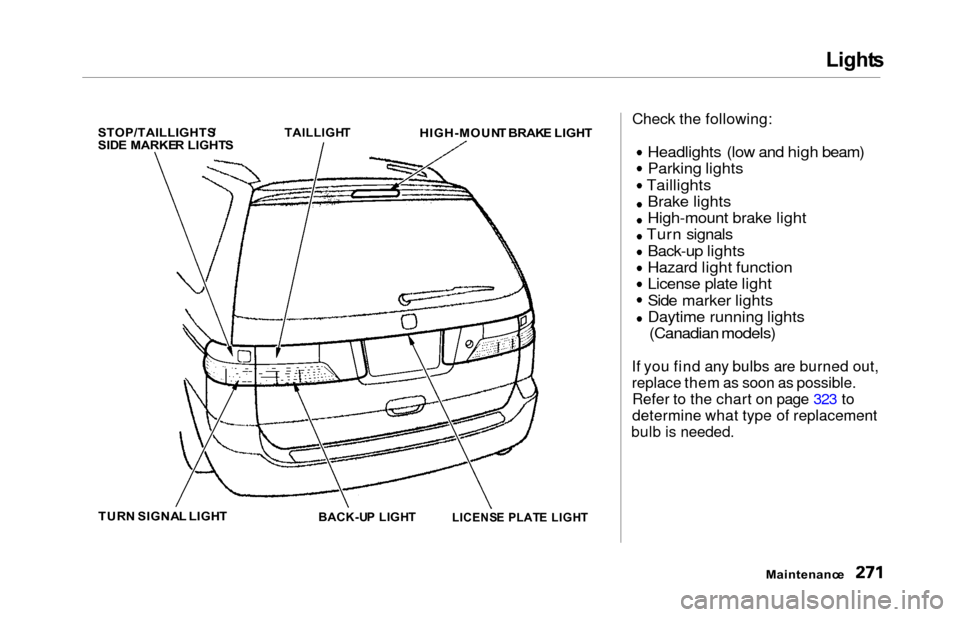
STOP/TAILLIGHTS /
SID E MARKE R LIGHT S
TAILLIGH
T
HIGH-MOUN T BRAK E LIGH T
TUR N SIGNA L LIGH T
BACK-UP LIGH T
Check the following:
Headlights (low and high beam)
Parking lights
Taillights Brake lights
High-mount brake light
Turn signals
Back-up lights
Hazard light function
License plate light
Side marker lights
Daytime running lights
(Canadian models)
If you find any bulbs are burned out,
replace them as soon as possible.
Refer to the chart on page 323 to
determine what type of replacement
bulb is needed.
Maintenance
LICENS
E PLAT E LIGH T
Page 275 of 352
Lights
Headligh t Aimin g
The headlights were properly aimed when your vehicle was new. If youregularly carry heavy items in the
cargo area or pull a trailer,
readjustment may be required.
Adjustment of the headlights should be performed by a Honda technicianor other qualified mechanic. Replacin
g a Headligh t Bul b
Your vehicle has halogen headlight bulbs, one on each side. When
replacing a bulb, handle it by its steel
base and protect the glass fromcontact with your skin or hard
objects. If you touch the glass, clean
it with denatured alcohol and a clean
cloth.
Halogen headlight bulbs get very hot
when lit. Oil, perspiration, or a scratch
on the glass can cause the bulb to
overheat and shatter.
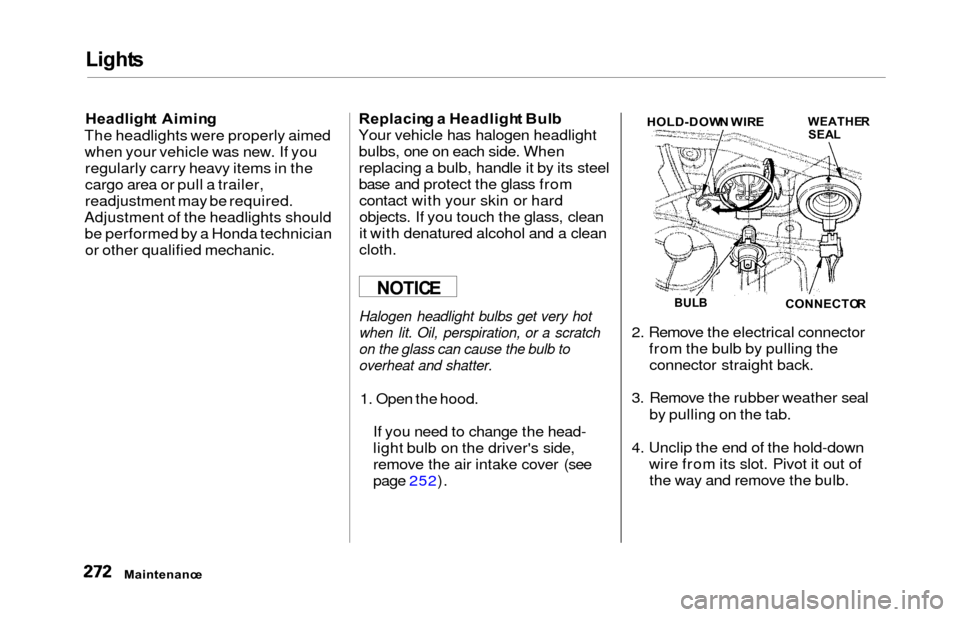
1. Open the hood.
If you need to change the head-
light bulb on the driver's side,
remove the air intake cover (see
page 252). 2. Remove the electrical connector
from the bulb by pulling theconnector straight back.
3. Remove the rubber weather seal by pulling on the tab.
4. Unclip the end of the hold-down wire from its slot. Pivot it out ofthe way and remove the bulb.
Maintenanc e
NOTICEBULBCONNECTO R
WEATHERSEALHOLD-DOW N WIR E
Page 276 of 352
Lights
5. Insert the new bulb into the hole,
making sure the tabs are in their
slots. Pivot the hold-down wire
back in place and clip the end into
the slot.
6. Install the rubber seal over the back of the headlight assembly.
Make sure it is right side up; it is
marked "TOP."
7. Push the electrical connector ontothe new bulb.
Turn on the headlights to test the
new bulb.
8. (Driver's side) Reinstall the air intake cover. Replacin
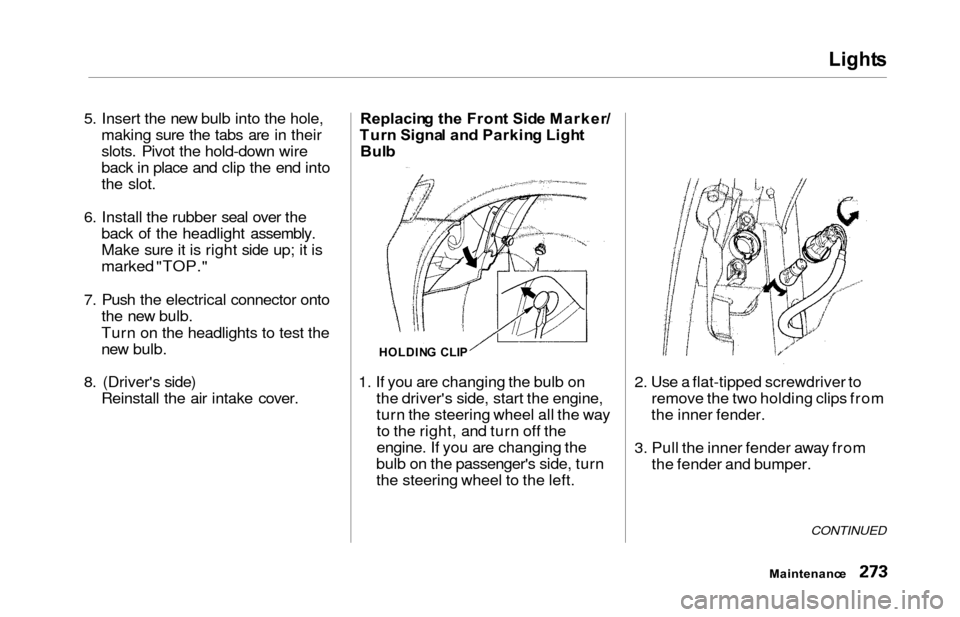
g th e Fron t Sid e Marker /
Tur n Signa l an d Parkin g Ligh t
Bul b
1. If you are changing the bulb on the driver's side, start the engine,
turn the steering wheel all the wayto the right, and turn off the
engine. If you are changing the
bulb on the passenger's side, turn
the steering wheel to the left. 2. Use a flat-tipped screwdriver to
remove the two holding clips from
the inner fender.
3. Pull the inner fender away from the fender and bumper.
CONTINUED
Maintenanc e
HOLDING CLI P
Page 305 of 352
If You r Engin e Won' t Star t
Diagnosing why your engine won't
start falls into two areas, depending
on what you hear when you turn the
key to START (III):
You hear nothing, or almostnothing. The engine's starter
motor does not operate at all, or
operates very slowly.
You can hear the starter motor operating normally, or the starter
motor sounds like it is spinning
faster than normal, but the engine does not start up and run.
Nothin g Happen s o r th e Starte r
Moto r Operate s Ver y Slowl y
When you turn the ignition switch to START (III), you do not hear the
normal noise of the engine trying to
start. You may hear a clicking sound
or series of clicks, or nothing at all.
Check these things:
Your vehicle has the ImmobilizerSystem. You should use a
properly-coded master or valet key
to start the engine (see page 77).
A key that is not properly coded will cause the immobilizer systemindicator in the dash panel to blink
rapidly.
Check the transmission interlock.
The transmission must be in Park or Neutral or the starter will not
operate.
Turn the ignition switch to ON (II).
Turn on the headlights and checktheir brightness. If the headlightsare very dim or don't light at all,the battery is discharged. See
Jum p Startin g on page 303 .
Turn the ignition switch to START
(III). If the headlights do not dim,
check the condition of the fuses. If
the fuses are OK, there is proba-
bly something wrong with the electrical circuit for the ignition
switch or starter motor. You will
need a qualified technician to determine the problem. (See
Emergency Towing on page 317.)
If the headlights dim noticeably or
go out when you try to start the
engine, either the battery is dis-
charged or the connections are
corroded. Check the condition of
the battery and terminal connec-
tions (see page 257). You can then try jump starting the vehicle
from a booster battery (see page 303).
Takin g Car e o f th e Unexpecte d
Page 315 of 352
Fuses
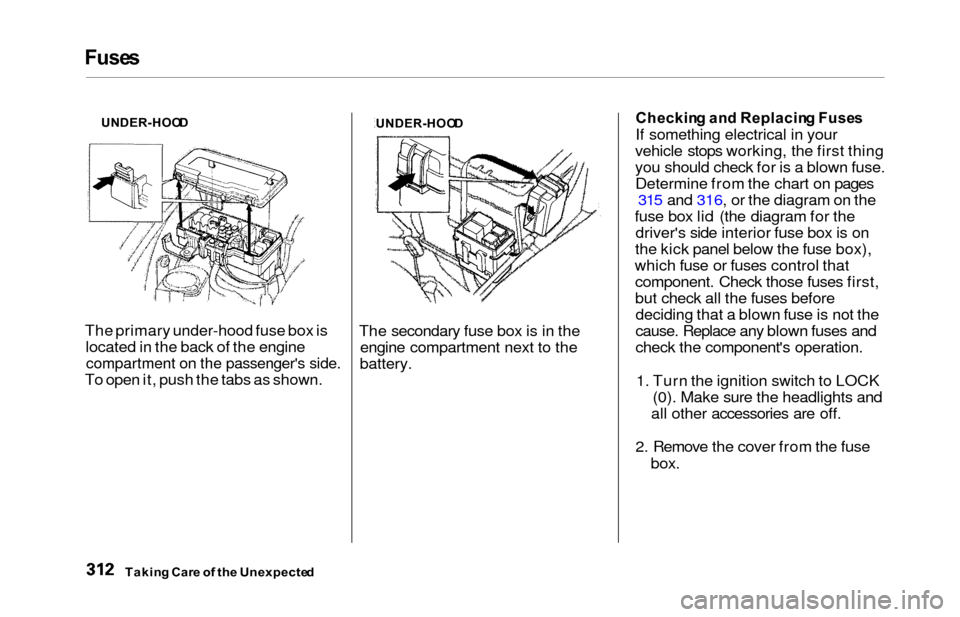
The primary under-hood fuse box is
located in the back of the engine
compartment on the passenger's side.
To open it, push the tabs as shown. The secondary fuse box is in the
engine compartment next to the
battery.
Checkin g an d Replacin g Fuse s
If something electrical in your
vehicle stops working, the first thing
you should check for is a blown fuse. Determine from the chart on pages 315 and 316, or the diagram on the
fuse box lid (the diagram for the driver's side interior fuse box is on
the kick panel below the fuse box),
which fuse or fuses control that component. Check those fuses first,
but check all the fuses beforedeciding that a blown fuse is not the
cause. Replace any blown fuses and
check the component's operation.
1. Turn the ignition switch to LOCK (0). Make sure the headlights and
all other accessories are off.
2. Remove the cover from the fuse box.
Takin g Car e o f th e Unexpecte d
UNDER-HOO D
UNDER-HOOD
Page 343 of 352
Index
Battery
Charging SystemIndicator............................ 58, 308
Jump Starting............................. 303
Maintenance............................... 257
Specifications............................. 323
Before Driving.............................. . 187
Belts, Seat.................................... . 8, 4 5
Beverage Holder............................ 118
Body Repair.................................... 289
Brakes Anti-lock System (ABS)............
211
Break-in, Ne
w Linings .............. 188
Fluid............................................ 250
Light, Burned-out...................... 274
Parking........................................ 116
System Indicator.................. 58, 310
Wear Indicators......................... 210
Brakes, ABS Operation................................... . 211
System Indicator.................. 59, 212
Braking System............................. . 210
Break-in, New Vehicle .................. 188
Brightness Control, Instruments...
67 Brights, Headlights......................... 66
Bulb Replacement
Back-up Lights........................... 275
Brake Lights............................... 274
Cargo Area Light....................... 278
Front Parking Lights................. 273
Front Side Marker Lights......... 273 Headlights.................................. 272
High-mount Brake Light.......... 276
Individual Map Lights............... 278
License Plate Light.................... 277
Rear Bulbs.......................... 274, 275
Specifications............................. 323
Turn Signal Lights..................... 273
Bulbs, Halogen............................... 272
Cables, Jump Starting With.......... 304
Cancel Button.................................. . 75
Capacities Chart............................. 322
Carbon Monoxide Hazard............. . 53
Cargo Area Light........................... 127
Cargo Net ...................................... 200
Carrying Cargo.............................. 197
Cassette Player
Care............................................. 184
Operation........................... 160, 181
CAUTION, Explanation of............... ii
CD Changer.......................... 163, 177
CD Player.............................. 163, 175
Center Pocket .............................. . 122
Center Table................................... 117
Certification Label......................... 320
Chains............................................. 269
Change Oil How to ......................................
241
When to ....................................
230
Changing a Flat Tire ..................... 293
Changing Engine Coolant............. 245 Charging System Indicator.... 58, 308
Checking Automatic Transmission Fluid....................................... . 249
Battery Condition...................... 257
Brake Fluid................................ . 250
Drive Belts.................................. 262
Engine Coolant........................... 193
Engine Oil................................... 192
Fuses.......................................... 312
Power Steering Fluid................. 251