Page 146 of 352
Climate Contro l Syste m
Fan Control Dial
You can manually select the fan
speed by turning the fan control dial.
When you turn the dial clockwise, the fan is taken out of automaticmode and starts to run at its lowestspeed. Turning the dial fully
clockwise increases the fan's speed,
which increases air flow.
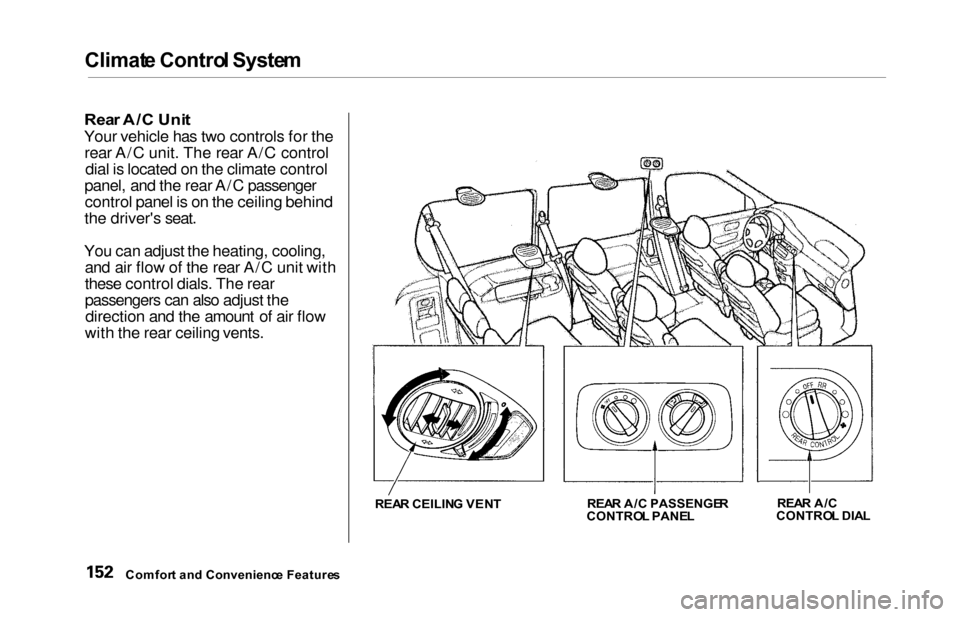
Rear A/C Control Dial
With this dial, you can adjust the rear A/C unit heating, cooling, andair flow (see page 152).
Mode Button
Use the MODE button to select the
vents the air flows from. Some air will flow from the dashboard corner
vents in all modes. Each time you
press the MODE button, the display shows the mode selected. Press the
button four times to see all the
modes.
MOD E BUTTO N
REAR A/ C CONTRO L DIA L
CONTINUED
Comfor t an d Convenienc e Feature s
FA
N CONTRO L DIA L
Page 149 of 352

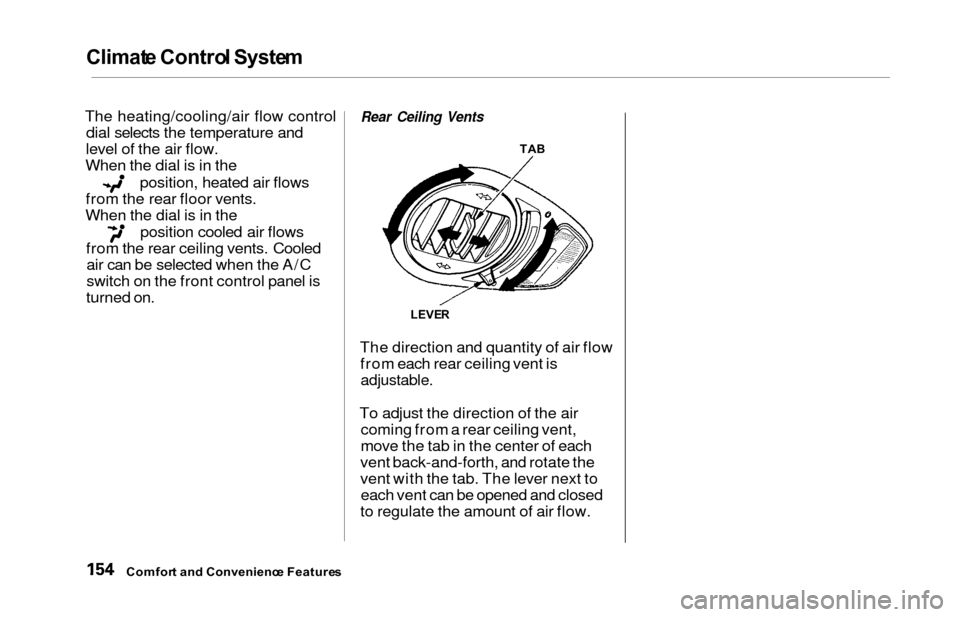
Climate Contro l Syste m
EX model with Navigation System
Fully-automati c Operatio n
To put the Automatic Climate Control in fully-automatic mode,
press the AUTO button. Then set
the desired temperature by pressing
either side of the TEMP button:
to raise the temperature above the
displayed value, or to lower the
temperature.
The system automatically selects the proper mix of conditioned and/or
heated air that will, as quickly as
possible, raise or lower the interior
temperature from its current level to
the set temperature.
When you set the temperature to its lower limit (60°F/18°C) or its upper
limit (90°F/32°C), the system runsat full cooling or heating only. It does
not regulate the interior temperature.
When the temperature is set between the lower and upper limits,
the system regulates the interior
TEMPERATUR E BUTTO N
AUTO BUTTO N
TEMPERATUR E DISPLA Y
temperature to the set value.
In cold weather, the fan will not
come on automatically until the
vehicle has been driven for a short time and the heater starts to develop
warm air. Pressing the OFF button shuts the
climate control system completely
off. Keep the system completely off
only for short periods. To keep stale
air and mustiness from collecting,
you should have the fan running at all times.
Comfor t an d Convenienc e Feature s
OFF BUTTO N
Page 155 of 352
Climate Contro l Syste m
Rear A/ C Uni t
Your vehicle has two controls for the
rear A/C unit. The rear A/C control dial is located on the climate control
panel, and the rear A/C passenger control panel is on the ceiling behind
the driver's seat.
You can adjust the heating, cooling, and air flow of the rear A/C unit with
these control dials. The rear
passengers can also adjust thedirection and the amount of air flow
with the rear ceiling vents.
REA R CEILIN G VEN T REA
R A/ C PASSENGE R
CONTRO L PANE L REA
R A/ C
CONTRO L DIA L
Comfor t an d Convenienc e Feature s
Page 156 of 352
Climat
e Contro l Syste m
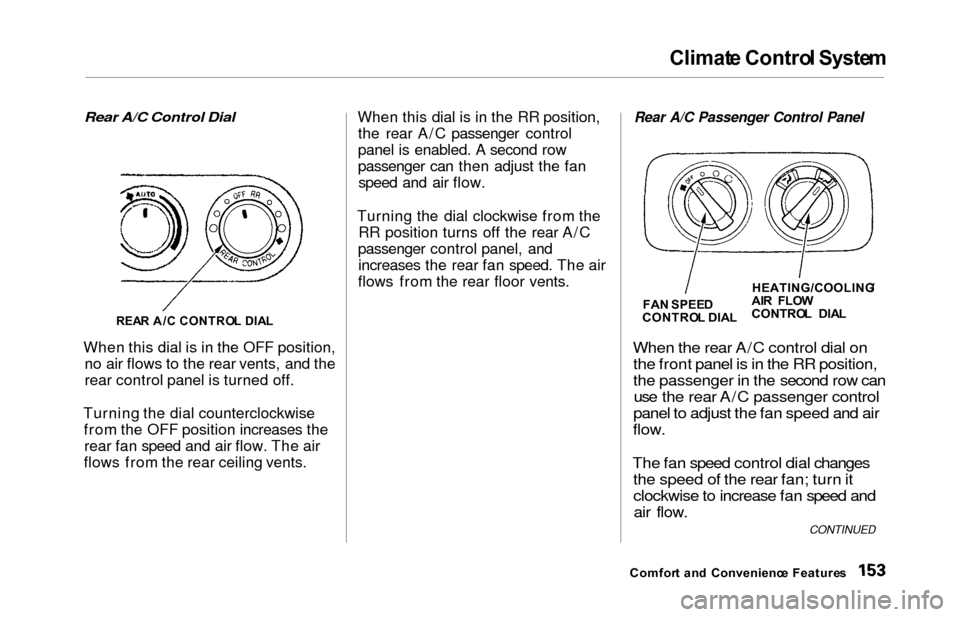
Rear A/C Control Dial
When this dial is in the OFF position, no air flows to the rear vents, and the
rear control panel is turned off.
Turning the dial counterclockwise from the OFF position increases therear fan speed and air flow. The air
flows from the rear ceiling vents. When this dial is in the RR position,
the rear A/C passenger control
panel is enabled. A second row
passenger can then adjust the fanspeed and air flow.
Turning the dial clockwise from the RR position turns off the rear A/C
passenger control panel, and increases the rear fan speed. The air
flows from the rear floor vents.
Rear A/C Passenger Control Panel
When the
rear A/C control dial on
the front panel is in the RR position,
the passenger in the second row can use the rear A/C passenger control
panel to adjust the fan speed and air
flow.
The fan speed control dial changes the speed of the rear fan; turn it
clockwise to increase fan speed andair flow.
Comfor t an d Convenienc e Feature s
REA
R A/ C CONTRO L DIA L
FA
N SPEE D
CONTRO L DIA LHEATING/COOLING
/
AI R FLO W
CONTRO L DIA L
CONTINUED
Page 157 of 352
Climate Contro l Syste m
The heating/cooling/air flow control
dial selects the temperature and
level of the air flow.
When the dial is in the
position, heated air flows
from the rear floor vents.
When the dial is in the
position cooled air flows
from the rear ceiling vents. Cooled air can be selected when the A/C
switch on the front control panel is
turned on.
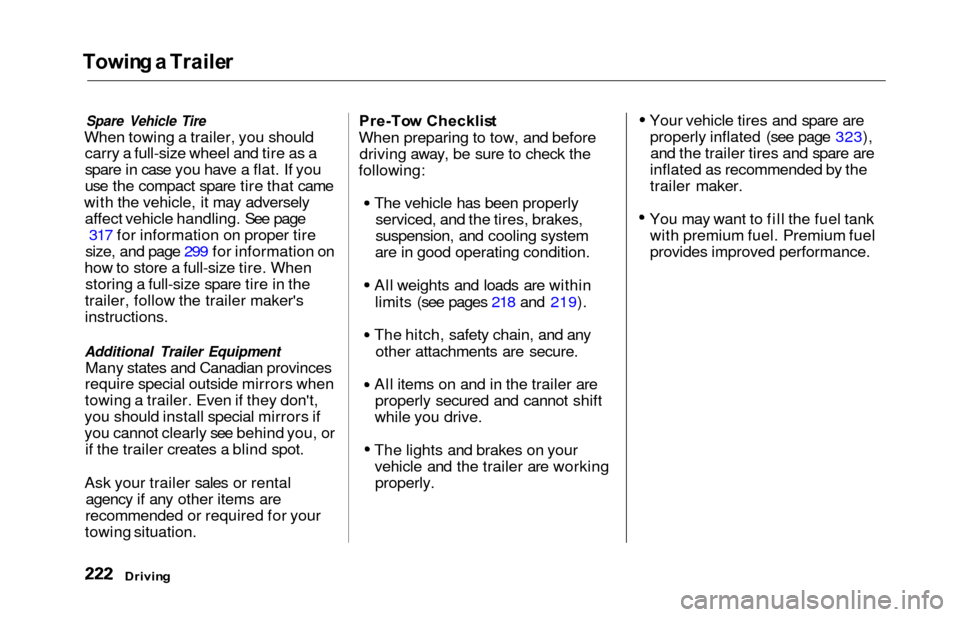
Rear Ceiling Vents
The direction and quantity of air flow from each rear ceiling vent is
adjustable.
To adjust the direction of the air coming from a rear ceiling vent,
move the tab in the center of each
vent back-and-forth, and rotate the
vent with the tab. The lever next to each vent can be opened and closed
to regulate the amount of air flow.
Comfor t an d Convenienc e Feature s
TAB
LEVE R
Page 225 of 352
Towing a Traile r
Spare Vehicle Tire
When towing a trailer, you should
carry a full-size wheel and tire as a
spare in case you have a flat. If you
use the compact spare tire that came
with the vehicle, it may adversely affect vehicle handling. See page 317 for information on proper tire
size, and page 299 for information on
how to store a full-size tire. When storing a full-size spare tire in the
trailer, follow the trailer maker's
instructions.
Additional Trailer Equipment
Many states and Canadian provinces
require special outside mirrors when
towing a trailer. Even if they don't,
you should install special mirrors if
you cannot clearly see behind you, or if the trailer creates a blind spot.
Ask your trailer sales or rental agency if any other items are
recommended or required for your
towing situation. Pre-To
w Checklis t
When preparing to tow, and before driving away, be sure to check the
following:
The vehicle has been properlyserviced, and the tires, brakes,
suspension, and cooling system
are in good operating condition.
All weights and loads are within limits (see pages 218 and 219).
The hitch, safety chain, and any other attachments are secure.
All items on and in the trailer are properly secured and cannot shift
while you drive.
The lights and brakes on your vehicle and the trailer are workingproperly. Your vehicle tires and spare are
properly inflated (see page 323),and the trailer tires and spare are
inflated as recommended by the
trailer maker.
You may want to fill the fuel tank with premium fuel. Premium fuel
provides improved performance.
Drivin g
Page 228 of 352

Maintenance
This section explains why it is
important to keep your vehicle well
maintained and to follow basic
maintenance safety precautions.
This section also includes Maintenance Schedules for normal
driving and severe driving conditions,
a Maintenance Record, and instruc-
tions for simple maintenance tasks
you may want to take care of
yourself.
If you have the skills and tools to per-
form more complex maintenance tasks on your Honda, you may want
to purchase the Service Manual. See page 337 for information on how to
obtain a copy, or see your Honda
dealer.
Maintenance Safety....................... 226
Important Safety Precautions.. 227
Maintenance Schedule.................. 228
Required Maintenance Record.... 235
Owner Maintenance Checks........ 237
Fluid Locations............................... 238
Engine Oil....................................... 239 Adding Oil................................... 239Recommended Oil..................... 239
Synthetic Oil............................... 240
Additives..................................... 241
Changing the Oil and Filter...... 241
Cooling System.............................. 243
Adding Engine Coolant............. 243
Replacing Engine Coolant........ 245
Windshield Washers..................... 248
Automatic Transmission Fluid..... 249
Brake Fluid..................................... 250
Brake System............................ . 250
Power Steering............................... 251
Air Cleaner Element...................... 252
Hood Latch.................................... . 254
Spark Plugs..................................... 254
Replacement............................... 254
Specifications............................. 256
Battery............................................ 257
Wiper Blades.................................. 259
Air Conditioning System............... 261 Air Conditioning Filter.................. 262Drive Belts...................................... 262
Timing Belt.................................... . 263
Tires................................................ 263 Inflation....................................... 263
Inspection.................................. . 265
Maintenance............................... 266
Tire Rotation.............................. 266 Replacing Tires and Wheels.... 267
Wheels and Tires....................... 268
Winter Driving........................... 268
Snow Tires.............................. 269
Tire Chains............................. 269
Lights............................................. . 270
Headlight Aiming...................... 272
Replacing Bulbs......................... 272
Storing Your Vehicle..................... 281
Maintenanc e
Page 246 of 352
Cooling Syste m
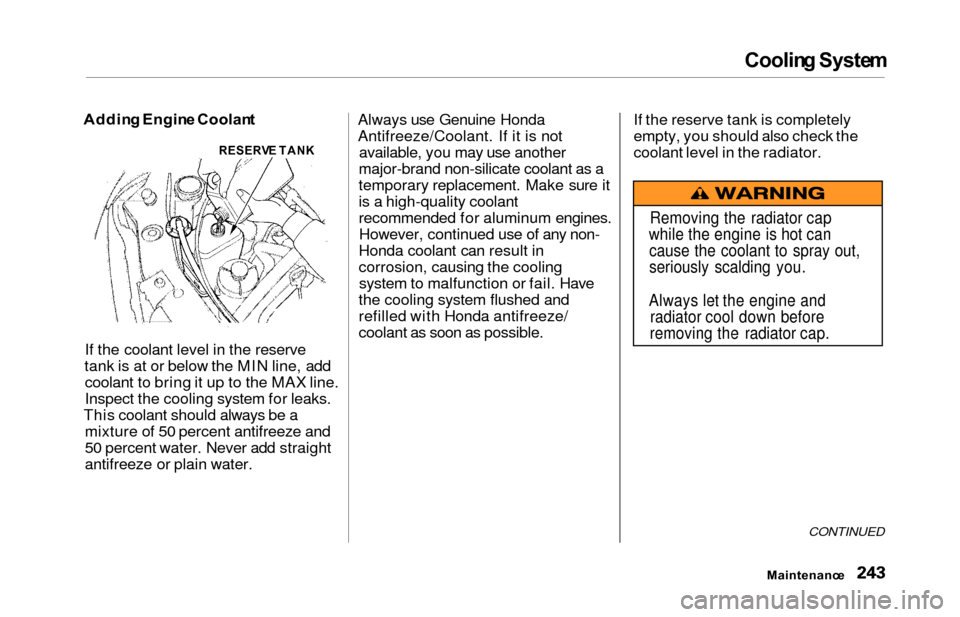
Addin g Engin e Coolan t
If the coolant level in the reserve
tank is at or below the MIN line, add coolant to bring it up to the MAX line.
Inspect the cooling system for leaks.
This coolant should always be a mixture of 50 percent antifreeze and
50 percent water. Never add straight
antifreeze or plain water. Always use Genuine Honda
Antifreeze/Coolant. If it is not
available, you may use another
major-brand non-silicate coolant as a
temporary replacement. Make sure it
is a high-quality coolant
recommended for aluminum engines. However, continued use of any non-
Honda coolant can result in
corrosion, causing the cooling system to malfunction or fail. Have
the cooling system flushed and
refilled with Honda antifreeze/
coolant as soon as possible. If the reserve tank is completely
empty, you should also check the
coolant level in the radiator.
CONTINUED
Maintenanc
e
RESERVE TAN K
Removing the radiator cap
while the engine is hot can cause the coolant to spray out,
seriously scalding you.
Always let the engine and radiator cool down before
removing the radiator cap.