Page 149 of 352

Climate Contro l Syste m
EX model with Navigation System
Fully-automati c Operatio n
To put the Automatic Climate Control in fully-automatic mode,
press the AUTO button. Then set
the desired temperature by pressing
either side of the TEMP button:
to raise the temperature above the
displayed value, or to lower the
temperature.
The system automatically selects the proper mix of conditioned and/or
heated air that will, as quickly as
possible, raise or lower the interior
temperature from its current level to
the set temperature.
When you set the temperature to its lower limit (60°F/18°C) or its upper
limit (90°F/32°C), the system runsat full cooling or heating only. It does
not regulate the interior temperature.
When the temperature is set between the lower and upper limits,
the system regulates the interior
TEMPERATUR E BUTTO N
AUTO BUTTO N
TEMPERATUR E DISPLA Y
temperature to the set value.
In cold weather, the fan will not
come on automatically until the
vehicle has been driven for a short time and the heater starts to develop
warm air. Pressing the OFF button shuts the
climate control system completely
off. Keep the system completely off
only for short periods. To keep stale
air and mustiness from collecting,
you should have the fan running at all times.
Comfor t an d Convenienc e Feature s
OFF BUTTO N
Page 150 of 352
Climate Contro l Syste m
Semi-automati c Operatio n
You can manually select various functions of the Climate Controlsystem when it is in FULL AUTO.
All other features remain auto- matically controlled. Some of these
functions appear in the NavigationSystem display. Press the A/C
button next to the display to show
these functions.
Air Conditioning (A/C) Buttons
Pressing "ON" or "OFF" in the display turns the air conditioning on
and off. You will see A/C ON or A/C OFF activated in the display.
When you turn the A/C off, the system cannot regulate the inside
temperature if you set it below the outside temperature. With the A/C
on, use the temperature buttons to
adjust the temperature of the air
flow to a comfortable setting.
TEMPERATUR E BUTTON S
AI R CONDITIONIN G (A/C ) BUTTON S
CONTINUED
Comfort an d Convenienc e Feature s
RECIRCULATIO N BUTTO N
Page 151 of 352
Climate Contro l Syste m
Recirculation Button
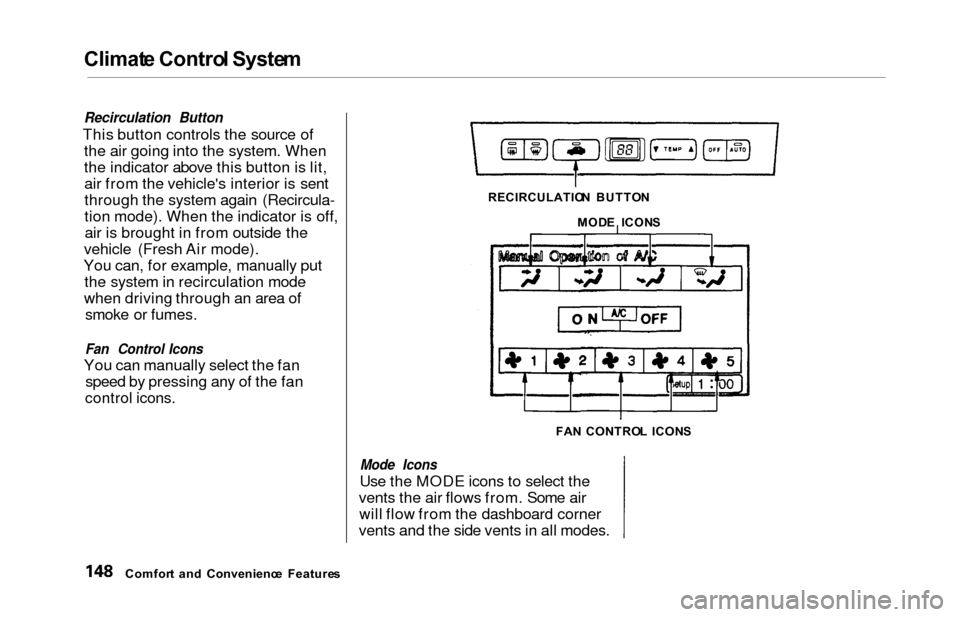
This button controls the source of
the air going into the system. When
the indicator above this button is lit,air from the vehicle's interior is sent
through the system again (Recircula-
tion mode). When the indicator is off,air is brought in from outside the
vehicle (Fresh Air mode).
You can, for example, manually put the system in recirculation mode
when driving through an area of smoke or fumes.
Fan Control Icons
You can manually select the fan speed by pressing any of the fan
control icons.
Mode Icons
Use the MODE icons to select the
vents the air flows from. Some air will flow from the dashboard corner
vents and the side vents in all modes.
Comfor t an d Convenienc e Feature s RECIRCULATIO
N BUTTO N
MOD E ICON S
FA N CONTRO L ICON S
Page 154 of 352
Climat
e Contro l Syste m
Sunligh t Sensor/Temperatur e
Senso r
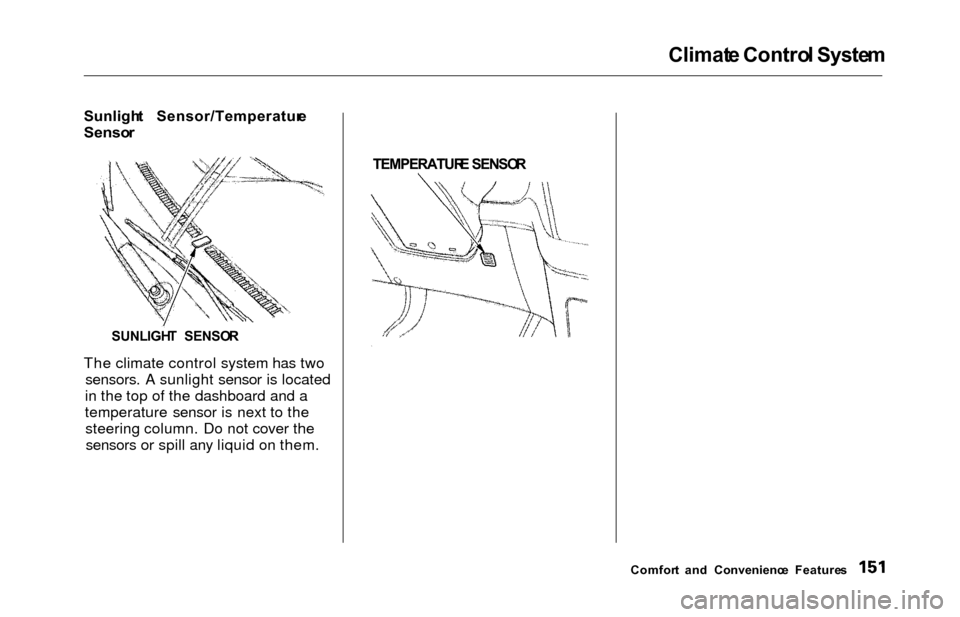
The climate control system has two sensors. A sunlight sensor is located
in the top of the dashboard and a
temperature sensor is next to the steering column. Do not cover thesensors or spill any liquid on them.
TEMPERATUR
E SENSO R
Comfort an d Convenienc e Feature s
SUNLIGH
T SENSO R
Page 155 of 352
Climate Contro l Syste m
Rear A/ C Uni t
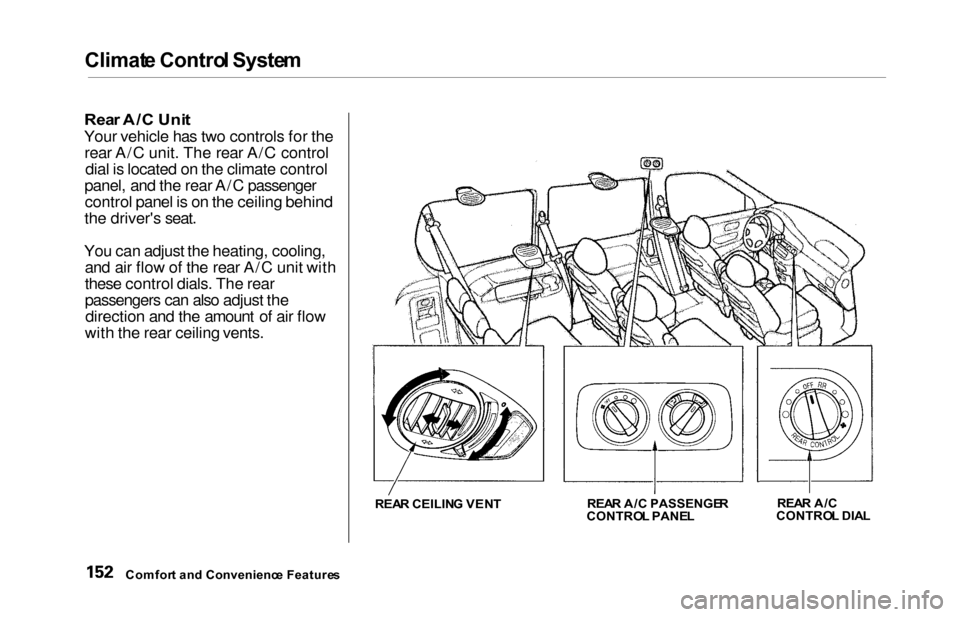
Your vehicle has two controls for the
rear A/C unit. The rear A/C control dial is located on the climate control
panel, and the rear A/C passenger control panel is on the ceiling behind
the driver's seat.
You can adjust the heating, cooling, and air flow of the rear A/C unit with
these control dials. The rear
passengers can also adjust thedirection and the amount of air flow
with the rear ceiling vents.
REA R CEILIN G VEN T REA
R A/ C PASSENGE R
CONTRO L PANE L REA
R A/ C
CONTRO L DIA L
Comfor t an d Convenienc e Feature s
Page 157 of 352
Climate Contro l Syste m
The heating/cooling/air flow control
dial selects the temperature and
level of the air flow.
When the dial is in the
position, heated air flows
from the rear floor vents.
When the dial is in the
position cooled air flows
from the rear ceiling vents. Cooled air can be selected when the A/C
switch on the front control panel is
turned on.
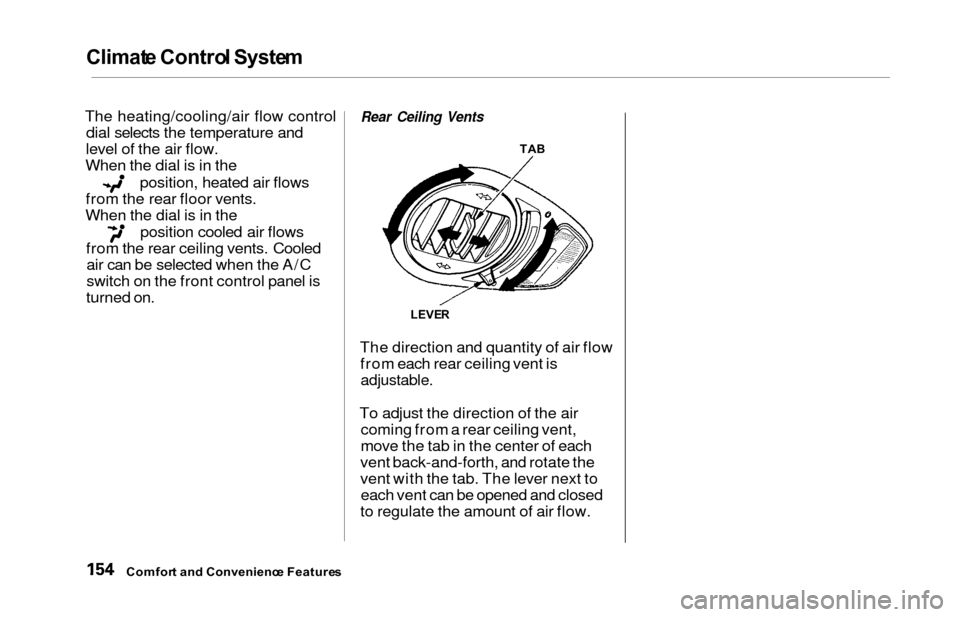
Rear Ceiling Vents
The direction and quantity of air flow from each rear ceiling vent is
adjustable.
To adjust the direction of the air coming from a rear ceiling vent,
move the tab in the center of each
vent back-and-forth, and rotate the
vent with the tab. The lever next to each vent can be opened and closed
to regulate the amount of air flow.
Comfor t an d Convenienc e Feature s
TAB
LEVE R
Page 265 of 352
Air Conditionin g Filter , Driv e Belt s
Air Conditionin g Filte r
The air conditioning filter removes pollen and dust that is brought in
from the outside through the heatingand cooling system/climate control
system.
This filter should be replaced every 30,000 miles (48,000 km) under
normal conditions. It should be
replaced every 15,000 miles (24,000
km) if you drive primarily in urban areas that have high concentrations
of soot in the air from industry and
diesel-powered vehicles. Replace it
more often if air flow from the
heating and cooling system/climate control system becomes less than
usual. Have the air conditioning filter
replaced by your Honda dealer. Driv
e Belt s
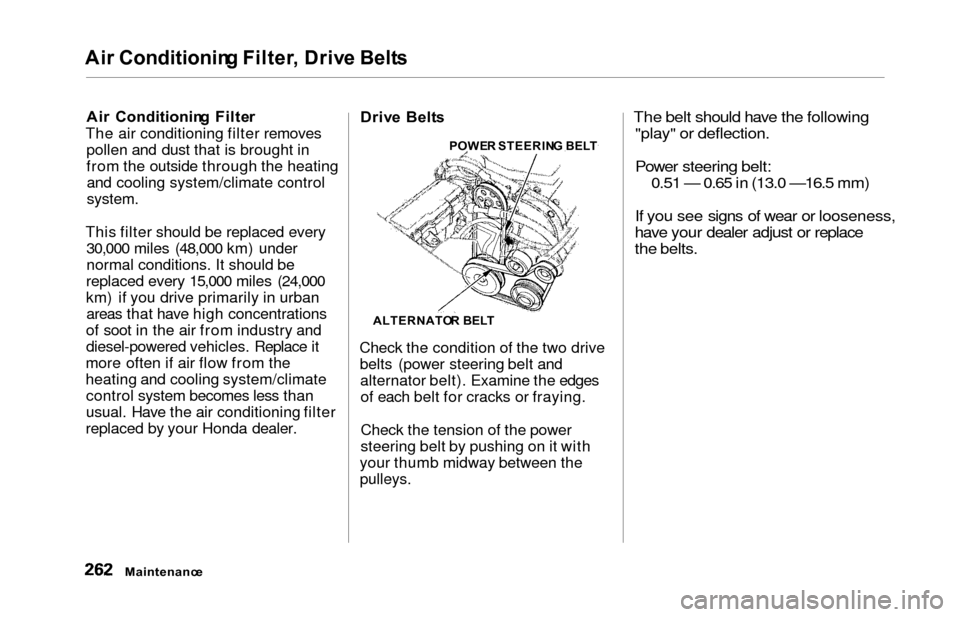
Check the condition of the two drive belts (power steering belt andalternator belt). Examine the edgesof each belt for cracks or fraying.
Check the tension of the power
steering belt by pushing on it with
your thumb midway between the
pulleys.
The belt should have the following "play" or deflection.
Power steering belt: 0.51 — 0.65 in (13.0
—16.5 mm)
If you see signs of wear or looseness,
have your dealer adjust or replace
the belts.
Maintenanc e
ALTERNATO R BEL T
POWE
R STEERIN G BEL T
Page 306 of 352
If You r Engin e Won' t Start , Jum p Startin g
The Starte r Operate s Normall y
In this case, the starter motor's speed sounds normal, or even faster
than normal, when you turn the ignition switch to START (III), but
the engine does not run. Are you using the proper startingprocedure? Refer to Startin g th e
Engin e on page 203 .
Do you have fuel? Turn the
ignition switch to ON (II) for a
minute and watch the fuel gauge.
The low fuel level warning light may not be working, so you were
not reminded to fill the tank.
There may be an electrical problem, such as no power to the
fuel pump. Check all the fuses (see page 311).
If you find nothing wrong, you will
need a qualified technician to find
the problem. See Emergenc y
Towin g on page 317. Jum
p Startin g
If your vehicle's battery has run
down, you may be able to start the
engine by using a booster battery.
Although this seems like a simple
procedure, you should take several
precautions.
You cannot start a Honda by pushing
or pulling it. To jump start your vehicle, follow
these directions closely:
1. Open the hood and check the physical condition of the battery(see page 257). In very cold
weather, check the condition of the electrolyte. If it seems slushyor like ice, do not try jump starting
until it thaws.
If a battery sits in extreme cold, the
electrolyte inside can freeze.
Attempting to jump start with a frozen
battery can cause it to rupture.
2. Turn off all the electrical acces- sories: heater, A/C, climate
control, stereo system, lights, etc. Put the transmission in Neutral or
Park and set the parking brake.
CONTINUED
Takin g Car e o f th e Unexpecte d
A battery can explode if you do
not follow the correct procedure,
seriously injuring anyone nearby.
Keep all sparks, open flames,
and smoking materials away
from the battery.
NOTIC E