2000 HONDA CIVIC COUPE clock
[x] Cancel search: clockPage 77 of 293
Key
s an d Lock s
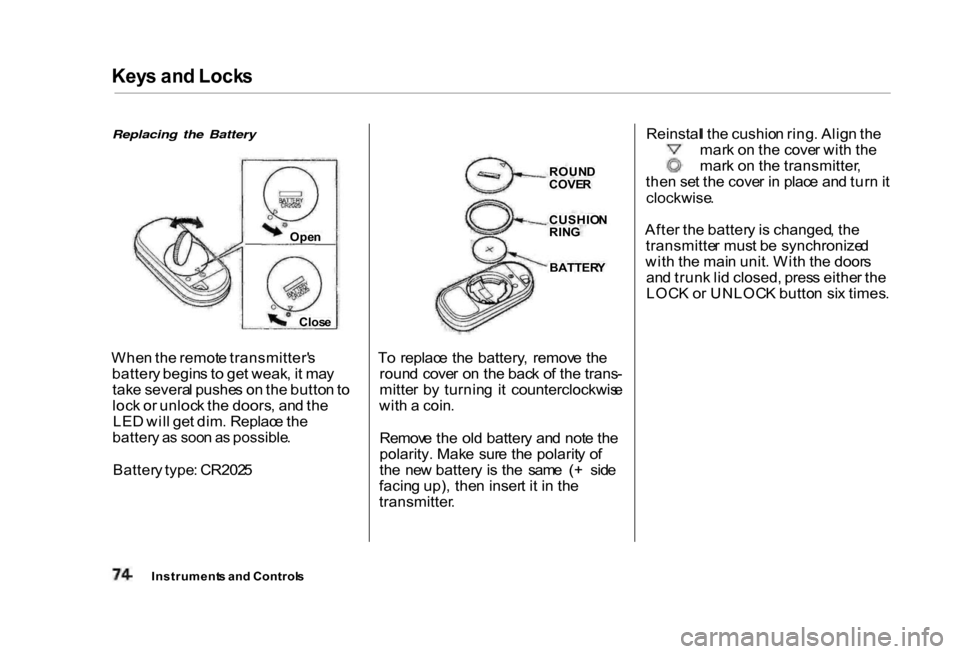
Replacing the Battery
Whe n th e remot e transmitter' s
batter y begin s t o ge t weak , i t ma y
tak e severa l pushe s o n th e butto n to
loc k o r unloc k th e doors , an d th e
LE D wil l ge t dim . Replac e th e
batter y a s soo n a s possible .
Batter y type : CR202 5 T
o replac e th e battery , remov e th e
roun d cove r o n th e bac k o f th e trans -
mitte r b y turnin g i t counterclockwis e
wit h a coin .
Remov e th e ol d batter y an d not e th e
polarity. Make sur e th e polarit y o f
th e ne w batter y i s th e sam e ( + sid e
facin g up) , the n inser t i t i n th e
transmitter . Reinstal
l th e cushio n ring . Alig n th e
mar k o n th e cove r wit h th e
mar k o n th e transmitter ,
the n se t th e cove r i n plac e an d tur n it
clockwise .
Afte r th e batter y is changed , th e
transmitte r mus t b e synchronize d
wit h th e mai n unit . Wit h th e door s
an d trun k li d closed, press eithe r th e
LOC K o r UNLOC K butto n si x times .
Instrument s an d Control s
Ope
n
Clos e
ROUN
D
COVE R
CUSHIO N
RIN G
BATTER Y
Page 83 of 293
Foldin
g Rea r Sea t
Th e bac k o f th e rea r sea t fold s dow n
t o giv e yo u direc t acces s t o th e trunk .
Eac h sid e fold s dow n separately .
Wit h onl y hal f th e sea t folded , yo u
ca n stil l carr y a passenge r i n th e
bac k seat . Th e seat-bac k ca n b e
release d fro m insid e th e ca r o r insid e
th e trunk .
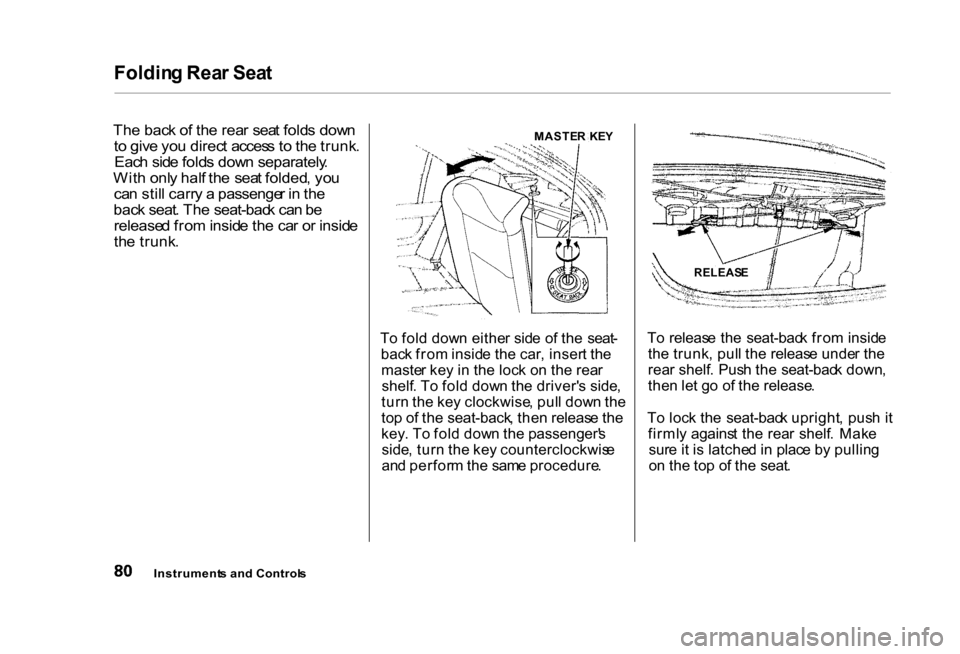
To fol d dow n eithe r sid e o f th e seat -
bac k fro m insid e th e car , inser t th e
maste r ke y i n th e loc k o n th e rea r
shelf . T o fol d dow n th e driver' s side ,
tur n th e ke y clockwise , pul l dow n th e
to p o f th e seat-back , the n releas e th e
key . T o fol d dow n th e passenger' s
side , tur n th e ke y counterclockwis e
an d perfor m th e sam e procedure .T
o releas e th e seat-bac k fro m insid e
th e trunk , pul l th e releas e unde r th e
rea r shelf . Pus h th e seat-bac k down ,
the n le t g o o f th e release .
T o loc k th e seat-bac k upright , pus h i t
firml y agains t th e rea r shelf . Mak e
sur e it i s latche d in plac e b y pullin g
o n th e to p o f th e seat .
Instrument s an d Control s
MASTE
R KE Y
RELEASE
Page 92 of 293
Comfor
t an d Convenienc e Feature s
Th e heatin g an d ai r conditioning *
system s in you r Hond a provid e a
comfortabl e drivin g environmen t i n
al l weathe r conditions .
Th e standar d audi o syste m ha s
man y features . Thi s sectio n de -
scribe s thos e feature s an d ho w to
us e them . (I f yo u selecte d a n
optiona l audi o system , refe r t o th e
operatin g instruction s tha t cam e
wit h it. )
* Ai r conditionin g is standar d o n th e
D X Valu e Package , L X an d E X
model s in th e U.S. , an d S E mode l i n
Canada . I t i s optiona l o n othe r
models .
Heatin
g an d Cooling....................... . 9 0
Wha t Eac h Contro l Does........... . 9 0
Ho w to Us e th e System.............. . 9 2
T o Tur n Everythin g Off............ . 9 7
Audi o Syste m (U.S . D X an d LX ,
an d Canadia n L X an d SE)...... . 9 8
Operatin g th e Radio................... . 9 8
Adjustin g th e Sound................. . 10 0
Digita l Clock.............................. . 10 1
Operatin g th e Optiona l Cassett e
Player..................................... . 10 2
Tap e Searc h Functions............ . 10 2
Operatin g th e Optiona l
C D Player/Changer............. . 10 4
C D Change r Erro r
Indications............................. . 10 6
Audi o Syste m (Canadia n EX ) ..... . 10 7
Operatin g th e Radio................. . 10 8
Adjustin g th e Sound.................. 111
Audi o Syste m Lighting............ . 11 2
Digita l Clock.............................. . 11 2
Operatin g th e Cassett e
Player..................................... . 11 3
Tap e Searc h Functions............ . 11 4
Operatin g th e Optiona l
C D Player/Changer............. . 11 7
C
D Change r Erro r
Indications............................. . 12 0
Audi o Syste m (U.S . D X Valu e
Packag e an d EX).................. . 12 1
Operatin g th e Radio................. . 12 2
Adjustin g th e Sound................. . 12 5
Audi o Syste m Lighting............ . 12 6
Digita l Clock.............................. . 12 6
Radi o Frequencies.................... . 12 7
Radi o Reception........................ . 12 7
Operatin g th e C D Player......... . 12 9
Operatin g th e C D Changer..... . 13 1
Protectin g Compac t Discs....... . 13 2
C D Playe r Erro r Indications.... . 13 3
C D Change r Erro r
Indications............................. . 13 4
Operatin g th e Cassett e
Player..................................... . 13 5
Tap e Searc h Functions............ . 13 6
Carin g fo r th e Cassett e
Player..................................... . 13 8
Thef t Protection....................... . 13 9
Comfor t an d Convenienc e Feature s
Page 93 of 293
Heatin
g an d Coolin g
Prope r us e o f the Heatin g an d
Coolin g syste m ca n mak e th e
interio r dr y an d comfortable , an d
kee p the window s clea r fo r bes t
visibility .
I f you r ca r doe s no t hav e ai r
conditioning , i t ca n b e installe d a t
an y time . You r deale r ca n instal l a
Genuin e Hond a ai r conditionin g
syste m tha t meet s Honda' s hig h
qualit y standard s an d is designe d to
exactl y fi t you r car . Pleas e contac t
you r deale r fo r mor e information .
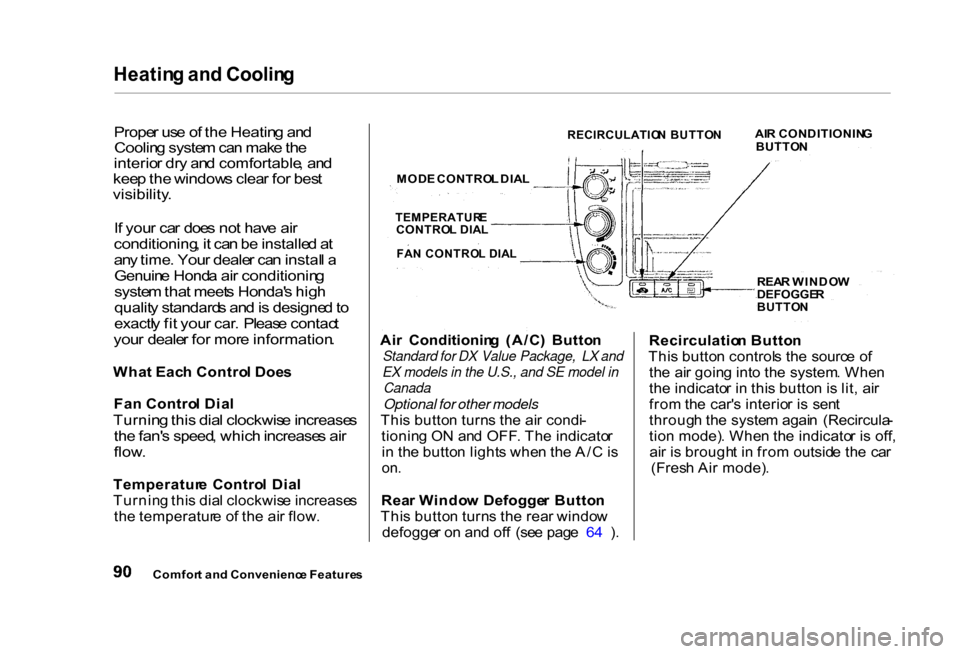
Wha t Eac h Contro l Doe s
Fa n Contro l Dia l
Turnin g this dial clockwis e increase s
th e fan' s speed , whic h increase s ai r
flow .
Temperatur e Contro l Dia l
Turnin g thi s dia l clockwis e increase s
th e temperatur e o f th e ai r flow . Ai
r Conditionin g (A/C ) Butto n
Standard for DX Value Package, LX and
EX models in the U.S., and SE model in
Canada
Optional for other models
Thi s butto n turn s th e ai r condi -
tionin g O N an d OFF . Th e indicato r
i n th e butto n light s whe n th e A/ C is
on .
Rea r Windo w Defogge r Butto n
Thi s butto n turn s th e rea r windo w
defogge r o n an d of f (se e pag e 6 4 ) . Recirculatio
n Butto n
Thi s butto n control s th e sourc e o f
th e ai r goin g int o th e system . Whe n
th e indicato r i n thi s butto n is lit , ai r
fro m th e car' s interio r i s sen t
throug h th e syste m agai n (Recircula -
tio n mode) . Whe n th e indicato r i s off ,
ai r i s brough t i n fro m outsid e th e ca r
(Fres h Ai r mode) .
Comfor t an d Convenienc e Feature s
RECIRCULATIO
N BUTTO N
AI
R CONDITIONIN G
BUTTO N
MOD E CONTRO L DIA L
TEMPERATUR E
CONTRO L DIA L
FA N CONTRO L DIA L
REAR WINDO W
DEFOGGE R
BUTTO N
Page 104 of 293

Audi
o Syste m
Digita l Cloc k
Th e audi o syste m als o display s th e
time . Th e ignitio n switc h mus t b e in
ACCESSOR Y (I ) o r O N (II) .
T o se t th e time , pres s th e CLOC K
button . Th e hou r number s wil l begi n
blinking . Pres s th e Prese t 5 butto n to
ge t th e number s t o coun t down , o r
th e Prese t 6 butto n to ge t th e hour s
t o coun t up .
Pres s th e CLOC K butto n again , an d
th e minute s number s wil l begi n
blinking . Us e th e Prese t 5 or Prese t
6 butto n to chang e th e minute s t o
th e correc t value .
Afte r yo u hav e se t th e clock , pres s
th e CLOC K butto n agai n t o retur n t o
th e norma l display . I f yo u d o not , th e
syste m wil l automaticall y retur n t o
th e norma l displa y abou t seve n
second s afte r yo u sto p pressin g th e
Prese t buttons .
Comfort an d Convenienc e Feature s
TIM
E DISPLAYE D
PRESE T 5 BUTTO N
PRESE T 6 BUTTO N
CLOC K BUTTO N
Page 195 of 293
Coolin
g Syste m
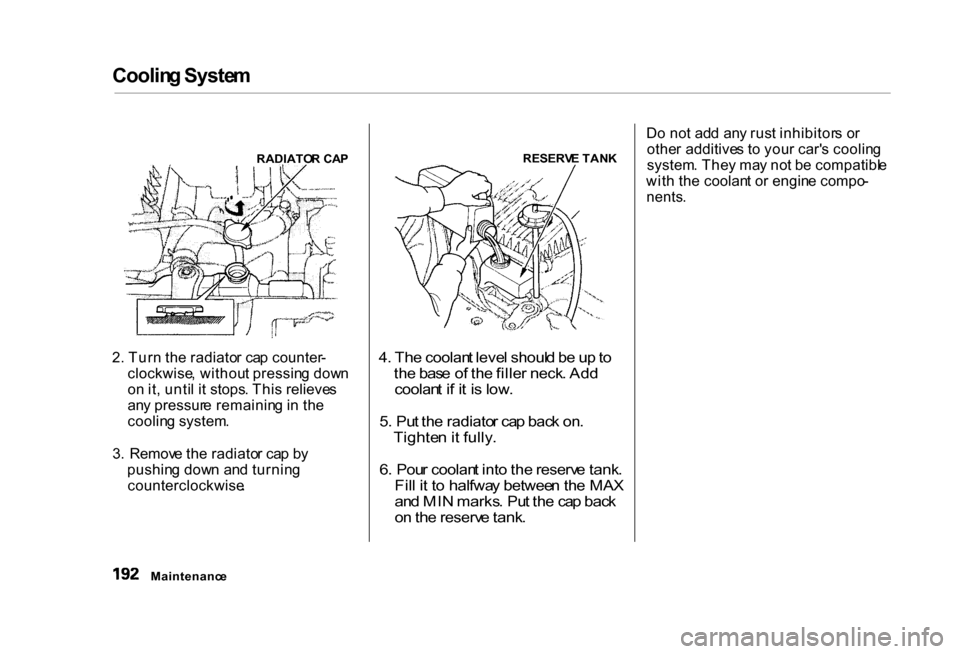
RADIATO R CA P
2 . Tur n th e radiato r ca p counter -
clockwise , withou t pressin g dow n
o n it , unti l i t stops . Thi s relieve s
an y pressur e remainin g in th e
coolin g system .
3 . Remov e th e radiato r ca p b y
pushin g dow n an d turnin g
counterclockwise .
RESERV
E TAN K
4 . Th e coolan t leve l shoul d b e u p to
th e bas e o f th e fille r neck . Ad d
coolan t i f i t i s low .
5 . Pu t th e radiato r ca p bac k on .
Tighte n it fully .
6 . Pou r coolan t int o the reserv e tank .
Fil l i t t o halfwa y betwee n th e MA X
an d MI N marks . Pu t th e ca p bac k
o n th e reserv e tank .
D
o no t ad d an y rus t inhibitor s o r
othe r additive s t o you r car' s coolin g
system . The y ma y no t b e compatibl e
wit h th e coolan t o r engin e compo -
nents .
Maintenanc e
Page 225 of 293
Light
s
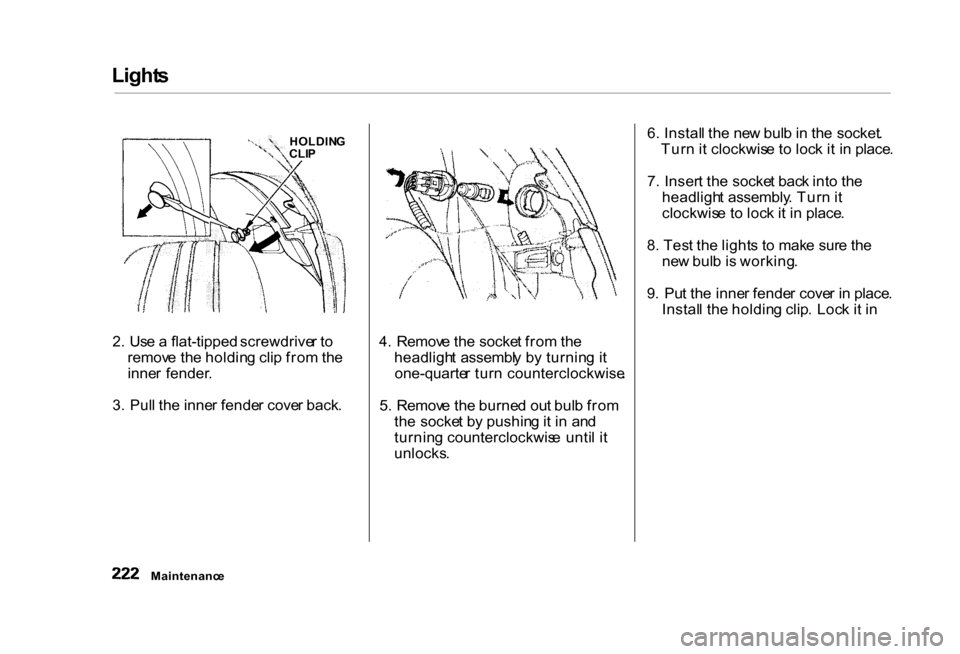
2. Us e a flat-tipped screwdrive r to
remov e th e holdin g cli p fro m th e
inne r fender .
3 . Pul l th e inne r fende r cove r back . 4
. Remov e th e socke t fro m th e
headligh t assembl y b y turnin g i t
one-quarte r tur n counterclockwise .
5 . Remov e th e burne d ou t bul b fro m
th e socke t b y pushin g it i n an d
turnin g counterclockwis e unti l i t
unlocks . 6
. Instal l th e ne w bul b in th e socket .
Tur n i t clockwis e t o loc k i t i n place .
7 . Inser t th e socke t bac k int o th e
headligh t assembly . Tur n it
clockwis e t o loc k i t i n place .
8 . Tes t th e light s t o mak e sur e th e
ne w bul b is working .
9 . Pu t th e inne r fende r cove r i n place .
Instal l th e holdin g clip . Loc k i t i n
Maintenanc e HOLDIN
G
CLI P
Page 226 of 293
Light
s
Replacin g Rea r Bulb s
(i n Fenders )
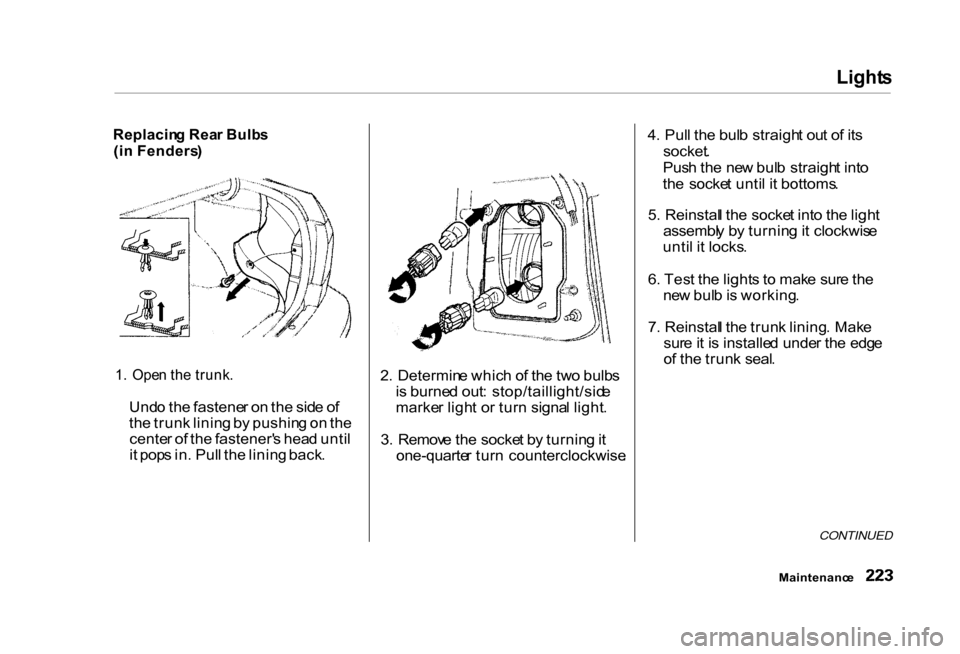
1 . Ope n th e trunk .
Und o th e fastene r o n th e sid e o f
th e trun k linin g b y pushin g o n th e
cente r o f th e fastener' s hea d unti l
i t pop s in . Pul l th e linin g back . 2
. Determin e whic h o f th e tw o bulb s
i s burne d out : stop/taillight/sid e
marke r ligh t o r tur n signa l light .
3 . Remov e th e socke t b y turnin g it
one-quarte r tur n counterclockwise .4
. Pul l th e bul b straigh t ou t o f it s
socket .
Pus h th e ne w bul b straigh t int o
th e socke t unti l i t bottoms .
5 . Reinstal l th e socke t int o th e ligh t
assembl y b y turnin g it clockwis e
unti l i t locks .
6 . Tes t th e light s t o mak e sur e th e
ne w bul b is working .
7 . Reinstal l th e trun k lining . Mak e
sur e it i s installe d unde r th e edg e
o f th e trun k seal .
CONTINUED
Maintenanc e