2000 FORD EXCURSION lock
[x] Cancel search: lockPage 68 of 232

Replacing lost transmitters
If a remote transmitter has been lost
and you would like to remove it
from the vehicle's memory, or you
would like to purchase additional
remote transmitters and have them
programmed to your vehicle:
²Takeallyour vehicle's
transmitters to your dealer for
programming, or
²Perform the programming
procedure yourself
Programming remote transmitters
It is necessary to haveall(maximum of four Ð original and/or new) of
your remote transmitters available prior to beginning this procedure.
To program the transmitters yourself:
²Insert a key in the ignition and
turn from 3 (OFF) to 4 (ON)
eight times in rapid succession
(within 10 seconds) with the
eighth turn ending in the 4 (ON)
position. The doors will
lock/unlock to confirm that
programming mode has been
entered.
²Within 20 seconds, program a
remote transmitter by pressing
any button on a transmitter. The doors will lock/unlock to confirm that
the remote transmitter has been programmed. (If more than 20
seconds pass before pressing a remote transmitter button, the
programming mode will exit and the procedure will have to be
repeated.)
²Repeat the previous step to program additional remote transmitters.
The doors will lock/unlock to confirm that each remote transmitter has
been programmed.
²When you have completed programming the remote transmitters, turn
the ignition to 3 (OFF) or wait 20 seconds. Again the doors will
lock/unlock to confirm programming has been completed.
3
2
1
5
4
Controls and features
68
Page 69 of 232

Keyless entry system
With the keyless entry keypad, you can:
²lock or unlock the vehicle doors without using the key.
Your vehicle has a factory set 5 digit code that operates the keyless entry
system. You can also program your own 5 digit personal entry code. The
factory-set code is located:
²on the owner's wallet card in the glove compartment
When pressing the controls on the keyless entry keypad, press the
middle of the controls to ensure a good activation.
Programming your own personal entry code
To program your own code:
1. Enter factory set code (keypad will illuminate when pressed).
2. Press 1/2 control within five
seconds of step 1.
3. Enter your personal 5 digit code.
Enter each digit within five seconds
of previous one.
Do not set a code that includes five
of the same number or presents
them in sequential order. Thieves
can easily figure out these types of codes.
Your personal code does not replace the permanent code that the
dealership gave you. You can use either code to unlock your vehicle. If a
second personal code is entered, the module will erase it in favor of the
new code.
If you wish to erase your personal code, use the following instructions:
1. Enter factory set code.
2. Press 1/2 control within five
seconds of step 1 and release.
3. Within five seconds of step 2,
press and hold the 1/2 control for
two seconds.
The system will now only respond
to the factory set code.
123
45678
90
123
45678
90
Controls and features
69
Page 70 of 232

Unlocking the doors with the keyless entry system
To unlock the driver's door, enter either the factory-set code or personal
code (each digit pressed within five seconds of the prior digit). The
interior lamps will illuminate.
To unlock all doors, enter the
factory-set code or personal code
(driver door unlocks) and press the
3/4 control within five seconds.
Locking the doors with the keyless entry system
It is not necessary to first enter the
factory or personal code prior to
locking all doors. To lock all the
doors:
²Press the 7/8 and the 9/0 control
at the same time.
SECURILOCKYPASSIVE ANTI-THEFT SYSTEM
The SecuriLockypassive anti-theft system provides an advanced level of
vehicle theft protection. Your vehicle's engine can only be started with
the two special SecuriLockyelectronically coded keys provided with
your vehicle. Each time you start your vehicle, the SecuriLockykey is
read by the SecuriLockypassive anti-theft system. If the SecuriLocky
key identification code matches the code stored in the SecuriLocky
anti-theft system, the vehicle's engine is allowed to start. If the
SecuriLockykey identification code does not match the code stored in
the system or if a SecuriLockykey is not detected (vehicle theft
situation), the vehicle's engine will not operate.
If there is any potential SecuriLockyanti-theft problem with your
vehicle, ensureALL SecuriLockykeysfor that vehicle are brought to
the dealership, to aid in troubleshooting.
The SecuriLockypassive anti-theft system is not compatible with
aftermarket remote start systems. Use of these systems may result in
123
45678
90
123
45678
90
Controls and features
70
Page 71 of 232

vehicle starting problems and a loss of security protection. Large metallic
objects, a second key or electronic devices used to purchase gasoline or
similar items on the same key ring as the PATS ignition key may cause
vehicle starting problems. If present, you need to keep these objects
from touching the PATS ignition key while starting the engine. These
objects cannot damage the PATS ignition key, but can cause a
momentary problem if they are too close to the key during engine start.
If a problem occurs, turn the ignition OFF and restart the engine with all
other objects on the key ring held away from the ignition key. Check to
make sure the encoded ignition key is an approved Ford encoded
ignition key.
Spare SecuriLockykeys can be purchased from your dealership and
programmed to your SecuriLockypassive anti-theft system. Refer to
Programming spare SecuriLockykeysfor more information.
If one or both of your SecuriLockykeys are lost or stolen and you want
to ensure the lost or stolen key will not operate your vehicle, bring your
vehicle and all available SecuriLockykeys to your dealership for
reinitialization.
Theft indicator
The theft indicator on the instrument cluster will operate as follows:
²When the ignition is OFF, the theft indicator will flash briefly every
two seconds to indicate the SecuriLockysystem is protecting your
vehicle.
²When the ignition is turned to ON or START, the theft indicator will
light for three seconds and then go out. If the theft indicator stays on
for an extended period of time or flashes rapidly, have the system
serviced by your dealership or a qualified technician.
Programming spare SecuriLockYkeys
Spare SecuriLockykeys can be purchased from your dealership and
programmed to your SecuriLockypassive anti-theft system (up to a
total of eight keys). Your dealership can program your new SecuriLocky
key(s) to your vehicle or you can do it yourself using the following
simple procedure. To program a new SecuriLockykey yourself, you will
need two previously programmed SecuriLockykeys (keys that already
operate your vehicle's engine). If two previously programmed
SecuriLockykeys are not available (one or both of your original keys
were lost or stolen), you must bring your vehicle to your dealership to
have the spare SecuriLockykey(s) programmed.
Controls and features
71
Page 72 of 232

Procedure to program spare SecuriLockYkeys to your vehicle
New SecuriLockykeys must have the correct mechanical key cut for
your vehicle.
Conventional (non-SecuriLocky) keyscannotbe programmed to your
vehicle.
You will need to have two previously programmed SecuriLockykeys and
the new unprogrammed SecuriLockykey readily accessible for the
procedure. Please read and understand the entire procedure before you
begin.
1. Insert the first previously programmed SecuriLockykey into the
ignition and turn the ignition from OFF to ON (maintain ignition in ON
for at least one second).
2. Turn ignition to OFF and remove the first SecuriLockykey from the
ignition.
3. Within five seconds of turning the ignition to OFF, insert the second
previously programmed SecuriLockykey into the ignition and turn the
ignition from OFF to ON (maintain ignition in ON for at least one second
but no more than five seconds).
4. Turn the ignition to OFF and remove the second SecuriLockykey
from the ignition.
5. Within 10 seconds of turning the ignition to OFF, insert the
unprogrammed SecuriLockykey (new key/valet key) into the ignition
and turn the ignition from OFF to ON (maintain ignition in ON for at
least one second). This step will program your new SecuriLockykey.
6. To program additional SecuriLockykey(s), repeat this procedure from
step 1.
If the programming procedure was successful, the new SecuriLocky
key(s) will start the vehicle's engine. The theft indicator (located on the
instrument cluster) will light for three seconds and then go out.
If the programming procedure was not successful, the new SecuriLocky
key(s) will not operate the vehicle's engine. The theft indicator will flash
on and off. Wait at least one minute and then repeat the procedure from
step 1. If failure repeats, bring your vehicle to your dealership to have
the spare SecuriLockykey(s) programmed.
Controls and features
72
Page 73 of 232

CARGO NET (IF EQUIPPED)
The cargo net secures lightweight
objects in the cargo area. Attach the
net to the anchors provided. This
net is not designed to restrain
objects during a collision.
TRIDOOR
The TriDoor area is intended for cargo storage only, not for passengers.
You can open and close the TriDoors from outside the vehicle only. You
cannot open the liftgate or cargo doors from inside the vehicle.
²To open the liftgate, unlock the
liftgate (with the key, the key fob
by pressing the UNLOCK button
twice or power door locks) and
pull up on the liftgate handle.
²To open the cargo doors, open
the liftgate, then open right cargo
door first, using the handle on
top of the door, then open the
left cargo door using the handle
on the side of the door.
²To close and lock the liftgate and
cargo doors, close the left cargo door first, then the right cargo door,
then pull down and close the liftgate. Lock the TriDoor with the key,
key fob or the power door lock button.
The cargo doors and liftgate should be closed before driving your
vehicle. Leaving the liftgate and/or the cargo doors open could
cause serious damage to the TriDoors and its components as well as
allowing carbon monoxide to enter the vehicle. If you must drive with
the cargo doors and liftgate window open, keep the vents open so
outside air comes into the vehicle.
Controls and features
73
Page 80 of 232
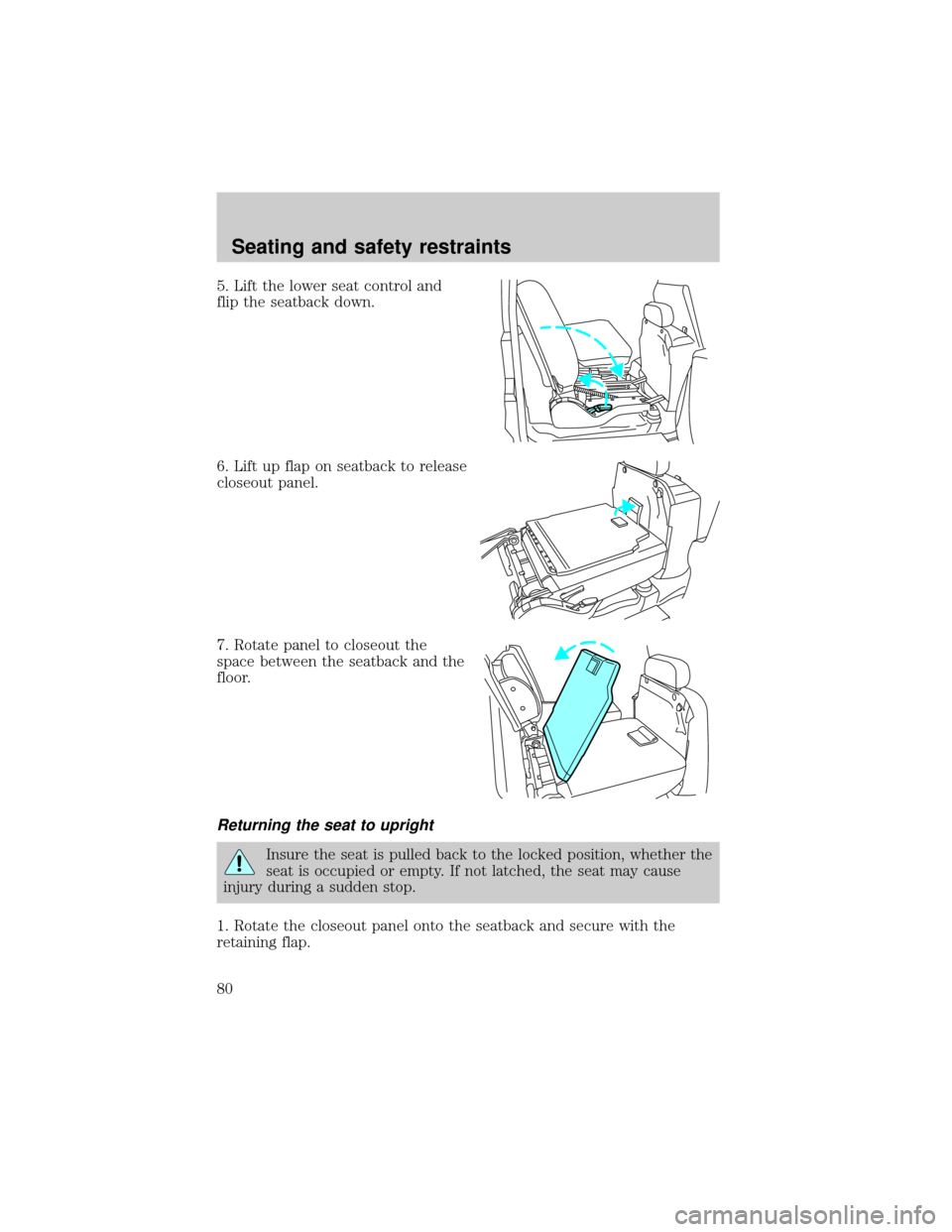
5. Lift the lower seat control and
flip the seatback down.
6. Lift up flap on seatback to release
closeout panel.
7. Rotate panel to closeout the
space between the seatback and the
floor.
Returning the seat to upright
Insure the seat is pulled back to the locked position, whether the
seat is occupied or empty. If not latched, the seat may cause
injury during a sudden stop.
1. Rotate the closeout panel onto the seatback and secure with the
retaining flap.
Seating and safety restraints
80
Page 82 of 232

To reduce the risk of personal injury, the second row seat should not be
left in the forward, E-Z entry position while the vehicle is in motion.
Please ensure that the seat is in the upright, fully latched rearward
position before putting the vehicle in motion. Refer to the warning label
on the seat side shield.
1. Rotate the upper seat control
rearward while pushing the seatback
toward the front of the vehicle.
2. Push the seatback toward the
front of the vehicle. This releases
the seat track and the seat will
move forward.
3. After entering the 3rd row seat,
pull back the 2nd row seatback until
it latches at full rearward position.
This will latch and lock the seatback and the seat track.
Insure the seat is pulled back to the locked position, whether the
seat is occupied or empty. If not latched, the seat may cause
injury during a sudden stop.
FOLDING DOWN THE THIRD ROW SEAT
Pull the seat release lever located
on the lower right side of the
seatback while pushing the seatback
down into the seat cushion. The
seatback will latch into place.
Pull the seat release lever to return
the seatback into the upright seating
position.
Seating and safety restraints
82