Page 201 of 429

2-97
Charging System Indicator Message
The charging system battery
symbol will come on in
the message center when
you turn on the ignition as
a check to show you it
is working.
It will remain on as long as the engine is not running.
It should go out once the engine is running. If it stays
on, or comes on while you are driving, you may have a
problem with the charging system. It could indicate that
you have problems with a generator drive belt, or
another electrical problem. Have it checked right away.
Driving while this indicator appears in the message
center could drain your battery.
If you must drive a short distance with the message on,
be certain to turn off all your accessories, such as the
radio and air conditioner.
Service Traction System Warning
Message (Option)
If your vehicle has the
traction control system and
this message is displayed
when you're driving, there
may be a problem with your
traction control system.
Your vehicle may need service.
When this message is displayed, the traction control
system will not limit wheel spin. Adjust your
driving accordingly.
The message may appear for the following reasons:
�If there's a brake system problem that is specifically
related to traction control, the traction control system
will turn off and the warning message will come on.
If your brakes begin to overheat, the traction control
system will turn off and the warning message will
come on until your brakes cool down.
�If the traction control system is affected by an
engine
-related problem, the system will turn off and
the warning message will come on.
If the traction control system warning message comes on
and stays on for an extended period of time when the
system is turned on, your vehicle needs service.
Page 287 of 429
4-37 Driving with a Trailer
CAUTION:
If you have a rear-most window open and you
pull a trailer with your vehicle, carbon monoxide
(CO) could come into your vehicle. You can't see
or smell CO. It can cause unconsciousness or
death. (See ªEngine Exhaustº in the Index.)
To maximize your safety when towing a trailer:
�Have your exhaust system inspected for
leaks, and make necessary repairs before
starting on your trip.
�Keep the rear
-most windows closed.
�If exhaust does come into your vehicle
through a window in the rear or another
opening, drive with your front, main
heating or cooling system on and with the
fan on any speed. This will bring fresh,
outside air into your vehicle. Do not use
RECIRCULATION because it only
recirculates the air inside your vehicle.
(See ªComfort Controlsº in the Index.)
Towing a trailer requires a certain amount of experience.
Before setting out for the open road, you'll want to get
to know your rig. Acquaint yourself with the feel of
handling and braking with the added weight of the
trailer. And always keep in mind that the vehicle you are
driving is now a good deal longer and not nearly as
responsive as your vehicle is by itself.
Before you start, check the trailer hitch and platform
(and attachments), safety chains, electrical connector,
lamps, tires and mirror adjustment. If the trailer has
electric brakes, start your vehicle and trailer moving and
then apply the trailer brake controller by hand to be sure
the brakes are working. This lets you check your
electrical connection at the same time.
During your trip, check occasionally to be sure that the
load is secure, and that the lamps and any trailer brakes
are still working.
Page 294 of 429
5-4
2. Get the vehicles close enough so the jumper cables
can reach, but be sure the vehicles aren't touching
each other. If they are, it could cause a ground
connection you don't want. You wouldn't be able to
start your vehicle, and the bad grounding could
damage the electrical systems.
To avoid the possibility of the vehicles rolling, set
the parking brake firmly on both vehicles involved in
the jump start procedure. Put an automatic transaxle
in PARK (P) or a manual transaxle in NEUTRAL
before setting the parking brake.
3. Turn off the ignition on both vehicles. Unplug
unnecessary accessories plugged into the cigarette
lighter or the accessory power outlet. Turn off all
lamps that aren't needed, as well as radios. This will
avoid sparks and help save both batteries. In
addition, it could save your radio!
NOTICE:
If you leave your radio on, it could be badly
damaged. The repairs wouldn't be covered by
your warranty.
4. Open the hoods and locate the batteries.
Find the positive (+) and negative (
-) terminals on
each battery.
CAUTION:
An electric fan can start up even when the engine
is not running and can injure you. Keep hands,
clothing and tools away from any underhood
electric fan.
Page 325 of 429

6-
6-1
Section 6 Service and Appearance Care
Here you will find information about the care of your vehicle. This section begins with service and fuel information,
and then it shows how to check important fluid and lubricant levels. There is also technical information about your
vehicle, and a part devoted to its appearance care.
6
-2 Service
6
-3 Fuel
6
-5 Fuels in Foreign Countries
6
-5 Filling Your Tank
6
-7 Filling a Portable Fuel Container
6
-8 Checking Things Under the Hood
6
-11 Engine Oil
6
-15 Engine Air Cleaner/Filter
6
-16 Passenger Compartment
Air Filter Replacement
6
-18 Automatic Transaxle Fluid
6
-21 Engine Coolant
6
-24 Radiator Pressure Cap
6
-24 Power Steering Fluid
6
-25 Windshield Washer Fluid
6
-26 Brakes6
-30 Battery
6
-31 Bulb Replacement
6
-38 Windshield Wiper Blade Replacement
6
-40 Tires
6
-48 Appearance Care
6
-48 Cleaning the Inside of Your Vehicle
6
-52 Cleaning the Outside of Your Vehicle
6
-55 Underbody Maintenance
6
-55 Chemical Paint Spotting
6
-56 GM Vehicle Care/Appearance Materials
6
-57 Vehicle Identification Number (VIN)
6
-57 Electrical System
6
-65 Replacement Bulbs
6
-65 Capacities and Specifications
6
-66 Normal Maintenance Replacement Parts
Page 381 of 429
6-57
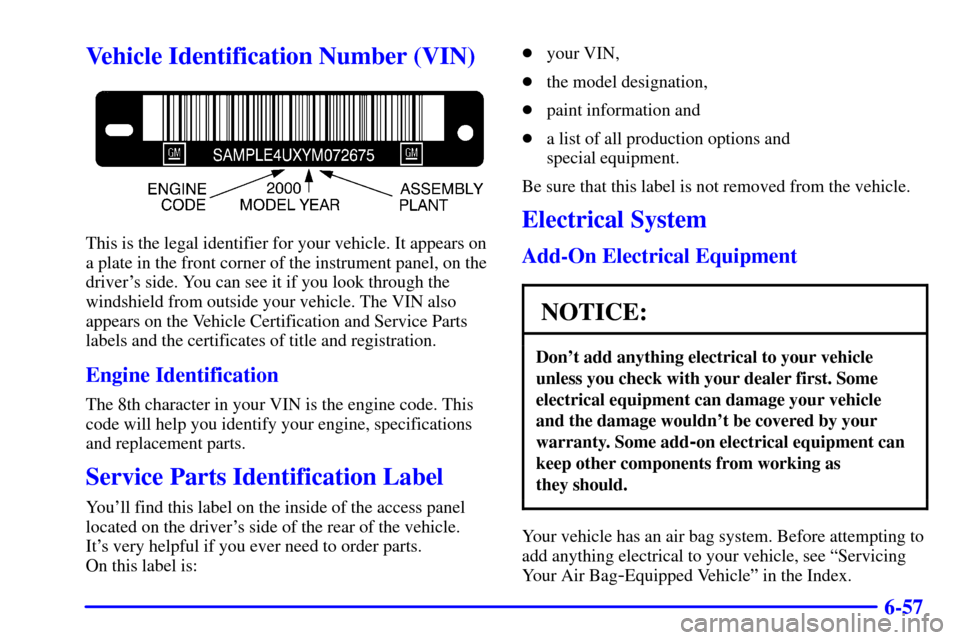
Vehicle Identification Number (VIN)
This is the legal identifier for your vehicle. It appears on
a plate in the front corner of the instrument panel, on the
driver's side. You can see it if you look through the
windshield from outside your vehicle. The VIN also
appears on the Vehicle Certification and Service Parts
labels and the certificates of title and registration.
Engine Identification
The 8th character in your VIN is the engine code. This
code will help you identify your engine, specifications
and replacement parts.
Service Parts Identification Label
You'll find this label on the inside of the access panel
located on the driver's side of the rear of the vehicle.
It's very helpful if you ever need to order parts.
On this label is:�your VIN,
�the model designation,
�paint information and
�a list of all production options and
special equipment.
Be sure that this label is not removed from the vehicle.
Electrical System
Add-On Electrical Equipment
NOTICE:
Don't add anything electrical to your vehicle
unless you check with your dealer first. Some
electrical equipment can damage your vehicle
and the damage wouldn't be covered by your
warranty. Some add
-on electrical equipment can
keep other components from working as
they should.
Your vehicle has an air bag system. Before attempting to
add anything electrical to your vehicle, see ªServicing
Your Air Bag
-Equipped Vehicleº in the Index.