Page 173 of 365
yellowblue
3-30
Using RDS Mode
Your audio system is equipped with a Radio Data
System (RDS). RDS mode gives you many useful new
features. With RDS, the radio can:
�seek only to stations with the types of programs you
want to listen to,
�seek to stations with traffic announcements,
�receive announcements concerning local and
national emergencies and
�receive and display messages from radio stations.
RDS features are only available for use on FM stations
which broadcast RDS information. The RDS features of
your radio rely upon receiving specific RDS information
from these stations. These features will only work when
the RDS information is available. In rare cases, a radio
station may broadcast incorrect information that will
cause the radio features to work improperly. If this
happens, please contact the radio station.
When you are tuned to an RDS station, the station name
will appear on the display, instead of the frequency.
Most RDS stations provide their station name, the
time of day and a Program Type (PTY) for their
current programming.Accessing RDS Mode:
1. Push P
-TYPE LIST/AUDIO knob.
2. Turn knob either clockwise or counterclockwise to
select a program type. List is alphabetical.
3. Push P
-TYPE LIST/AUDIO knob again to
lock in selection.
4. Push SEEK TYPE button to activate search.
VOL: Turn this knob clockwise to increase volume
when RDS interrupts regular play. Turn it
counterclockwise to decrease volume.
DISP: Press this knob to recall the RDS station being played.
TRAF: Press this button to receive traffic announcements.
If the current tuned station does not broadcast traffic
announcements, the radio will seek to a station that does. The
TRAF icon will flash on the display. When the radio finds a
station that broadcasts traffic announcements, it will stop.
If no station is found, NO TRAF will appear on the display.
When a traffic announcement comes on the tuned radio
station, you will hear it, even if the volume is muted or a
cassette tape or compact disc is playing. The TRAF icon
and TRAFFIC will appear on the display while the
traffic announcement plays. If the cassette tape or
compact disc player was being used, the tape or compact
disc will stay in the player and resume play at the point
where it stopped.
Page 178 of 365
yellowblue
3-35 Theft-Deterrent Feature
THEFTLOCK� is designed to discourage theft of your
radio. The feature works automatically by learning a
portion of the Vehicle Identification Number (VIN).
If the radio is moved to a different vehicle, it will not
operate and LOC will be displayed.
With THEFTLOCK activated, your radio will not
operate if stolen.
Theft-Deterrent Feature RDS Radios
THEFTLOCK� is designed to discourage theft of your
radio. The feature works automatically by learning a
portion of the Vehicle Identification Number (VIN).
If the radio is moved to a different vehicle, it will not
operate and LOCKED will be displayed.
When the radio is turned off, the blinking red light
indicates that THEFTLOCK is armed.
With THEFTLOCK activated, your radio will not
operate if stolen.
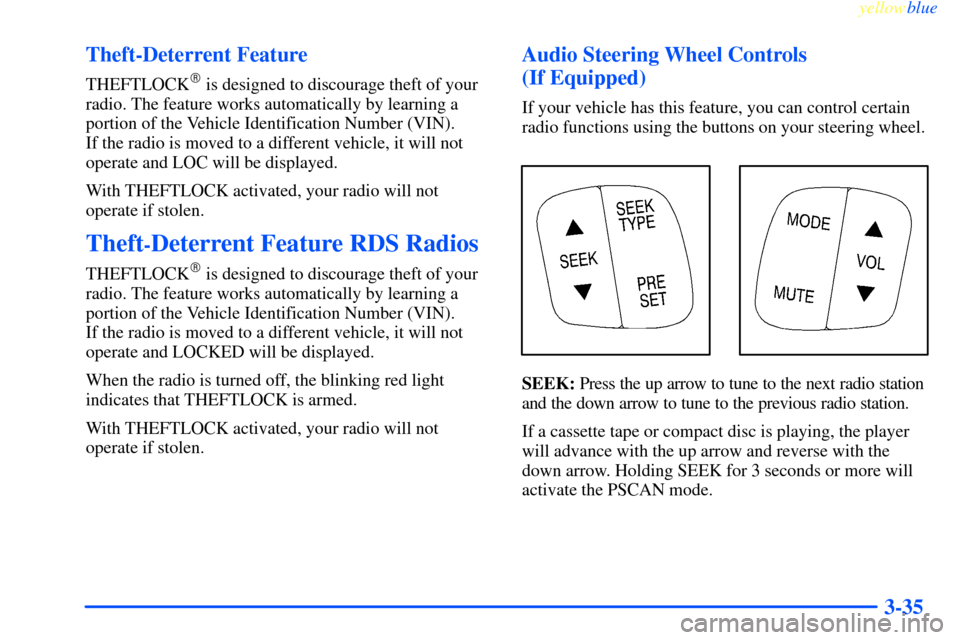
Audio Steering Wheel Controls
(If Equipped)
If your vehicle has this feature, you can control certain
radio functions using the buttons on your steering wheel.
SEEK: Press the up arrow to tune to the next radio station
and the down arrow to tune to the previous radio station.
If a cassette tape or compact disc is playing, the player
will advance with the up arrow and reverse with the
down arrow. Holding SEEK for 3 seconds or more will
activate the PSCAN mode.
Page 180 of 365
yellowblue
3-37 Tips About Your Audio System
Hearing damage from loud noise is almost undetectable
until it is too late. Your hearing can adapt to higher
volumes of sound. Sound that seems normal can be loud
and harmful to your hearing. Take precautions by
adjusting the volume control on your radio to a safe
sound level before your hearing adapts to it.
To help avoid hearing loss or damage:
�Adjust the volume control to the lowest setting.
�Increase volume slowly until you hear comfortably
and clearly.NOTICE:
Before you add any sound equipment to your
vehicle
-- like a tape player, CB radio, mobile
telephone or two
-way radio -- be sure you can
add what you want. If you can, it's very
important to do it properly. Added sound
equipment may interfere with the operation of
your vehicle's engine, Delco Electronics radio or
other systems, and even damage them. Your
vehicle's systems may interfere with the
operation of sound equipment that has been
added improperly.
So, before adding sound equipment, check with
your dealer and be sure to check Federal rules
covering mobile radio and telephone units.
Page 183 of 365
yellowblue
3-40 Backglass Antenna
Your AM-FM antenna is integrated with your rear
window defogger, located in the rear window. Be sure
that the inside surface of the rear window is not
scratched and that the lines on the glass are not
damaged. If the inside surface is damaged, it could
interfere with radio reception.
NOTICE:
Do not try to clear frost or other material from
the inside of the rear window with a razor blade
or anything else that is sharp. This may damage
the rear defogger grid and affect your radio's
ability to pick up stations clearly. The repairs
wouldn't be covered by your warranty.
Because this antenna is built into your rear window,
there is a reduced risk of damage caused by car washes
and vandals.
If you choose to add a cellular telephone to your vehicle,
and the antenna needs to be attached to the glass, be sure
that you do not damage the grid lines for the AM
-FM
antenna. There is enough space between the lines to
attach a cellular telephone antenna without interfering
with radio reception.
Vehicle Customization Settings
Your audio system can be used to control vehicle
customization settings using the DISP button when
the radio is off. See ªVehicle Customization Settingsº
in the Index.
Page 290 of 365
yellowblue
6-33 Brake Adjustment
Every time you apply the brakes, with or without the
vehicle moving, your brakes adjust for wear.
Replacing Brake System Parts
The braking system on a vehicle is complex. Its many
parts have to be of top quality and work well together if
the vehicle is to have really good braking. Your vehicle
was designed and tested with top
-quality GM brake
parts. When you replace parts of your braking
system
-- for example, when your brake linings wear
down and you have to have new ones put in
-- be sure
you get new approved GM replacement parts. If you
don't, your brakes may no longer work properly. For
example, if someone puts in brake linings that are wrong
for your vehicle, the balance between your front and
rear brakes can change
-- for the worse. The braking
performance you've come to expect can change in many
other ways if someone puts in the wrong replacement
brake parts.
Battery
Your new vehicle comes with a maintenance free
ACDelco� battery. When it's time for a new battery, get
one that has the replacement number shown on the original
battery's label. We recommend an ACDelco battery.
Vehicle Storage
If you're not going to drive your vehicle for 25 days or more,
remove the black, negative (
-) cable from the battery.
This will help keep your battery from running down.
CAUTION:
Batteries have acid that can burn you and gas
that can explode. You can be badly hurt if you
aren't careful. See ªJump Startingº in the Index
for tips on working around a battery without
getting hurt.
Contact your dealer to learn how to prepare your vehicle
for longer storage periods.
Also, for your audio system, see ªTheft
-Deterrent
Featureº in the Index.
Page 342 of 365
yellowblue
7-15
Part B: Owner Checks and Services
Listed in this part are owner checks and services which
should be performed at the intervals specified to help
ensure the safety, dependability and emission control
performance of your vehicle.
Be sure any necessary repairs are completed at once.
Whenever any fluids or lubricants are added to your
vehicle, make sure they are the proper ones, as shown
in Part D.
At Each Fuel Fill
It is important for you or a service station attendant to
perform these underhood checks at each fuel fill.
Engine Oil Level Check
Check the engine oil level and add the proper oil if necessary.
See ªEngine Oilº in the Index for further details.
Engine Coolant Level Check
Check the engine coolant level and add DEX
-COOL�
coolant mixture if necessary. See ªEngine Coolantº in
the Index for further details.Windshield Washer Fluid Level Check
Check the windshield washer fluid level in the
windshield washer tank and add the proper fluid if
necessary. See ªWindshield Washer Fluidº in the Index
for further details.
At Least Once a Month
Tire Inflation Check
Make sure tires are inflated to the correct pressures.
See ªTiresº in the Index for further details.
Cassette Deck Service
Clean cassette deck. Cleaning should be done every
50 hours of tape play. See ªAudio Systemsº in the Index
for further details.
Page:
< prev 1-8 9-16 17-24