Page 172 of 364

3-31
To help avoid hearing loss or damage:
�Adjust the volume control to the lowest setting.
�Increase volume slowly until you hear comfortably
and clearly.
NOTICE:
Before you add any sound equipment to your
vehicle
-- like a tape player, CB radio, mobile
telephone or two
-way radio -- be sure you can
add what you want. If you can, it's very
important to do it properly. Added sound
equipment may interfere with the operation of
your vehicle's engine, Delphi Delco Electronics
radio or other systems, and even damage them.
Your vehicle's systems may interfere with the
operation of sound equipment that has been
added improperly.
So, before adding sound equipment, check with
your dealer and be sure to check Federal rules
covering mobile radio and telephone units.
Care of Your Cassette Tape Player
A tape player that is not cleaned regularly can cause
reduced sound quality, ruined cassettes or a damaged
mechanism. Cassette tapes should be stored in their
cases away from contaminants, direct sunlight and
extreme heat. If they aren't, they may not operate
properly or may cause failure of the tape player.
Your tape player should be cleaned regularly after
every 50 hours of use. Your radio may display CLN or
CLEAN to indicate that you have used your tape player
for 50 hours without resetting the tape clean timer. If
this message appears on the display, your cassette tape
player needs to be cleaned. It will still play tapes, but
you should clean it as soon as possible to prevent
damage to your tapes and player. If you notice a
reduction in sound quality, try a known good cassette
to see if it is the tape or the tape player at fault. If this
other cassette has no improvement in sound quality,
clean the tape player.
The recommended cleaning method for your
cassette tape player is the use of a scrubbing action,
non
-abrasive cleaning cassette with pads which scrub
the tape head as the hubs of the cleaner cassette turn.
The recommended cleaning cassette is available through
your dealership (GM Part No. 12344789).
Page 181 of 364

4-7
And, of course, actual stopping distances vary greatly
with the surface of the road (whether it's pavement or
gravel); the condition of the road (wet, dry, icy); tire
tread; the condition of your brakes; the weight of the
vehicle and the amount of brake force applied.
Avoid needless heavy braking. Some people drive
in spurts
-- heavy acceleration followed by heavy
braking
-- rather than keeping pace with traffic.
This is a mistake. Your brakes may not have time to
cool between hard stops. Your brakes will wear out
much faster if you do a lot of heavy braking. If you
keep pace with the traffic and allow realistic following
distances, you will eliminate a lot of unnecessary
braking. That means better braking and longer
brake life.
If your engine ever stops while you're driving, brake
normally but don't pump your brakes. If you do, the
pedal may get harder to push down. If your engine
stops, you will still have some power brake assist. But
you will use it when you brake. Once the power assist is
used up, it may take longer to stop and the brake pedal
will be harder to push.
Anti-Lock Brakes (ABS)
Your vehicle has anti-lock brakes (ABS). ABS is
an advanced electronic braking system that will help
prevent a braking skid.
When you start your engine, or when you begin to
drive away, your anti
-lock brake system will check
itself. You may notice that your brake pedal moves
or pulses a little. This is normal.
If there's a problem with
the anti
-lock brake system,
this warning light will stay
on. See ªAnti
-Lock Brake
System Warning Lightº
in the Index.
Page 203 of 364
4-29
�Tie a red cloth to your vehicle to alert police that
you've been stopped by the snow.
�Put on extra clothing or wrap a blanket around you.
If you have no blankets or extra clothing, make body
insulators from newspapers, burlap bags, rags, floor
mats
-- anything you can wrap around yourself or
tuck under your clothing to keep warm.
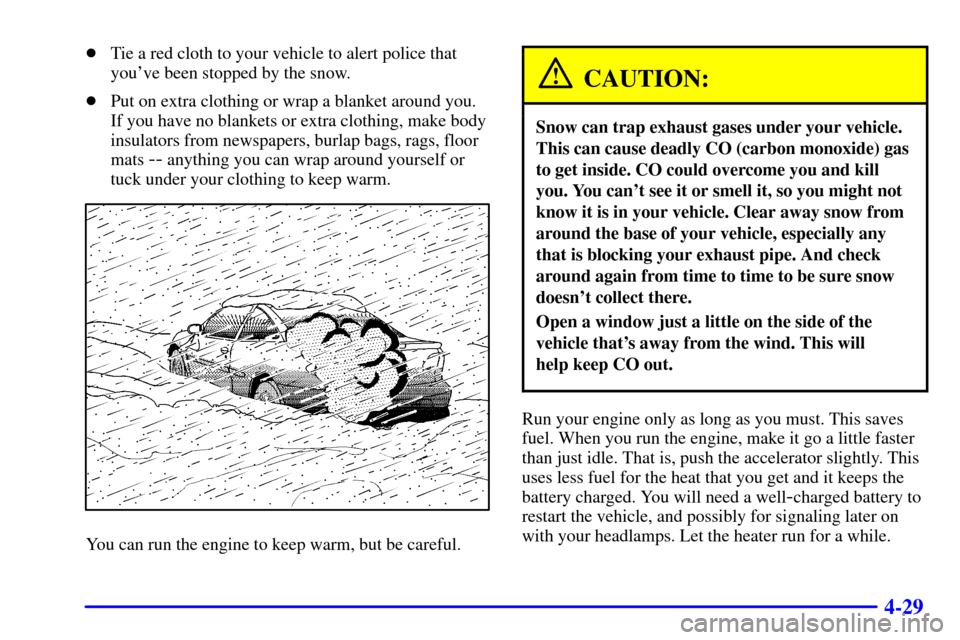
You can run the engine to keep warm, but be careful.
CAUTION:
Snow can trap exhaust gases under your vehicle.
This can cause deadly CO (carbon monoxide) gas
to get inside. CO could overcome you and kill
you. You can't see it or smell it, so you might not
know it is in your vehicle. Clear away snow from
around the base of your vehicle, especially any
that is blocking your exhaust pipe. And check
around again from time to time to be sure snow
doesn't collect there.
Open a window just a little on the side of the
vehicle that's away from the wind. This will
help keep CO out.
Run your engine only as long as you must. This saves
fuel. When you run the engine, make it go a little faster
than just idle. That is, push the accelerator slightly. This
uses less fuel for the heat that you get and it keeps the
battery charged. You will need a well
-charged battery to
restart the vehicle, and possibly for signaling later on
with your headlamps. Let the heater run for a while.
Page 220 of 364

5-5
CAUTION:
Using a match near a battery can cause battery
gas to explode. People have been hurt doing this,
and some have been blinded. Use a flashlight if
you need more light.
Be sure the battery has enough water. You don't
need to add water to the ACDelco� battery
installed in every new GM vehicle. But if a
battery has filler caps, be sure the right amount
of fluid is there. If it is low, add water to take care
of that first. If you don't, explosive gas could
be present.
Battery fluid contains acid that can burn you.
Don't get it on you. If you accidentally get it in
your eyes or on your skin, flush the place with
water and get medical help immediately.
6. Check that the jumper cables don't have loose or
missing insulation. If they do, you could get a shock.
The vehicles could be damaged, too.Before you connect the cables, here are some basic
things you should know. Positive (+) will go to
positive (+) and negative (
-) will go to a heavy,
unpainted metal engine part. Don't connect
positive (+) to negative (
-) or you'll get a short
that would damage the battery and maybe other
parts, too.
7. Remove the red plastic cap, and connect the red
positive (+) cable to the positive (+) terminal of
the vehicle with the dead battery. Use a remote
positive (+) terminal if the vehicle has one.
Page 258 of 364
6-12
Engine Oil
If the oil pressure light appears on the instrument panel,
it means you need to check your engine oil level right
away. For more information, see ªOil Pressure Lightº
in the Index.
You should check your engine oil level regularly; this is
an added reminder.
Checking Engine Oil
It's a good idea to check your engine oil every time you
get fuel. In order to get an accurate reading, the oil must
be warm and the vehicle must be on level ground.
Check the oil here if you
have a 2.2L engine.
2.2L L4 Engine2.4L L4 Engine
Check the oil here if you have a 2.4L engine. The dipstick's
handle will be a yellow ring.
Turn off the engine and give the oil several minutes to
drain back into the oil pan. If you don't, the oil dipstick
might not show the actual level.
Pull out the dipstick and clean it with a paper towel or
cloth, then push it back in all the way. Remove it again,
keeping the tip down, and check the level.
Page 271 of 364
6-25 Checking Coolant
The surge tank is located on the passenger's side of the
engine compartment.
CAUTION:
Turning the surge tank pressure cap when the
engine and radiator are hot can allow steam and
scalding liquids to blow out and burn you badly.
Never turn the surge tank pressure cap
-- even a
little
-- when the engine and radiator are hot.
The vehicle must be on a level surface. When your
engine is cold, the coolant level should be at the
FULL COLD mark.
If the low coolant light
comes on and stays on,
it means you're low on
engine coolant.
See ªLow Coolant Lightº
in the Index.

