Page 117 of 339

2-49 Automatic Headlamp System
When it is dark enough outside, your automatic
headlamp system will turn on your headlamps at the
normal brightness along with other lamps such as the
taillamps, sidemarker, parking lamps and the instrument
panel lights.
To idle your vehicle with the automatic headlamp
system off, set the parking brake while the ignition is
off. Then start the vehicle. The automatic headlamp
system will stay off until you release the parking brake.
The headlamp switch can always be used to turn on the
regular lamps. As with any vehicle, you should turn on
the regular headlamp system when you need it.
Headlamps-On Reminder
A chime will sound when your headlamps are turned on
and your ignition is in OFF, LOCK or ACCESSORY.
Daytime Running Lamps
Daytime Running Lamps (DRL) can make it easier for
others to see the front of your vehicle during the day.
DRL can be helpful in many different driving
conditions, but they can be especially helpful in the
short periods after dawn and before sunset.The DRL system will make your headlamps come on at
a reduced brightness when:
�the ignition is on,
�the headlamp switch is off,
�the parking brake is released and
�it is bright enough outside and the automatic
headlamps are off.
When the DRL are on, only your headlamps will be on.
The taillamps, sidemarker and other lamps won't be on.
Your instrument panel won't be lit up either.
When it begins to get dark, your DRL will turn off. Your
headlamps will come on automatically.
When it begins to get bright, the regular lamps will go
off, and your headlamps will change to the reduced
brightness of DRL.
To idle your vehicle with the DRL off, set the parking
brake. The DRL will stay off until you release the
parking brake.
As with any vehicle, you should turn on the regular
headlamp system when you need it.
Page 118 of 339
2-50 Fog Lamps
Your vehicle has fog lamps. Use them for better vision
in foggy or misty conditions. Your parking lamps and/or
low
-beam headlamps must be on for your fog lamps to
work. Fog lamps are not meant to be used without
headlamps in the dark.
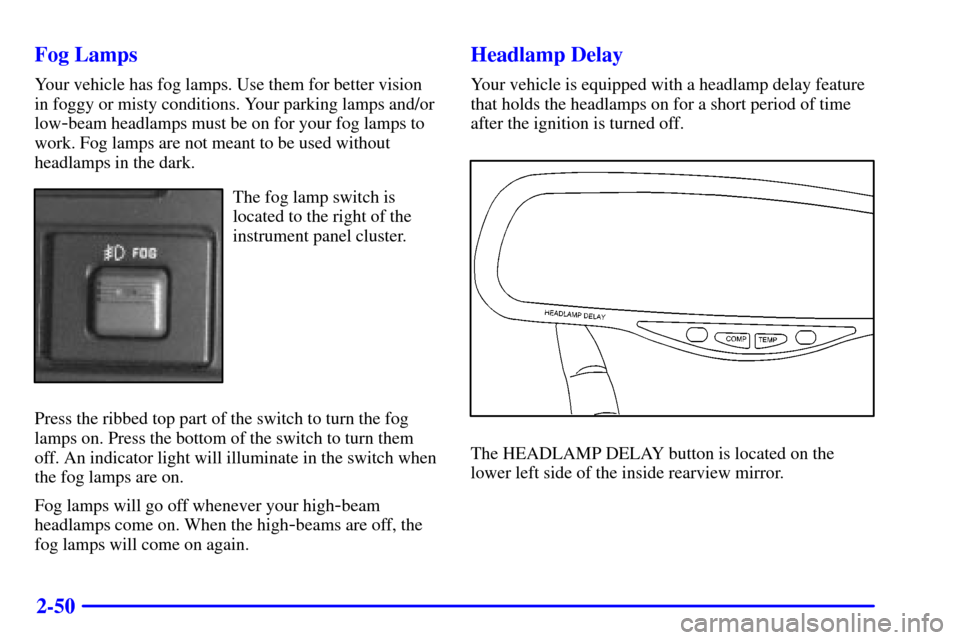
The fog lamp switch is
located to the right of the
instrument panel cluster.
Press the ribbed top part of the switch to turn the fog
lamps on. Press the bottom of the switch to turn them
off. An indicator light will illuminate in the switch when
the fog lamps are on.
Fog lamps will go off whenever your high
-beam
headlamps come on. When the high
-beams are off, the
fog lamps will come on again.
Headlamp Delay
Your vehicle is equipped with a headlamp delay feature
that holds the headlamps on for a short period of time
after the ignition is turned off.
The HEADLAMP DELAY button is located on the
lower left side of the inside rearview mirror.
Page 119 of 339

2-51
The length of time that the headlamps stay on after the
ignition is turned off can be adjusted by pressing and
holding the HEADLAMP DELAY button. The delay
can be varied in five steps (0, 15, 30, 60 and 90
seconds). When the HEADLAMP DELAY button is
held in, the Light Emitting Diode (LED) on the mirror
will show five step changes in brightness. When the
LED is at its brightest the headlamp delay will be
90 seconds, and when it is most dim the delay will be
zero seconds.
Interior Lamps
Instrument Panel Intensity Control
The instrument panel intensity control is located next to
the parking/headlamp switch. Turn the thumbwheel up
to adjust the instrument panel lights. Turn the
thumbwheel up to the first notch to return the radio
display and gear shift indicator LED display to full
intensity when the headlamps or parking lamps are on.
To turn on the dome lamps (with the vehicle doors
closed) turn the thumbwheel up to the second
notch position.
Exit Lighting and Delayed Illumination
With this feature, your interior lamps will come on and
stay on for up to 25 seconds when entering the vehicle
and up to five seconds when leaving your vehicle.
When the doors are opened, the dome lamps will only
come on if the DOME OVERRIDE button is in the out
position. When all doors are closed the lamps will stay
on for a short period of time and will then fade out. If
the DOME OVERRIDE button is pressed in, the dome
lamps will not illuminate.
Dome Lamps
The dome lamps will come on when you open the doors.
You can also turn the dome lamps on by turning the
thumbwheel, located next to the parking/headlamps
switch knob, all the way up to the second notch. In this
position, the dome lamps will remain on whether the
doors are opened or closed.
Page 125 of 339

2-57
CAUTION:
A convex mirror can make things (like other
vehicles) look farther away than they really are.
If you cut too sharply into the right lane, you
could hit a vehicle on your right. Check your
inside mirror or glance over your shoulder before
changing lanes.
Storage Compartments
Your vehicle has a variety of storage compartments
designed to store small items.
Glove Box
To open your glove box, move the release button toward
the passenger's side and pull the door open.
Center Overhead Console
Your vehicle has an overhead console. It has a storage
compartment inside it. Your vehicle also has a
HomeLink transmitter. See ªHomeLink
� Transmitterº
in the Index.Rear Compartment
The rear compartment can be used to store a small item,
like a book.
To open the rear compartment, press the release button
located at the rear of the compartment door.
Instrument Panel Cupholder
Your vehicle has a cupholder located in the middle of
the instrument panel.
To use the cupholder, pull
the handle and slide the
cupholder tray open.
To close the cupholder, slide it back into the
instrument panel.
Page 130 of 339

2-62
To prevent damage or loss of cargo as you're driving,
check now and then to make sure the luggage carrier and
cargo are still securely fastened.
Be sure the cargo is properly loaded.
�If small heavy objects are placed on the roof, place
the load in the area over the rear wheels. If you need
to, cut a piece of 3/8 inch plywood to fit inside the
crossrails and side rails to spread the load.
�Tie the load to the crossrails or the side rail supports.
Use the crossrails only to keep the load from sliding.
�If you need to carry long items, move the crossrails
as far apart as they will go. Tie the load to the
crossrails and tie loops. Also tie the load to the
bumpers. Do not tie the load so tightly that the
crossrails or side rails are damaged.
�For the purpose of wind noise reduction, locate the
front crossrail approximately 18 to 24 inches (46 cm
to 58 cm) rearward of the front supports.
�After moving the crossrails, be sure to tighten all the
slider screws.
Your vehicle has a Center High
-Mounted Stoplamp
(CHMSL) located above the tailgate glass or above the
rear load doors.If items are loaded on the roof of the vehicle, care should
be taken not to block or damage the CHMSL unit.
Ashtrays and Cigarette Lighter
Front Ashtray
The front ashtray is located at the bottom of the
instrument panel. Pull on the notch in the ashtray door to
open it.
NOTICE:
If you store paper or other things that burn in
your ashtrays, they could be set on fire by
cigarettes or other smoking materials. That could
cause a fire and possibly damage your vehicle. Do
not store papers and other things that burn in
your ashtrays.
To remove the front ashtray, press the retainer spring
and pivot the ashtray toward you. To replace the ashtray,
place the bottom part of the ashtray on the pivot bar at
the bottom of its mounting on the instrument panel.
Then turn the ashtray back to its original position.
Page 138 of 339
2-70
The Instrument Panel - Your Information System
Page 139 of 339
2-71
A. Dome Override Switch
B. Lamp Controls
C. Air Outlets
D. Multifunction Lever
E. Instrument Panel Cluster
F. Gearshift Lever
G. Rear Window Wiper Washer Switch (If Equipped)
H. Audio System
I. Comfort Control System
J. Glove Box
K. AshtrayL. Cupholder
M. Auxiliary Power Outlets
N. Compact Disc Player
O. Electric Tailgate Glass Release (If Equipped)
P. Fog Lamp Switch
Q. Automatic Transfer Case Switch
R. Tilt Lever
S. Parking Brake Release
T. Hood Release
U. Fuse Block
Page 140 of 339
2-72
Instrument Panel Cluster
United States version shown, Canada similar
Your instrument cluster is designed to let you know at a glance how your vehicle is running. You'll know how fast you're
going, about how much fuel you have and many other things you'll need to know to drive safely and economically.