Page 168 of 339

3-15
If the disc comes back out and ERR appears on the
display, it could be that:
�The disc is upside down.
�It is dirty, scratched or wet.
�There's too much moisture in the air. (Wait about an
hour and try again.)
�You are driving on a very rough road.
Please contact your dealership if any error recurs or
cannot be corrected.
PREV (1): Press this button to go back to the start of the
current track if more than eight seconds have played. Press
PREV again to go to the previous track on the disc.
NEXT (3): Press this button to advance to the next track
on the disc.
REV (4): Press and hold this button to quickly reverse
within a track. As the CD reverses, elapsed time will be
displayed to help you find the correct passage.
FWD (6): Press and hold this button to quickly advance
within a track. As the CD advances, elapsed time will be
displayed to help you find the correct passage.
SEEK: Press the left arrow while playing a CD to go
back to the start of the current track. It will go back to
the current track if more than eight seconds have played.Press the left arrow again to go to previous tracks. Press
the right arrow to go to the next higher track on the disc.
RANDOM: Press P.SCAN to enter the random play
mode. RANDOM will appear on the display. While in
this mode, the tracks on the disc will be played in
random order. If you press SEEK, PREV or NEXT
while in the random mode, the previous or next track
will be scanned randomly. Press P.SCAN again to turn
off RANDOM and return to normal operation.
RECALL: Press this button to see what track is
currently playing. Press RECALL again within five
seconds to see how long the track has been playing.
When a new track starts to play, the track number will
also appear. Press RECALL a third time and the time of
day will be displayed.
CD TAPE: With a disc loaded in the player and the
radio playing, press this button twice to play the remote
compact disc. To return to playing the radio, press
AM
-FM. If the cassette tape player, remote CD player
and console
-mounted CD changer are all loaded, press
CD TAPE to switch between the tape, remote CD and
CD changer.
EJECT: Press this button on the remote player to
eject a compact disc.
Page 325 of 339
6-63
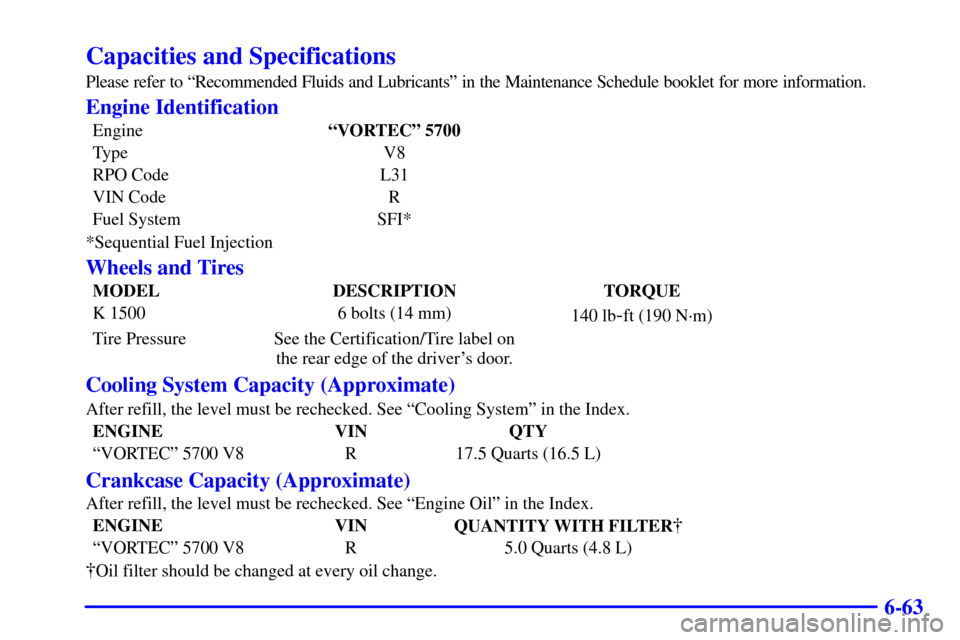
Capacities and Specifications
Please refer to ªRecommended Fluids and Lubricantsº in the Maintenance Schedule booklet for more information.
Engine Identification
EngineªVORTECº 5700
Type V8
RPO Code L31
VIN Code R
Fuel System SFI*
*Sequential Fuel Injection
Wheels and Tires
MODEL DESCRIPTION TORQUE
K 1500 6 bolts (14 mm)
140 lb
-ft (190 N´m)
Tire Pressure See the Certification/Tire label on
the rear edge of the driver's door.
Cooling System Capacity (Approximate)
After refill, the level must be rechecked. See ªCooling Systemº in the Index.
ENGINE VIN QTY
ªVORTECº 5700 V8 R 17.5 Quarts (16.5 L)
Crankcase Capacity (Approximate)
After refill, the level must be rechecked. See ªEngine Oilº in the Index.
ENGINE VIN
QUANTITY WITH FILTER�
ªVORTECº 5700 V8 R 5.0 Quarts (4.8 L)
�Oil filter should be changed at every oil change.
Page 333 of 339

7-7
�Trip Interruption -- If your trip is interrupted due
to a warranty failure, incidental expenses may be
reimbursed during the 48 months/50,000 miles
(80 000 km) warranty period. Items covered are
hotel, meals and rental car.
Roadside Service Availability
Wherever you drive in the United States or Canada,
an advisor is available to assist you over the phone.
A dealer technician, if available, can travel to your
location within a 30 mile (50 km) radius of a
participating Cadillac dealership. If beyond this radius,
we will arrange to have your car towed to the nearest
Cadillac dealership.
Reaching Roadside Service
Dial the toll-free Roadside Service number:
1
-800-882-1112. An experienced Roadside
Service Advisor will assist you and request the
following information:
�A description of the problem
�Name, home address, home telephone number
�Location of your Cadillac and number you are
calling from
�The model year, Vehicle Identification Number
(VIN), mileage and date of delivery
Roadside Service for the Hearing or
Speech Impaired
Roadside Service is prepared to assist owners who have
hearing difficulties or are speech impaired. Cadillac has
installed special telecommunication devices called Text
Telephone (TTY) in the Roadside Service Center.
Any customer who has access to a (TTY) or a
conventional teletypewriter can communicate with
Cadillac by dialing from the United States or Canada
1
-800-833-CMCC -- daily, 24 hours.
Page:
< prev 1-8 9-16 17-24