3-
3-1
Section 3 Comfort Controls and Audio Systems
In this section, you'll find out how to operate the comfort control and audio systems offered with your vehicle.
Be sure to read about the particular systems supplied with your vehicle.
3
- 2 Comfort Controls
3
- 2 Electronic Climate Control (ECC)
3
- 3 Automatic Operation
3
- 4 Manual Operation
3
- 6 Air Conditioning
3
- 6 Heating
3
- 6 Defrosting
3
- 7 Rear Window Defogger
3
- 7 Ventilation System
3
- 8 Audio Systems
3
- 8 Setting the Clock
3
- 9AM-FM Stereo with Cassette Tape Player
3
- 13 AM-FM Stereo with Cassette Tape and
Compact Disc Player with Radio Data
Systems (RDS) (If Equipped)3
- 21 Radio Data Systems (RDS) Program
Type (PTY) Selections
3
- 22 CD Adapter Kits
3
- 22 Trunk-Mounted CD Changer (Option)
3
- 26 Theft-Deterrent Feature
3
- 27 Audio Steering Wheel Controls
3
- 27 Understanding Radio Reception
3
- 28 Tips About Your Audio System
3
- 29 Care of Your Cassette Tape Player
3
- 30 Care of Your Compact Discs
3
- 30 Care of Your Compact Disc Player
3
- 31 Heated Backlite Antenna
3-13 AM-FM Stereo with Cassette Tape and
Compact Disc Player with Radio Data
Systems (RDS) (If Equipped)
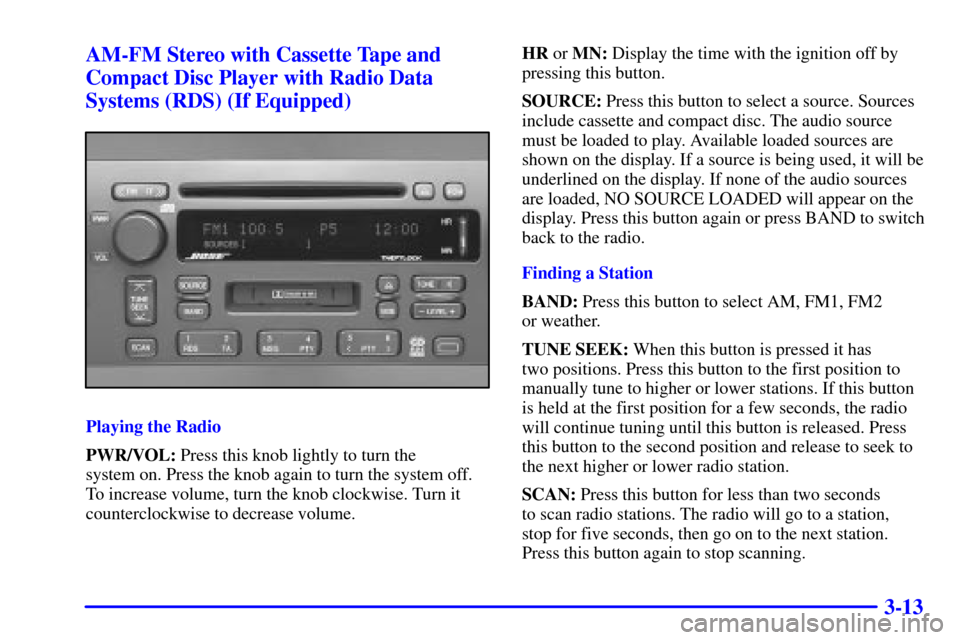
Playing the Radio
PWR/VOL: Press this knob lightly to turn the
system on. Press the knob again to turn the system off.
To increase volume, turn the knob clockwise. Turn it
counterclockwise to decrease volume.HR or MN: Display the time with the ignition off by
pressing this button.
SOURCE: Press this button to select a source. Sources
include cassette and compact disc. The audio source
must be loaded to play. Available loaded sources are
shown on the display. If a source is being used, it will be
underlined on the display. If none of the audio sources
are loaded, NO SOURCE LOADED will appear on the
display. Press this button again or press BAND to switch
back to the radio.
Finding a Station
BAND: Press this button to select AM, FM1, FM2
or weather.
TUNE SEEK: When this button is pressed it has
two positions. Press this button to the first position to
manually tune to higher or lower stations. If this button
is held at the first position for a few seconds, the radio
will continue tuning until this button is released. Press
this button to the second position and release to seek to
the next higher or lower radio station.
SCAN: Press this button for less than two seconds
to scan radio stations. The radio will go to a station,
stop for five seconds, then go on to the next station.
Press this button again to stop scanning.