Page 2 of 381

yellowblue
i
The 2000 Buick LeSabre Owner's Manual
1-1 Seats and Restraint SystemsThis section tells you how to use your seats and safety belts properly. It also explains the air bag system.
2-1 Features and ControlsThis section explains how to start and operate your vehicle.
3-1 Comfort Controls and Audio SystemsThis section tells you how to adjust the ventilation and comfort controls and how to operate your audio system.
4-1 Your Driving and the RoadHere you'll find helpful information and tips about the road and how to drive under different conditions.
5-1 Problems on the RoadThis section tells you what to do if you have a problem while driving, such as a flat tire or overheated engine, etc.
6-1 Service and Appearance CareHere the manual tells you how to keep your vehicle running properly and looking good.
7-1 Maintenance ScheduleThis section tells you when to perform vehicle maintenance and what fluids and lubricants to use.
8-1 Customer Assistance InformationThis section tells you how to contact Buick for assistance and how to get service and owner publications.
It also gives you information on ªReporting Safety Defectsº on page 8-9.
9-1 IndexHere's an alphabetical listing of almost every subject in this manual. You can use it to quickly find
something you want to read.
Page 9 of 381
yellowblue
1-2
Seats and Seat Controls
This section tells you about the power seats -- how to
adjust them and also about reclining seatbacks, lumbar
adjustments, heated seats and head restraints.
Manual Lumbar Support
The knob that controls this feature is located on the outer
edge of the seat. Turn the knob towards the front of the
vehicle to increase lumbar support. Turn the knob towards
the rear of the vehicle to decrease lumbar support.
Power Seat
The power seat controls are located on the outboard side
of each front seat cushion.
�Raise or lower the front of the seat cushion by holding
the front part of the horizontal control up or down.
�Raise or lower the rear of the seat cushion by holding
the rear part of the horizontal control up or down.
Page 10 of 381
yellowblue
1-3
�Raise or lower the entire seat cushion by holding the
whole horizontal control up or down.
�Move the seat forward or back by pushing the
horizontal control to the front or back.
�Push the vertical control forward to bring the seat to
a more upright position. Push it rearward to recline
the seatback. See ªReclining Front Seatbacksº
later in this section.Power Lumbar Control (If Equipped)
The lumbar control is
located on the outboard side
of each front seat. Use the
power seat control first to
get the proper position.
Then continue with the
lumbar adjustment.
To reshape the lower seatback, press the lumbar control
forward to increase support and rearward to decrease
support. Press the control up or down to raise or lower
the support mechanism.
Keep in mind that as your seating position changes, as it
may during long trips, so should the position of your
lumbar support. Adjust the seat as needed.
Page 11 of 381

yellowblue
1-4 Memory Seat and Mirrors (Option)
The controls for the memory seat and mirrors are located
on the driver's door panel, and are used to program and
recall previous settings that have been stored.
Adjust the driver's seat (including the lumbar
adjustments) and both outside mirrors to the position
you would like for driving. Then press and hold memory
button 1 for five seconds. A double beep will sound
when the memory is set.
To set the seat and mirror positions for a second driver,
follow the previous steps, but press button 2 instead.When your vehicle is in PARK (P) and a memory button
is pressed, a single beep will sound through the audio
system and the memory position will be recalled.
You can also store an exit position for each driver. The
exit position is programmed by moving the seat to the
desired exit position and then holding the exit button for
five seconds. The exit position set will be for the most
recently selected driving position (1 or 2).
The exit position will be recalled when the exit button is
pressed and will correspond to the driving position that
was recalled last.
Note that selecting a new position with the memory button
will change all other personal choice settings that you have
previously programmed also. See ªPersonal Choice
Programmingº in the Index for further information.
Memory recall will only work when the automatic
transaxle is in PARK (P).
Page 20 of 381
yellowblue
1-13 Lap-Shoulder Belt
The driver has a lap-shoulder belt. Here's how to
wear it properly.
1. Close and lock the door.
2. Adjust the seat (to see how, see ªSeatsº in the Index)
so you can sit up straight.
3. Pick up the latch plate and pull the belt across you.
Don't let it get twisted.
The lap
-shoulder belt may lock if you pull the belt
across you very quickly. If this happens, let the belt
go back slightly to unlock it. Then pull the belt
across you more slowly.
4. Push the latch plate into the buckle until it clicks.
Pull up on the latch plate to make sure it is secure.
If the belt isn't long enough, see ªSafety Belt
Extenderº at the end of this section.
Make sure the release button on the buckle is
positioned so you would be able to unbuckle the
safety belt quickly if you ever had to.
Page 50 of 381
yellowblue
1-43
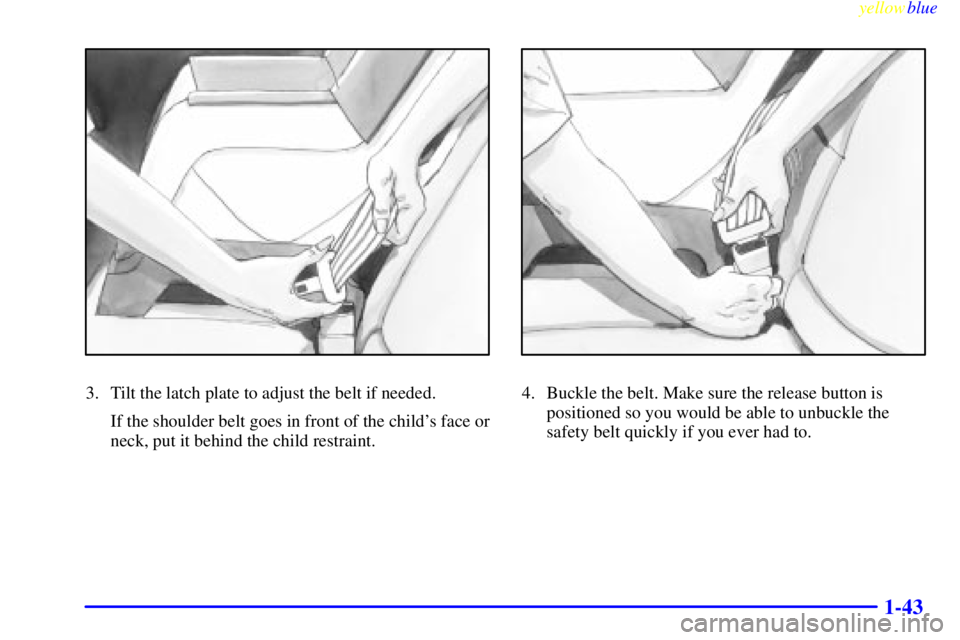
3. Tilt the latch plate to adjust the belt if needed.
If the shoulder belt goes in front of the child's face or
neck, put it behind the child restraint.4. Buckle the belt. Make sure the release button is
positioned so you would be able to unbuckle the
safety belt quickly if you ever had to.
Page 57 of 381

yellowblue
1-50
Safety Belt Extender
If the vehicle's safety belt will fasten around you, you
should use it.
But if a safety belt isn't long enough to fasten, your
dealer will order you an extender. It's free. When you go
in to order it, take the heaviest coat you will wear, so the
extender will be long enough for you. The extender will
be just for you, and just for the seat in your vehicle that
you choose. Don't let someone else use it, and use it
only for the seat it is made to fit. To wear it, just attach it
to the regular safety belt.
Checking Your Restraint Systems
Now and then, make sure the safety belt reminder light
and all your belts, buckles, latch plates, retractors and
anchorages are working properly. Look for any other
loose or damaged safety belt system parts. If you see
anything that might keep a safety belt system from
doing its job, have it repaired.
Torn or frayed safety belts may not protect you in a
crash. They can rip apart under impact forces. If a belt is
torn or frayed, get a new one right away.
Also look for any opened or broken air bag covers, and
have them repaired or replaced. (The air bag system
does not need regular maintenance.)
Replacing Restraint System Parts
After a Crash
If you've had a crash, do you need new belts?
After a very minor collision, nothing may be necessary.
But if the belts were stretched, as they would be if worn
during a more severe crash, then you need new belts.
If belts are cut or damaged, replace them. Collision
damage also may mean you will need to have safety belt
or seat parts repaired or replaced. New parts and repairs
may be necessary even if the belt wasn't being used at
the time of the collision.
If your seat adjuster won't work after a crash, the special
part of the safety belt that goes through the seat to the
adjuster may need to be replaced.
If an air bag inflates, you'll need to replace air bag
system parts. See the part on the air bag system earlier in
this section.
Page 92 of 381

yellowblue
2-35
Express-Down Windows
The driver's and front passenger's windows have an
express
-down feature. Pull the AUTO control back
all the way, release it and the window will lower
automatically. To stop the window from lowering, pull
the AUTO control again. To partially open the window,
pull the AUTO control back slightly. To raise the
window, hold the AUTO control forward.
Window Lock
Press the LOCK button on the driver's armrest to
disable all passenger window controls. (If you have a
Driver Information Center (DIC), you can also set the
control to only lock out the rear window controls. See
ªDriver Information Centerº in the Index.) The driver's
window controls will still be operable. This is a useful
feature when you have children as passengers.
Press the LOCK button again to allow passengers to
reuse their window controls.
Horn
Press on the center area of the steering wheel to
sound the horn.
Tilt Wheel
A tilt steering wheel allows you to adjust the steering
wheel before you drive.
You can also raise it to the highest level to give your
legs more room when you exit and enter the vehicle.
To tilt the wheel, hold the
steering wheel and pull
the lever toward you.
Move the steering wheel to
a comfortable level, then
release the lever to lock
the wheel in place.